

Filmtools
Filmmakers go-to destination for pre-production, production & post production equipment!
Shop NowThis inexpensive consumer camcorder makes surprisingly good HD images.

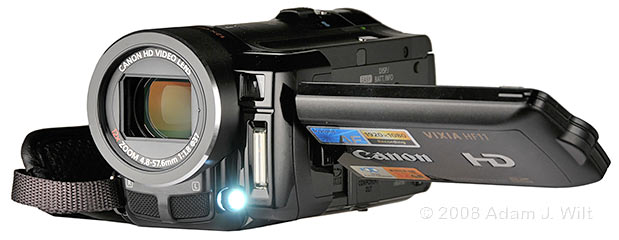
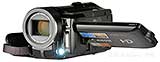
The HF11 with LED video light illuminated. Above the LED are the flash and the instant-AF window.
The $1199 Vixia HF11 ($850 street price) is a one-chip CMOS consumer HD camcorder recording 1080-line AVCHD to flash memory, either its own internal 32 GB buffer or an SD / SDHC memory card. It lacks a viewfinder; it offers no manual control other than a fiddly little joystick and a short-throw zoom rocker; it has limited image tweaks, yet its CMOS sensor and “DIGIC” image processor yield remarkably good images, and its high-bitrate AVCHD codec records those images as faithfully and transparently as do codecs on much more expensive, professional camcorders. Yes, it’s a great little vacation cam, and if you’re willing to work within its limitations, it can also serve professionally.
Why look at the HF11?
At MacWorld SF 2008, I saw some video at the Canon booth that I assumed had been shot with one of their three-chip pro camcorders, like the XL H1 or XH A1. Dvinfo.net‘s Chris Hurd, who was working the booth, told me it was all shot with one of the HF11’s predecessors, the HF10 or HF100. I was taken aback; the pix looked far too good for a single-chip consumer camera. Only one shot, a pan across a field of grass, showed any noticeable blocking artifacts from low-bitrate AVCHD recording.
The HF11 came out last August, bumping the maximum recording bitrate from 17 to 24 Mbits/sec—the first camcorder to offer that option, the highest bitrate available in AVCHD.
Looking at the HF11 lets us answer two questions: can a sub-$1000 consumer camcorder produce an HD image suitable for professional use, and is AVCHD capable of recording that image with sufficient quality for professional consideration? The answer to both questions, in my opinion, is “yes”.
Design
The HF11 is a sleek black chunk of camcorder, a cylindrical lens housing extending back with a rectangular lump on the left for its flip-out LCD screen. With the stock battery, it’s under a pound in weight, just over five inches long, just under three inches wide, and two and half inches tall. As befits a high-end consumer camcorder, the HF11 is finished in multiple shades and textures of black, with tasteful chrome touches; it’s a pleasure to look at (and photograph, grin). It’s elegant rather than flashy, and even with its reflective accents, it’s small enough and dark enough that it won’t attract too much attention.
The front has a 12x zoom lens behind a rectangular anti-flare mask, and a 37mm screw fitting for filters or wide-angle attachments. The HF11 uses an internal shutter-style lens cap that opens automatically when the camera is turned on in shooting mode. On the left are an instant-autofocus sensor window, a vertical flash for the HF11’s still camera mode, and a blue-white LED video light (!), all of which will be blocked by any add-on lens adapter or hood. A pair of mics sits below the lens.
The left side is dominated by a 2.7 inch flip-out LCD, which can rotate 270 degrees from straight down to straight forward. Behind the LCD are an SD/SDNC card slot and a multipin component connector (which looks identical to the mini-D-shell connector on many Sony HDV camcorders, except for a keyed notch in the shell that prevents using a Sony cable). A slide switch releases the SDHD access door, while the component plug rests behind a pull-out door tethered to the camera with a plastic leash, as are all the other pull-open covers on the HF11. An “Easy” pushbutton containing a light blue LED enables the camera’s “auto everything, just trust me” mode of operation; another pushbutton clears the LCD of data clutter (leaving only the record/pause indicator) and shows battery info when the camera is shut off.
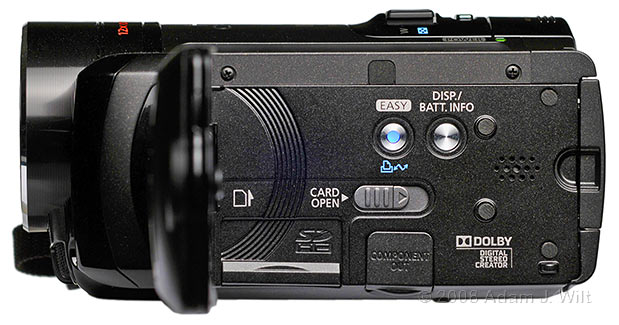
Left side, screen open, Easy mode engaged.
The LCD panel has a row of multifunction membrane buttons and a four-way joystick. The menbrane buttons display the function menu, and provide start/stop, zoom, and backlight control buttons while recording, and transport controls during playback. The joystick is used both for navigating the menu system and for selecting between the various parameters that can be manually controlled, and controlling them.
The rear of the camera has pull-off, tethered covers for the 1/8″ mic jack, a 1/8″ dual-use jack for either A/V output or headphones (menu selectable), and a coax jack for the AC adapter. The stock battery, good for about an hour of recording, fits flush with the sculpted rear surface; higher-capacity batteries (roughly speaking, a two-hour and a three-hour battery) stick out the back when used. There’s a dedicated start/stop button on the right edge, where your thumb rests naturally.
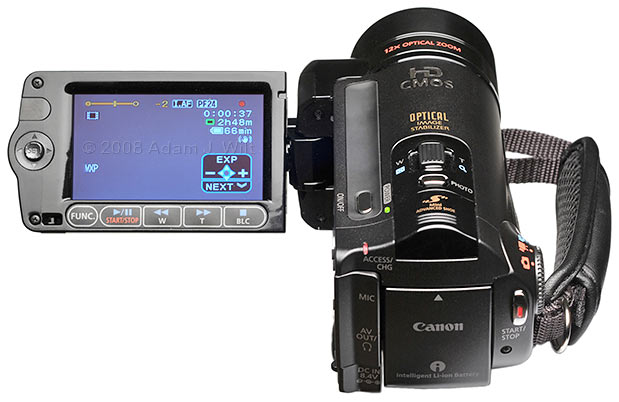
Operator’s view of the camera. Joystick menu is displayed.
The right side of the camera has a four-position mode selector dial for recording or playback of stills or video, and mini-HDMI and mini-USB 2.0 sockets behind a pull-off cover. The side of the camera forms a comfy handgrip and has an adjustable, padded strap.
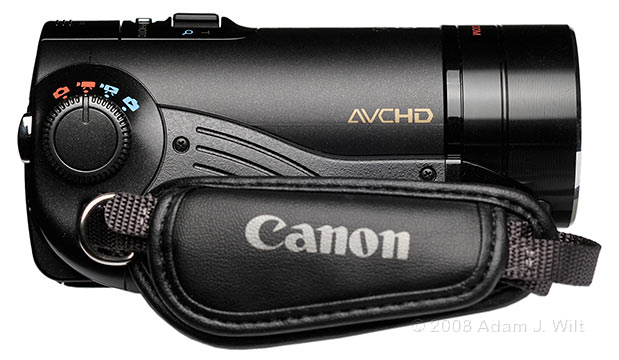
Right side, dial set for movie-shooting mode.
Atop the camera are the side-to-side zoom rocker, the on/off pushbutton and LED, a “Photo” pushbutton for use when the HF11 is put into photo mode or for grabbing a still frame while shooting video. At the rear is a slide-off cover over Canon’s proprietary “mini advanced shoe”, for Canon’s own VL-5 video light or DM-100 stereo directional mic (but not anything designed for the “advanced accessory shoe”, or for a standard shoe mount).
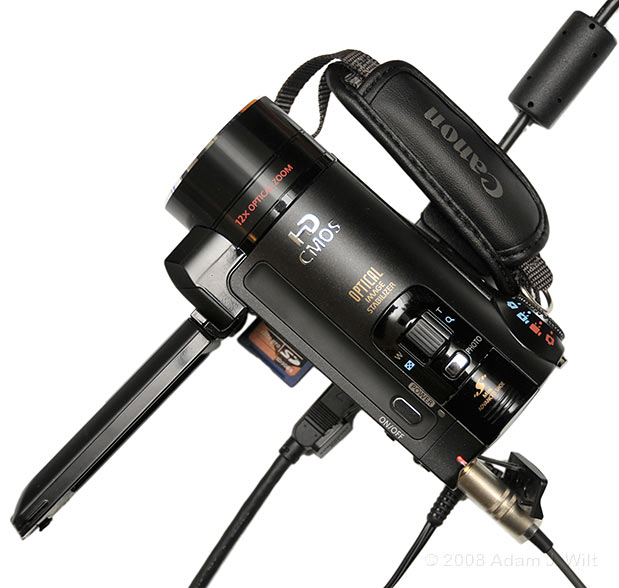
Component cable and SDHC card on the left, composite+audio and headphones in the rear, USB on the right.
The underside of the camera has the battery release and the tripod socket—but no socket for an anti-rotation pin. The tripod socket is so far forward (to avoid sticking up into the SDHD card socket) that there isn’t room for an anti-rotation pin socket (which would stick up into the mic compartment), so you need to ensure that any tripod used with the HF11 either lacks the pin or allows the pin to be retracted or removed.
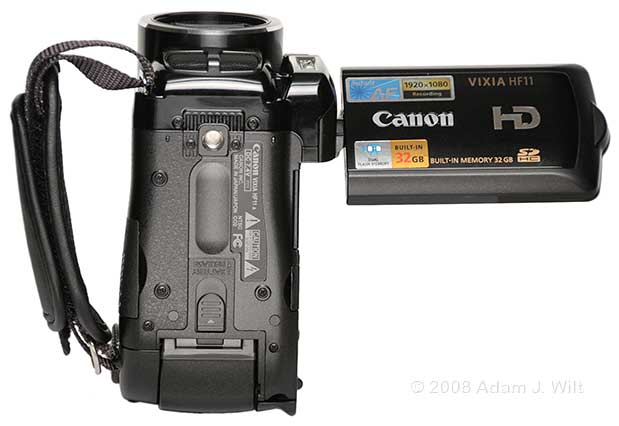
Underneath: the tripod socket and the battery release.
The camera comes with a stock battery and AC adapter/charger (which charges the battery on the camera), as well as cables for USB, AV, and component connections. An HDMI cable is not included, and as the HF11 uses a mini-HDMI socket, it may take some looking around to find a matching cable. Both Mac and PC software are provided for simple still image management and editing; I didn’t use either one in my tests.
Operation
The HF11 fits comfortably in the right hand, with the index finger on the zoom rocker and the thumb poised over the start/stop button.
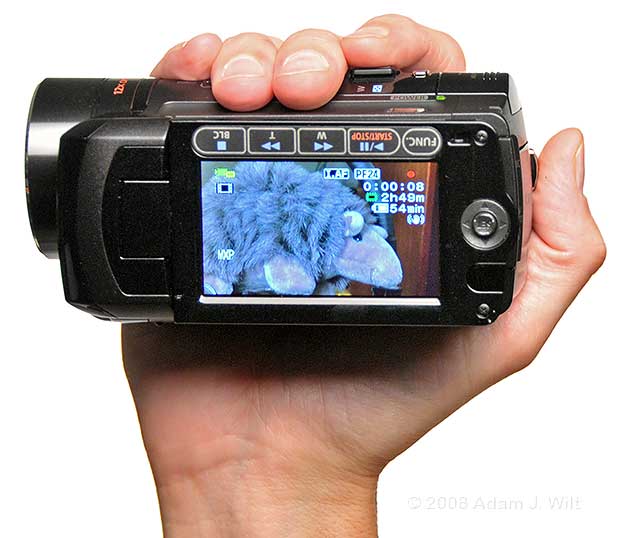
The Canon Vixia HF11 is a compact handful of camera.
There is no viewfinder—there’s no room for a viewfinder—so the LCD must be used. When the camera’s on/off button is pressed, the camera turns on in a power-saving standby mode; opening the LCD powers the camera fully up into record-ready mode, so you can rolling within one second of opening the LCD.
Operation is fairly simple: ensure the four-position dial is in video-recording node, push the start/stop button, and away you go. The side-to-side zoom rocker allows zooms ranging from 2-30 seconds, but the lever is quite sensitive, so a smooth zoom takes a very gentle and careful touch. Pushing to the left goes wide, pushing right zooms in; compared to the action of most pro zooms this seems reversed. If the zoom is too touchy, you can set the zoom to use one of three constant speeds, or use the membrane buttons on the LCD for a fast, fixed-speed zoom.
What, you wanted more control? It’s available, though you have to work for it. Normally, the camera is in fully automatic mode, varying shutter, gain, aperture, and focus as it sees fit (it’ll even go into slow-shutter mode in low light: 1/30 in 60i and 30p, and 1/12 in 24p), but you can also put the camera in to Tv mode to manually set the shutter speed, or Av mode to fix the aperture. The selected setting appears in the LCD, along with the mode indicator. You can then lock the overall exposure and then adjust it manually with the joystick: press the joystick in to display the pop-up joystick menu, push down until the “EXP” menu is shown, push up to lock or unlock the exposure, and when locked, push right or left to tweak the setting.
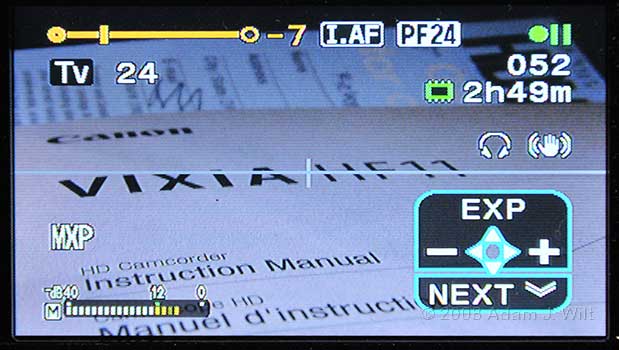
VF data with exposure compentation bar, Tv mode at 1/24th second, clip #52 on internal memory, recording time left, headphones & stabilization enabled, horizon line and manual audio level displayed, MXP recording format, and joystick menu. Not shown: remaining time on battery, because the camera was on AC power at the time.
Other shooting options are selected and adjusted the same way, such as auto/manual audio level, rec review and last-scene deletion, turning the video light on and off, focusing, and adjusting headphone levels. It’s a very compact interface, but obviously not one well suited to on-the-fly operations; it’s best to consider it a way of setting up the camera before a shot rather than using it to change settings while recording.
Normally, the camera uses through-the-lens auto-focus as well as Instant AF using a separate sensor; the latter is very good (perhaps too good) at detecting an out-of focus condition and instantaneously snapping the focus to the right point. Instant AF can be disabled if you’d prefer; the TTL AF is slower, but less jarring. Autofocus hunts continuously, so even static subjects will show slight focus pulsing in AF modes.
Manually focusing the camera can be done with the joystick; the HF11 has a focus assist feature that blows up the image in the LCD 2x to allow fine focusing. But pushing the joystick side to side ramps focus at a fixed speed, so it’s difficult to obtain fine control.
I found the best way to operate focus normally was to let Instant AF grab the focus, then lock it with the joystick to prevent hunting.Of course, if you need to follow focus during the shot, that won’t work; I let the camera take charge rather than trying to track focus changes with the joystick control.
Pressing the FUNC. membrane switch brings up the menus, which let you tweak the camera’s operational modes and the look of its images. Among them:
- Tv: Fixed shutter speed, variable aperture and gain.
- Av: Fixed aperture, varying shutter speed and gain.
- Cine mode: tones down color and detail settings; fixes knee at 70%.
- Portrait / Sports / Night / Snow / Beach / Sunset / Spotlight / Fireworks: optimizes the camera for the specified situation.
- White balance: Auto, manual WB, daylight, tungsten, shade, cloudy, and two fluorescent settings.
- Image Effects (e.g., looks): off (contrasty, saturated, and sharpened), vivid (more saturated), neutral (less saturated), low sharpening, soft skin detail, and custom (in which you can set saturation, contrast, skin detail, and sharpening yourself).
- Digital Effects: fades, wipes, sepia, B&W, and “art” (posterized color).
- Recording quality (discussed below).
- Simultaneous still image recording: on/off, size, and quality.
- Self timer on/off (provides a 10-second delay for recording).
- Digital Zoom off / 40x / 200x.
- Zoom rocker speed: variable or three fixed speeds.
- Autofocus mode: Instant AF or normal, TTL AF.
- Focus assist (magnification) on/off.
- Optical image stabilization on/off.
- Frame rate: 60i, PF30, PF24.
- Auto slow shutter on/off.
- Mic attenuation on/off and wind filter on/off.
- Headphones jack,or AV output jack: one or the other!
- Component output: 1080i or 480i.
Going into the custom setting of Image Effects lets you tweak saturation, contrast, skin detail, and sharpening, but as befits a consumer-oriented camera each setting has only three variations: -, normal, and +. While some may miss the finer granularity of seven, fifteen, or 199 separate steps in each control, I found that the three variations were nicely spaced, and that setting each one to its “-” position reduced things from the contrasty, crisp, colorful, consumer-oriented “Kodachrome” look to a much more natural appearance that worked well when intercut with other cameras.
There plenty of other settings, too, mostly dealing with photo mode and playback / memory mangement. Download the manual for the complete listing.
The HF11 also operates as a still camera, shooting 4:3 or 16:9 still pix from 640×480 up to 2048×1536. It has spot, center-weighted and full-frame evaluative metering modes, flash, and even a playback histogram (though not a live histogram) for checking exposure. The HF11 can grab stills at up to 5fps in continuous mode, and it can snap stills while recording video, too (though not with the same level of control as in stills mode, of course; you’re simply grabbing a still of the current video frame, at either 1920×1080 or 848×480 size).
next: Performance; Conclusions…
Camera Performance
The 12x zoom runs from 4.8-57.6mm. In 35mm SLR terms, it starts at the equivalent of 43mm. Compared to an EX1, it’s about 2/3 as wide. The optical zoom range can be supplemented with digital zoom to a maximum of 40x or 200x. As you might expect, such magnified images are fairly soft and noisy, and there’s a discontinuity in zoom speed as one crosses the boundary between optical and digital magnification, but the digitally zoomed images are as cleanly magnified as you could hope for.
The lens has a bit of barrel distortion fully wide, but not to excess; around midzoom it’s fairly distortion-free, and it’s a bit pincushiony at telephoto—again, not to excess by comparison to most other camcorder zooms. Chromatic aberration is present when zoomed in or out all the way, showing as green/magenta fringing, but it’s minimal.
The lens holds its f/1.8 maximum aperture for the first 2/3-3/4 of the zoom range, and ramps smoothly down to f/3.0 at full tele. There’s some portholing in that last quarter of the zoom range, darkening the edges of the image about a stop down from the center. The lens focuses as close as 1cm when wide, but near focus is a meter away at telephoto. Overall, it’s a pretty good lens for its zoom range, especially given its tiny size and price.
The HF11 has Canon’s refined optical stabilization, which works very well to take most of the shake out of this featherweight camera.
The sensor is a single, 1/3.2″ 4×3 CMOS chip (thus a bit smaller than a 16×9, 1/3″ chip) using an RGB Bayer pattern. In video mode, it uses 1920×1080 effective photosites, and feeds its image to Canon’s DIGIC DV II processor.
Yes, the chip has a rolling shutter, and violent camera motions show “jellocam” distortions. But these are minimized when optical stabilization is on, since it smoothes the high-frequency shakes that make jellocam most obvious. Fast pans still show tilt, but the rolling shutter reads the chip in 1/60 second, so image distortions are no worse than on cameras like the Sony PMW-EX1 and EX3. Practically speaking, the rolling shutter is only an issue with the most frenetic shakycam moves.
The best resolution we should expect from a 1080-line Bayer-pattern sensor is 80%, or about 800 TV lines per picture height (TVl/ph). Indeed, that’s pretty much what I see; I’d call it somewhere in the range of 750-800 TVl/ph. The image above that resolution is fairly clean, too, though some chroma aliasing is present and there is noticeable diagonal aliasing, both of which are common characteristics for Bayer-mask images.
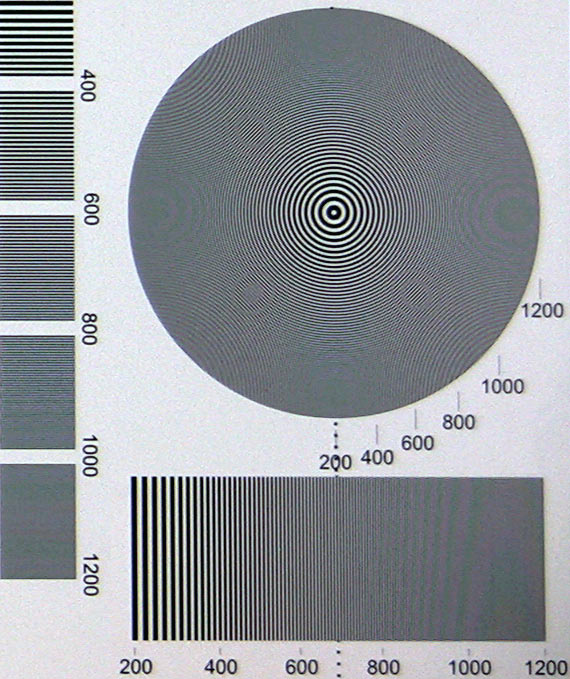
A 1:1 excerpt from a DSC Labs multiburst chart, recorded in MXP.
The chart shown was shot using the camera’s highest-quality mode, 24 Mbit/sec 1920×1080 PF30, but I saw little variation across frame rates or recording formats. Both interlaced and progressive shooting modes gave me similar results, as did different recording formats: on a still image, as I’ll discuss, even 5Mbit/sec LP mode gave a comparable picture, despite its 1440×1080 recording (which tops out at 787 TVl/ph resolution in the horizontal direction).
The camera offers three 16×9, 1080-line formats: 60i, PF30, and PF24. 60i is of course the standard 59.94 fields per second, interlaced; PF30 and PF24 are 30 fps and 24 fps progressive images, recorded using interlaced formatting with 2:2 (PsF) pulldown for PF30 and 2:3 pulldown for PF24. Assuming a constant bitrate across the three frame rates, there is no increase in efficiency at lower frame rates since the signal is always processed as 59.94 interlaced, though of course the inherent redundancy of temporally-correlated fields and repeated fields (in PF24) may improve compression quality somewhat.
The camera offers video shutter speeds in 60i and PF30 of 1/8, 1/15, and 1/30 second; in PF24 you can choose 1/6, 1/12, 1/24, and 1/48. All frame rates allow 1/60, 1/100, 1/250, 1/500, 1/1000, and 1/2000. There is no clear scan / synchro scan.
Apertures can be set in half-stop values between 1.8 and 8.0, zoom range allowing.
It’s hard to get a feel for the camera’s sensitivity, since the exposure system doesn’t let you lock out gain changes nor does it tell you what the current settings are. When ample light is present, the HF11’s images are very clean; when the light level drops, they get noisier, but not as noisy as you might expect. Between the comparatively large pixels (cameras of this ilk often use smaller chips with higher pixel counts) and the DIGIC processing, the camera does as well in low light as many 3-chip 1/3″ camcorders. What noise there is is a fairly unobtrusive balance between luma and chroma.
As the light level drops even further, the camera can automatically go to a slow shutter (if enabled) or it can boost gain further, or you can turn on the HF11’s LED video light. It casts a cold bluish glow towards the center of the image and lets you get pix at reasonably close distances in what would otherwise be utter darkness. If you’re looking for a full-color simulation of IR nightvision, or a “Cops”-style flashlight-cam look, it’s handy; it’s also useful for simple location scouting pix (the HF11’s small size and weight makes it a great take-along cam for location scouts even if you plan to use a “real” camera for actual production).
Dynamic range is very good: I’m able to see about 8.3 stops cleanly resolved in normal shooting modes, and a full 9 stops in cinema mode. In normal modes, the camera is a bit contrasty and uses an auto knee which sets in anywhere from 70% and up. In cine mode, contrast is tamed and the knee is fixed at 70%. Hue and luma don’t show much obvious distortion at the knee point, and colors tend to bleach to white just before clipping sets in; the pix from this camera look very much like pix from an XL H1 or XH A1. That’s the DIGIC image processor again, handling highlights just as it cleans up the noise, and giving the HF11’s images that characteristic Canon look.
Color rendition is clean and consistent, if perhaps a bit bold. Backing the saturation off to “-” renders a neutral, more accurate image.
Contrasty edges along areas of overexposure can show a bit of purple fringing; it’s noticeable but not so prevalent as to be distracting.
The camera does not offer variable frame rates, 720p modes, or 480i/p modes, though the component output can be set to downconvert to 480i, and both component and composite outputs can be set to display either full-frame or letterboxed 480i images.
The camera records two channels of Dolby AC-3 audio at an unspecified bit rate. I tested recording with the built-in mics, feeding them music from near-field monitors. In automatic gain, sudden peaks tended to cause clipping distortion until the auto level control caught up; in manual mode the sound was clean, if a bit lacking in bass (which I attribute to the mics). There weren’t any overt compression artifacts, at least none that I can point to objectively. I’d certainly use the HF11 for background audio and interview tracks; I’d want to test it more rigorously before recording feature film sound on it.
AVCHD Recording
The HF11 records AVCHD (long-GOP AVC, a flavor of h.264) to flash memory, either the camera’s built-in 32 GB buffer or an SD / SDHC card. It offers five bit rates, which it labels with arbitrary letter codes; I list them with their peak data rates, resolutions and recording times on the internal memory:
- LP: 5 Mbit/sec, 1440×1080, 12 h 15m
- SP: 7 Mbit/sec, 1440×1080, 9h 35m
- XP+: 12 Mbit/sec, 1440×1080, 5h 45m
- FXP: 17 Mbit/sec, 1920×1080, 4h 10m
- MXP: 24 Mbit/sec, 1920×1080, 2 h 55m
All bit rates use 8-bit, 4:2:0 sampling and 60i recording.
RANT
I don’t understand why manufacturers insist on making up nonsensical codes for different recording qualities. SP (standard play) and LP (long play) are perhaps forgivable as hold-overs from consumer VHS days, but XP+? Plus? Plus what? What happened to plain old XP? Is FXP “full” XP, and MXP “maximum” XP? And again, if XP went missing, why FXP and MXP, and not FXP+ and MXP+? How the frack are we civilians supposed to keep these things straight? If they weren’t lined up in the menus in order, there’d be no way to sort ’em out!
And it’s not just Canon, oh, no.
Panasonic calls their AVCHD quality levels PH, HA, HG, and HE—I dare you to tell me (without looking it up) which is the good one and which is the least-good one. I double-dare you to tell me which one(s) correspond to their Canon counterparts— the letter codes sure won’t tell you!
Sony? LP, SP, HQ, and FH. At least you can sorta suss out the order between the first three. But FH?
JVC? EP, SP, and XP. Aha! At last we’ve found out what happened to XP: JVC took it. Dang!
I tell you: some days it’s not worth getting out of bed.
SD / SDHC cards (SDHC is a revised SD card capable of holding more than 2 GB) need to meet certain restrictions: they must be 128 MB or larger, and must have an SD speed class of 2 or greater (4 or greater for FXP and MXP recording). At press time, a 16 GB class 6 SDHC card is about $25-$30: not as cheap as tape, yet, but still cheap enough that you can carry a pocketful of cards to a shoot and not worry about offloading data in the field.
The camera has a simple, tabbed interface in playback mode for sorting between stills and clips.
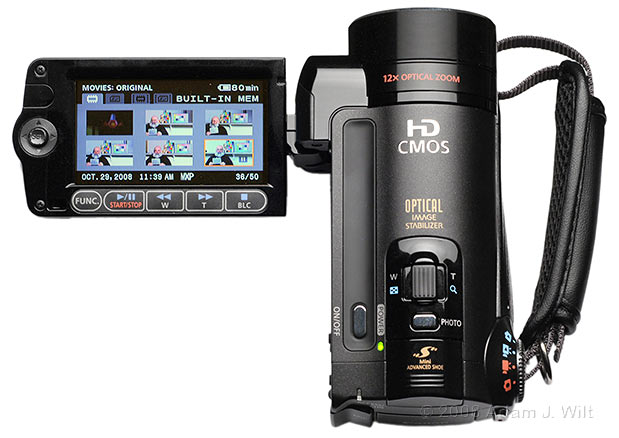
Tabbed interface shows metadata for current clip at bottom of display.
You can even create simple playlists in-camera.
The camera connects to a computer via USB; files can be transferred to hard disk via drag ‘n’ drop. The camera can also connect to a Canon DVD burner via USB, and make an AVCHD DVD for every format other than MXP (the 24 Mbit/sec data rate of MXP is too high for a DVD).
Final Cut Pro 6 on a 2.3 GHz MacBook Pro transcodes the AVCHD files to ProRes422 via the Log & Transfer window (but not ProRes422 HQ, alas), taking about twice real time to do so. FCP can also transcode to the Apple Intermediate Codec for those who prefer it.
In Adobe Premiere CS4, the AVCHD clips are directly usable, and play in draft mode with only the occasional stutter.
All clips import as 29.97 interlaced, since that’s how they are recorded. Extracting “pure” 24p from the PF24 clips can be done using Apple’s Cinema Tools, DVFilm’s Maker or other reverse-telecine tools.
Fine, so AVCHD is usable in common NLEs. How does it look?
AVCHD has a “not ready for prime time” reputation based on early reviews, all of which have been at lower bit-rates. Yet AVC in general is said to be roughly twice as efficient as MPEG-2, meaning that the same quality can be obtained at half the bit rate. The HF11 is the first camcorder to support the 24 Mbit/sec rate, which should allow it—if theory holds—to make better images than 25 Mbit/sec HDV, or even 35 Mbit/sec XDCAM EX HQ.
I found that on static images, there was little to differentiate even the 5 Mbit/sec clips from the 24 Mbit/sec clips. However, the quality of the lower bit-rate clips degraded quickly as soon as any motion was introduced; indeed, the quality of moving pictures recorded with AVCHD varied in direct proportion to bit-rate. Slow pans of dense, sunlit foliage held up very nicely at 24 Mbit/sec, while at 5 Mbit/sec the trees were reduced to fuzzy green blobs, only resolving to individual branches and leaves once the camera stopped moving (and once there was no breeze to move the trees themselves!). Intermediate data rates gave intermediate results. Overall, 5 Mbit/sec looked like bad web video, while 24 Mbit/sec looked like it could hold its own against HDV or XDCAM EX.
To test this more rigorously, I bolted the HF11 alongside a Sony PMW-EX1 using a spare RED arm, so I could operate the cameras in parallel.
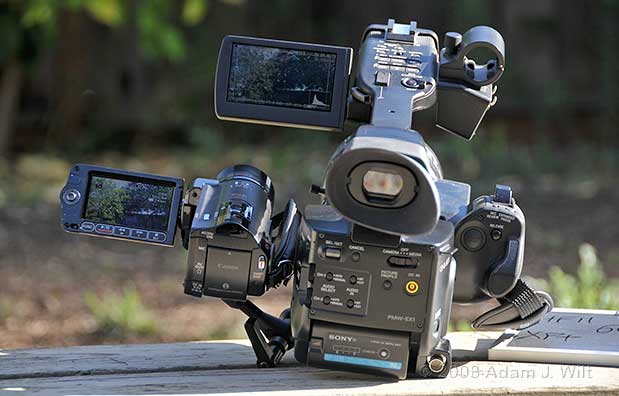
The HF11 attached to a Sony PMW-EX1 using a RED Arm.
I then set up a variety of busy scenes, indoors and out, setting both cameras to the same angle of view, same frame rate, and same shutter time. I could then shoot the same scene with both cameras simultaneously, recording the same static images, wild pans, rolls about the lens axis (“dutch” angles), and general codec-stressing shakycam. I pitted the HF11’s five bit-rates against the EX1’s 25 Mbit/sec, 1440×1080 HDV-compatible mode, and its 35 Mbit/sec, 1920×1080 EX HQ mode. I imported both camera’s clips into FCP, transcoded them both to ProRes 422, lined up matching clips in a top-and-bottom splitscreen, and compared the compression.
In 60i mode, I found that the HF11’s 17 Mbit/sec images held up almost as well as the EX1’s 35 Mbit/sec images, while its 24 Mbit/sec pix were visibly less affected by compression artifacts. Likewise, the HF11’s 12 Mbit pix almost equaled the EX1’s 25 Mbit pix, while its 17 Mbit pix were better. AVCHD really is roughly twice as good as MPEG-2 in terms of bit-rate for a given quality of image.
Now, not every frame of every comparison bore this out: in any given test where the results were close, sometimes the EX1’s images were better than the HF11s, and a few frames later, the reverse might be true. The two clips were created by different cameras, and had slightly different content (due to parallax). I could not guarantee that both cameras started their GOP structures at the same point in time; indeed I cannot say that they even have the same GOP length.
Nonetheless, in normal 1x playback the quality of compression appeared essentially equal when AVCHD was recorded at half the bit-rate of the corresponding MPEG-2.
In frame-by-frame examination of the clips, the MPEG-2 (at roughly twice the bit-rate of the AVCHD) tended to equal the AVCHD images perhaps 70% of the time; of the remaining 30% where I could point to an unambiguous quality difference, the MPEG-2 images were better perhaps 2/3 of the time, and the AVCHD excelled the other 1/3 of the time. Put another way, AVCHD equalled MPEG-2 70% of the time, surpassed it slightly 10% of the time, and fell slightly beneath its quality 20% of the time, while running at half its bit-rate (17 vs. 35 Mbit/sec, and 12 vs. 25 Mbit/sec).
In progressive, the contest tilted more towards MPEG-2, since the EX1 records its 35 Mbit/sec as true progressive, while the HF11 uses pulldown to record both 30p and 24p as 60i. As a result, 17 Mbit/sec AVCHD wasn’t able to hold up to 35 Mbit/sec MPEG-2; and even 24 Mbit/sec wasn’t quite able to equal it, though it came close. Part of the problem with AVCHD, at least as recorded on the HF11, is that it’s always recorded as interlaced, and thus shows interlaced 4:2:0 chroma:
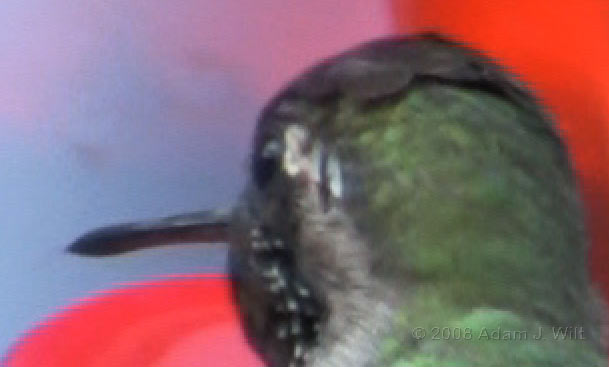
A 2:1 blowup of an HF11 progressive image. Note the “sawtooth” chroma, indicative of interlaced 4:2:0 color encoding. (The HF11 was shooting wide-open at full telephoto, and it focused on the hummingbird’s tail: sometimes shallow depth of field works against you!)
Interlaced coding also isn’t as efficient as progressive coding, and even at 30p (where at least there were no repeated fields in either format) the 35 Mbit/sec XDCAM EX footage held a slight quality lead over the 24 Mbit/sec AVCHD.
When the EX1 was set to SP recording (HDV-compatible 25 Mbit/sec MPEG-2, using pulldown) the contest was closer, and the nearly-two-to-one advantage of AVCHD held—because, in essence, I was still comparing two interlaced recordings.
Yes, it’s not an entirely fair test, since the cameras were different: the EX1 produces more finely detailed images that are harder to compress than the images the HF11 produces. Even so, I was able to produce interlaced pictures using the HF11 that were essentially as good, as far as compression is concerned, as interlaced images from the EX1 recorded at twice the bit-rate.
Based on my testing, I’d say that if you’re happy with HDV, or with interlaced EX1 footage, you’ll be happy with high-bitrate AVCHD as produced by this little Canon.
The HF11 wasn’t quite able to match the EX1 in 24p, but that may be due to the HF11’s interlaced encoding; I’d like to test an AVCHD camera laying down its progressive picture using progressive, native-frame-rate encoding.
Overall? AVCHD is capable of turning out high-quality images, and at least in interlaced modes, the HF11 can record images of comparable quality to HDV and XDCAM EX camcorders.
Conclusion
The HF11 intrigued me due to its addition of 24 Mbit/sec recording to the high quality I’d seen from its HF10/HF100 brethren, and in testing it proved itself a capable camera. While it’s clearly aimed at the consumer crowd, it has the ability to produce interlaced images fully usable in a professional environment (at least, if you accept that HDV and XDCAM EX interlaced images are usable professionally, then the HF11’s pictures will be perfectly acceptable to you). Its progressive pictures are slightly degraded by interlaced encoding, but even then its quality is surprisingly good.
For a walk-around consumer camera, it’s hard to fault the little Canon. For professional applications, it holds up very well if you respect its limitations: it won’t let you focus, zoom or tweak exposure and audio on the fly with anything like the control afforded by a pro camera, but its basic image quality is such that if you lock it down before a shot, or if you’re happy to let the camera control focus and exposure, the HF11 will capture images that approach those of cameras costing (and weighing) as much as several HF11s put together.
Yes, there’s a bit of chromatic aberration (it’s still less than on many three-chip HD camcorders costing ten times as much). Yes, there’s some purple fringing on blown-out highlights. There’s no clear scan, there’s no 50i compatibility, and it records 4:2:0 interlaced color. But it makes an image that’s about as sharp as a single chip 1920×1080 imager can, with color, detail and dynamic range that are close matches for Canon’s 3-chip cameras. That’s nothing to sneer at.
If you need something small for travel purposes; something lightweight and shock-resistant; something capable of recording nearly three hours at a go internally at its highest quality, or two hours on a 16 GB SDHD card at 17 Mbit quality (which for talking-head interviews is well-nigh indistinguishable from 24 Mbit/sec quality); something that will intercut seamlessly with XL H1s or XH-series HDV cameras; something that can fit in a large coat pocket and still leave change from a $1000 bill (assuming, of course, you can even find a $1000 bill): the HF11 is well worth a look.
Besides, it’s just plain fun to use. It weighs nothing and it fits comfortably in your hand, and its image quality is better than it should be for the price.
The following bullet points are based on looking at the HF11 as a camera for professional use.
Pros
- Small, compact, light.
- Inexpensive.
- Nearly 800 TVl/ph resolution.
- 8.3-9 stops of latitude.
- Enough image tweaks to correct the “consumeresque” defaults.
- 60i, 30p, and 24p imaging.
- 32 GB internal memory, plus SD/SDHC card recording.
- AVCHD recording with bit-rates high enough for quality work.
- 12x zoom with good quality for the price.
- Exposure and focus can be manually locked down.
- Stills can be grabbed while shooting video.
Cons
- Twitchy consumer controls make on-the-run adjustments difficult.
- Overly sensitive zoom lever.
- It’s not possible to set gain and exposure separately.
- Interlaced recording makes 24p extraction more difficult.
- Interlaced 4:2:0 chroma even on progressively-captured images.
- No anti-rotation pin socket on baseplate.
- Proprietary, Canon-only accessory shoe.
- Lens attachments block Instant AF sensor, flash, LED video light.
- No eye-level EVF.
- No clear scan / synchro scan.
Cautions
- CMOS rolling shutter.
- Manual focusing can be a challenge.
- Only three levels of adjustment on most parameters may leave you unsatisfied.
- No XLRs, timecode in/out, phantom powering, or other pro features.
- Lower bit-rate recording show lots of compression artifacts.
- AVCHD is computationally expensive, and requires a fast computer for hiccup-free editing.
- SDHC cards are still more expensive than HDV tapes.
Recommended For…
- Minimal-kit documentary work.
- Cramped locations and POV work.
- Vibration-sensitive work: vehicle and helmet mounts.
- Crash-cam work (due to low cost).
- Affordable B cameras, especially when the A cams are 3-chip Canons.
- Low-cost stringer / preditor cams.
- Poles, jib arms, handheld stabilizers.
- Walk-around, just-have-it-with-you, location-scouting cams.
See also:
Chris Hurd’s HF11 overview and comparison with the HDV-format HV30
Vixia HF11 review at camcorderinfo.com
Canon’s Vixia HF11 webpage.