
(Page 1 of 1 pages for this article )

Thursday, October 07, 2010

Filed under: CamerasProductionTipsTraining

Alexa ISO Settings: The Least You Need to Know

Art Adams | 10/07

Changing an HD camera’s ISO has a greater impact on an image than simply affecting exposure. Learn what’s really happening… and take advantage of it!

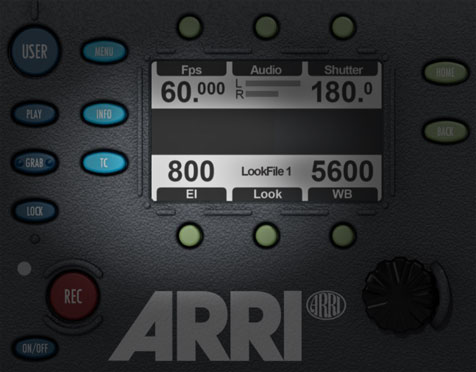
My previous Arri Alexa article showed you how the camera’s dynamic range responds to different ISO settings. In this shorter article I’ll show you why that’s useful and practical information.

All the world loves graphic examples, so let’s start off with one:
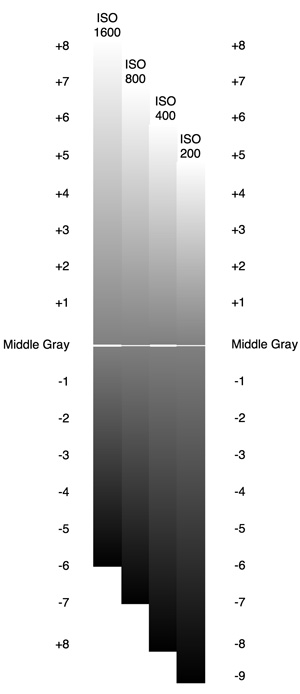
This graph shows how tones are allocated at four different ISO settings on the Alexa in LogC mode. The top of each column shows how many stops above 18% (“middle”) gray that maximum white (“clipping”) occurs, and the bottom of the scale shows where the signal dissolves into black (at the noise floor).

Arri says that ISO 800 is the “sweet spot” where there are an equal number of stops above and below 18% gray. That’s great to know, but that’s not always the most important factor when choosing an ISO setting. There are other considerations, such how much noise we can tolerate or how much highlight information we need to retain.

Looking at the above graph, there are a couple of thoughts that occur to me:

Highlight retention shrinks with noise reduction. The ISO’s that offer the least noise also have the fewest number of stops between 18% gray and maximum white. This means that ISO 200 might be a good choice for a low-key moody night interior where we need to see into the shadows, because there’ll be more stops of underexposure latitude available than at higher ISOs. There should be few, if any, bright highlights in the shot that need to retain detail, because there will be fewer stops of latitude between 18% gray and maximum white.

This setting might also be a good choice for green screen, where a low noise level is beneficial and highlights can be meticulously controlled. It’s probably not so good for harsh noonday exterior shots in the desert, where it may be advantageous to record a greater range of light tones than dark tones.

As highlight retention increases, noise increases. Ironically, ISO 800 should be a great choice when shooting day exteriors as we can comfortably retain highlights at up to seven stops above 18% gray—which is more highlight retention detail than any other camera on the market that I’m aware of. This can be especially important when shooting car spots, where highlight kicks tend to be a feature and not a mistake, and when shooting from interiors into day-lit exteriors.

ISO 400 might be a good compromise between retaining highlight detail and crushing noise, as we lose only one stop of highlight latitude while pushing the noise one stop farther down the scale from 18% gray toward black.

You may have noticed another effect that’s worth looking at in more detail: although the number of stops between 18% gray and maximum white vary depending on the ISO, the end points (white and gray) are always the same. The catch is that the distance between them varies. While a difference of one stop of brightness at ISO 1600 only covers 1/8th of the difference between 18% gray and white, that same stop is 1/5th of that distance at ISO 200. The same is true of shadow detail at various ISOs.

We can easily say that ISO 200 opens up shadows and compresses highlights because the camera allocates more stops below 18% gray than above, giving darker tones both more overall latitude and a longer tonal scale. Conversely, ISO 1600 compresses shadows and opens up highlights because more stops are allocated above 18% gray than below, allowing the highlights more room to breath.

So if you habitually expose flesh tones at one stop brighter than your spot meter reads (Zone 6), for example, LogC will record a brighter value at ISO 200 than it will at ISO 1600. And if you want a background to drop into blackness, you only need to underexpose it by five stops (reflected) at ISO 1600 whereas you’ll need to push it down three or four stops further at ISO 200.

Does this matter in the practical world? To some extent, yes: while you can place those values where you want them in a color grade, there may be more or less contrast separating those tones from others depending on the ISO you choose. For example, light skin tones might separate nicely from a bright background at ISO 800, where a change of one stop of brightness results in 1/7th the distance from middle gray to maximum white, whereas there will be less contrast between those two tones at ISO 200, where each stop results in steps that encompass 1/5th the distance from middle gray to maximum white.

Because geeks like graphic examples, and I am clearly a geek, here’s another graphic example:
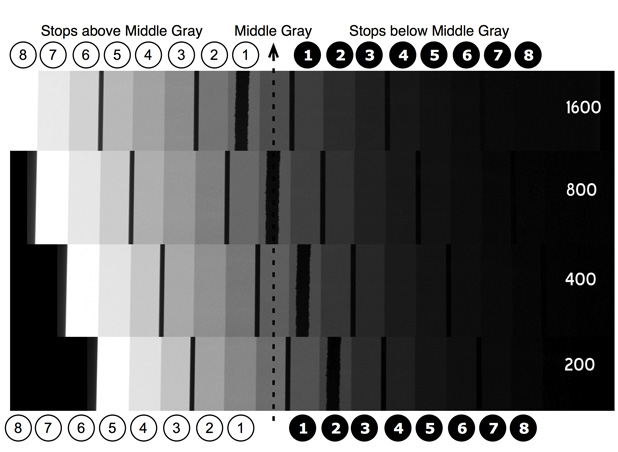
What I did was take the images of the DSC Labs 102db 17-stop latitude chart from my previous article and cut them up so that 18% gray is lined up at four different ISOs. The chip with the tape running down the center reflects 18% gray at ISO 800 and moves around depending on how the camera ISO changes, so I added a dotted line that runs vertically through the chart to indicate the 18% gray (45%) chip at each ISO.

I had to manipulate the charts a little in Photoshop as maximum white values in LogC vary depending on the ISO: highlights can reach 100% at ISO 1600 but max out at 85% or so at ISO 200. This maximum value for white ultimately doesn’t matter because LogC is meant only for storage and not for critical viewing: the first things that happen in a color grade are setting a black level and a white level, so white will simply be placed wherever the DP and/or colorist want it to be. That’s what I did here: using the Photoshop “Levels” tool I picked a maximum black, just below the darkest chip at the right side of the chart, as well as a maximum white, at the top left of the brightest chip.

Because of this manipulation this chart is not meant to be a true dynamic range guide. (For that, see this article.) Instead this chart is good for pointing out things like this:

Maximum white at ISO 200 occurs at 18% gray plus five stops. The chip that is white at ISO 200 is varying shades of gray at ISO 400, 800 and 1600.

18% gray minus five stops at ISO 1600 is near black, but looking down the chart we can see additional tonal detail in the dark tones as the ISO decreases to 800, 400 and 200.

A commenter to a previous article praised Alexa because he thought he could throw away his ND filters when shooting outside. That’s not the case, as these graphs indicate: when shooting HD nothing comes for free, and there are gains and penalties involved whenever you change the ISO setting on a camera that allows you to do so. While it may make intuitive sense to shoot day exteriors at ISO 200, you may be much better off shooting them at ISO 800 to retain highlight detail.The same could be true of a moody night interior, where ISO 200 will open up more shadow detail with less noise than ISO 800 will.

Keep in mind that this article addresses LogC only. Rec 709 will look much more normal at different ISOs because the stops at the top and bottom of the range are severely rounded off by Arri’s aggressive Rec 709 S-shaped gamma curve. Still, there will be differences in how much detail shadows and highlights hold at different ISOs in Rec 709 so it’s wise to use what I’ve outlined above as a predictor and observe what actually happens to extremes of exposure at different ISO settings in the field.

Oh—and just because another HD camera doesn’t have ISO settings doesn’t mean it’s not affected exactly the same way: -3db gain will offer less noise while compromising the camera’s ability to hold detail in extreme highlights, while +3db gain will result in more noise but also more highlight detail retention. Don’t take my word for it; try it out!

I will be working on an article shortly that shows that this strategy also works on the RED ONE MX. Stay tuned!

For more information about the Arri Alexa, please go to Arri Digital.

Thanks are due to Chater Camera, who provided an Alexa for this test series, and DSC Labs, who provided the test chart.

Art Adams is a DP whose brightness changes depending on his exposure to new technology. His website is www.artadamsdp.com.

(Page 1 of 1 pages for this article )

                    Clip to Evernote


The ‪ARRI M40‬ Outshines the Competition at NAB 2012

Jeremiah Karpowicz | 05/25

See why this light is in such high demand

image

We asked John Gresch, ARRI Vice President of Lighting Products, to tell us more about the products ARRI had to show at NAB 2012 and he gave us some details about the ARRI M40. It…

NAB 2012: RED

Adam Wilt | 05/07

RED’s Ted Schilowitz discusses 2012’s products, and a photo gallery.

RED’s “Leader of the Rebellion” Ted Schilowitz held a press conference at NAB on Monday, describing the projects and products RED is working on. Rather than paraphrase him, I’ve got him on card (well, it’s not “on…

NAB 2012: Cameras & Lenses

Adam Wilt | 05/02

A brief sampling of interesting photographic tools at NAB.

I’ve already covered the basics of what Sony and Panasonic announced, as well as looking at Canon’s…

You must be registered to comment. This is an effort to reduce spam. Please REGISTER HERE.

Great article.  The graphic examples were very helpful. 

Can you compare this to push and pull processing?  (maybe in another article)

Posted by .(JavaScript must be enabled to view this email address)  on  10/08  at  07:27 AM


“18% gray is lined up at four different ISOs… I added a dotted line that runs vertically through the chart to indicate the 18% gray (45%) chip at each ISO.”

I was going to ask about this when I saw the first chart and clearly you were thinking the same way. I am still trying to understand what the charts are showing me.

Did you line up the 18% gray as determined by the chart (before camera) or when assessing the footage (after camera)? Because if I just look at the vertical strip 18% chips you lined up vertically, they seem to get progressively lighter from top to bottom. If you lined up the chips “after camera,” should all the grays vertically be the same? Because if you’re looking at them in Photoshop, should all the 18% chips vertically stacked have the same brightness?

In the previous article, and here, you note that the strip with the tape through it is 18% gray on the chart where Alexa sees it at ISO800. So as you change the ISO, the 18% gray (before camera) moves left and right. If you lined up the chips “before camera,” should all the taped chips vertically be lined up? Because the brightness of that chip (before camera) isn’t changing?

Maybe it’s my laptop screen, or the angle of view, but the chips don’t seem to be the same on the 18% line, so I don’t understand what’s lined up and am having trouble understanding the chart.

—-
Or put another way..
You say it’s 45% grey. I put my light meter out there, and based on its internal measurements (45% grey), it says an ISO 800 camera needs a t5.6 (whatever). It is a dark scene and I want the camera to make sure I have lots of dark detail. So I ISO down to 200. I meter again and now the meter says I need to open up the lens 2 stops to t2.8.

Are the charts indicating that the change in Alexa ISO would also cause the camera interpret the same 45% grey now 2 stops darker? Or would the lens adjustments push the scale back to the left?

Posted by IEBA  on  10/11  at  11:33 AM


To address your first question: the 18% gray patches don’t match precisely because of how I manipulated them in Photoshop. Since LogC white clip values vary, I white-picked the brightest chip so that the brightest whites were all the same value. I didn’t want to manipulate the charts any more than that so the 18% grays don’t line up absolutely perfectly.

If I’d left the white values alone then the grays would all line up precisely but the whites would be very different values, which would also be confusing. (LogC white clip values vary depending on the ISO, because of changes in how the linear gamma is mapped.)

Still, I think the grays line up well enough to illustrate the point.

To address your second question:  If your meter said to shoot at T5.6 at ISO 800, and you changed your ISO to 200, you would have to open up the stop to T2.8. The gray chip that WAS 18% gray at ISO 800 is now two shades darker, and the gray chip that was two shades lighter than 18% is now exactly 18%.

The biggest difference is that you had seven stops of overexposure latitude at ISO 800, but at ISO 200 you now only have five because two of those stops are now distributed below 18% gray. So while the shadows will contain more detail and less noise your highlights will clip sooner.

Posted by Art Adams  on  10/11  at  03:53 PM


Wait, wait, I think I get what my mind has been rummaging around for a while. You keep saying dropping the ISO gives you less highlight detail (stops).

The chart had a chip with 18% gray (at ISO 800) that you marked with tape. That gray never changed “grayness” in real life. It is what it is. 18% or whatever, it is a certain amount of gray, and the luminance of that chip on the backlit chip chart never changed. It is fixed. X. And you put tape across it to help us keep track of it. I think that much I am good on.

So let’s say that X is a black man’s face. Now, whether it be highlight detail on a man’s face, or white chips a chip chart, I seem to read the chart to say there are 7 stops above X, no matter what the ISO.

So the black man’s face, at 18% gray, would always have 7 stops highlight detail above it, at every ISO, as I understand it. But you said available highlight detail goes down as ISO goes down.

If X (and the luminance of all the chips above it) doesn’t change, and we’re supposed to have less highlight detail as ISO decreases, I’d expect to count fewer chips above the chip you marked, not the same.

Posted by IEBA  on  10/11  at  10:37 PM


Well… I tried to lay it out in the graphics, but when you change the ISO you’re simply changing the gain on the camera. Going from 800 to 200 reduces gain (“negative gain,” although not really), so the camera becomes less noisy but also sees less highlight detail.

“If X (and the luminance of all the chips above it) doesn’t change, and we’re supposed to have less highlight detail as ISO decreases, I’d expect to count fewer chips above the chip you marked, not the same.”

That’s exactly what I’ve shown. The trick is that the chip with the tape across it is only 18% gray at ISO 800. At ISO 400 it moves one shade down and the next brightest chip becomes the new 18% gray. At 200 the chip with the tape becomes two stops darker instead of just one, and the old 18% gray is now pushed aside by the next brighter chip, which is now 18% gray.

18% gray moves around depending on the ISO. That’s what the ISO is really doing: arbitrarily placing 18% gray on the dynamic range scale, based on where ISO is set.

And when you move 18% gray in either direction on the scale, you lose one stop from one side and allocate it to the other. That’s why ISO 400 loses one stop from highlights and adds one to the shadows: you’ve just moved where the camera places 18% gray. The brightness seen by the sensor is exactly the same, but you’ve changed how the camera responds to it. You’d open up one stop and shoot.

The graphics above really do explain it fairly well. I’m not sure what else I can tell you.

Posted by Art Adams  on  10/11  at  11:32 PM


The dotted line shows where 18% gray is. The chip with the tape on it is only there to give you a reference and see how 18% gray at ISO 800 moves around. That chip is only middle gray at ISO 800.

The dotted line shows where 18% falls at different ISO’s, and that’s what you really want to watch.

Posted by Art Adams  on  10/11  at  11:34 PM


me:
>>If X (and the luminance of all the chips above it)
>>doesn’t change, and we’re supposed to have less
>>highlight detail as ISO decreases, I’d expect to
>>count fewer chips above the chip you marked,
>>not the same.

Art:
> That’s exactly what I’ve shown. The trick is that
> the chip with the tape across it is only 18% gray
> at ISO 800. At ISO 400 it moves one shade down and
> the next brightest chip becomes the new 18% gray.

Here’s the crux. The chart chip with the tape never changed luminance. When you say it “moved down” you’re measuring after capture, by assessing the LogC files, which you yourself said “[LogC] it’s not meant to be viewed on a Rec 709 display. LogC is for storage only, not for viewing.”

If, as you said, “I set that first chip just to the point of clipping at ISO 800… well, no matter what ISO I set the camera to, that chip was always just clipping—and without changing the stop!”

Then line up all the chip charts so that the clipping white is in the same spot (since it is the same exact luminance value going into the camera where the camera clipped) then line up all those white chips, but the dotted line through that, and let’s see how the grays differ as they go down the chart.

I did this here:
http://ieba.wordpress.com/2010/10/13/alexa
And there, I agreed with you. You are right, the Alexa does have fewer stops at ISO 200 than 800, but it’s fewer TOTAL stops. Middle gray moves down because the difference between each step is larger. It moves down because, as you decrease ISO and have fewer total steps, you get from black to your middle gray quicker. This says to me that, at lower ISOs, there’s LESS shadow resolution, not more.

At least that’s my interpretation.

Posted by IEBA  on  10/13  at  11:36 AM


Hi IEBA-

You are misinterpreting my data, and you seem to be hung up on where the tape is placed on the chart. That was only meant to show where 18% gray started off, at ISO 800; it is not 18% gray at every ISO. That’s the point of the article.

As I mentioned in the article, the chart that you’ve manipulated was tweaked roughly in Photoshop and was never intended to be used as any sort of exact latitude reference, but only as a rough conceptual guide. All the values that you’ve noted on the chips are values created in Photoshop as a result of white balancing the white chips and making them appear white—something that doesn’t happen in LogC as white clips at different values depending on the ISO—and don’t reflect any real data or values.

I wish I could spend more time explaining this to you… but I can’t. It’s probably best if you get your hands on an Alexa and perform your own tests. You can do this with a RED as well.

Posted by Art Adams  on  10/13  at  12:14 PM


Hi Art, your Alexa’s articles are great and really helpful.

I have this queston regardng metering:

If I wanna use my spot lightmeter with LogC… should I first stop a 18% gray at 40% -as Arri states- on the waveform (or until the Alexa’s false color turns “Green”)... then meter it with my spotmeter and compare both readings? If I do that I will get 1 stop of difference between both… does it mean that I should use my lightmeter with a “one stop down” calibration?

Bottomline: Should I calibrate my lightmeter to read the 18% gray as the LogC curve sees it (one stop down)? or should I use it normally (spotmeter reading it at 50%)? (entering same ISO/fps values on both as usual).

Thanks!
Luis

Posted by .(JavaScript must be enabled to view this email address)  on  03/11  at  05:53 PM


Dear Art ,

would you say that the camera’s negative or positive gains controller at the sensor output act accordingly to the relative iso’s setting?

Posted by .(JavaScript must be enabled to view this email address)  on  06/01  at  05:45 AM


Name:

Email:

Location:

URL:

Smileys

Remember my personal information

Notify me of follow-up comments?

Submit the word you see below:


The Best of Stunning Good Looks
LIGHTING: Advanced Cucoloris Use Illustrated by a Solar Eclipse
CAMERAS: Food Fights with the FS700
CAMERA MATH: The Importance of Ratios
GEEK-OUT: The Matrix, Reloaded
Lighting Fire and Liquids: Playtime with the Sony FS700
LED Light Tests: Flesh Tone and Color Comparison Shootout
BEHIND THE SCENES: Smoke in the Woods with the Canon 5D
LED Light Tests: PRG Sponsors an LED Light Shootout
CANON C300: Trimming White Balance, Plus a Look at Daylight vs. Tungsten Color
CAMERAS: Now It’s Rocket Science
Lights, Camera, Kids: Shooting a Childish Spot for T-Mobile on the Canon 5D
GEEK OUT: The Non-Technical Technical Guide to Sony OLED Monitors
LIGHTING STRATEGIES: Rough Guide to Illuminating a Bounce Card
LIGHTING STRATEGIES: Exploiting a Single Light Source
BOOK REVIEW: “How to Shoot Movies Without Shooting Yourself in the Foot”
LIGHTING STRATEGIES: Placing the Fill Light for Faces
LIGHTING STRATEGIES: What Makes Soft Lights Cast Soft Shadows?
For You, a Panel Discussion
LIGHTING STRATEGIES: Soft Light vs. Hard Light
Pulse Width Modulation is NOT Your Friend
LIGHTING STRATEGIES: Placing a Hard Key Light
The Simplest, Fastest Interview Lighting Setup—Ever.
The Future of Technology is You
Fill Light: The Underdog of Lighting
Blue Nile Shines Thanks to the Canon 5D and Apple Color
You’ve read my writing, now hear my talking
Anatomy of a Spot: T-Mobile
DSC Labs Hawk Chart: The Simplest Color Chart That You Can’t Live Without
Arri Alexa and Rosco LitePads Come Through for OnLive’s First National Spot


The ‪ARRI M40‬ Outshines the Competition at NAB 2012

Jeremiah Karpowicz | 05/25

See why this light is in such high demand

image

We asked John Gresch, ARRI Vice President of Lighting Products, to tell us more about the products ARRI had to show at NAB 2012 and he gave us some details about the ARRI M40. It…

NAB 2012: RED

Adam Wilt | 05/07

RED’s Ted Schilowitz discusses 2012’s products, and a photo gallery.

RED’s “Leader of the Rebellion” Ted Schilowitz held a press conference at NAB on Monday, describing the projects and products RED is working on. Rather than paraphrase him, I’ve got him on card (well, it’s not “on…

NAB 2012: Cameras & Lenses

Adam Wilt | 05/02

A brief sampling of interesting photographic tools at NAB.

I’ve already covered the basics of what Sony and Panasonic announced, as well as looking at Canon’s…

LED Light Tests: Flesh Tone and Color Comparison Shootout

Art Adams | 04/09

There’s one color that will always bother us if it’s wrong: flesh tone. We tested ten common LED lights against a tungsten Inkie and a Kino Flo… come see the results!

Color comparison tests are hard. Color science is witchcraft, and objective color is exceedingly difficult to quantify. Comparison is really the only way to judge color, so we tested ten LED lights against two tungsten Tweenies and a 3200K 2’x4…

To be considered for listing, contact pr (at) provideocoalition (dot) com


Copyright © 2012, HD Expo, LLC a division of Diversified Business Communications. DBA Createasphere

All rights reserved. HD EXPO, High Def EXPO, Createasphere, E-Tech, Entertainment Technology Exposition, 3D Production Workshop, VariCamp, P2 Camp, ColorCamp 101, and Lighting, Filters & Gels for HD are all trademarks of HD Expo, LLC.

Terms of Use  |  Privacy Policy

Check PageRank