
(Page 1 of 1 pages for this article )

Friday, June 27, 2008

Filed under: BusinessDistribution

Dymo Discpainter, Part Deux

Art Adams | 06/27

Wherein I use the Discpainter to print 70 DVDs, with reasonable results.
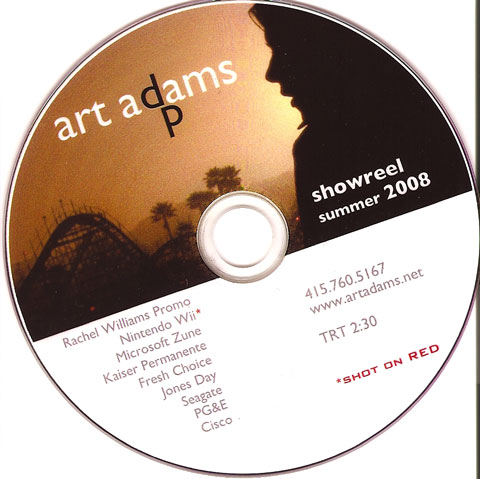
This is what my current Discpainter-painted showreel looks like, minus the dust (added by my rarely used desktop scanner). The dithering is exaggerated here, as it doesn’t look nearly as obvious to the naked eye. You can also see some circular banding across the solid color parts of the image; sadly, that does read about the same on the scanner as it does by eye.

Overall I’m reasonably happy with my purchase. I don’t know of any other affordable technology that would let me print on a DVD in less time than it takes to burn and verify another one. I printed 70 DVDs last week over the course of two days and I only had one small hiccup: the printer stopped responding at one point, requiring me to reinstall the software. Otherwise it saved me tons of time over trying to print the same number of DVDs using my old and finicky Epson R320.

I’ve already written about how clunky the design software is. You may notice that the “d” in “adams” has a slight white outline; that’s because Dymo’s Discus software won’t allow me to change the color of one letter in a text box without changing all of them. I had to create the dark letter “d” in a separate text box and lay it over the white “d”. That’s the best coverage I was able to achieve. Supposedly Disclabel supports the Dymo Discpainter but I couldn’t get it to recognize mine at all. I should probably file a trouble ticket before launching on my next showreel design, as virtually anything is better than using Dymo’s own software. It works, but you won’t like it.

Dymo says to expect 50 DVDs on an ink cartridge. I got closer to 100 before I had to change. Unfortunately the Discpainter doesn’t tell you when a color is running low. You just have to notice that your results are starting to look very “minus cyan” (or whatever color might be running low).

The bottom line: the 3-color Discpainter does well enough. Most of my pleasure at using it comes from how quickly and easily it prints DVDs compared to other home-grown methods I’ve tried. The quality… eh, that’s another story. But it’ll be good enough until someone else figures out a better way to do the same thing at the same price point.

(Page 1 of 1 pages for this article )

                    Clip to Evernote


LSS Notes: Sony F3/FS100 preso at MTE; “C300 = Awesome”

Adam Wilt | 12/08

PMW-F3/NEX-FS100 demo Monday 12 Dec; large raster workflow seminar Tuesday 13 Dec; the best demo video ever.

[Update 9 Dec: ASG Large Raster Workflow seminar Tuesday in San Francisco.]

1) Media Solutions and Sony present Sony PMW-F3/NEX-FS100u Demo and Workflow Solutions this Monday, 12 December, at Meets…

Straightforward Primary Color Correction in Premiere Pro

Jeff Sengstack | 10/15

To do the bulk of color correction in Premiere Pro, all you need to use are one or two video effects and two or three scopes.

imageAdvertisement

Color correction falls into three categories:…

The CRT Replacement Is Here…Finally!

Terence Curren | 10/03

Sony Trimaster OLED monitors really deliver.

image

With the death of CRTs, those of us who needed to critically evaluate video images in a standardized display universe were left with no adequate replacement. Most…

You must be registered to comment. This is an effort to reduce spam. Please REGISTER HERE.

Hi Art,

Why not design the graphics in Photoshop (or similar) and just add the playlist. Would get rid of the white outline on the ‘d’ issue.

Generally I only use the included software to add simple texts and do everything else in PS.

George.

Posted by .(JavaScript must be enabled to view this email address)  on  06/28  at  07:01 AM


Personally. My solution is two DVD drives on my desktop, Nero and Epson R1800 (a great photo printer which prints on DVD). Fast and gorgeous output. It takes about 60 seconds a disk a photo quality and I’ve never had a misfeed after several hundred disks. (which I heard is a problem on cheaper Epsons)

Posted by stephen v2  on  06/28  at  07:54 AM


I have a Epson R380 and have used it for about a year with no problems at all. I have printed approx 300 hundred discs in the year or so. Pretty low use but a lot less hassle than the R320 I used before. For layout I use Photoshop and not the Epson Print CD that came with the printer. I use the app just to place the image on the disc and send to the printer. Print speed is 30-60 sec for most discs although full ink coverage takes a bit longer. I saw the Discpainter at MacWorld this year but it didn’t have many advantages over the Epson. Now if I could afford a dedicated CD printer with a no hassle tray that would be just too cool.

Cheers
RC Fisher

Posted by RC Fisher  on  06/28  at  01:46 PM


The only advantage it had over my Epson was reliability. The disk feed on the R320 was a real pain. It worked after a spell, but it took a bit of messing with. I just wanted something that worked. It’s the same reason I switched from Windows to a Mac: I want to spend more of my time doing things than trying to do things. smile

There were a few times when I talked myself out of buying the Discpainter, but in the end I found myself in a situation where I’d delayed sending out a new reel for so long (by waiting for footage to become available) that I just wanted to get the damned thing out as fast as I could. The Discpainter made that happen.

It’s only 3-color instead of 6, it doesn’t print perfectly, but the results are perfectly predictable and repeatable. I’m okay paying for that.

As for why didn’t I use Photoshop… well, I didn’t think of it. Duh, though. I guess I need to do some cleanup for the next round.

Posted by Art Adams  on  06/28  at  09:29 PM


Name:

Email:

Location:

URL:

Smileys

Remember my personal information

Notify me of follow-up comments?

Submit the word you see below:


LSS Notes: Sony F3/FS100 preso at MTE; “C300 = Awesome”

Adam Wilt | 12/08

PMW-F3/NEX-FS100 demo Monday 12 Dec; large raster workflow seminar Tuesday 13 Dec; the best demo video ever.

[Update 9 Dec: ASG Large Raster Workflow seminar Tuesday in San Francisco.]

1) Media Solutions and Sony present Sony PMW-F3/NEX-FS100u Demo and Workflow Solutions this Monday, 12 December, at Meets…

Straightforward Primary Color Correction in Premiere Pro

Jeff Sengstack | 10/15

To do the bulk of color correction in Premiere Pro, all you need to use are one or two video effects and two or three scopes.

imageAdvertisement

Color correction falls into three categories:…

The CRT Replacement Is Here…Finally!

Terence Curren | 10/03

Sony Trimaster OLED monitors really deliver.

image

With the death of CRTs, those of us who needed to critically evaluate video images in a standardized display universe were left with no adequate replacement. Most…

The Templatorization of “Creativity”

Terence Curren | 09/28

Is there any room left for new ideas, or are we doomed to work on repeats of previous projects forever?

image

The trend toward basing creative endeavors on templates has been with us for many years, culminating in Hollywood’s use of its history as templates for its current production.

To be considered for listing, contact pr (at) provideocoalition (dot) com


Copyright © 2011, HD Expo, LLC a division of Diversified Business Communications. DBA Createasphere

All rights reserved. HD EXPO, High Def EXPO, Createasphere, E-Tech, Entertainment Technology Exposition, 3D Production Workshop, VariCamp, P2 Camp, ColorCamp 101, and Lighting, Filters & Gels for HD are all trademarks of HD Expo, LLC.

Terms of Use  |  Privacy Policy

Check PageRank