

Filmtools
Filmmakers go-to destination for pre-production, production & post production equipment!
Shop NowAn 18-stop test chart, a tunnel made of showcard and a dozen yards of black plastic ground cover later, we have a pretty good idea of the RED MX’s exposure latitude.

When DSC Labs offered to send me a 102db (translation: 18-stop) exposure latitude chart, I just couldn’t bring myself to say no. And, naturally, the first camera I wanted to test was the RED ONE MX. How much better is the new sensor? Let’s take a look…
The Ambi-2 102db test chart, by DSC Labs, is a backlit chart. Due to the limitations of print technology it’s currently impossible to create a printed test chart with a range of more than five or six stops, and today’s cameras regularly offer ten or more stops of latitude. A backlit chart, where light is passed through a series of progressively denser strips printed on a piece of clear plastic, is the only way to create a chart that meets or exceeds the latitude of today’s cameras.
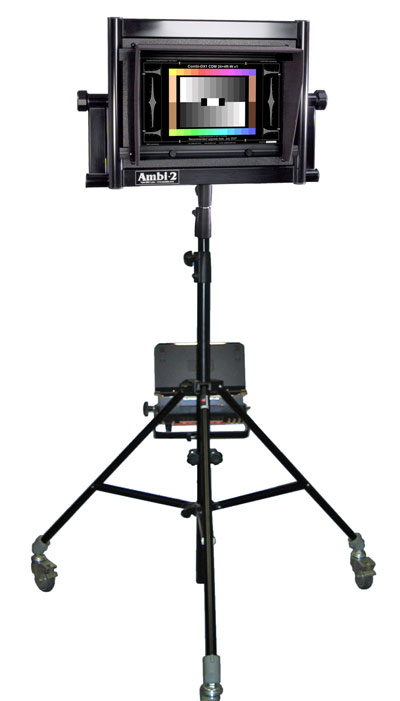
The Ambi-2, with a full-color rear-lit chart. This is not the chart I’ve been using, but shows the overall setup. My configuration does not have the light source mounted on the stand, as this one does, as DSC sent a prototype LED light that clips on the back.
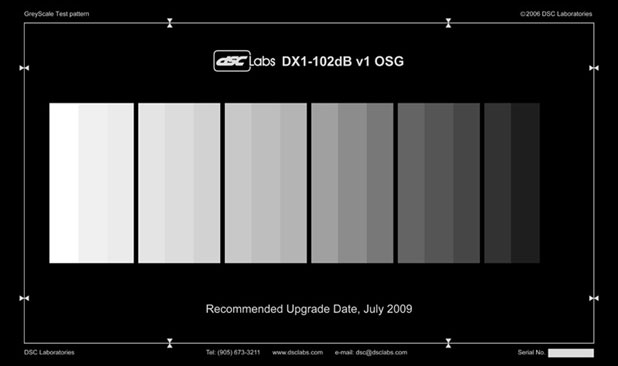
This is the rear-lit gray scale used for these tests. When backlit there are 18 steps, so with the first (far left) step exposed such that it just barely clips, the next 17 steps show the actual dynamic range of the camera. While it is an 18-step chart it is intended to show a maximum of 17 stops of latitude. The image above is a representation as there isn’t a camera today that can resolve the entire scale.
I performed these tests with the aid of Adam Wilt, in his office at Meets the Eye Studios in San Carlos, CA. This space was perfect but for one thing: it wasn’t light-tight. Backlit charts only work properly if there is NO spill light on the front of it, as that may have the effect of “flashing” the shadows and showing more latitude than the camera can see under normal conditions.
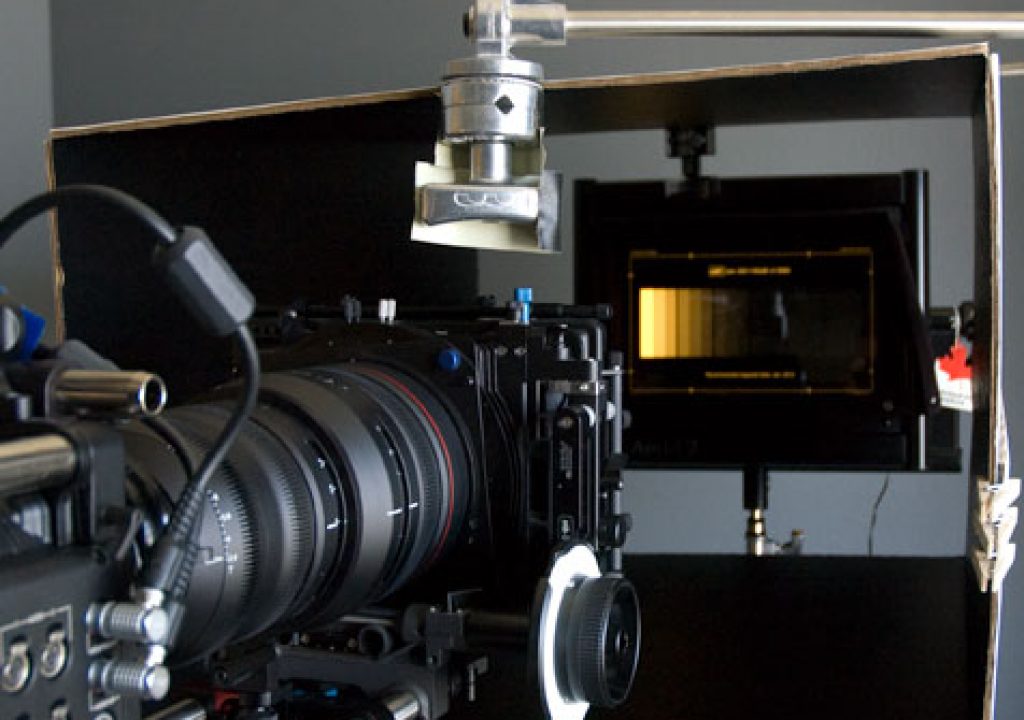
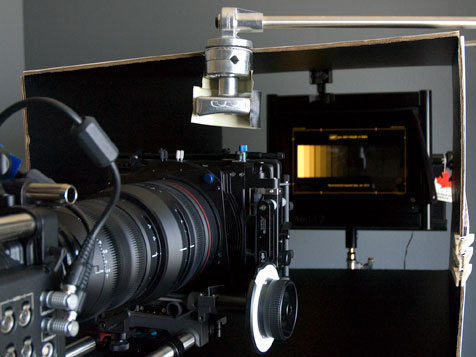
So Adam made a tunnel out of black showcard:
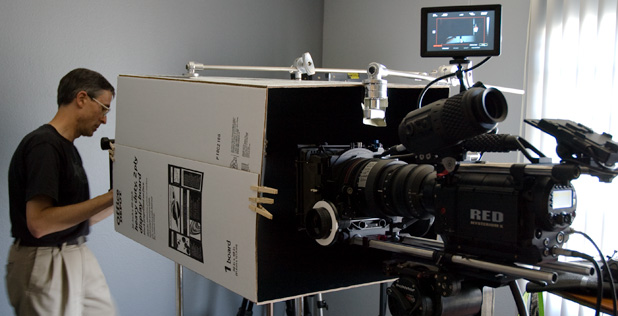
I bought some black plastic ground cover cloth at Home Depot, and a few yards later we had both the front and the back sealed against outside light. The only light source used was inside the back of the Ambi-2 itself and was an LED source that looked a lot like a Rosco LightPad, although I don’t know who makes it. It was designed to be a perfectly even light source, as unevenness could result in misleading test results, and its only drawback is its spectrum: it’s a very blue-green light. I hope to repeat this test at some point in the future using a full-spectrum tungsten light, both raw and through full CTB for daylight testing.
Adam is an extremely thorough tester, which is nice as we double-check each other to make sure we don’t inadvertently get into trouble. In this case Adam solved two very tricky problems that I hadn’t thought of before the test.
The first problem was eliminating the effect of lens vignetting. While we started off using a RED zoom we switched over to a Zeiss Ultra Prime to eliminate the effects of vignetting. RED zooms tend not to vignette if one stops down far enough (about T5.6) but the chart wasn’t bright enough to allow for that stop. A 65mm Ultra Prime showed no vignetting and allowed us to clip the clear wedge at around T2.8. (Adam determined that there was no vignetting by panning the camera left and right and watching a waveform monitor to make sure the edges didn’t dip.)
The second problem was finding a way to expose the clear wedge at 100% exactly, considering that the RED’s monitoring output is only meant as a “video tap.” Adam’s solution was to start with the aperture wide open, and then close it down as the camera rolled. In Apple Color it was quite easy to scrub through the frames and find the one with the right exposure for the tests I wanted to perform.
On to the next page, where we can see some test results…
Here’s the test we shot with the camera rated at EI 800:
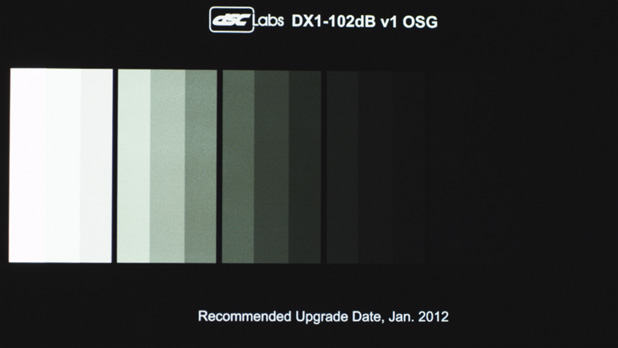
RED MX, EI 800, Camera RGB, RedGamma.
This is a cropped image from an Apple Color screen grab. I used Color for this test because I could interact directly with the R3D files. I opted to work in Camera RGB in order to see what was happening directly in the sensor’s color space. The camera was set to 5600k preset and I did no further white balancing. You can see the green hue from the spike in the LED illuminant. (The light source is a one-off prototype that will not ship with other Ambi-2 units until the spectrum has been perfected. The light is generally daylight-balanced but has some extra green in it. DSC is sending me a kit to convert this particular Ambi-2 into a tungsten-based unit for future tests.)
It’s important to know not to count that first wedge, the brightest one on the left. As the only solid reference point we have when evaluating a sensor is the point at which the photosites “saturate,” or clip, that first step is exposed so that it just barely clips. Starting with the next step down, the second wedge from the left, I can see 11 further steps and possibly part of a 12th.
It’s pretty hard to see this in RedGamma, so let’s take a look at RedLog instead:
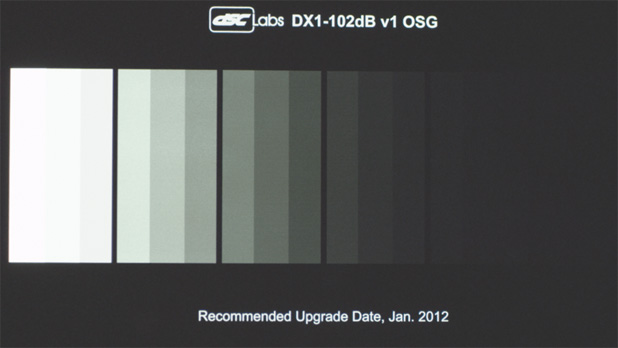
RED MX, EI 800, Camera RGB, RedLog.
RedLog boosts the blacks up to about 20% on a waveform monitor, which makes it a bit easier to see how far down into the murk the wedges drop. Step 12 is directly above the “12” in “2012”, and there’s a very faint 13th wedge barely visible just to the right of that. And, deep in the noise, there’s another step just barely visible beyond that.
That seems to imply 12 stops of reliable latitude, which a couple of barely visible stops beyond that. Hmmm. That’s pretty impressive. Let’s take a look at what the objective data says:
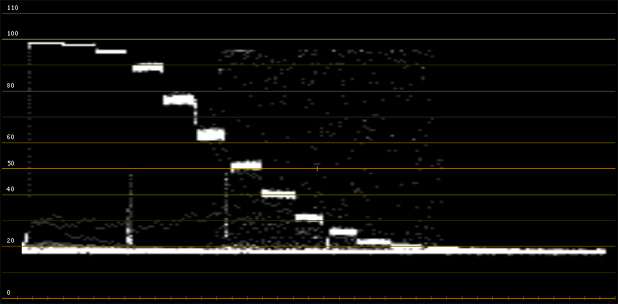
RED MX, EI 800, Camera RGB, RedLog.
We’re looking at luminance only because the green channel tended to clip ahead of the others in RGB parade, due to the green spike in the illuminant. Remember, skip the first step as we’ve clipped that to set an objective starting point. Middle gray and black are much more difficult to define, and are often defined for us by the camera manufacturer based on how they think their camera looks the best. (The RED trusts us to do that on our own, according to our tastes and needs.)
Skipping that top step, I can see 12 steps total. The 13th is barely visible if you really look for it, as is the 14th step–but since they appear to have the same brightness level it’s hard to know whether to count them as they show up as the same tone, instead of separate distinct tones. The last step is just a scan line brighter than black, so I’m going to say that it’s probably too far down in the mud to be of real use. Based on this waveform I’d say that there are 11 solid stops of really useful latitude visible. If there’s detail in those steps it will be barely visible, and both steps will appear to be the same tone.
Just to double-check that, let’s look at the same image in RedGamma, which will push the shadows back down toward black the way we’re used to seeing them:
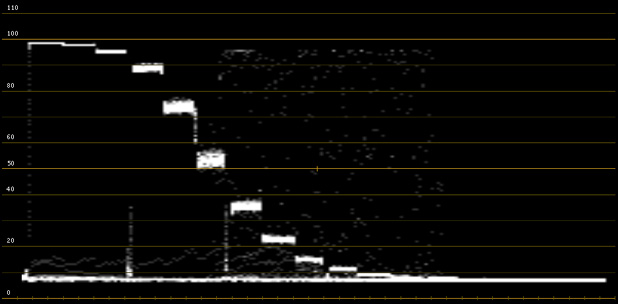
RED MX, EI 800, Camera RGB, RedGamma.
Now I’m only counting 10 stops. Stops 11 and 12 are visible as lines just above black, but they are of equal value so there won’t be much tonal difference between them using this gamma curve. Still, they’re down there if they are needed–although I suspect that you wouldn’t want to pull them up to make them more visible as they’d be awfully noisy so close to the noise floor.
Just for fun, let’s crank this thing up to EI 2000 and see how many steps we can detect:
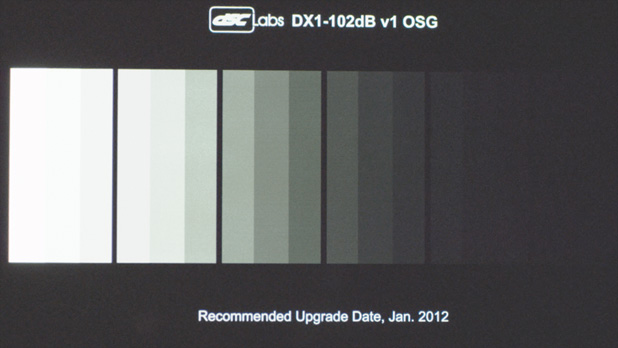
RED MX, EI 2000, Camera RGB, RedLog.
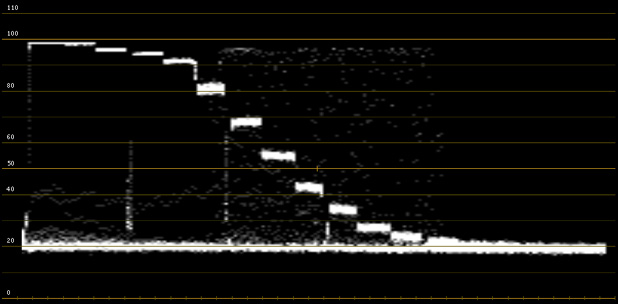
RED MX, EI 2000, Camera RGB, RedLog.
The waveform shows us that the second wedge from the left is now effectively clipped, so we’ll ignore that one for now. If I look carefully at the image itself, above the waveform, I can see… wow, maybe 15 wedges from the left! Subtract the top two wedges and we’re down to 12 stops, which is consistent with what we saw earlier, at least visually. The thing that disturbs me about this image, though, is that steps 12 and 13 are very similar in tone, and steps 14 and 15 are basically the same very dark tone. If the steps don’t show up as separate tones, well… it’s hard to say whether they count. There will most likely be some detail in tones 12 and 13, along with a little bit of contrast, but it’s questionable how useful steps 14 and 15 will be in a real-world situation.
If we look only at the waveform, and start counting after the first two clipped wedges, I can see 10 distinct steps. The 11th is a tiny bump on the noise floor that slopes down into the remaining tones that we could see visually, but not terribly well. Keep in mind that this is RedLog again so the blacks are artificially boosted; if we look at RedGamma we’ll see something very different:
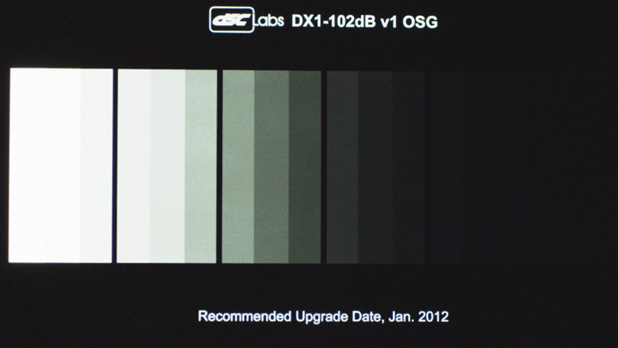
RED MX, EI 2000, Camera RGB, RedGamma.
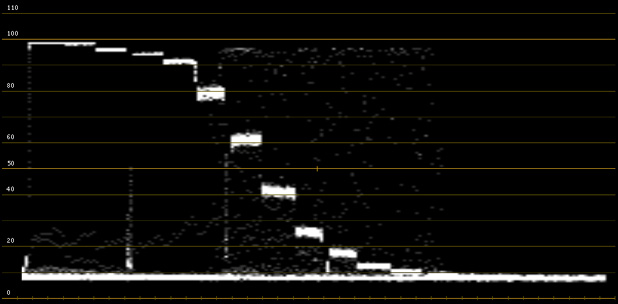
RED MX, EI 2000, Camera RGB, RedGamma.
Starting at the third wedge from the left (the first one that’s not clipped) I see 10 solid steps in the waveform, for 10 solid stops. In the visible image I see another step for a total of 11 visible steps. The second wedge is clipped at EI 2000 but we know that it’s not really clipped at EI 800, so let’s add that back into the mix for 11 really solid stops that are detectable on a waveform monitor, and 12 that can be seen by eye.
I tend to be very conservative when it comes to exposure, dividing the dynamic range of a camera into “paycheck stops” and “gravy stops.” Paycheck stops are the zones upon which you can reliably place information that will definitely be reflected in a normally graded final image, and which won’t cost you your job when something that’s supposed to be visible there doesn’t show up in dailies. Gravy stops are the zones that will probably show up but that I don’t personally count on: if they are there, great; if not, but I don’t rely on them. Based on this model I see 11 paycheck stops and a further 3 gravy stops that aren’t visible on a waveform monitor but that are somewhat visible when viewing an actual image.
If I want something completely black I would expose my shadows below those last two gravy stops. Or I could very easily crush them in post as they are barely visible anyway.
The original RED ONE M sensor clocked in at around 9.5 stops of latitude, so 11 stops of solid latitude is a healthy improvement. The real treat is the increased speed of the camera. At low light levels contrast is relatively easy to control, as shadows seem to fill themselves in. There are many different explanations for this, including the theory that shooting wide open on a lens results in reduced contrast due to a certain amount of added lens flare, but the bottom line for me is that it’s more important to have a fast camera than to have one with 13 stops of latitude. (Although I wouldn’t turn one away…)
By looking at the images above it should be fairly simple for you to decide how you want to use this camera. Latitude isn’t just a technical choice, it’s an artistic choice–and artistic choices vary based on the person making the choices.
Disclosure: DSC Labs provided the charts used for this test at no charge.
Thanks to Adam Wilt of Meets the Eye Studios, and David Corley and Michael Wiegand of DSC Labs, for their assistance in the creation of this article.
Art Adams is a DP who lives in the shadows. His website is at www.artadams.net.