Take these to heart and become the editor’s best friend.

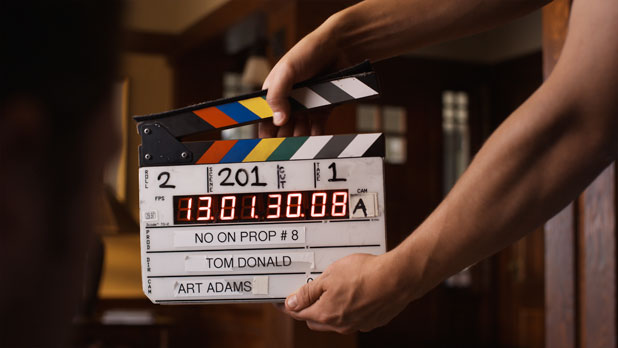
Slate training was my introduction to one of the most important tenets of filmmaking: always think of the next person down the production line. In the case of slating, this means taking care of the poor assistant editor who has to sync and track dailies based on your notes and your slating technique.
Just the way we are under the gun while shooting, assistant editors and editors are similarly rushed in creating rough cuts. The clearer you can be in identifying takes the easier their life will be-and that translates into fewer snide comments about your work when the producer visits the editing room.
Slating is traditionally the job of the second camera assistant, a position I don’t see much anymore except on the bigger budgeted shoots. More often than not I end up with a camera crew that consists of a first camera assistant and a DIT, and the DIT is never consistently on set as their duties dictate hovering over a laptop most of the day. This typically means that the first assistant has to slate shots themselves, although if you want to make a friend and you’re available to help you can jump in and take that burden off their hands. Just don’t think for a moment that slating is simple. There are a number of rules to follow that will make everyone’s lives easier.
1. Make the slate BIG in the frame. You won’t make any friends by holding the slate ten feet away from the camera on a wide shot. The rule of thumb is to place the slate one foot from the lens for every 10mm of focal length. For example, if the camera is sporting a 25mm lens, hold the slate 2’6″ from the lens. (I’d move it a little farther back for safety, so call it 3′.)
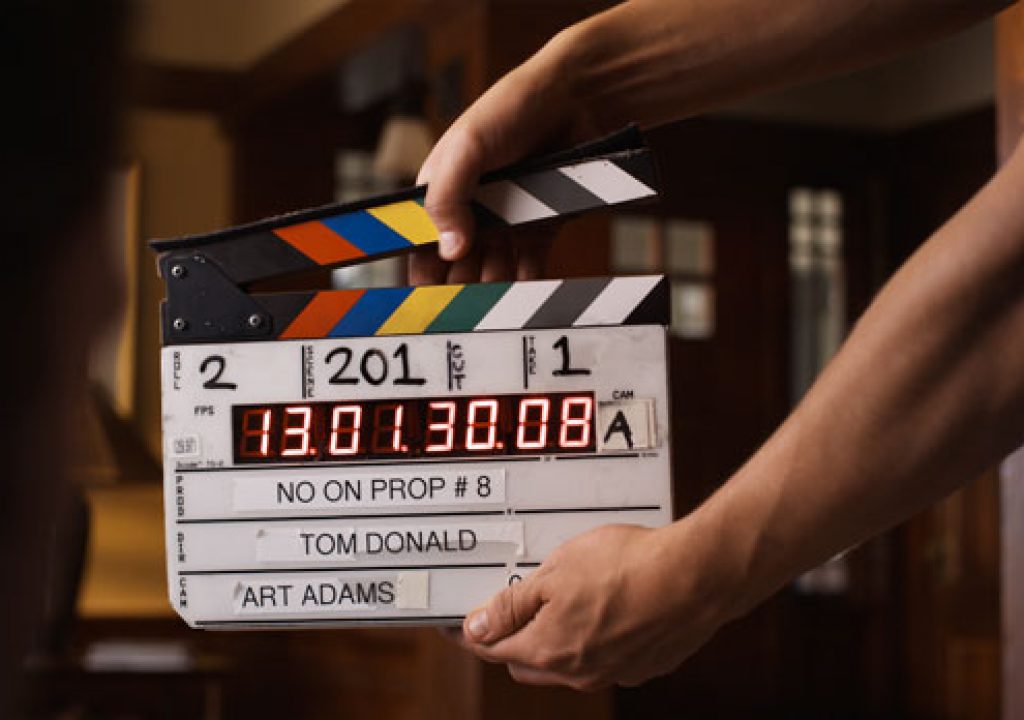
2. WRITE LEGIBLY AND LARGE. Someone will have to read your handwriting from a thumbnail image, possibly on a laptop. It looks like this:
Keep this image in mind while slating.

3. Make sure the slate is in the frame as the camera rolls. The thumbnail in the editing software is generated from the first frame, so if the slate is in the frame when the camera starts the thumbnail will contain all the relevant shot info-which makes finding circle takes easy.
This used to be a cool trick but is now standard practice. If you don’t do this you will get a phone call from the editing room. You never want to get to get a call from the editing room.
4. Editors sync sound by finding the first visible frame where the clapper stops moving and lining that up with the first audio frame that contains the sound of the clapper hitting the slate. The easiest way to discern when the clapper stops is to watch for the first frame where it doesn’t show any motion blur. This means that THE SLATE MUST NOT MOVE WHILE THE CLAPPER IS IN MOTION. If both the slate and the clapper show motion blur it becomes very hard to figure out when the clapper stops moving.
Do not let the clapper bounce. Once it hits the slate it must remain in contact with the slate until the slate has left the frame.
5. Proper slating technique dictates holding the slate with one hand and closing the clapper with the other. This keeps the slate still while the clapper is in motion. Over time you’ll become good enough to do a one-handed slate, but that takes practice.
6. Hit the clapper louder for wider shots and softer for closeups. You don’t want to startle an actor by banging the slate loudly in front of their face. The mic is usually closer for closeups so all you need to do is tap it.
7. Finding the proper slate position for closeups can be tricky. One technique is to imagine a string running from the lens to the actor’s eye, and then hang the open part of the slate on that string.
8. When using a long lens I’d occasionally hold the directly slate in front of the matte box to get it square to the lens and then move it quickly straight out to the proper distance. This can help with proper placement. (You don’t want the operator to have to re-frame for the slate as that means they aren’t framed up on the shot. If the director calls action quickly they’ll miss the shot… and take out their embarrassment on you.)
9. The slate goes into frame when the AD calls “Roll sound!” or “Rolling!” If sound rolls and you put the slate in, and there’s a delay of some sort before the camera rolls, you can turn the slate horizontally (bottom edge to the lens) to keep it in its proper position while allowing the operator to see the frame.
10. The first camera assistant will give you a cue as to when the camera is up to speed, unless the camera gives off some sort of audible cue that it is rolling.
If the AD calls “Roll sound, roll camera, slate it!” then they are a rookie. Professional ADs will only say “Roll sound!” or “Rolling!” and expect the rest to follow.
11. Just before you hit the slate, call out “Mark!” or “Marker!” This tells whoever is syncing dailies that the next loud noise they hear is the slate closing. “Mark” is nice and succinct, but if someone on the crew is named Mark it’s better to call “Marker.” (I was second camera assistant on a feature where the gaffer’s name was Mark, and if he was pre-lighting the next set he’d always come back when we rolled because he heard someone calling his name. He asked me to call “Marker.”)
12. Typically the sound mixer will pre-slate the audio, so you only need to call out “Mark!” and not the scene and take. This varies, though, and some sound people may ask you call out the scene and take before calling “Mark” and hitting the slate.
If you screw up when hitting the slate (it happens) call out “Second Sticks!” and hit the slate again. That helps whoever is syncing dailies to line the audio up to the right mark.
13. The slate only needs to be visible for about a second after hitting it. The editor can stop the footage to read it, so it doesn’t have to sit for a long time. Hit it, count to one, and pull it out.
14. Update the take number IMMEDIATELY, during the shot. You’ll quickly master the art of taking the cap off your pen quietly. If the take is blown and the director wants to go again immediately, the last thing they want to wait on is you updating the slate.
15. You’ll get scene and take info from the script supervisor, but you should know how the system works (at least in the U.S.):
The first shot of a scene is just the scene number, so if you’re on scene 17 you’ll start at “scene 17 take 1.” Most of the time this is the master, but not always. Every time the setup changes or there’s a change in the action (an actor picking up a line, for example) you add a letter: 17A, 17B, etc. (Certain letters, like O and I, are skipped because they look too much like numbers.) If you run out of letters you’ll then proceed to 17AA, 17AB, etc. (Yes, it happens.) When in doubt, check with the script supervisor. They’ll usually call out the slate info as it changes.
Some will tell you to mark the slate “take 2 p/u” if an actor flubbed a line and the director decides just to pick up that line. I think that’s sloppy, because “p/u” is hard to read. Besides, what happens if the actor flubs the pickup line? Do you call the next take “p/u p/u”? The proper way is to go to the next letter, but ultimately that’s the script supervisor’s call.
Here’s an important bit of trivia: the script supervisor is part of the editorial department, so what they say to put on the slate is what you put on the slate. They are giving you information directly on behalf of the editor. Don’t argue with them. If they make a mistake, it’s their fault–not yours.
(Early in my career I worked on a TV series where the script supervisor left and was replaced by another who had her own “system.” It was completely different from anything the crew had ever seen, and I remember the sound mixer pre-slating the takes by adding “and that’s the stupidest f***ing scene number I’ve ever heard.” The next day she got a phone call on set, turned a bit pale, and reverted to the commonly used system. Filmmaking is hard enough as it is without making up your own systems and expecting everyone down the line to follow them. Sticking to the standards means spending less time on the process and more time on creating.)
Commercials tend to work a bit differently. If you’re shooting several commercials over the course of a day or days then the slate will typically start with “101” for the first commercial, “201” for the second, etc. Letters are rarely used; instead the numbers are incremented for each new set up. Sometimes the numbers will track a shot in the boards.
You’re not done yet… turn the page for more hot tips.
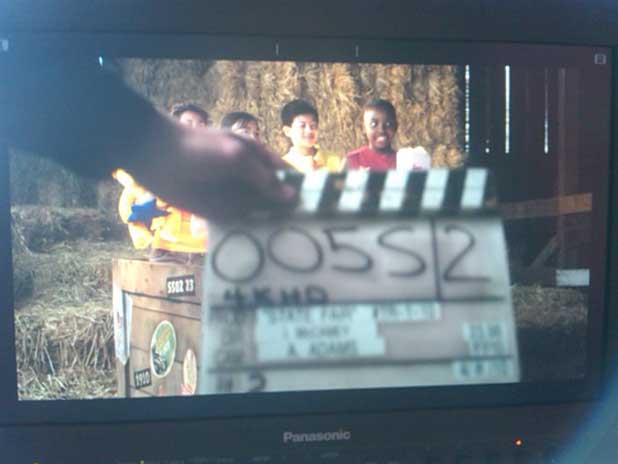
The only time it’s acceptable to shoot a slate out of focus is when the shot is locked off for visual effects.
16. If you’re simply ID’ing a take, which happens when it is being recorded without sound or if the sound is being recorded single-system with the picture onto tape or a hard drive, put the slate into the shot with the clapper closed. If the clapper is open then the editor will assume that it’s going to close and they’ll look for audio to sync up to it, but if it’s closed then they know not to bother. For example, the shot above was captured without sound.
17. Sometimes slating has to happen at the end of the shot. Hold the slate upside down to indicate that the slate is happening at the end of the take. (These are all visual cues that allow editors and their minions to very quickly figure out what’s going on with both picture and audio.)
After the director calls “Cut!” it’s a good idea to yell “Tail Slate!” or “Tail Sticks!” to remind the operator and first assistant not to stop the camera yet.
18. Make sure the slate is well lit. Shooting in the dark is no excuse for a dark slate. Ask the electricians to set up a small slate light that they will turn on for slating, or invest in a good flashlight with a wide beam.
19. When the shot is very, very tight there are a couple of things you can do:
If there’s room, simply hold the slate so scene and take fill the frame. When the camera rolls, wait a second and then move the clapper down into frame, say “Mark!” (or “Marker!”) and hit it.
If the shot is so tight that you can’t get both the scene and take in the frame, hold the scene box on the slate in the frame and wait for the camera to roll. Count to one and move the slate horizontally so the take number fills the frame and count to one again. The lower the clapper into frame, say “Mark!” (or “Marker!”) and hit it.
Insert slates are miniature slates, although often without clappers. If an extremely tight shot requires a clap and you don’t have an insert slate with a clapper, take the clapper off a regular slate and use it. Hold the insert slate in the shot as the camera rolls, count to one, and then hold the sticks in frame, say “Mark!” and clap ‘em. (Sometimes you can remove the sticks from a full size slate and squeeze the insert slate into the slot, toward the open end of the sticks.)
In the absence of an insert slate you can write the scene and take together in the “take” box (“17A/1”) and only shoot that portion of the slate. It’s a good idea to include all the information on the slate when possible, but the bottom line is that post only cares about the scene and take information. They probably know who the director and DP are.
20. Slating for multiple cameras on film was pretty simple: you’d “bump” a slate on each camera, meaning you’d roll a second of film on each camera’s slate, and then at the beginning of the take you’d take one set of clapper sticks out in front of the cameras and say “A and B common mark” before hitting them. (This tells the editor that A and B cameras are rolling and this sync mark works for both.) That doesn’t work in digital because bumping a slate means creating a separate file, which defeats the purpose of ID’ing a take.
The solution is to hit each camera’s slate separately. Bang the slates in sequence: “A camera mark!”, “B camera mark!”, etc. Hopefully there are enough people around to help if there aren’t enough assistants to do the job. Often the A-camera first assistant can slate their own camera as they usually have a wide shot.
When slating multiple cameras keep your slate in the frame from the beginning of the shot. This not only creates a thumbnail of the slate for the editor but it blocks the camera’s view of other slates, preventing the editor or assistant editor from trying to sync the audio to the wrong camera’s slate.
Each camera will have its own slate with a large “A” or “B” or “C” letter on it somewhere. The letters are often different colors: red for A camera, blue for B camera, etc. (There’s a color system for additional cameras that I don’t remember anymore.) Once again, this is another visual tool that helps an editor quickly figure out what’s going on.
(21) Occasionally you’ll have odd slate numbers: R17A means you’re reshooting 17A, 17A-TV means you’re shooting a “clean” version of the scene for TV, etc. Visual effects projects often have a very bizarre nomenclature for identifying scenes and takes, often because each completed shot requires many separate visual elements and all the elements must be tracked. The script supervisor or visual effects supervisor will guide you in this.
(22) Roll (or card) numbers are often ignored by union crews. I’m not sure why, but assistants frequently buy slates that don’t have a place for roll numbers and union editors typically don’t ask for that kind of information. (See the slate at the top of this page.)
(23) Make sure you spell the director and DP’s names properly. If you want to impress everyone, get a label maker and print out neat labels for each new shoot. It looks very professional, and that goes a long way toward impressing those around you. Neatness counts. (Large budget projects will custom order engraved slates with the project title and director/DP information.)
ROOKIE MISTAKES that you’ll want to avoid:
(24) DON’T TAKE THE SLATE AWAY FROM THE CAMERA. There’s a tendency for rookie second camera assistants to hook the slate in their belt and walk around with it. This is pointless and possibly embarrassing, because if you’re not on the set when the cameras roll someone is going to be very angry with you.
Always leave the slate in the first camera assistant’s front box, on the dolly, or some other consistent place near the camera so that the first assistant can easily find the slate and mark the shot if you’re not around. The slate should always be within easy reach of the first camera assistant.
(25) NEVER REHEARSE SLATING. Film students often think they have to hit the slate during rehearsals, when the camera isn’t rolling. You don’t rehearse the slate as it isn’t part of the performance, it’s just an identification tool for editors who have to round up the good takes quickly and cut them together.
Some of these tips may seem unusually intricate but there’s a good reasons for every one of them. In the film business time is money, and knowing how to mark a shot quickly so that an editor can find it quickly saves a lot of money in the long run. The best way to make a producer angry is to force them to spend more money than they need to, and bad slating can waste a lot of money–both on set and in the editing room.
My first union job was loading film on a sitcom with a crew that hadn’t done a lot of sitcoms before. The first assistants refused to do their own paperwork (“That’s the second assistant’s job!”) and the second assistant was a bit crazed managing four cameras on the first few episodes. I often received rolls of film that had nothing on them but a blank camera report and a roll number. I did my best to fill in the camera reports but I often had to send the rolls to the lab with almost no scene and take information.
On the third episode a guy walked up to me on the set and said, “Hey, can I ask you a favor? Can you PLEASE make sure the camera reports have the scene and take info on them? I’m the third assistant editor they’ve hired on this show and I’d like to keep my job.” Upon hearing this the first assistants became a bit more cooperative and that assistant editor was able to sync dailies fast enough to stay employed.
What you do on set affects a lot of people down the line. Get in the habit of doing it right and, in time, it’ll become so routine that you’ll be able to focus on the hundred other things you have to learn to do properly.
Art Adams is a DP who likes to be in sync with his crews. His website is at www.artadamsdp.com.


Filmtools
Filmmakers go-to destination for pre-production, production & post production equipment!
Shop Now