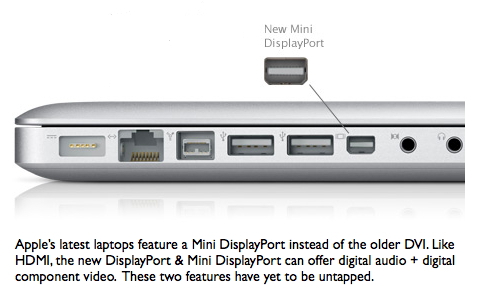
Apple is switching its outputs from DVI to DisplayPort. Understand its hidden potential.

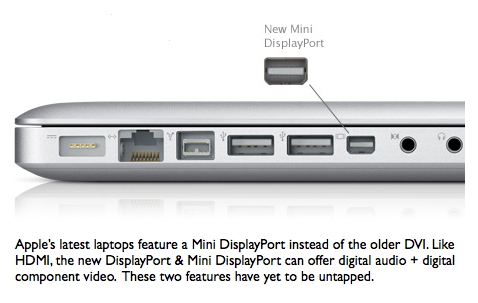
You’ve probably heard or read that Apple recently changed the video outputs on all of the new laptops from DVI to Mini DisplayPort, and has stated that all desktop models will begin offering DisplayPort outputs as they are updated. At first, some people think the DisplayPort just a nuisance and requirement to purchase another adaptor… but there is much more to it! Together with DisplayPort come additional capabilities, which in some cases will potentially eliminate the need to purchase an expensive peripheral device from AJA, Blackmagic Design, or Matrox, especially when the only goal is to achieve proper color evaluation on an external video monitor (not to capture or output to to high-end videotape formats).
The goal: Make Apple’s Digital Cinema Desktop proper
Way back in 2005, Apple launched Final Cut Pro 5, together with a new feature called the “Digital Cinema Desktop”. The purpose was to allow FCP editors to preview full screen video on an independently connected computer monitor. However, together with the launch of the Digital Cinema Desktop feature, Apple warned us that it was for content only, and was not to be trusted for color correction purposes. This warning was stated both verbally at NAB 2005, as well as in writing in Apple’s support article TA27705. (The same article also explained the importance of viewing interlaced video on an interlaced monitor, but that is much less of an issue nowadays, thanks to the greater awareness about the advantages of shooting progressive video, and the popularity of the progressive mode in both consumer and professional camcorders.) The reason for the color precaution has to to with the accuracy of the conversion between RGB and component video. If you are not familiar with these terms (or even if you are), please see the sidebar: “RGB versus component video”, later in this article.
The way we record, and the way we monitor
With two important exceptions, HD video recording is generally done in component, both in consumer and pro. This is mainly due to the códecs used in HD camcorders, decks, and in editing:
- All AVCHD camcorders use H.264 (MPEG4 part 10) to record in component.
- All JVC Everio HD camcorders use either MPEG2 to record in component or AVCHD to record in component.
- All HDV camcorders (both 720p and 1080i/p) use MPEG2 to record in component.
- JVC’s new GY-HM100 camcorder uses MPEG2 with a QuickTime wrapper to record in component.
- All Sony XDCAM-EX and XDCAM-HD camcorders use MPEG2 to record in component.
- All Panasonic P2 HD cameras use either DV100 or AVC-Intra, both to record in component.
- All standard Sony HDCAM camcorders use DCT compression and record in component.
- Apple’s ProRes422 and ProRes422(HQ) also record in component.
Exceptions that can record RGB:
- Sony HDCAM-SR offers the option of recording component or RGB 4:4:4.
- Red cameras record REDCODE in RGB.
As you can see, most HD digital video is component. However, the human eye and brain are only compatible with RGB, and that’s why all color computer monitors, color video monitors, projectors, and color TV sets display RGB (whether or not they can accept either RGB or component). Therefore, a conversion must be made when playing a component video signal to be seen by the human eye. If to be done in real time, this conversion is best done in hardware, not in software. That is the reason behind Apple’s warning mentioned above.
Sidebar: RGB versus component video
The primary colors in video are RGB, or red, green, and blue. However, a long time ago, video engineers discovered that given a situation of limited bandwidth, it is often more efficient to handle the video in a component version of RGB. This is because the human eye is more sensitive to the luminance portion of the video than the chroma portion. Component video assigns more of the bandwidth to the luminance. Over the years, there have been many different ways of expressing component video, including:
- Y, R-Y, B-Y (Y=Luminance, R=Red, B= Blue)
- Y, Cb, Cr
- YPbPr
- YUV
Sometimes the terms are associated more with one context than with another. In the component analog days, there were even fights among the standards in terms of the chroma levels (the EBU N10 level, the SMPTE level, and the Sony Betacam USA level, etc.) which sometimes caused mismatches when interconnecting equipment. I remember having to re-calibrate component analog switchers to work with a different standard… and having to prove to Leader Instruments that in the PAL world, Sony had accepted the EBU N10 level, in order to prevent Leader from forcing PAL component vectorscope users to display the words “MII” just to measure the proper level for PAL Betacam SP. It was very different in the NTSC world, where the Sony USA chroma levels won over in popularity over the SMPTE levels. But that’s all nostalgia now 🙂
The proper way to monitor HD video
In the old standard-definition days, editors who dealt with DV25 video (DV, DVCAM, DVCPRO25) and couldn’t afford a professional interface from AJA, Blackmagic Design, or Matrox could monitor via the IEEE-1394 (FireWire, i.LINK) through a DV camcorder/deck or DAC device, and from there to an NTSC or PAL monitor. But to monitor HD properly from a component timeline on an HD monitor, it has been necessary to use a professional interface. In the case of a Mac Pro tower, one can use a low-cost Intensity or Intensity Pro, since they output digital component over HDMI, or a more expensive professional HD interface from AJA, Blackmagic Design, or Matrox, which will have either HDMI and/or HD-SDI output. In those cases, the conversion from component to RGB occurs in hardware in the monitor. Now that Apple has committed to DisplayPort, there will likely be a more inexpensive way to monitor component progressive HD video properly, since the DisplayPort spec includes both RGB and component (as does the current HDMI spec). So far, Apple hasn’t supported the component part, but either Apple or a third party will likely do so soon. It is not yet clear whether the graphic hardware on the current laptops can already support digital component output. It is possible that Apple has only partially supported the DisplayPort’s advantages in the current hardware.
How DisplayPort will likely be used to monitor digital component HD signals
I see two different ways the DisplayPort and Mini DisplayPort will be used to monitor digital component HD signals:
- Using an inexpensive DisplayPort-to-HDMI cable (or Mini DisplayPort-to-HDMI cable) to an HDMI monitor.
- Directly with a DisplayPort monitor, as long it supports component digital over DisplayPort and has other appropriate characteristics for critical HD video analysis.
DisplayPort supporters
DisplayPort is not an Apple-proprietary connector as the old ADC was. DisplayPort is an open standard promoted by VESA (the Video Electronics Standards Association). So far, the following manufacturers have announced their intention to support the DisplayPort spec (or already offer it): AMD/ATI, Analogix, Apple, ASRock, ASUSTeK, Circuit Assembly, Dell, Genesis Microchip, Hewlett-Packard, Hosiden Corporation, Intel, Integrated Device Technology, Japan Aviation Electronics, Lenovo, Luxtera, Molex, NVIDIA, NXP Semiconductors, Palit Microsystems Palit, Parade Technologies, Pioneer Corporation, Philips, Quantum Data, Samsung, Sparkle Computer, Texas Instruments, and Tyco Electronics.


Filmtools
Filmmakers go-to destination for pre-production, production & post production equipment!
Shop Now








