
Many of our readers may have first heard about AJA’s KiPro back on April 20, 2009, when I published a “first look” after AJA’s announcement at NAB. A few months have passed, and KiPro is now available for purchase. I received an evaluation unit from AJA and found it to work flawlessly with its current feature set. Following are the details of the product, my observations, target market, and wish list.
What is KiPro?
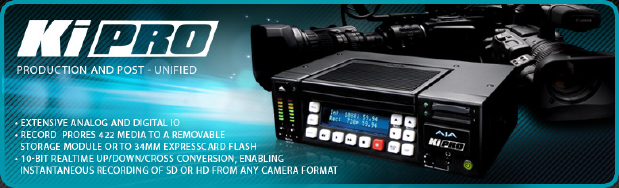
KiPro is a US$3,995 tapeless, standalone audio/video recorder for very high-end production, since it uses Apple’s revered ProRes422 or ProRes422(HQ) códec. All of KiPro’s currently available recording modes are 10-bit, full-raster, and 4:2:2. (More info about the recording modes are ahead in this article.) In addition to all of the video inputs we could possibly want in this type of recorder, KiPro also has both unbalanced RCA inputs and balanced XLR audio inputs, and the balanced inputs are selectable among line level, microphone level, and microphone level with 48-volt phantom power.
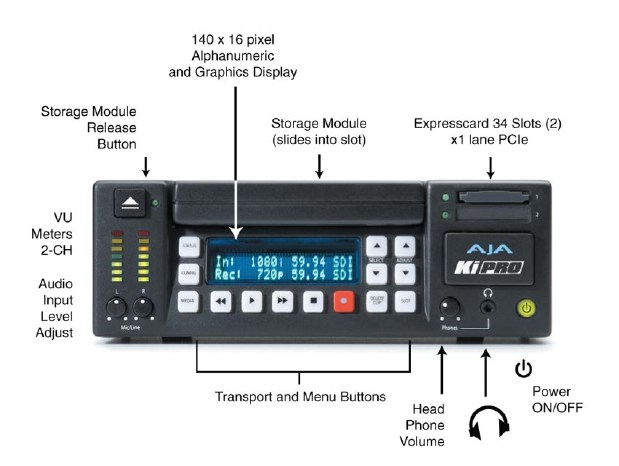
KiPro’s front panel
Some KiPro applications
Here are some applications where I believe KiPro is very well suited:
- High-end EFP (Electronic Field Production)
- Studio recording
- High-end mobile unit recording in HD
- Instant replay (See Future variable motion playback? on page two of this article.)
KiPro’s video inputs allow for the connection of almost any professional SD or HD camera, or almost any HD video mixer (commonly yet imprecisely known as a “switcher” in the USA).
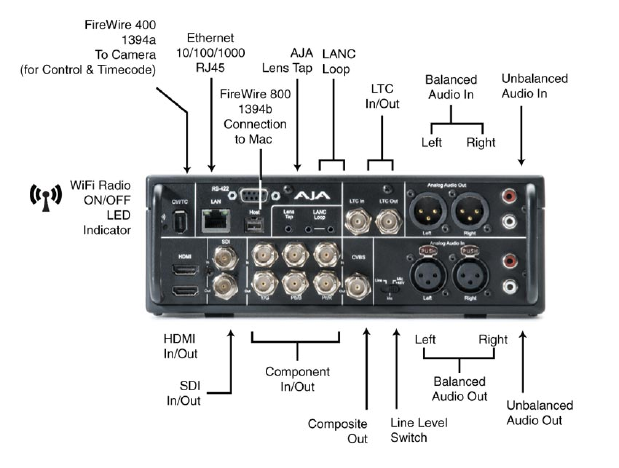
Video inputs include SDI, HDMI, and component analog (in that preferred order, if and when you have the option), and all can accept either SD or HD signals.
To get full-raster, 4:2:2 recording on an HD tape recorder, you would need to spend either US$74,500 for a D5-HD recorder from Panasonic or US$55,125 for a portable HDCAM-SR recorder from Sony. (The DVCPRO-HD format is not full-raster in any mode; The HDV 720p format is full-raster but always 4:2:0; and the HDV 1080 format is always subsampled at 1440×1080 at 4:2:0.) With a savings of at least US$51,130 between the US$3,995 KiPro and the US$55,125 for a portable HDCAM-SR recorder, you’ll be able to buy quite a few media modules, as you will see in the next section.
Cost of KiPro’s media modules
Although eventually KiPro users will have the option of recording either to SxS ExpressCard34 media or to AJA’s media modules, the first revision of KiPro’s firmware only supports the latter (which are much less expensive per GB anyway). Here are the list prices for AJA’s media modules for KiPro as of the publication of this article:
- 250GB HDD – US$265
- 500GB HDD – US$385
- 128GB SSD – US$695
- 256GB SSD – US$1395
The HDD versions incorporate a SATA drive, while the SSD incorporate solid-state memory. AJA recommends the use of the SSD (solid state) modules for applications where KiPro may be in motion during recording. The modules have both a SATA connection (for use when connected to KiPro), and a FireWire800 port (for use when connected to a computer). If the computer has a powered FireWire port, then the module can be powered via FireWire. Otherwise (i.e. some non-Apple computers), a separate power supply can be used to power the module.
Regarding 10-bit field recording
All current KiPro recording modes are 10-bit, 4:2:2, and full-raster. This “triple play” of features beats any current onboard HD camera códec, with the possible exception of Panasonic’s AVC-Intra códec (and only in its 100 megabit/second mode), which comes standard in some current Panasonic cameras, and is optional in another.
Although the HD-SDI standard is by definition a 10-bit signal, I know at least one camera (the JVC GY-HD250) which delivers an HD-SDI output which is actually derived from an 8-bit signal, even when the camera is live. According to JVC, when the GY-HD250’s signal is output live via HD-SDI: “…the lower order 2 bits are set to 0”. Most other HD cameras with HD-SDI output, like Sony’s EX1 and EX3, do deliver a true 10-bit signal when in live mode. Despite the GY-HD250’s HD-SDI output being derived from an 8-bit signal, it will still benefit from the improved encoding of ProRes422 or ProRes422(HQ) offered by KiPro. If you are in the market to rent or purchase an HD video mixer (“switcher”) to feed KiPro, choose one that offers at least 10-bit internal processing to take full advantage of true 10-bit camera outputs.
Although recent revisions of HDMI support 10-bit (often expressed as 30-bit, since it is 10-bit per channel) or even better, I haven’t yet seen any camera that puts out a 10-bit signal over HDMI. However, the same advantages that apply with an 8-bit HDMI camera source also apply here as they do with the GY-HD250. KiPro will still record a much better signal from a live camera with an 8-bit HDMI output than the inboard camera can… and that signal will be immediately editable in Final Cut Pro, unlike an AVCHD or other long-GOP H.264 camera, which currently needs to be converted before realtime editing in FCP 6.06 or 7.0. This means that KiPro gives better quality with one of these cameras in live mode, while it saves time in post.
See page 2 for:
- KiPro’s recording modes
- Onboard upscaling, downscaling, and cross conversion
- WiFi control over KiPro from your iPhone, iPod Touch, or laptop
- HFS+ formatting rules!
- 50Hz and ±60Hz recording on a single media module
- KiPro’s mounting options
- KiPro workflow with Final Cut Pro 6 or Final Cut Pro 7
See page 3 for:
- KiPro workflow with Premiere Pro CS4 on Mac
- KiPro workflow with Windows-based NLEs
- Future variable motion playback?
- Wish list for future upgrades to KiPro
- Bottom line
- Disclosure, to comply with the FTC’s new rules
- Index to Allan T©pper’s articles and seminars
KiPro’s recording modes
At present, KiPro recordings are made exclusively on one of AJA’s removable media modules. Currently, we have the choice of editing in full-raster, 10-bit video, at either SD, 720HD or 1080HD, either in ProRes422 or in ProRes422(HQ). The framerate is determined by the source video, while the spatial resolution can be the same as the source, or scaled to a different one (see next section about that). Future firmware updates will add the capability of recording to SxS ExpressCard34 cards, and the capability of choosing among two more of Apple’s growing family of ProRes422 códecs: ProRes422(LT) and ProRes422(Proxy), for a total of four quality settings, instead of the two current ones. As stated before, KiPro’s current recording quality is much higher than the onboard recorders of most cameras that will ever feed KiPro. A ProRes422 or ProRes422(HQ) file size is much denser of that of most camera códecs, although much lighter than corresponding uncompressed video files.
KiPro’s onboard upscaling, downscaling, and cross conversion
Thanks to KiPro’s onboard upscaling, downscaling, and cross conversion, your recording resolution doesn’t have to match your camera’s output resolution. Any combination is available from 1080HD, 720HD, or SD signals to any type of recording. Frame rate is not changed during this process. Only spatial resolution is changed. This feature helps you have a consistent type of raw footage for a project, even though you may be using multiple cameras which have diverse spatial resolution outputs. For example, if you are shooting a project where you really want 720p59.94 (aka “60p”, as used by ESPN and Fox), you may be using some cameras which can deliver that signal directly, and other’s that don’t. With KiPro, you can record 720p from a camera that normally delivers only 1080.
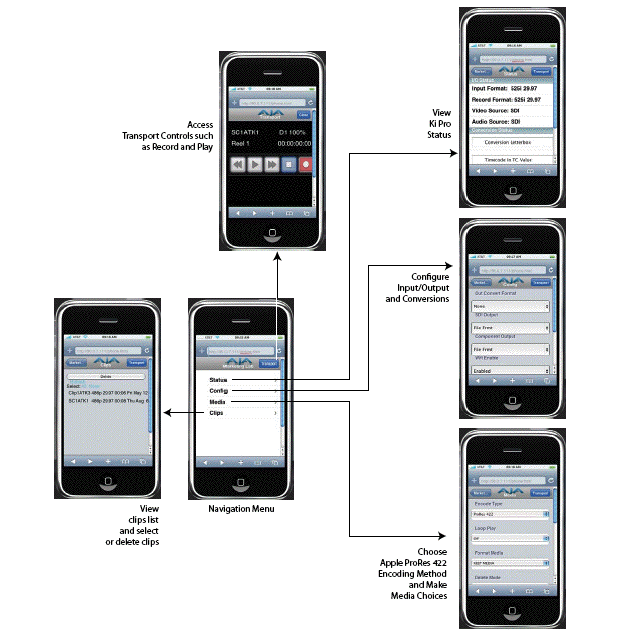
WiFi control over KiPro from your iPhone, iPod Touch, or laptop
Control from your camera
KiPro has both LANC and a lens tap in order to be controlled from your camera. However, neither is active in version 1.0 of KiPro’s firmware. Both are pending to become active in a future firmware update.
HFS+ formatting rules!
I love the fact that AJA chose to use the superior HFS+ formatting with KiPro’s media module. Too many other manufacturers of disk recorders have unfortunately chosen the lame FAT32 format, and then have had to create elaborate schemes to compensate for FAT32’s many limitations. Even though these workarounds can eventually work, they do so at the expense of showing the user a bunch of sequential files for a large clip, instead of a single file. Whenever I talk to other manufacturers about this, they usually say that the are looking for cross-platform compatibility. I respond that they should use the best format available (HFS+), instead of wasting resources with elaborate, counter-interactive workarounds. Any Windows user can buy and install MacDrive to make Windows compatible with HFS+ and then reap its benefits of a simplified user interface when seeing a single large file for a single large clip. Thank you AJA for using HFS+.
50Hz and ±60Hz recording on a single media module
Unlike some 50Hz/±60Hz camcorders (which allow for shooting 23.976p, 25p, 29.97p, 50i/p, or 59.94i/p) that force you to reformat your recording media to contain only 50Hz or only ±60Hz material at one time, KiPro allows us to combine 50Hz and ±60Hz material simultaneously on the same media module. Thank you AJA for making KiPro 100% universal!
KiPro’s mounting options
AJA offers the optional KiExoskeleton for US$595 and the red endplates for US$245. AJA says to purchase 15mm rod sets from any camera supplier, as they are an industry standard.
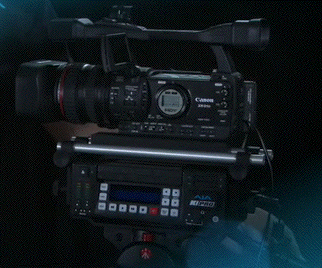
KiPro sandwiched between camera and tripod, for a single camera shoot.
KiPro workflow with Final Cut Pro 6 or Final Cut Pro 7
As stated earlier, all files recorded with KiPro are born to edit instantly in Final Cut Pro 6 or 7. If you are in a real rush, you could drag a file directly from the KiPro module to the bin or timeline. However, it is recommended to drag the clips to your disk array first.
See page 3 for:
- KiPro workflow with Premiere Pro CS4 on Mac
- KiPro workflow with Windows-based NLEs
- Future variable motion playback?
- Wish list for future upgrades to KiPro
- Bottom line
- Disclosure, to comply with the FTC’s new rules
- Index to Allan T©pper’s articles and seminars
KiPro workflow with Adobe Premiere CS4 on Mac
Apple offers a free “playback-only” ProRes422 and ProRes422(HQ) decoder for any Mac that’s missing ProRes. This allows programs like Premiere and After Effects to read and edit from ProRes422(HQ) files. Even if that’s all you have, you can use the raw material from KiPro as an immediate source in Premiere CS4, and edit either to uncompressed 10 bit, or to some other high-quality códec. If the full ProRes422(HQ) códecs have been installed on your Mac, then you can both read and render to ProRes422(HQ) using Premiere CS4 on the Mac.
If you’re in a real rush, you can drag or import the files directly from KiPro to Premiere CS4, but it is recommended to copy them to your disk array before editing for best results.
KiPro workflow with Windows-based NLEs
Fortunately, Apple offers a free “playback-only” ProRes422(HQ) decoder for Windows, which plays KiPro files in true 10-bit. There have been some grumbling in forums that Adobe Premiere CS4 for Windows misinterprets the file and truncates it to 8-bits, although the consensus at AJA is that this is a simple setting that needs to be fixed by the user in Premiere CS4 for Windows.
In order to read HFS+ formated drives in Windows, just purchase and install MacDrive in your Windows system. On the Windows system, you will be able to use the ProRes422(HQ) files as source material to edit immediately, but at present you’ll have to render to some other high-quality códec (i.e. CineForm) or to uncompressed 10-bit, at least until Apple decides to offer a ProRes422(HQ) encoder for Windows. Some people will say: “When hell freezes over”, but those people should recall that Apple’s own slogan when first offering iTunes for Windows was: “Hell froze over!”. (Interestingly, Apple chose not to translate that slogan for Latin America or Spain.)
If you’re in a real rush, you can drag or import the files directly from KiPro to your Windows NLE that accepts QuickTime files, but it is recommended to copy them to your disk array before editing for best results.
Future variable motion playback?
I foresee using KiPro with a controller like JL Cooper’s ES-SloMo. At present, KiPro does not offer variable motion playback, and KiPro’s RS-422 controller port doesn’t yet work. When asking Jon Thorn (KiPro’s product manager at AJA), he responded: “Once RS-422 is enabled, varied speed playback and a multitude of other playback options may become enabled, but I’d rather not promise anything of that nature right now”. I am optimistic 🙂
Pros
- Excellent quality in Apple’s ProRes422 and ProRes422(HQ)
- Excellent physical design in KiPro
- Logical and friendly user interface in KiPro
- Reasonable price for the product and for the KiPro media modules
My wish list for future upgrades to KiPro
- RAID1 media module option, for redundancy
- Time lapse (interval) recording
- Variable motion playback
Bottom line
It should be clear by now that I like KiPro very much for use in the indicated recommended applications. I do not recommend KiPro for comfortable one-person, handheld ENG (Electronic News Gathering), but I do recommend it for all of the other applications I listed, especially if you are looking for higher-quality than what your camera’s inboard recorder offers. On the other hand, if you long for the old days of having a 3/4″ U-Matic recorder slung on one shoulder, and your camera perched on the other, then perhaps you should use KiPro even for uncomfortable one-person, handheld ENG! However, for comfortable one-person, handheld ENG, the closest similar device is the nanoFlash from Convergent Design, which offers full-raster HD 4:2:2, but only at 8-bit.
Disclosure, to comply with the FTC’s new rules
AJA is not paying Allan T©pper to do this review, nor is AJA giving Allan T©pper a free unit in exchange for this review. Allan T©pper must return the KiPro evaluation unit. AJA is a sponsor of ProVideo Coalition magazine, but Allan T©pper would have done this review either way.
Allan T©pper’s articles and seminars
Get a full index of Allan T©pper’s articles and upcoming seminars at AllanTepper.com. Listen to his podcast TecnoTur, together with Tanya Castañeda, Rub©n Abruña, and Liliana Marín, free via iTunes or at TecnoTur.us.


Filmtools
Filmmakers go-to destination for pre-production, production & post production equipment!
Shop Now