

Filmtools
Filmmakers go-to destination for pre-production, production & post production equipment!
Shop Now
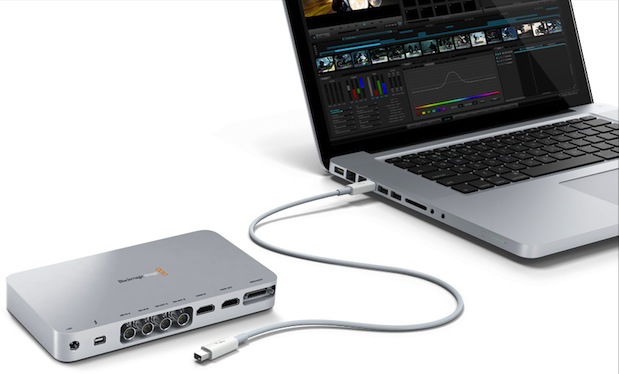
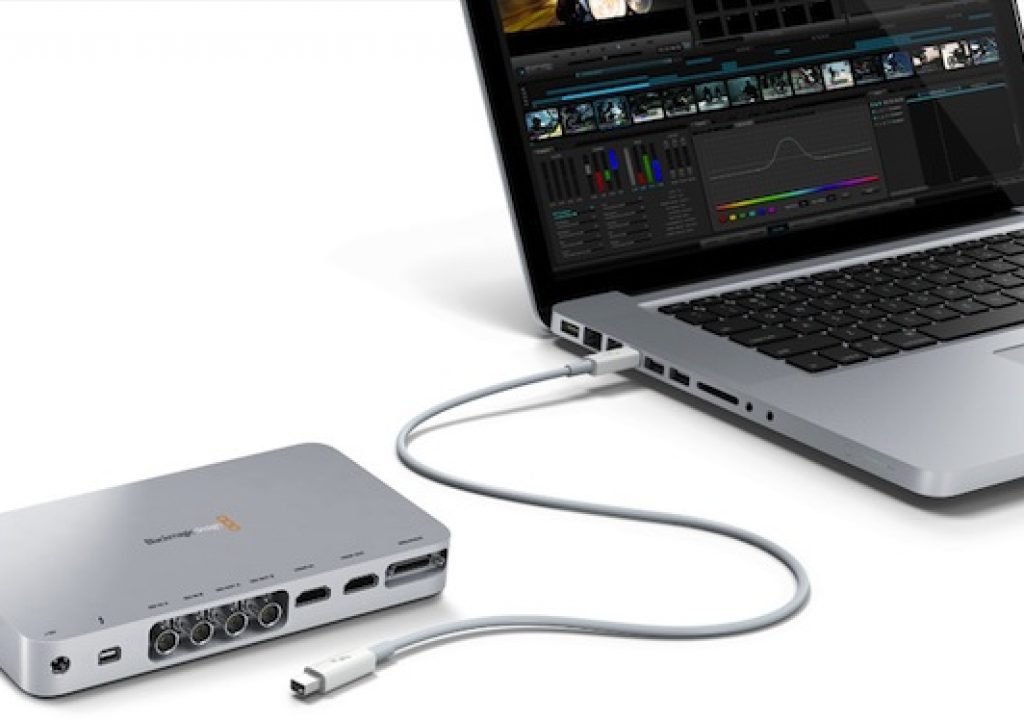
Blackmagic Design has begun shipping its first Thunderbolt based audio/video i/o interface, which is officially known as the UltraStudio 3D. As its suffix indicates, it is capable of 3D stereoscopic workflows, although it is certainly capable of 2D workflows too. However, we must be diligent and refer to it with its full name (including the “3D” suffix) in order to differentiate it from other Blackmagic models whose names also begin with “UltraStudio”. This first look at the US$995 UltraStudio 3D will cover its features, specs, and even an initial limitation for HP DreamColor monitors, together with a somewhat costly workaround. You’ll also learn everything you need to know about the UltraStudio 3D’s end-point Thunderbolt connection and its current limitations.
UltraStudio 3D features and specs
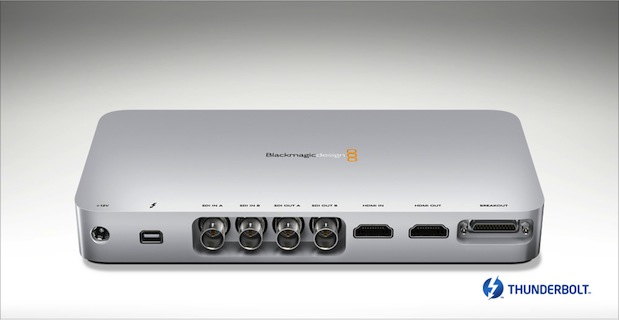
The UltraStudio 3D offers:
- Compatibility with all Macs that offer Thunderbolt (iMac, MacBookAir, MacBookPro, MacMini). (The UltraStudio 3D’s Thunderbolt port is an end-point, which means no loop-ability. Connect it at the end of the chain, after your Thunderbolt-based RAID. More details about this later in this article.)
- 10-bit hardware architecture
- Dual-link 3 Gb/s SDI
- Support for up to 1080p60 in SDI and component analog (This also includes 1080p59.94 which is the standard maximum framerate.)
- Analog video i/o including component, Y/C (“S-Video”), and composite via a breakout cable (one of these three possibilities at a time)
- HDMI 1.4a connections (although currently no RGB output over HDMI, as explained later in this article)
- Genlock/tri-sync input
- RS-422 deck control with Sony protocol
- Hardware-based, 10-bit up, down, and cross conversion.
- Hardware-based SD and HD keying.
- Supports Final Cut Studio, Premiere Pro, Photoshop, ProTools, After Effects, DaVinci Resolve, and other apps. (Due to the current limitations in FCP X, UltraStudio 3D cannot support it directly so far.)
- Free developer SDK.
- 2-channel balanced analog i/o
- 2-channel digital audio (AES/EBU) i/o
- International power supply with included plugs for different regions (More info about this ahead in this article)
- Full resolution dual-stream 3D support
- Includes free Media Express 3 capture/playback software which allows batch capture and playback of 2D and dual-stream stereoscopic 3D in DPX, ProRes (10-bit), uncompressed YUV and RGB (8 or 10-bit), DV100 (“DVCPRO HD”) (8-bit), and MJPEG files (8-bit).
- 3D workflows featuring interleaved, side-by-side, frame-packed, and dual stream capture and playback. Dual-stream 3D allowing the use of the dual-link SDI connections to capture and play back two streams, one for the left eye and one for the right eye.
In that 3D mode, the two streams are recorded into two separate media files. Blackmagic explains that dual-stream 3D is higher quality because each eye is full resolution video, but dual-stream is less compatible with current editing software. To solve this problem, the included Media Express 3 software has been upgraded to handle both interleaved and dual stream 3D for capture and playback of 3D media.
International power supply with included plugs for different regions
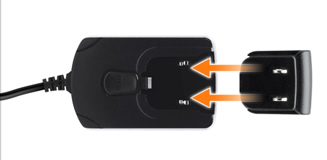 This type of power supply and interchangeable plug reminds me of one that I received many years ago when I used to use a Blackberry. I believe that this is the first time that Blackmagic is including plugs for different regions. All of the other Blackmagic products I have ever seen so far that require AC power (i.e. the ones that are not powered by a host computer, like the Multibridge Pro and the HDLink Pro) have come from the factory without any AC power cable, so that either the reseller or end-user would acquire one locally to match the type of electrical outlet used in that region.
UltraStudio 3D pricing, in general and for HP DreamColor users
The UltraStudio 3D is available now for US$995 from Blackmagic Design resellers worldwide. However, if you use (or plan to use) a DreamColor monitor from HP, currently you’ll need an additional device (HDLink Pro 3D DisplayPort, which is the upgraded version and name of the HDLink Pro DisplayPort which I covered in my 2009 article DreamColor converter boxes for non-compliant systems). This will mean an additional US$495 to be added to the US$995 (plus an electrical cable and an HD-SDI cable), at least until Blackmagic Design adds the digital RGB over HDMI. At NAB 2011 when the UltraStudio 3D was first announced, Blackmagic was considering the possibility of adding this feature via a future firmware update, and when I contacted their public relations department last week, this was still under investigation but not yet confirmed. If you use any other HD monitor, than you’ll be able to connect it directly via an HDMI or HD-SDI cable.
UltraStudio 3D’s end-point Thunderbolt connection
The Thunderbolt port on the UltraStudio 3D is what’s called an end-point, which means that there is no looping capability beyond the UltraStudio 3D. If you are going to have a Thunderbolt-based disk array RAID like a Promise Pegasus, then you’ll need to place the Pegasus in the middle of the chain and the UltraStudio 3D at the end. Today, this means that you won’t be able to connect any GUI (graphic user interface) monitor on the Thunderbolt bus (or on that particular Thunderbolt bus, since some Macs have two Thunderbolt buses). Of course, you can connect a video monitor to the HD-SDI or HDMI output of the UltraStudio 3D, but that’s -well- for video, not to display your computer’s GUI. If you are using a MacBookPro or MacBookAir, you’ll certainly have the laptop’s internal monitor as your GUI and that will be it. If you use a 21.5” iMac, you’ll have the 21.5” monitor as your GUI and that will be it. If you use a 27” iMac, then you have two Thunderbolt ports, so you’ll have the 27” as your GUI, plus potentially an additional one from the second Thunderbolt port. If you use a MacMini, then you’ll be able to connect a GUI monitor directly to the MacMini’s own HDMI output. In the future, you will be able to have the capability of adding a GUI monitor on the same bus with the UltraStudio 3D, either with a monitor with built-in loopable Thunderbolt, or by adding a GPU to the Thunderbolt bus. This situation is identical with Matrox’s current offering, as you’ll see in a related article.
Related articles
Please consider reading the following related articles:
- AJA announces Io XT interface with Thunderbolt at IBC in Amsterdam from September 9th, 2011
- Blackmagic breaks Thunderbolt price budget with US$299 Intensity Extreme from September 9th, 2011
- Matrox adds optional Thunderbolt connectivity to existing MXO2 family of interfaces from September 5th, 2011
- Why FCP X’s secondary monitor should be 1920×1200, not 1920×1080 from August 15, 2011
- Does Premiere CS5 achieve the “impossible dream” for critical evaluation monitoring? from July 1st, 2010
- Why should I care if my monitor shows ITU Rec.709? from December 8th, 2009
- Who is the ITU, and why should I care? from December 8th, 2009
- How to connect your HD evaluation monitor to your editing system properly: Let me count the ways! from May 23rd, 2009
- DreamColor from HP: an ideal tool for critical image evaluation from December 8th, 2009
- DreamColor converter boxes for non-compliant systems from December 8th, 2009
- DreamColor direct interfaces from December 8th, 2009
- Thunderbolt in MacBook Pro: a new era for demanding video editors who prefer laptops from February 27th, 2011
- Mac Mini w/Thunderbolt: preferred platform for many new editing systems from August 8th, 2011
Allan T©pper’s books, consulting, articles, seminars, and audio programs
Contact Allan T©pper for consulting, or find a full listing of his books, articles and upcoming seminars and webinars at AllanTepper.com. Listen to his TecnoTur program, which is now available both in Castilian and in English, free of charge. Search for TecnoTur in iTunes or visit TecnoTur.us for more information.
Disclosure, to comply with the FTC’s rules
None of the manufacturers listed in this article is paying Allan T©pper or TecnoTur LLC specifically to write this article. Some of the manufacturers listed above have contracted T©pper and/or TecnoTur LLC to carry out consulting and/or translations/localizations/transcreations. Many of the manufacturers listed above have sent Allan T©pper review units. So far, none of the manufacturers listed above is/are sponsors of the TecnoTur programs, although they are welcome to do so, and some are, may be (or may have been) sponsors of ProVideo Coalition magazine. Some links to third parties listed in this article and/or on this web page may indirectly benefit TecnoTur LLC via affiliate programs.