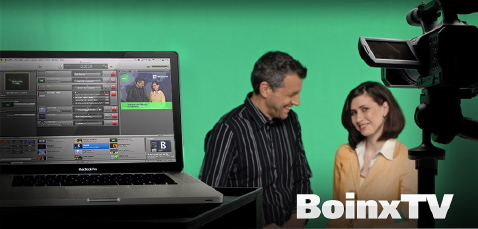

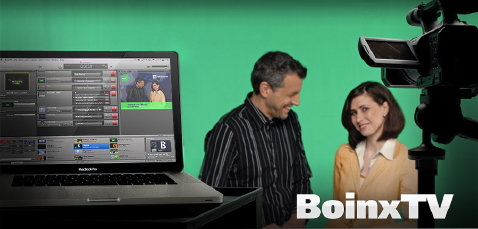
BoinxTV is a new product from Boinx Software Ltd. in Puchheim, Germany. You may have seen other products from Boinx, like FotoMágico, iStopMotion, iVeZeen, Mousepos©, and PhotoPresenter. BoinxTV was first launched in November 2008 and was quickly updated to 1.1 at the beginning of December. Like the infamous Video Toaster from NewTek, BoinxTV offers to convert your computer into a live production studio. One of the first noticeable differences is that BoinxTV is for the Mac.
Some of BoinxTV’s features
- Connect up to three cameras (SD or HD).
- Play back any QuickTime video as a source to roll in live.
- Switch among up to 4 sources (3 cameras + playback of pre-recorded clips).
- Animated lower thirds, scrolling credits.
- RSS ticker with headlines and summaries.
- Sports scores.
- Pre-defined layers for different production styles, customizable with Apple’s free Quartz Composer software.
- Real time, on-screen clock.
- Records to a QuickTime file or outputs live output for live streaming (using optional 3rd-party software) or live SDI output (using optional 3rd-party hardware).
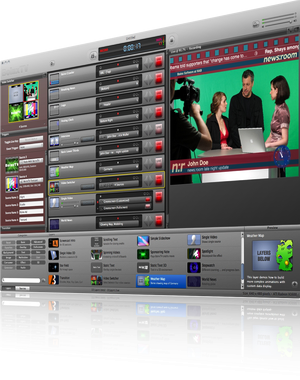
BoinxTV’s GUI
BoinxTV’s compatible cameras
- Any DV25 camera (DV, DVCAM) with IEEE-1394 (FireWire, i.LINK) output.
- Any HDV camcorder as long as it has a true progressive mode.
- Any camera with HDMI output, if you add the Blackmagic Intensity or Intensity Pro (only with a Mac Pro tower).
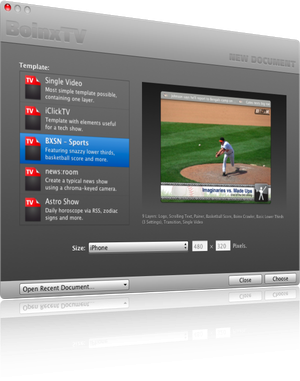
With the BoinxTV’s template chooser, you can select one of the default designs, whether for news, sports, or even a horoscope type show.
BoinxTV’s requirements
- Either an Intel-based Mac with discrete graphics… or a dual-processor PowerMac G5 with a ATI graphics and a minimum of 2 GB of RAM. BoinxTV runs on all current notebook and desktop Macs (including the MacBook with NVIDIA GeForce 9400M) with the exception of the Mac mini and the (white and black) MacBook with integrated Intel GMA graphics.
- MacOS X Leopard (10.5.5 or higher), QuickTime (7.5.5 or higher) and iLife ’05 (or later) or one of the Apple Pro software packages to be installed.
- For complex layers, the fastest processor you can afford.
- If you also need live chroma key, you need a Mac Pro tower with an ATI HD 3870 graphic card.
BoinxTV’s pricing
- US$499 for the unbranded version
- US$199 for the branded version (“Sponsored Edition”)
What’s the Sponsored Edition?
The BoinxTV “Sponsored Edition” has the same functionality as the standard version of BoinxTV, but requires a 5-second credit for BoinxTV in every video you create with BoinxTV. You can use the included “Made with BoinxTV” ad or you can create your own. Boinx uses the honor system for this. According to Boinx, if you don’t comply:
“No thunderbolts will strike you down for such despicable behaviour. Boinx is not, however, responsible for any lightning which may occur. There are no technical restrictions, but expect to collect some bad karma points at least!”
Can I try it first?
Download a 30-day trial from BoinxTV’s website.
Bottom line
If you use a Mac and need to produce a multi-camera shoot using up to three cameras, then you should definitely look into BoinxTV and determine whether it suits you. For simpler productions, you can certainly use a MacBook Pro laptop. For heavy layering and live chroma key, you’ll need a Mac Pro tower with an ATI HD 3870 graphic card.


Filmtools
Filmmakers go-to destination for pre-production, production & post production equipment!
Shop Now