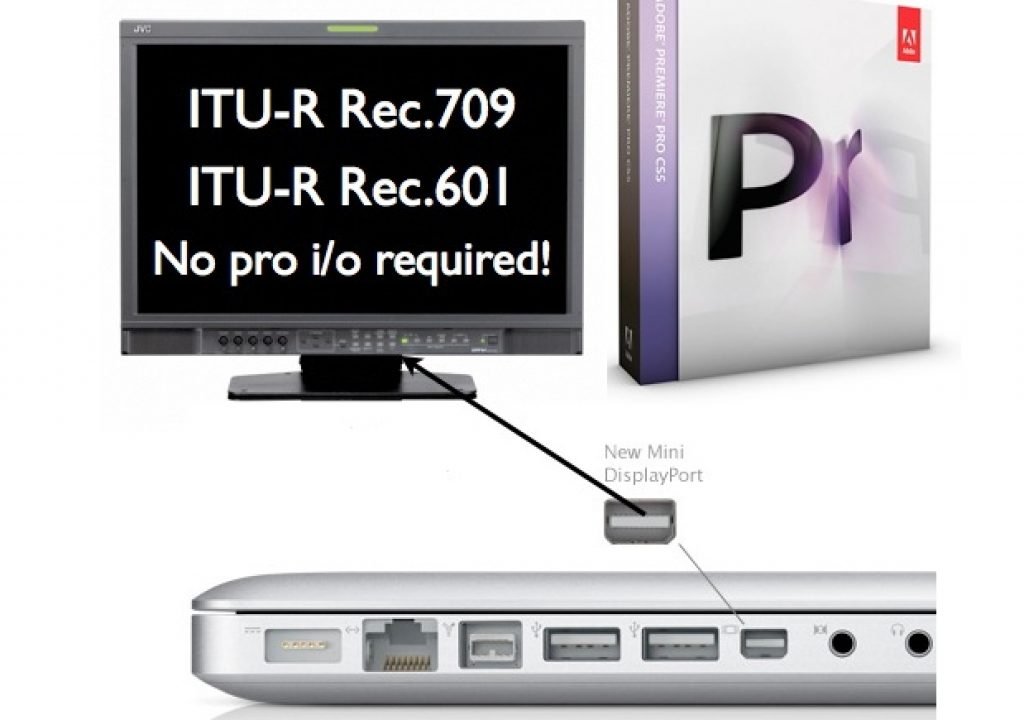

Anyone who has ever read the seven articles I’ve published so far about critical video evaluation -be it with the HP DreamColor monitor, or any other brand and model- knows why this process has traditionally required a professional interface to do this properly. Even Apple has warned about this, both verbally at NAB 2005 when announcing the Digital Cinema Desktop, as well as in writing, in Apple’s support article TA27705. This situation has affected other professional editing programs too. This situation has convinced many video editors -even those who now deal exclusively with tapeless footage- to buy a (seemingly) otherwise unnecessary professional i/o interface from manufacturers like AJA, Blackmagic, Matrox, or MOTU. Has this situation changed with Premiere CS5, together with 10-bit/30-bit DisplayPort or HDMI connections on computers?
In this article
- Four traditional reasons for a professional i/o device
- The way we record, and the way we monitor
- Sidebar: RGB versus component video
- The “impossible dream”, fulfilled?
- Sidebar: Why not output YUV over DP or HDMI from the computer…?
- Other NLE programs which may also make this possible
- Other reasons to include a professional i/o, despite new possibilities
- Related articles
Traditional reasons for a professional i/o device
Traditionally, purchasers (or consultants/designers) of professional non-linear video editing systems have had several reasons to include a professional i/o (input-output device):
- To capture
- To output to tape or live to air
- To monitor on an interlaced display
- To achieve a proper and trustworthy realtime YUV>RGB conversion
Let’s see how many of these reasons still apply today.
1: Capture, what’s capture?
In the era of tape-based production, it was/is necessary to capture the audio and video to the NLE. With all analog tape-based material, and many digital tape based formats, this required a professional i/o device. Some digital tape formats could/can be captured via IEEE-1394 (FireWire, i.LINK), including those based upon the DV25 códec (DV, DVCam, Professional DV, DVCPRO25), the DV50 códec (DVCPRO50), HDV, and the DV100 códec (DVCPROHD). (With Panasonic DVCPRO25, DVCPRO50, and DVCPRO100 decks, this capability is model-dependent, and capable models sometimes require an optional IEEE-1394 card.) Even so, and especially before the birth of “open timelines”, there were benefits to capturing even these formats via a professional i/o device in order to capture all tape formats directly to a single lossless códec, or to uncompressed video. However, nowadays, we have “open timelines”, and a large portion of today’s production is done tapelessly, so many editors can now disqualify the first justification listed above. (For more historical background about this, see my articles: When to edit native, when hybrid, when pure i-frame, and why and Why capture HDV via HDMI.)
2: Output to tape, or to air
In the era of tape based distribution, it was/is often necessary to output edited programs to tape, and many of them required the use of a professional i/o device to make that possible. However, nowadays many productions are distributed on DVD, Blu-ray, the web, and mobile devices. Even those productions destined for traditional broadcast are often sent via FTP (hopefully SFTP) or on a disk (magnetic or optical) to the TV network or station… so many editors can now disqualify the second justification listed above.
3: Monitoring on an interlaced display
Interlacing? What’s interlacing? It’s a way to cheat when you don’t have enough bandwidth! If you don’t know what interlacing is (I wish I could say “was”), there’s no reason to repeat that explanation here. Just review my previous articles, or this nice one from Wikipedia. Anybody who has been reading my articles for a while -or has known me personally- knows that I am a progressive guy, not an interlaced guy! As I have stated previously, I wish interlaced versions of HD hadn’t even been ratified. Fortunately, more affordable tapeless cameras with native progressive sensors (especially CMOS), progressive shooting modes, and progressive recording are now available from both consumer and pro camera manufacturers. Most of these actually even offer native progressive recording modes too, with the notable exception of several Panasonic AG-HMC series cameras, which offer native 23.976p recording, but currently offer non-native 25p or 29.97p recording, as explained in another recent article.
Sadly, I do realize that there is still some interlaced production happening in the camera (480i, 486i, 576i, and 1080i, rather than the beloved 720p or 1080p modes), sometimes out of true choice or necessity, and sometimes because the camera operator didn’t know any better and just shot in interlaced mode because the last person to rent the camera left it in that mode. (I have seen this happen too often!) Whatever the reason that there is still some interlaced production happening, there isn’t much interlaced viewing happening anymore, considering that most video nowadays is seen either on an LCD, a plasma, or a projector, which are natively progressive. Unless an editor knows that a production with mostly interlaced raw footage -with very fast movement- is destined to be sent to a 1080i TV station which demands 1080i (as opposed to 1080p), s/he may in many cases consider de-interlacing the raw footage to progressive and working on a progressive timeline, in order to take advantage of progressive from there forward, and in many cases, to avoid forcing a realtime de-interlace in a 30-cent chip in someone’s TV set, monitor, or projector.
Way back in 2005, when Apple first offered the Digital Cinema Desktop feature, there was a lot more SD production happening, and therefore, a lot more interlaced footage and projects. Also, back then, there were many more CRT (cathode ray tube) monitors and TV sets being used, which meant there were many more people actually seeing final productions on an interlaced screen. In 2010, interlaced screens are rare at the viewers’ end.
Taking into account all of these issues, some editors may decide to leave interlaced video in the past, and exclusively deliver progressive programs, whether they be low framerate (23.976p or 25p), medium framerate (29.97p), or high framerate (50p or 59.94p) for maximum smoothness (if not destined for an iPad), together with all of the progressive advantages. If that is the case, they can disqualify the third justification listed above.
4: Achieving a proper and trustworthy realtime YUV>RGB conversion
Way back in 2005, Apple launched Final Cut Pro 5, together with a new feature called the Digital Cinema Desktop. The purpose was to allow FCP editors to preview full screen video on an independently connected computer monitor. However, together with the launch of the Digital Cinema Desktop feature, Apple warned us that it was for content only, and was not to be trusted for color correction purposes. This warning was stated both verbally at NAB 2005, as well as in writing on Apple’s support article TA27705. (The same article also explained the importance of viewing interlaced video on an interlaced monitor, but we already covered that above in section 3.) The reason for the color/gamma precaution has to to with the accuracy of the conversion between RGB and component video.
On page 2 of this article
On page 2, you’ll see:
- The way we record, and the way we monitor
- Sidebar: RGB versus component video
- The “impossible dream”, fulfilled?
- Sidebar: Why not output YUV over DP or HDMI from the computer…?
- Other NLE programs which may also make this possible
- Other reasons to include a professional i/o, despite new possibilities
- Related articles
Click here to continue to page 2.
Sidebar: RGB versus component video
The primary colors in video are RGB, or red, green, and blue. However, a long time ago, video engineers discovered that given a situation of limited bandwidth, it is often more efficient to handle the video in a component derived version of RGB. This is because the human eye is more sensitive to the luminance portion of the video than the chroma portion. Component video assigns more of the bandwidth to the luminance. Over the years, there have been many different ways of expressing component video, including:
- Y, R-Y, B-Y (Y=Luminance, R=Red, B= Blue)
- Y,Cb, Cr
- YPbPr
- YUV
Sometimes the terms are associated more with one context than with another. In the component analog days, there were even fights among the standards in terms of the chroma levels (the EBU N10 level, the SMPTE level, and the Sony Betacam USA level, etc.) which sometimes caused mismatches when interconnecting equipment. I remember having to re-calibrate component analog switchers to work with a different standard… and having to prove to Leader Instruments that in the PAL world, Sony had accepted the EBU N10 level, so they would not stop forcing PAL component vectorscope users to have the display say “MII” in order to show the proper level for PAL Betacam SP. It was very different in the NTSC world, where the Sony USA chroma levels won over in popularity over the SMPTE levels. But that’s all nostalgia now:)
The way we record, and the way we monitor
With two important exceptions in the field (and a couple more in editing), digital video recording is done in component (YUV), both in consumer and pro. This is mainly due to the most popular códecs used in HD camcorders, decks, and in editing:
- All AVCHD camcorders use H.264 (MPEG4 part 10) to record in component.
- Canon photographic cameras that record HD video use H.264 (MPEG4 part 10) to record in component.
- Canon’s new professional tapeless camcorders (XF305 and XF300) use MPEG2 to record in component.
- Kodak and Sanyo hybrid cameras use H.264 (MPEG4 part 10) to record in component.
- All JVC Everio HD camcorders record use either MPEG2 to record in component, or AVCHD in component.
- All HDV camcorders (both 720p and 1080i/p) use MPEG2 to record in component.
- JVC’s professional tapeless camcorders use MPEG2 to record in component.
- All Sony XDCAM-EX and XDCAM-HD camcorders use MPEG2 to record in component.
- All Panasonic P2 HD cameras use either DV100 or AVC-Intra, both to record in component.
- All standard Sony HDCAM camcorders use DCT compression and records in component.
- Apple’s ProRes422 and ProRes422(HQ) record in component.
- Cineform’s also 422 records in component.
Exceptions that can record RGB:
- Sony HDCAM-SR offers the option of recording component or RGB 4:4:4.
- Red cameras record REDCODE in RGB 4:4:4.
- Apple’s ProRes 4444 records RGB.
- Cineform’s 444 records RGB.
As you can see, most HD digital video is component (YUV). Video monitors, projectors, and TV sets actually display RGB (whether or not they can accept either RGB and/or component). Therefore, a conversion must be made when playing a component video signal to be seen by the human eye. For critical evaluation, we need a proper and trustworthy realtime conversion. Although Apple’s colorspace conversions are certainly proper and trustworthy when rendered via software, Apple’s 2005 warning indicates that this is not the case with the realtime conversion done with the Digital Cinema Desktop feature. To my knowledge, this has not changed with any newer version of FCP, and if it has, no one from Apple seems to be flaunting it. Although Apple’s Color program handles all material exclusively in RGB, to my knowledge, the program still does not pipe its program output specifically or accurately to a graphic card output, but only to one of the professional i/o devices.
In the standard-definition days, editors who dealt with DV25 video (DV, DVCAM, DVCPRO25) natively, and couldn’t afford a professional interface from AJA, Blackmagic Design, or Matrox could monitor via the IEEE-1394 (FireWire, i.LINK) through a DV camcorder/deck or DAC device, and from there to an NTSC or PAL monitor. In those cases, the YUV to RGB conversion was done by the NTSC or PAL monitor. But to monitor HD properly -in HD- for critical evaluation from a component timeline, it has been necessary to use a professional interface. When Apple committed to miniDisplayPort over 18 months ago, many people (including myself) began to wonder whether a direct connection to monitors might someday become possible for this purpose. As stated before: For critical evaluation, we need a proper and trustworthy realtime conversion, and as stated, apparently that hasn’t yet happened with Apple’s Digital Cinema Desktop feature so far. But keep reading!
With a traditional, conventional NLE system, the uncommon RGB timelines (i.e. 4:4:4) are processed in RGB and (when desired to output to an HDCAM-SR recorder in RGB 4:4:4 mode) the video output leaves via dual-link HD-SDI (or nowadays, via 3G-SDI). But let’s go back to the more common situation, where the timeline is YUV. With a traditional, conventional NLE system, YUV timelines are normally processed in YUV and the video output leaves the computer in YUV, where they are output as SDI or HD-SDI to a monitor, and it is the monitor’s responsibility to carry out a realtime, hardware-based, proper and trustworthy conversion to RGB. Some professional i/o devices offer either DVI or HDMI output. In the case of DVI (which by definition is always 8-bit RGB), the realtime proper and trustworthy conversion to RGB is carried out by the professional i/o device. Some of them with HDMI output, i.e. Blackmagic Designs, offer the HDMI output strictly with YUV output, which means that the Blackmagic product (from a YUV timeline) is leaving the colorspace alone, and the HDMI monitor is then in charge of the YUV>RGB colorspace conversion. (As explained in my DreamColor articles, it is not recommended to connect an HDMI output from any current Blackmagic product directly to a DreamColor monitor, since the DreamColor engine demands a signal that is already both truly progressive and RGB. If you do that, the DreamColor engine will shut off) On the other hand, several products from AJA and Matrox offer HDMI outputs, where the operator can select that the HDMI output be either digital YUV or digital RGB. When selecting the RGB option, the realtime proper and trustworthy conversion from YUV to RGB is handled 100% by the professional i/o. Yet another option, covered in this article, are the external converter boxes that go from SDI or HD-SDI to either HDMI or DisplayPort (model dependent), from both AJA and Blackmagic. All of the converter boxes covered in this article can convert the source signal to RGB (when required). In that case, the proper and trustworthy conversion to RGB (when necessary) is handled 100% by that converter box.
The impossible dream, fulfilled?
For many years, editors and readers of my articles have been asking me: “Why can’t I just connect my critical video evaluation monitor directly to an extra output of my computer?” If you have been reading this and my other articles, you know why that has not been possible up until now, and you will also have read why Apple even warned us at NAB 2005 and in support article TA27705. However, if you have been reading points 1 through 4 above, you may be saying that you have already disqualified those points.
I was happily surprised to hear that -for the first time in Adobe Premiere’s history- version CS5 now handles realtime YUV to RGB colorspace conversion 100% on its own, and that Adobe guarantees the accuracy of this realtime conversion with all transitions and modes that use 32-bit floating-point, which fortunately covers all seven of Premiere CS5’s color correctors!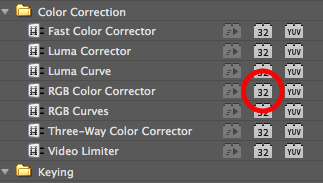
The image (left), courtesy of Adobe and Karl Soul©, shows how to indicate when you have selected a floating 32-bit function. In the past, part or all of this work was in the hands of either the operating system or the GPU’s driver, but now all of this work is handled completely by Adobe. Karl Soul© of Adobe tells us all about it in episode 3 (English) of TecnoTur, which is already available free via iTunes or at TecnoTur.us. You can listen to it immediately here:
Consider subscribing free right now so you’ll be sure to receive all new episodes automatically as soon as they become available.
Sidebar: Why not output YUV over DP or HDMI from the computer…?
Some readers may be asking: “Why not output YUV over DisplayPort or HDMI from the computer, and let the monitor do the conversion to RGB?”
Even though DisplayPort and HDMI can handle either YUV or RGB, so far in my experience, all of the computer implementations of DisplayPort handle RGB-only, and any HDMI computer implementations that Greg Staten has seen currently handle RGB-only. Although a driver could be written to send YUV over these computer outputs, I have two reasons why I believe maintaining them as RGB makes more sense:
- To be compatible with the HP DreamColor (since the DreamColor engine demands an RGB source anyway), and all other monitors with these inputs will also take RGB, including the JVC DT-V24L1 I covered back in this article.
- Since an editor/grader/colorist can alternate between YUV timelines (with YUV footage) and RGB timelines (with RGB footage), and the final goal is RGB at the display, with YUV timelines, one last conversion is inevitable. However, I would hate to reduce an RGB timeline to YUV, only to have it be re-converted back to RGB again. I realize that that is what happens with traditional SDI and HD-SDI outputs which are not dual-link or 3G (or with those dual-link SDI or 3G-SDI systems which have been set for YUV), but that is a necessary and natural sacrifice since they were designed either to feed recorders that natively record YUV, and/or to SDI monitors that were only designed to accept YUV over SDI. I also realize that that’s what happens whenever we watch video that is distributed as YUV, be it from DVD, Blu-ray, web, cable, or (H)DTV. I just want to simplify monitor workflow and be a purist in closed NLE and grading systems, by having the least number of conversions possible, especially since raw RGB footage contains more chroma information… and that’s the way the computer outputs are currently working anyway.
Other NLE programs which may also make this possible
Greg Staten of HP has told me that some versions of Avid Media Composer may also make this possible, but I do not have more details than that. There may be other NLE programs that also offer this, but I haven’t heard of them yet. If you have confirmed information about another NLE program that offers it -and whose manufacturer guarantees it- please comment below.
Other reasons to include a professional i/o, despite new possibilities
If you have studied all four points and have determined that you are 100% covered, i.e.:
- You never capture from live or tape (anymore), or if you do, it can be exclusively via IEEE-1394.
- You never print to tape (anymore) and don’t playback live to air (anymore).
- You only deliver progressive programs (despite the fact that you may receive some interlaced raw footage).
- Your NLE program does a proper and trustworthy realtime conversion to RGB for your critical monitor.
- Your system has a spare non-mirroring output, ideally DisplayPort or HDMI (to be 10-bit), or at least DVI (which would be 8-bit).
Then currently, I know only one more reason to purchase a professional i/o for your NLE, especially if it will be a laptop: Matrox’s MAX option, which for a laptop, is currently available only inside of one of the MXO2 family of i/o boxes, and only with the initial purchase. I already covered the MXO2 family here, and I’ll be publishing the MAX article very soon!
Related articles:
- Allan T©pper’s: Why should I care if my monitor shows ITU Rec.709?
- Allan T©pper’s: Who is the ITU, and why should I care?
- Allan T©pper’s: How to connect your HD evaluation monitor to your editing system properly: Let me count the ways!
- Allan T©pper’s review: DreamColor from HP: an ideal tool for critical image evaluation
- Patrick Inhofer’s review: HP’s DreamColor: A PVM CRT Replacement?
- Allan T©pper’s: DreamColor direct interfaces
- Allan T©pper’s: DreamColor converter boxes for non-compliant systems
- Allan T©pper’s: Matrox’s original MXO crashes the Direct DreamColor interface party
- Allan T©pper’s: Why the iPad will dictate your shooting framerate & shutter speed
- Allan T©pper’s: When 25p beats 24p…
- Allan T©pper’s: Canon HV40: a great inexpensive feeder deck for native Sony 3G HDV recordings
- Allan T©pper’s: When to edit native, When hybrid, and When pure i-frame… and Why
- Allan T©pper’s: Panasonic’s AVCCAM incomplete native progressive recording modes
- Allan T©pper’s: Why capture HDV via HDMI?
Allan T©pper’s consulting, articles, seminars, and audio programs
Contact Allan T©pper for consulting, or find a full listing of his articles and upcoming seminars and webinars at AllanTepper.com. Listen to his TecnoTur program, which is now available both in Castilian and in English, free of charge. Search for TecnoTur in iTunes or visit TecnoTur.us for more information.
Disclosure, to comply with the FTC’s rules
No manufacturer is paying Allan T©pper or TecnoTur LLC specifically to write this article. Some of the manufacturers listed above have contracted T©pper and/or TecnoTur LLC to carry out consulting and/or translations/localizations/transcreations, and some of them have sent him equipment for evaluations or reviews. At the date of the publication of this article, none of the manufacturers listed above is/are sponsors of the TecnoTur programs, although they are welcome to do so, and some are, may be (or may have been) sponsors of ProVideo Coalition magazine.


Filmtools
Filmmakers go-to destination for pre-production, production & post production equipment!
Shop Now








