Click Here

(Page 1 of 1 pages for this article )

Tuesday, December 08, 2009

Filed under: *VIDEO*EditingHardware

DreamColor converter boxes for non-compliant systems

Allan Tépper | 12/08

image

This article is to help people who have determined that their current NLE or grading system does not currently comply with the DreamColor Engine, and are looking a converter box to make it comply. As stated in my DreamColor monitor review, the DreamColor Engine is very demanding: it absolutely requires a true progressive digital RGB signal over HDMI or DisplayPort. Interlaced video, PsF, and/or digital YUV over HDMI are not welcomed by the Engine. If you supply either or both of those, the DreamColor Engine will shut off, the settings for color space will become inactive, and the monitor will display full gamut, which is much more saturated than ITU Rec.601 or ITU Rec.709. These are some of the DreamColor monitor’s most important features. Make sure you take advantage of them by making your system deliver a compliant signal.
image

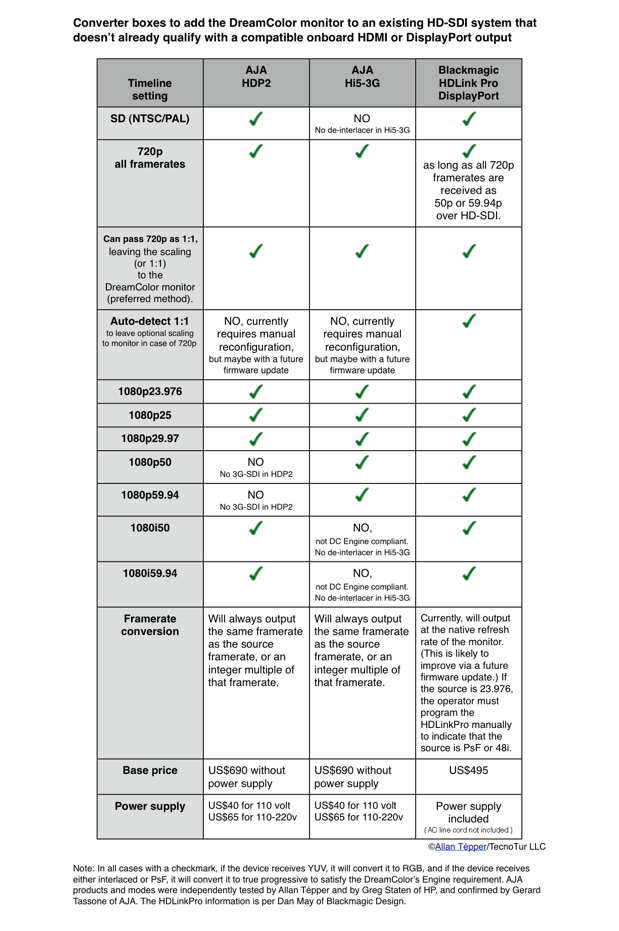
Click here to see this comparison chart in a full-sized PDF.

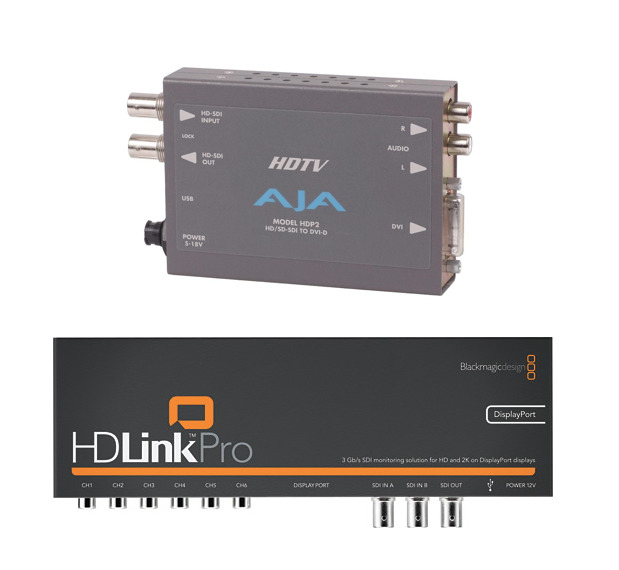
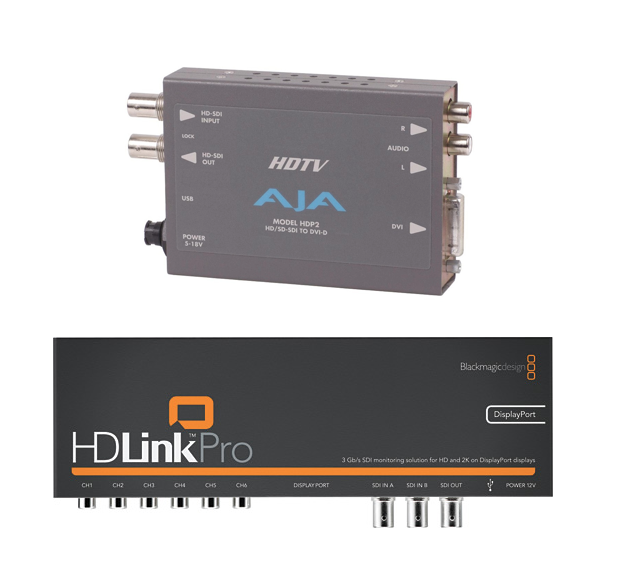
As you will see in the chart, neither the HDP2 nor the Hi5-3G covers all modes by itself, but depending upon your typical formats and framerates, you may discover that one of them covers everything you do. On the other hand, the HDLinkPro DisplayPort covers all of the modes, all though at present, instead of passing the source framerate or an integer multiple of it, it matches the monitor’s default resolution, although Blackmagic Design says that will likely change in a future firmware update.

Alternative to a converter box

Instead of using a converter box, you may consider replacing your current NLE or grading interface to have an all-in-one-experience with less connections and hassle. For that, see the companion article DreamColor direct interfaces.

Read the related articles

Allan Tépper’s articles and seminars

Get a full index of Allan Tépper’s articles and upcoming seminars at AllanTepper.com. Listen to his podcast TecnoTur, together with Tanya Castañeda, Rubén Abruña, and Liliana Marín, free via iTunes or at

TecnoTur.us.

(Page 1 of 1 pages for this article )


You must be registered to comment. This is an effort to reduce spam. Please REGISTER HERE.

Will the HDLink Pro (it uses a DVI-D with a HDMI converter) work?

THX

Posted by .(JavaScript must be enabled to view this email address)  on  12/09  at  10:18 AM


Daniel Leite,

I am not sure. That version wasn’t tested by be or by Greg at HP. My impression is that it will work, but only pass 8-bit video ony (24-bit color).

Allan Tépper

Posted by Allan Tépper  on  12/09  at  10:32 AM


Allan,

Thanks for this highly informative series of related articles. Together with my recent expenditure of much time researching the Dreamcolor (and similar monitors) along with I/O considerations, I feel fairly well informed.

My first response is that I’d like to understand more about what tech considerations for monitoring in progressive since the Dreamcolor insisits on it, when I’m working on an interlaced project. It doesn’t seem to satisfy the quest for a “WYSIWYG” monitoring solution. I worry about working an interlaced timeline but monitoring in progressive and I need know if that is a potential for problems.

Your articles didn’t go into whatever technical virtues Display Port has over HDMI if any. Insofar as the Dreamcolor has it and touts it as the new big thing now, and HDLink Pro has a Display Port version, I’d like to hear more about that if you know something.

I’ve been waiting and wondering why we are not seeing more Display Port monitors to challenge HP’s Dreamcolor by now. I’ve been reading that many/most monitor mfgs are dying to get away from HDMI due to the royalties and Display port supposedly has none.

We are beginning to see more graphic cards with display port and I understand that some TV mfgs are introducing it on forthcoming models.

Seems like AJA, BMD, and Matrox should all soon make it as ubiquitous as the other I/O connections like HDMI etc. In other words putting it on their internally installed cards.

I believe at least one of Nvidia’s new cards designed to support Adobe’s new “Mercury Playback Engine” have Display Port (can’t recall offhand).

Will we see a new generation of graphic cards simultaneously display computer graphics AND also send an interlaced signal to an external monitor? That would seem a logical direction for Nvidia, to me. If the Dreamcolor demands a progressive input anyway, then a Nvidia wouldn’t need to to do a conversion to the signal going to the Dreamcolor.

Do you think we’ll see it on cameras? The emergence of Display Port just begs the question: How potentially disruptive is this new technology?
I get the feeling that it could be.

Thanks for your insights!

wsmith

Posted by wsmith  on  12/09  at  12:48 PM


WSMITH,

>Thanks for this highly informative series of related articles.

You are welcome!

Most (if not all) LCD monitors are naturally progressive anyway, and just use a built-in de-interlacer (when needed), whose technique and quality can vary among models. It’s just a question of at what point in the path an interlaced signal gets de-interlaced, and how well (or how poorly) it is done. Some of Blackmagic’s converters offer interlaced simulation on LCD, but I don’t have experience with it. If you must monitor an interlaced signal as interlaced, perhaps you need a leftover HD CRT, even though it won’t really show all of the HD pixels.

For this particular application, there isn’t any specific advantage at present with current products. Perhaps after Blackmagic changes the firmware to prevent forcing the output to the monitor’s default framerate… or when Adobe or Apple arranges to do everything via GPU with some graphic card. In the meantime, I’d prefer a direct interface even if it is HDMI 1.3.

I have nothing elso to add (for now) about your other comments pr reqiests fpr predictions. If and when I do, you’ll see it in future articles. Thanks again for your comments!

Posted by Allan Tépper  on  12/09  at  01:11 PM


Thanks Allan,

My Sony LMD 2030W is Sony’s entry level pro production LCD and it handles an interlaced input.

It’s 1900x1200 pixels, supports ITU rec 709 and while it doesn’t have Dreamcolor’s color space switchability or customization, I feel rather confident about at least being able to detect any motion artifact issues.

There is still a fair amount of interlaced programs being produced. For me that’s all I do currently.

I view this as a shortcoming and just not yet ready for prime time. I’m sitting on my hands a little longer.

Thanks!

Posted by wsmith  on  12/09  at  01:37 PM


Hi Allan.

Great write-up, and couldn’t come at a better time. I just ordered my DreamColor and have been looking at my options for delivering the signal.

One thing you did cover in the converter article is Standard Def signals and which converters did proper upconversions. I was leaning towards a Kona (maybe even a Kona 3) and using the HDP2 converter, but the fact is that the 2K grading is a luxury option and the LHi really makes more sense.

Will it output SD signals to the Dreamcolor? Or would I be as well off getting a second-hand LHe card and the HDP2?

Thanks again for the articles, always a pleasure to read.

Bjarki

Posted by Bjarkovic  on  12/23  at  03:01 PM


Hi Allan,

I’ve tried the regular HDLink PRO to convert a 4:4:4 dual link signal coming out of a Luther box and the Dreamcolor looses its color engine. I think the signal was RGB but I am not 100% sure.

I’d like to confirm that an HDLink PRO DisplayPort will be able to deal with that 4:4:4 dual link signal and convert it to progressive RGB the Dreamcolor requires.

BTW, RGB is always 4:4:4, right?

thanks,

Daniel Perez

Posted by .(JavaScript must be enabled to view this email address)  on  02/06  at  08:22 PM


I’m wondering whether the MOTU HDX-SDI would be able to do (and do well) the same things as the AJA and Blackmagic products… anyone have any experience with it?

http://www.motu.com/video-products/hdx-sdi

Thanks

Jean

Posted by .(JavaScript must be enabled to view this email address)  on  03/03  at  12:48 PM


Hi there,

  Ive just bought a 2010 Mac Pro with a ATI 5870. This card has 2xDVI and 1xMinidisplay Port.

A stupid question:

can I use one of the card outputs to monitor my color correction on DreamColor instead of my Decklink Extreme + converter?

Thanks in advance.

Piero

Posted by Piero Costantini  on  10/30  at  01:53 PM


Piero,

Yes if you use Premiere Pro CS5, but no if you use Final Cut Pro or Motion. The reasons are explained in my related articles.

Allan Tépper

Posted by Allan Tépper  on  10/30  at  02:04 PM


I have to tell you, Piero.

I have the Kona LHi card, and in order to properly output to the DreamColor, the HDP2 converter simply works. It makes sure any format played back from the Kona LHi is properly displayed on the DreamColor. I know it’s not cheap, but if you really want to make sure you get the best out of your DreamColor, it’s a no-brainer.

Bjarkovic.

Posted by Bjarkovic  on  10/30  at  02:11 PM


Thank Allan and Bjarkovic,

  I stille have some little doubts about this matter.

1. In FCP 7, if I have a ProRes 4444 timeline which is native RGB, does my ATI 5870 MiniDisplay port output a compilant RGB signal?

2. AJA HDP2 or HDLink Pro DVI-Digital?

3. Why Bjarkovic are you using a converter? Doesn’t the Kona LHi is RGB compilant by itself?

Thanks again.

Piero.

Posted by Piero Costantini  on  10/31  at  04:26 AM


Hi Piero.

1. Your ATI 5870 will output RGB via DVI which is probably 1920 x 1200. You need to output the image using a card with the correct resolution, frame rate and color space. If you change from a PAL to an NTSC project, your computer monitor’s output won’t change, but your video monitor’s output should. The output on your ATI card is a computer monitor output - not video.

2. The AJA HDP2 is great. Haven’t tried the other one.

3. Good question. Yes and no. When I’m outputting progressive video, it’s fine. But I work with all kinds of formats, including interlaced HD and occasional SD. By using the converter I get any format into the monitor in the correct color space, and I don’t have to worry about it. And it even displays fields beautifully (which computer monitors do not).

Hope this helps!

Regards,
B.

Posted by Bjarkovic  on  10/31  at  04:42 AM


Thank Bjarkovic,

  you have been very clear. The matter is quite easy to understand but really tricky sometimes!

So, if my BM via HDMI will output as YUV my ProRes 4444 RGB sequence, will I notice a loose of quality? (ProRes RGB > BM YUV output > HDP2 RGB)

Do you think would be better use a LHi instead of a BM?

Thanks,

Piero.

Posted by Piero Costantini  on  10/31  at  07:30 AM


As long as the sequence the Blackmagic is outputting a progressive signal, the DreamColor will display it correctly. If it is interlaced, the DreamColor will not display it in Rec.709 and you won’t be getting the correct picture.

I like the AJA cards personally - I’ve used them for years. I had a bad experience with BM a long time ago and haven’t used them since. I think they’re perfectly fine now, though.

On another note, I checked out your reel - nice stuff. I’m actually now color grading a project for an italian singer. Funny how these things move across the globe.

Posted by Bjarkovic  on  10/31  at  07:52 AM


The globe is not so big then!
What’s the name of the singer?

In Allan article I red that BM HDMI output is only YUV even if the sequence is ProRes 4444 progressive due to a FCP lack hence Dreamcolor won’t work well.

To use the Dreamcolor correctly I need a ‘pure’ RGB signal. To obtain it with my BM I need a converter. The converter will convert my YUV signal in RGB. Ok, good.
Now.

Will I notice a difference between my BM+converter and a LHi true RGB?
I ask this because I’m looking for the best quality and, as you know, the more you convert, the less is the final output.

Thanks.
Piero

Posted by Piero Costantini  on  10/31  at  10:21 AM


Hi again.

The singer is named Elisa Toffoli - maybe you know who she is?

I understand your concern with converters, but converting HD-SDI to DVI is something you have to do anyway - you can also have your Blackmagic do it, but by having a good converter, it just works.

B.

Posted by Bjarkovic  on  11/01  at  04:14 PM


Of course I know her! She’s from my region and I was very close friend with her band members. Tiny world!

Thanks again for your explanations. They were very useful.
I hope to get in touch again!

Ciao.
P.

Posted by Piero Costantini  on  11/01  at  04:48 PM


Name:

Email:

Location:

URL:

Smileys

Remember my personal information

Notify me of follow-up comments?

Submit the word you see below:


How to get the “24p” look for your live-switched multicam shoot
Avid now lets you edit video on your iPad for US$4.99. Should you?
AJA’s Io XT w/ Thunderbolt is now available, but it is not Riker: What’s the cover-up?
Pegasus Thunderbolt RAID5 from PROMISE
Can a professional really use Premiere Elements 10?
PsF’s missing workflow, Part 9: Premiere Elements 10
Sony’s FS100 camera to become “WorldCam” via free firmware update
Sony’s NX70 camera to receive its missing 29.97p framerate via free firmware update
PsF’s missing workflow, Part 8: ClipWrap to the rescue
PsF’s missing workflow, Part 7: Adobe Premiere Pro CS5.5.x
PsF’s missing workflow, Part 6: Tépper asks the camera manufacturers…
PsF’s missing workflow, Part 5: Átomos hires a stripper!
PsF’s missing workflow, Part 4: file-based HD video recorders
PsF’s missing workflow, Part 3: Sony’s AVCHD & NXCAM cameras
PsF’s missing workflow, Part 2: the Canon XA10 camera
PsF’s missing workflow Part 1: BENIGN PsF versus MALIGNANT PsF
Mac Mini for pro video editing: a field report from Guatemala
DaVinci Resolve training at Staff/HDTV in Guatemala
Blackmagic breaks Thunderbolt price budget with US$299 Intensity Extreme
AJA announces Io XT interface with Thunderbolt at IBC in Amsterdam
Matrox adds optional Thunderbolt connectivity to existing MXO2 family interfaces
Blackmagic delivers its first Thunderbolt-based i/o interface, the UltraStudio 3D
Relief after Apple’s segregation of keyboards in the USA
Roland QUAD-CAPTURE: the little sister of the OCTA-CAPTURE
Why FCP X’s secondary monitor should be 1920x1200, not 1920x1080
Apple USA unfortunately segregates Mac Mini’s keyboard options
Mac Mini w/Thunderbolt: preferred platform for many new editing systems
Review: Roland OCTA-CAPTURE 8/10-channel USB 2.0 audio interface
Adobe & Avid attract FCP-defectors with special discounts
FCP7 back for Enterprise/new features for FCPX within weeks


To be considered for listing, contact pr (at) provideocoalition (dot) com


Copyright © 2011, HD Expo, LLC a division of Diversified Business Communications. DBA Createasphere

All rights reserved. HD EXPO, High Def EXPO, Createasphere, E-Tech, Entertainment Technology Exposition, 3D Production Workshop, VariCamp, P2 Camp, ColorCamp 101, and Lighting, Filters & Gels for HD are all trademarks of HD Expo, LLC.

Terms of Use  |  Privacy Policy

Check PageRank