
Click Here

(Page 1 of 1 pages for this article )

Tuesday, December 08, 2009

Filed under: *VIDEO*EditingHardware

DreamColor direct interfaces

Allan Tépper | 12/08

For brand-new systems, or older systems whose owners have decided to replace the current interface to comply with the DreamColor

image

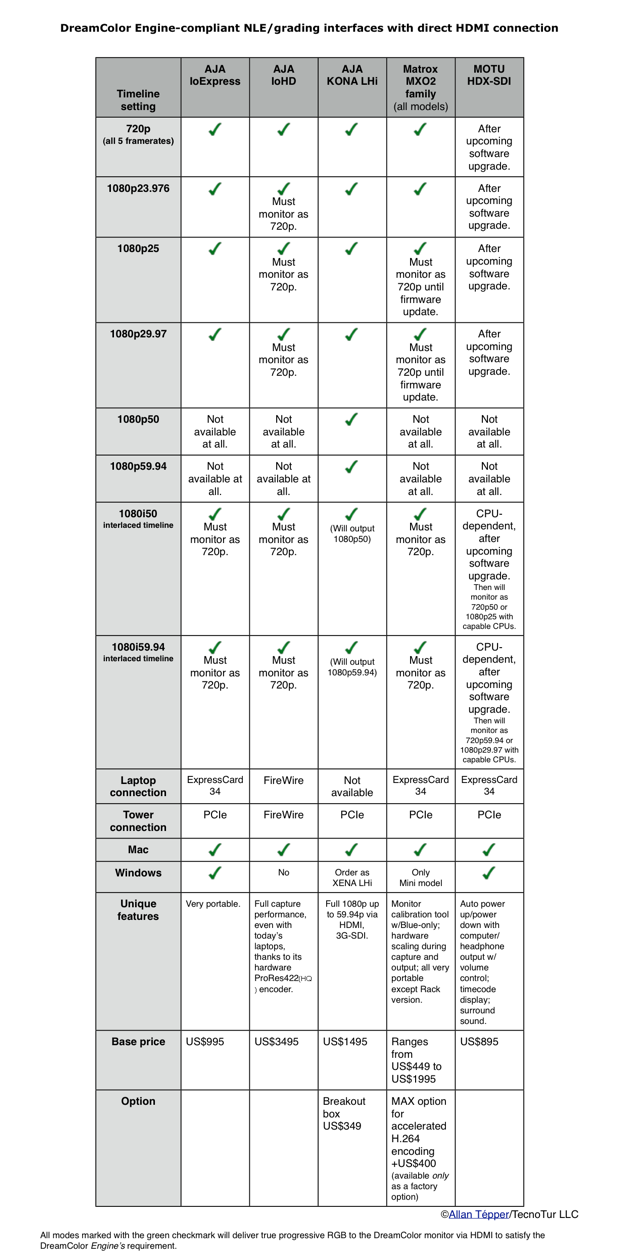
Whether you already own an HP DreamColor monitor, or you are considering buying one, you need to make sure your NLE or grading system complies completely with the DreamColor Engine. In this article, you’ll see a comparison chart showing available NLE/grading interfaces from three different manufacturers that are either completely or partially DreamColor Engine compliant, depending upon your formats and framerates. You’ll also learn why one popular manufacturer does not appear in the chart.

As stated in my DreamColor monitor review, the DreamColor Engine is very demanding: it absolutely requires a true progressive digital RGB signal over HDMI or DisplayPort. Although the monitor will accept them, interlaced video and/or digital YUV over HDMI are not welcome for the DreamColor Engine. If you supply either or both of those, the DreamColor Engine will shut off, the settings for color space settings will become inactive, and the monitor will display full gamut, which is much more saturated than ITU Rec.601 or ITU Rec.709. These are some of the DreamColor monitor’s most important features. Make sure you take advantage of them by making your system deliver a compliant signal.
image

Click here to see this comparison chart in a full-sized PDF.

Why no Blackmagic Design interfaces in this chart?

All current Blackmagic Design NLE interface products (DeckLink, IntensityPro, and Mulibridge families)  strictly deliver YUV component over HDMI. Ironically, a discontinued product from Blackmagic Design which you may already own —the MultibridgeExtreme— should work fine with the DreamColor using the MultibridgeExtreme’s DVI output, (albeit 8-bit) since by definition DVI is both true RGB and true progressive. The only detail is that it is better to connect it with a DVI<>HDMI cable, so that the DreamColor will still offer scaling or no-scaling (1:1) options, as covered in more detail in my DreamColor review. On the other hand, you will see a related, new product from Blackmagic, but not in this article. You’ll find it in the related article DreamColor converter boxes for non-compliant systems.

Three AJA options
image

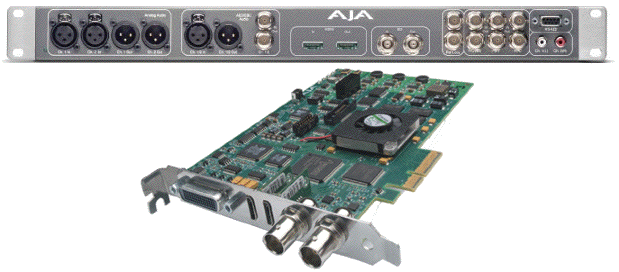
The AJA KONA LHi for Mac (or XENA LHi for Windows) are the queens of compatibility in the comparison chart if you need 1080p50 or 1080p59.94, but will only work with a tower, not with a laptop. (Shown above with the optional breakout box.)

As you will see in the chart, there are three AJA options. The most complete of the AJA options (and in general) is the KONA LHi (for Windows, order it as the XENA LHi). If your system uses a tower (not a laptop), either of these LHi models is quite attractive unless you need some of the unique features found from Matrox or MOTU. Please see the chart for details about other modes, unique features, and their workability with the other products. If you need one for a laptop, obviously you need to check out some of the other options shown in the chart.

Four Matrox options from the MXO2 family
image

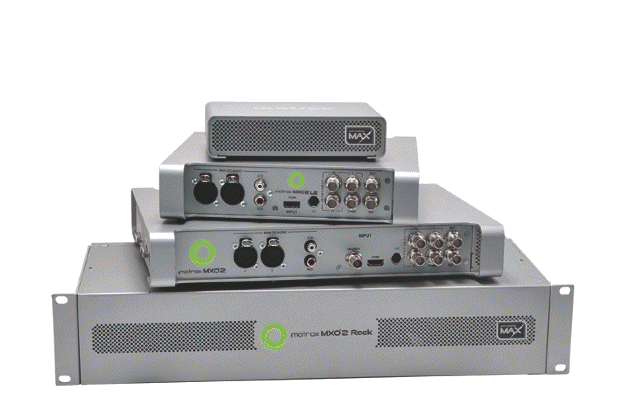
The Matrox MXO2 family now includes four members: MXO2, MXO2 Rack, MXO2 LE, and MXO2 Mini, and can include MAX (onboard H.264 encoding) as a factory-only option.

As you will see in the comparison chart, all of the MXO2 family products are partially compatible with the DreamColor Engine, and Wayne Andrews says that Matrox can definitely add the 1080p25 and 1080p29.97 as true progressive output over HDMI via a firmware update in the future, although he can’t give us a timeframe yet. In the meantime, you can just use any of the MXO2-family devices in those two modes and monitor as 720p. This won’t affect your final quality: it will just make the image look softer (or smaller) when monitoring. See the chart for details about other modes and their workability. Many people are interested in the MXO2 family because of its unique features, as listed in the chart.

MOTU, the newcomer to this space

image

The recently released HDX-SDI from MOTU has a built-in timecode reader, surround sound, and can auto power up/power down with the computer.

MOTU is a very highly regarded audio equipment manufacturer which is jumping in —full force— with its HDX-SDI, which was just released in November 2009. At first, their website didn’t clarify whether the HDX-SDI could output RGB over HDMI. However, within just a couple of hours of sending my e-mail inquiry, Jim Cooper —MOTU’s director of marketing— responded with the good news which enthusiastically confirmed that HDX-SDI already supported this in hardware (in the indicated modes and framerates) and that it would only require a very simple software update to comply. Jim is already on the road of testing the HDX-SDI with the DreamColor. As soon as he does (and releases the update), I will update the chart accordingly. Many people who have experience with MOTU audio equipment will immediately feel comfortable considering their new video products. I don’t yet have any hands-on experience with them, but I am impressed with the immediate and authoritative responses I received about the HDX-SDI’s capabilities and limitations. In the chart, you will see some of the HDX-SDI’s unique features.

Conclusion

Because our readers have so many different situations and priorities, I can’t pick an interface for everyone on a global scale. That’s why I made the chart to help you decide. Some people know that they always work with a specific spatial resolution and framerate, while others vary between projects. Others who edit for third parties need to be prepared for any contingency. This chart required much back and forth between each manufacturer. Enjoy it!

Read the related articles

Allan Tépper’s articles and seminars

Get a full index of Allan Tépper’s articles and upcoming seminars at AllanTepper.com. Listen to his podcast TecnoTur, together with Tanya Castañeda, Rubén Abruña, and Liliana Marín, free via iTunes or at

TecnoTur.us.

(Page 1 of 1 pages for this article )


You must be registered to comment. This is an effort to reduce spam. Please REGISTER HERE.

I hope you can get a MOTU HDX-SDI for eval. I also hope the pros on the audio side of this site can eval it too.

Posted by wsmith  on  12/09  at  12:59 PM


Great article Allan!  I too am disappointed with the off-axis response of our $3500 JVC DT-V24L3DY.  I’ve been considering a new Apple 24-inch Cinema display paired with a Matrox MXO to properly display full-screen YUV video.  I also like how the MXO allows the monitor to do double-duty as also a standard second monitor to expand your desktop.  Any comments on that solution versus the DreamColor solution?

Thanks for taking the time to write a great article!

Posted by .(JavaScript must be enabled to view this email address)  on  12/09  at  01:48 PM


Mitch Lewis,

Thank you! I am glad you liked it!

I don’t know how you would make the Apple Cinema Display show ITU Rec.709. Apple’s PR department has (up until now) neglected to respond when I have written them out that issue or when I have requested an evaluation unit for review. However, you could use a DreamColor with an MXO2-family product. You could also use the original MXO, but you would be limited to 8-bit video when monitoring.

Allan Tépper

Posted by Allan Tépper  on  12/09  at  02:18 PM


So using the original MXO would sort of get us “half-way” there, but we’d have to purchase a MXO2 (or one of the other capture devises in your excellent chart) and the DreamColor.  That’s a considerably more expensive solution, especially considering that the DreamColor would only serve a single purpose.  Where as the MXO connected to a Apple display would be both a YUV monitor and a standard 2nd monitor to expand your desktop.  I like that feature.

Hmmmm…......  DreamColor certainly something for us to consider.

Posted by .(JavaScript must be enabled to view this email address)  on  12/09  at  03:02 PM


Hi Allan.

Great write-up, and couldn’t come at a better time. I just ordered my DreamColor and have been looking at my options for delivering the signal.

One thing you did cover in the converter article is Standard Def signals and which converters did proper upconversions. I was leaning towards a Kona (maybe even a Kona 3) and using the HDP2 converter, but the fact is that the 2K grading is a luxury option and the LHi really makes more sense.

Will it output SD signals to the Dreamcolor? Or would I bet as well off getting a second-hand LHe card and the HDP2?

Thanks again for the articles, always a pleasure to read.

Bjarki

Posted by Bjarkovic  on  12/17  at  05:17 PM


Pardon the newbie question here, but what happens if I just directly attach the Dreamcolor to my macbook pro’s HDMI?

Posted by .(JavaScript must be enabled to view this email address)  on  01/08  at  04:29 PM


Nevermind, just realized you had an article right before this thoroughly explaining why you might want these. Thanks, wonderful articles!

Posted by .(JavaScript must be enabled to view this email address)  on  01/08  at  04:34 PM


gcelso

Thanks for your comment,

Actually, you must have meant your MacBookPro’s miniDisplayPort, because (at least as of today) no MacBookPro has direct HDMI.

The problem with what you asked: “Pardon the newbie question here, but what happens if I just directly attach the Dreamcolor to my macbook pro’s HDMI?” is answered in a part of the DreamColor review, which I will quote here:

###########
Why we can’t simply use Apple’s “Digital Cinema Display”
Way back in 2005, Apple launched Final Cut Pro 5, together with a new feature called the “Digital Cinema Desktop”. The purpose was to allow FCP editors to preview full screen video on an independently connected computer monitor. However, together with the launch of the Digital Cinema Desktop feature, Apple warned us that it was for content only, and was not to be trusted for color correction purposes. This warning was stated both verbally at NAB 2005, as well as in writing in Apple’s support article TA27705. The reason for the color precaution has to to with the accuracy of the conversion between RGB and component video. Someday, this may change, if and when Apple’s FCP team gets together with some GPU manufacturer to do a hardware 10-bit YUV>RGB conversion to DisplayPort or HDMI, but that hasn’t happened yet and may never happen.
###########

...so the color and gamma would be way off if you were to do that.


Allan Tépper

Posted by Allan Tépper  on  01/08  at  04:43 PM


Thanks Allan, yes, I was referring to the mini DisplayPort. I usually use one of those fairly inexpensive mini DisplayPort-to-HDMI adapters when I need to send a signal out to one of my televisions (for non-color critical work) from my MBP—which, of course, usually exhibits a color and gamma shift.

It would be nice if we didn’t have to go through an intermediary, and for one reason or another felt those capabilities were already somehow built-in into the DreamColor monitor—wishful thinking on my part.

Posted by .(JavaScript must be enabled to view this email address)  on  01/08  at  05:28 PM


Name:

Email:

Location:

URL:

Smileys

Remember my personal information

Notify me of follow-up comments?

Submit the word you see below:


Avid now lets you edit video on your iPad for US$4.99. Should you?
AJA’s Io XT w/ Thunderbolt is now available, but it is not Riker: What’s the cover-up?
Pegasus Thunderbolt RAID5 from PROMISE
Can a professional really use Premiere Elements 10?
PsF’s missing workflow, Part 9: Premiere Elements 10
Sony’s FS100 camera to become “WorldCam” via free firmware update
Sony’s NX70 camera to receive its missing 29.97p framerate via free firmware update
PsF’s missing workflow, Part 8: ClipWrap to the rescue
PsF’s missing workflow, Part 7: Adobe Premiere Pro CS5.5.x
PsF’s missing workflow, Part 6: Tépper asks the camera manufacturers…
PsF’s missing workflow, Part 5: Átomos hires a stripper!
PsF’s missing workflow, Part 4: file-based HD video recorders
PsF’s missing workflow, Part 3: Sony’s AVCHD & NXCAM cameras
PsF’s missing workflow, Part 2: the Canon XA10 camera
PsF’s missing workflow Part 1: BENIGN PsF versus MALIGNANT PsF
Mac Mini for pro video editing: a field report from Guatemala
DaVinci Resolve training at Staff/HDTV in Guatemala
Blackmagic breaks Thunderbolt price budget with US$299 Intensity Extreme
AJA announces Io XT interface with Thunderbolt at IBC in Amsterdam
Matrox adds optional Thunderbolt connectivity to existing MXO2 family interfaces
Blackmagic delivers its first Thunderbolt-based i/o interface, the UltraStudio 3D
Relief after Apple’s segregation of keyboards in the USA
Roland QUAD-CAPTURE: the little sister of the OCTA-CAPTURE
Why FCP X’s secondary monitor should be 1920x1200, not 1920x1080
Apple USA unfortunately segregates Mac Mini’s keyboard options
Mac Mini w/Thunderbolt: preferred platform for many new editing systems
Review: Roland OCTA-CAPTURE 8/10-channel USB 2.0 audio interface
Adobe & Avid attract FCP-defectors with special discounts
FCP7 back for Enterprise/new features for FCPX within weeks
Adobe Premiere Pro CS 5.5 brings better handling of medium framerate videos recorded as PsF


To be considered for listing, contact pr (at) provideocoalition (dot) com


Copyright © 2011, HD Expo, LLC a division of Diversified Business Communications. DBA Createasphere

All rights reserved. HD EXPO, High Def EXPO, Createasphere, E-Tech, Entertainment Technology Exposition, 3D Production Workshop, VariCamp, P2 Camp, ColorCamp 101, and Lighting, Filters & Gels for HD are all trademarks of HD Expo, LLC.

Terms of Use  |  Privacy Policy

Check PageRank