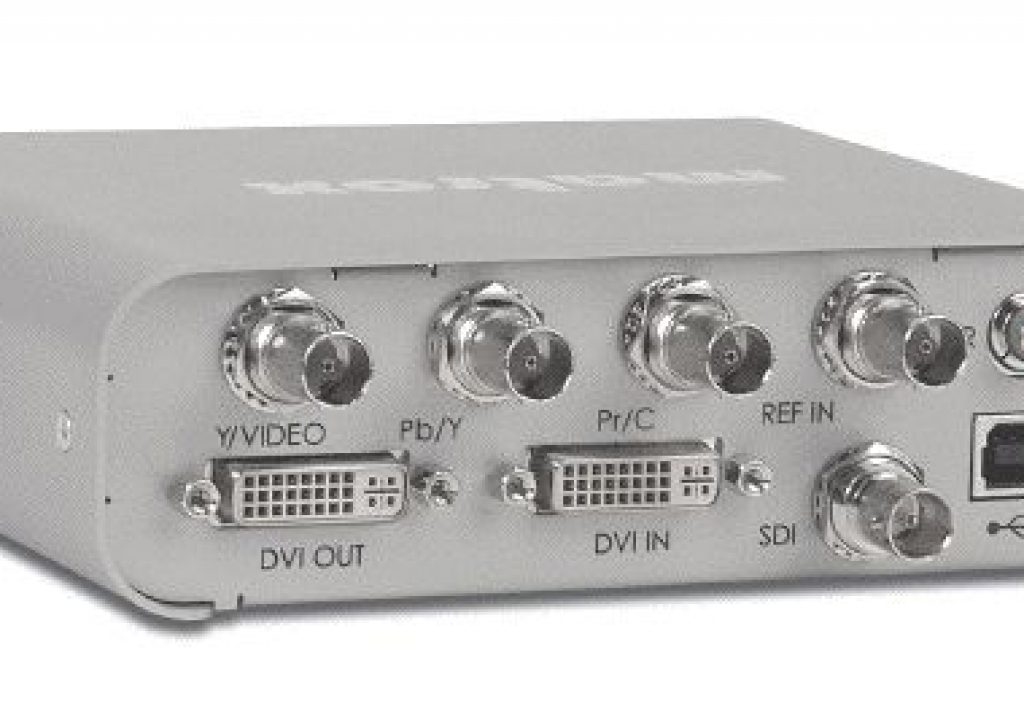
The original MXO is ideal to connect a DreamColor to a Mac which lacks ExpressCard34 or PCIe.

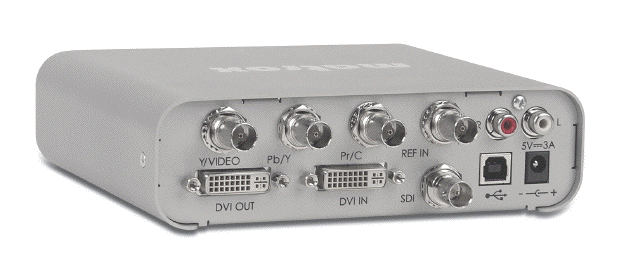
Many of our ProVideo Coalition readers already know that Matrox’s MXO2 family now includes four members, especially since I have covered them quite recently in my Direct DreamColor interfaces article. However, fewer of our readers may remember the original MXO device from Matrox, which is quite different from the MXO2 family members. The original MXO is still a current Matrox product, even though it doesn’t get nearly as much press lately, and it is not nearly as flexible as the MXO2-family devices. However, the original MXO “crashed the Direct DreamColor interface party” just after I made a product suggestion to the Matrox product manager and later tested it. In this article, you’ll learn how the original MXO differs from any MXO2 family member, the cases where it’s still an attractive -or the only- choice, how it managed to crash the Direct DreamColor interface party, and how it can even work with iMovie ’09!
How the original MXO differs from any current MXO2-family member
The original MXO differs from any current MXO2-family members in three categories:
Functionality
All current MXO2 family devices work both as an input and an output, which means that they can be used to capture video, as well as monitor properly and to “print to tape. On the other hand, the original MXO only works as an output, which allows to monitor properly or “print to tape”. Those are the main functional differences, all certainly not the only ones. The MXO2-family devices also do more hardware scaling, and offer optional MAX -for accelerated H.264 encoding.
8-bit only (24-bit color)
Unlike MXO2-family devices, which can input and output up to 10-bit video/30-bit color, the original MXO is limited to 8-bit video output, although you can certainly be editing 10-bit video with it. This only affects the output, which is often for monitoring only. As long as you are not going to print to tape, your material can still be 10-bit, even though you are only monitoring 8-bit/24-bit color. (See my DreamColor review to see the advantages of monitoring 10-bit/30-bit color on a 10-bit/30-bit panel, even if your source is 8-bit/24-bit color.) And even if you are going to print to tape, very few HD tape formats are 10-bit anyway. In the HD world, the only current tape formats I know about with 10-bit recording are D5-HD (in a particular mode) and HDCAM-SR (in a particular mode). Of course, it’s still better to be able to monitor actual 10-bit/30-bit color, but as you will see ahead, that’s not currently feasible with Macs that lack either an ExpressCard34 slot or a PCIe slot.
Connectivity
Unlike MXO2-family devices, which connect to the Mac computer either via ExpressCard34 or PCIe, the original MXO connects exclusively via DVI… or, with more modern Macs, using an adaptor that goes from mini DisplayPort to DVI. By definition, DVI is 8-bit, or maximum 24-bit color.
When the original MXO is still an attractive choice
As Adam Wilt covered here in ProVideo Coalition, Apple eliminated the ExpressCard34 slot back in June 2009 in the MacBookPro 15-inch model. From that point forward, the MacBookPro 13″ and 15″ models have SD(HC) slots, and the only remaining Mac with a ExpressCard34 slot at this writing is the MacBookPro 17″. This means that if you own (or plan to purchase) a MacBookPro 13″, MacBookPro 15″, iMac, or Mac Mini to edit Final Cut Pro or iMovie ‘09, and you like the DreamColor for all of the reasons I covered in my recent review, the original MXO is not only a good choice to connect your Mac to the DreamColor, it’s presently the only proper way to do it, to my knowledge. (Of course, the original MXO would also act as a proper bridge with any HD-SDI monitor too, not just with a DreamColor.)
How to connect the original MXO to your Mac with miniDisplayPort
In order to connect the MXO to your modern Mac with miniDisplayPort, you’ll need an adaptor that goes from the Mac’s miniDisplayPort to a female DVI connector. This adaptor is not currently available from Matrox, but you can either buy it from Apple for US$29 or from MonoPrice.com (product 5106) for US$10.73.
How the original MXO got to crash the party
A couple of days after publishing the DreamColor review and the four associated articles, I got to thinking how isolated the most popular Macs are now in terms of having a proper bridge to the DreamColor (or to any HD-SDI monitor), so I wrote to Wayne Andrews, Matrox’s product manager in charge of MXO and MXO2, to suggest a new product. I called the new product “MXOmdp”. I imagined something quite similar to the original MXO, but with a miniDisplayPort as input and output, and I described the application. To my surprise, Wayne wrote back saying that the original MXO would do what I was seeking (albeit with 8-bit), although he was somewhat unsure about whether it would satisfy the DreamColor Engine‘s demanding requirements, which I had covered in detail in the DreamColor review and its associated articles. I offered to test it if he sent me one, and the rest is history. The original MXO indeed does satisfy the DreamColor Engine’s demanding requirements. It still remains to be seen whether Matrox will ever build an “MXOmdp”, but in the meantime, the original MXO fits the application almost perfectly. Perhaps in the future, we’ll see the “MXOmdp” with MAX 🙂
FCP settings with original MXO/DreamColor
The original MXO is quite different from any of the other interfaces I included with the comparison chart, so special settings apply, even in the Apple Finder.
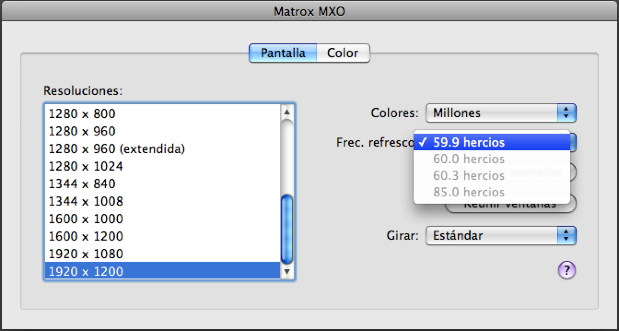
For FCP, it is best to set the Finder’s Monitor Control Panel so that the DreamColor/MXO resolution is 1920×1200 and what Apple abbreviates as “59.9Hz”.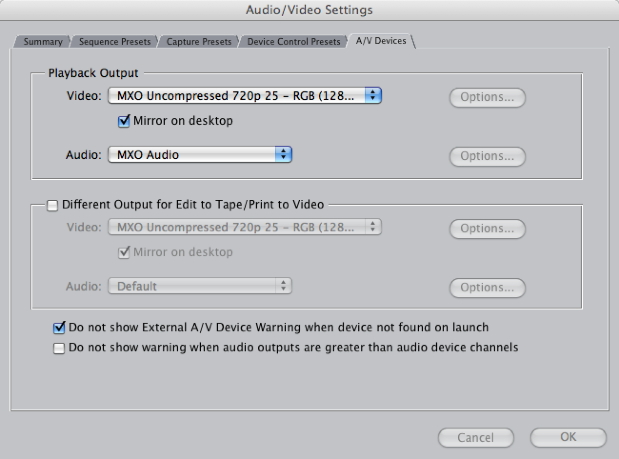
Then set FCP’s Audio/Video Settings>AV devices to match the timeline spatial and temporal resolution. In this particular adjustment for the MXO, the color space (RGB/YUV) is irrelevant. After the latest firmware that Matrox released, it will properly work at 50Hz from FCP from a 25p/50i/50p, even though the Finder setting is set to “59.9Hz”, and in that case shows 50Hz in the DreamColor information display, upon request.
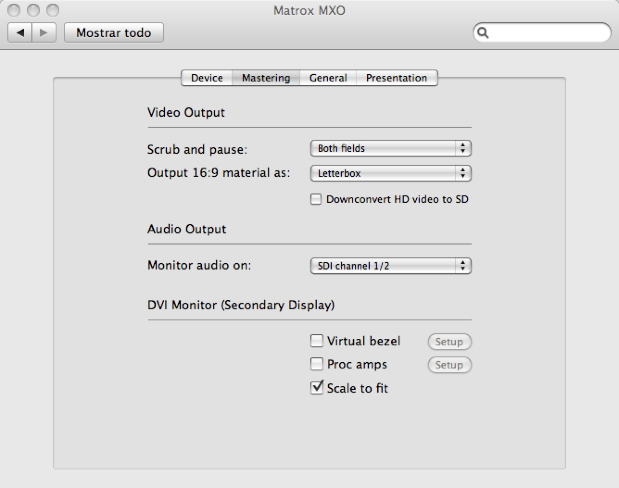
In the case of a 720p timeline, you can easily alternate between scaling to fit horizontally while retaining aspect ratio (as if it were 1920×1080) or displaying the 1280×720 as 1:1 by checking or un-checking Scale to fit in the Matrox MXO Control Panel, under the Mastering tab. This can be done with no problem with FCP running, although you won’t see the result on the DreamColor monitor until you return to FCP. (With the original MXO, that’s the way to do it. It’s not feasible to do it from the DreamColor’s panel, as it is with the MXO-2 family.)
For iMovie ’09 with original MXO/DreamColor
Many iMovie users will be happy to discover iMovie ‘09’s new 2nd monitor function Window>Viewer on Secondary Display [in the Castilian version of iMovie ’09, Ventana>Visor en pantalla secundaria]. Apple probably just thought that people would just use it with a secondary computer monitor, but with the original MXO, true critical evaluation is possible together with a DreamColor monitor (or other HD-SDI monitor). Considering that it’s a “free” program, it amazes me that iMovie ’09 includes such powerful image manipulation.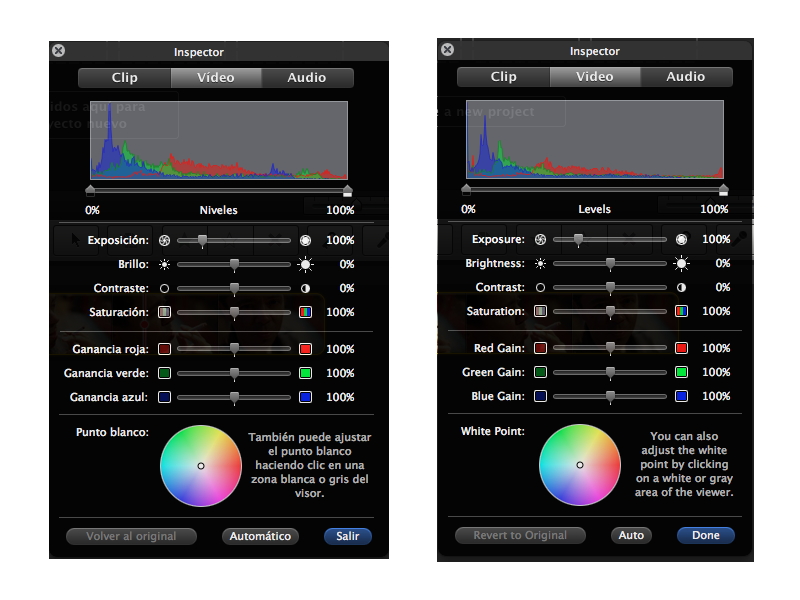
iMovie ’09 is localized in several languages, including Castilian, and its Inspector offers many image adjustments. I just wish it had a waveform and vectorscope, in addition to the histogram.
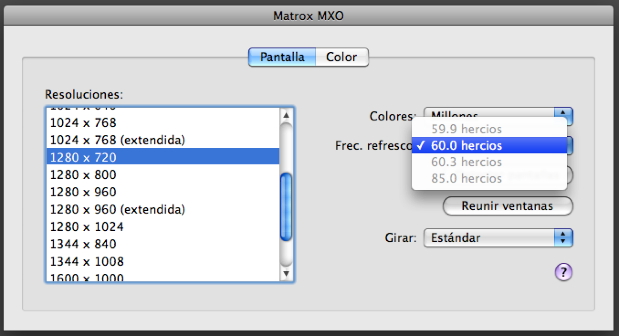
To do the “720p toggle” for iMovie/MXO, alternate the Finder’s Monitor Control panel settings between “1920×1200” at “59.9Hz” (which will actually give you 1920×1080 with proper 16:9 aspect ratio on the DreamColor screen) and 1280×720 at “60Hz” (which will display your 720p footage as 1:1 on the DreamColor monitor). This can be done with no problem with iMovie ’09 running, although you won’t see the result on the DreamColor monitor until you return to iMovie.
Allan T©pper’s articles and seminars
Get a full index of Allan T©pper’s articles and upcoming seminars at AllanTepper.com. Listen to his podcast TecnoTur, together with Tanya Castañeda, Rub©n Abruña, and Liliana Marín, free via iTunes or at
Disclosure, to comply with the FTC’s new rules
Matrox is not paying Allan T©pper to write this article. Matrox sent the MXO to Allan T©pper for him to do the test with the DreamColor, and he was happily surprised to receive a no charge invoice with the MXO.


Filmtools
Filmmakers go-to destination for pre-production, production & post production equipment!
Shop Now