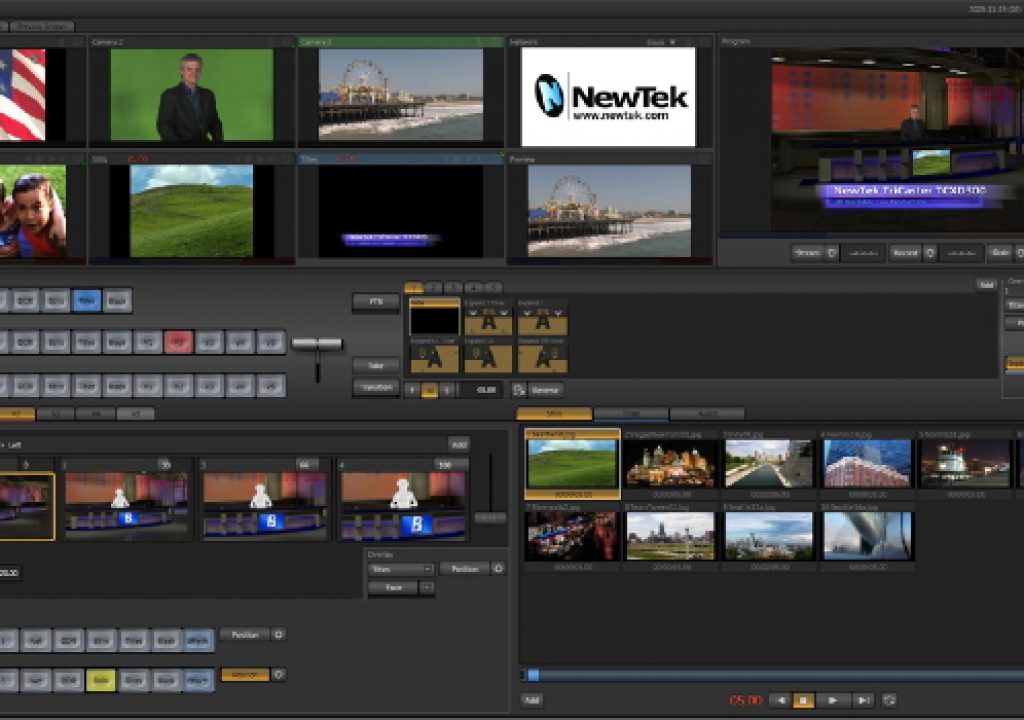
Standalone, portable HD studio mixer, character generator, recorder, streamer…

Any video professional with a couple of decades of experience under her/his belt will remember the original Video Toaster, which was a card that ran in a Commodore Amiga computer, and (among many others) included the infamous Kiki wipe. Despite very minor defects, the original Video Toaster -in its era- represented a revolution for multi-camera live (or live-on-tape) productions. Now NewTek has given birth to the HD-capable version of the 3rd-generation product. The TriCaster TCXD300 is an amazing standalone box that works in either SD or HD, and can record internally or externally, in addition to encoding live webcasts in HD. It has a high quality character generator and includes virtual sets. After attending an intense, multiple-hour demonstration in Miami, conducting a radio interview for both of TecnoTur‘s audio channels (the current Castilian channel, and the upcoming English channel) with two TriCaster team members, and a followup e-mail interaction with NewTek’s executive VP of engineering, I now know that there is no exaggeration in stating that the TriCaster TCXD300 is indeed the 3rd multicam revolution for HD live-to-disk, HD live-to-air, or HD live-to-web production. Experience many of the details in this article.
Purpose of this article
The purpose of this article is not to regurgitate the specs from the NewTek website, but to give another perspective, and many details not currently revealed at NewTek.com or NewTek-Europe.com.
Basic functions & specs
This is a preview of main points.
- Luggable standalone box, under 9 kg / under 20 pounds
- 3 simultaneous external video inputs, which can be any combination of HD-SDI, SD-SDI, HD component analog, SD component analog, Y/C (via BNC) and composite. Capable of simulating 6 live camera sources from 3 actual sources.
- Proc-amp adjustments for each external video input, which can be saved to a project.
- Inboard DDR (Digital Disk Recorder) to play back pre-recorded clips.
- Unlimited iVGA video inputs (Ethernet networked sources, like web pages or Skype).
- Very high quality chroma key.
- Live virtual sets, with “network quality” and zoom capability (details ahead).
- Combined preview outputs via DVI (HDMI compatible) eliminate the need for individual monitors for each camera source.
- Virtual waveform monitor and vectorscope on preview output (with a minor correctable bug… details ahead).
- Inboard character generator, high-quality and fully compatible with both USA and Spanish ISO keyboard (details ahead).
- Balanced audio inputs (mic/line) with optional phantom power.
- Audio processing: 48 Khz/24 bit
- Video processing: “beyond 10-bit” internal processing (details ahead), 10-bit output via HD-SDI.
- Projects in “locked” USA model: NTSC SD, 720p59.94 or 1080i59.94
- Projects in “unlocked” multi-standard model: all of the above, plus PAL SD, 720p50 and 1080i50
- Automatically scales camera sources and file sources to match the spatial resolution of the project (when necessary). If upscaling SD to HD, the system currently assumes that the SD source is anamorphic.
- Tally connection.
- Onboard HD video recorder (720p or 1080i) (MPEG2, 8-bit i-frame 100 megabit/s recording, either 4:2:0 standard profile or 4:2:2 high profile) can record either on the inboard RAID0, or externally (details ahead).
- Add an AJA KiPro recorder if you need 10-bit 4:2:2 recording.
- Live web streaming, up to full-raster 720p HD.
- Inboard video editing.
- Optional hardware-based control panel with fader bar, buttons and potentiometers.
The front panel
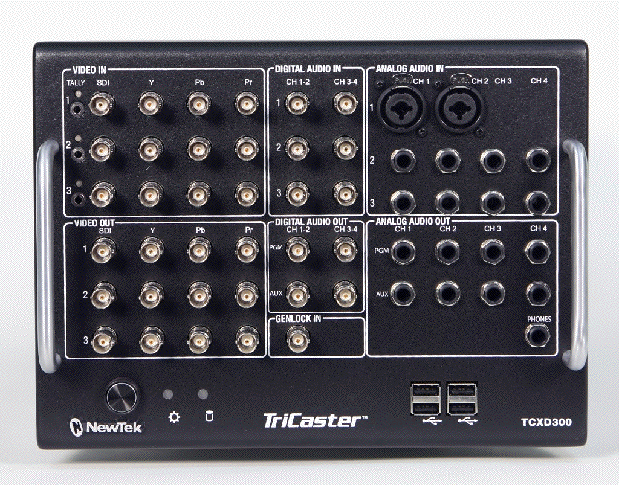
The front panel…or is it the back panel? 🙂
Some screenshots of different modes
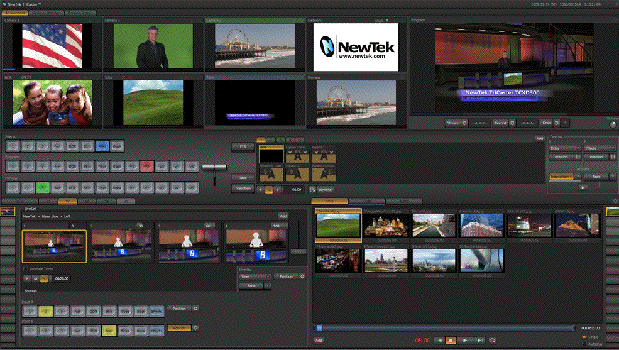
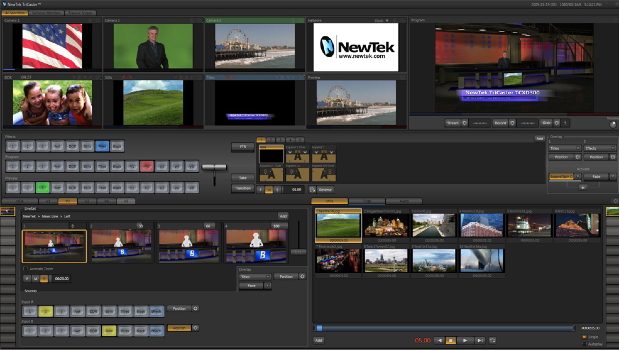
Production mode.
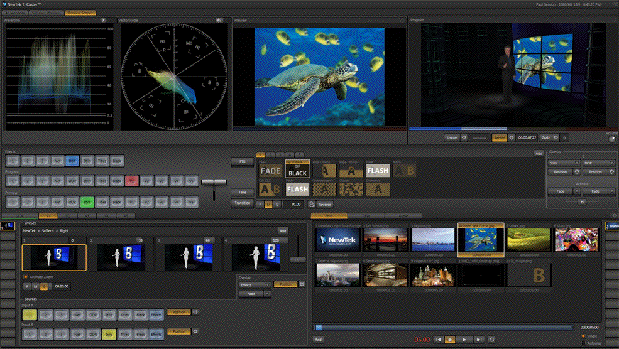
Live virtual sets with color scopes.
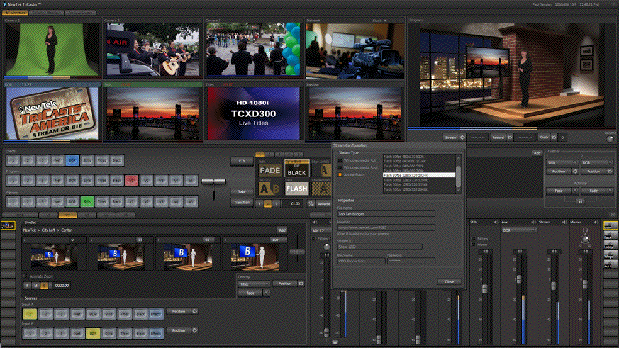
Live HD streaming.
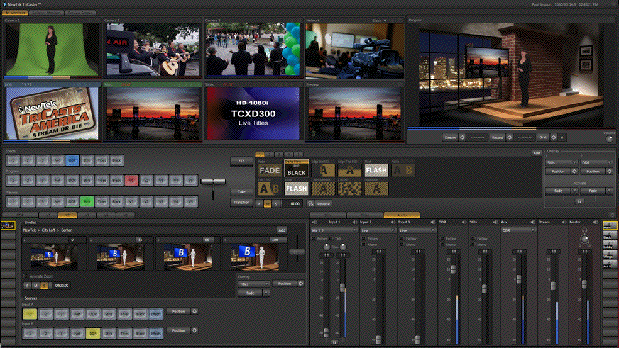
Up to 4 channel audio per camera (if embedded via SD-SDI or HD-SDI).
Pricing
The TriCaster TCXD300 base “locked” USA model costs US$14,995. The “unlocked” multi-standard model costs US$17,995. (More about the differences ahead in this article.)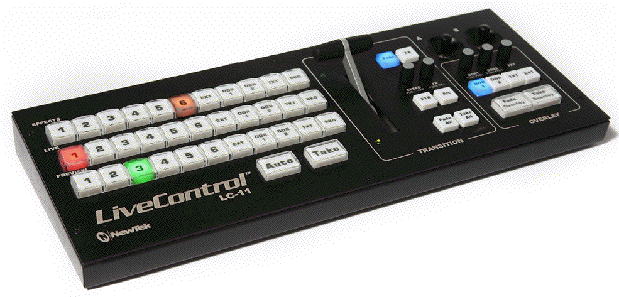
NewTek offers an optional hardware based control panel called LiveControl which costs US$1,995. It has a fader bar, buttons, and potentiometers. I consider this panel to be a must-have option. Otherwise, you can switch with a computer keyboard.
To make a complete studio system, just add…
For a complete studio HD system, add:
- Lights
- Talent
- 3 HD cameras [If conventional, add tripods, intercoms, camera operators, and (optionally) CCUs. If robotic, add the controller system, which can have a multicam CCU built inside.]
- Sync generator (if using genlockable cameras. See genlock section ahead.)
- Microphones (Optional: mixer, limiter/compressor/gate)
- 1 or 2 preview monitors (DVI or HDMI)
- 1 HD video program monitor with HD-SDI input, or some other HD monitor with an adaptor to allow for an HD-SDI source. If you choose the HP DreamColor monitor, then purchase either the AJA HDP2 or the Blackmagic HDLink Pro DisplayPort, since they are both capable of converting YUV to RGB (when necessary) and of converting interlaced video or PsF into true progressive (when necessary).
- Audio monitor (or at least headphones. Fortunately, the TriCaster TCXD300 does have a headphone output.)
- If 8-bit recording is okay, then you can record internally. If you must have a 10-bit recording, then purchase or rent an AJA KiPro.
- If webstreaming, adequate broadband service with a proper Ethernet connection, and an outside multicast service.
Ahead in this article
- Differences between “locked” USA version, versus unlocked multi-standard version
- About the TriCaster TCXD300’s webstreaming capability
- Internal video processing
- TriCaster TCXD300’s own audio/video recording
- Are genlockable cameras required? What difference does it make?
- Non-genlockable HD-SDI cameras for TriCaster TCXD300
- Genlockable HD-SDI cameras for TriCaster TCXD300
On page 3 you’ll find:
- Virtual sets and virtual live cameras
- Character generator keyboard compatibility
- All about black level, setup, and pedestal
- Waveform monitor panic, and response
- Wish list
- Conclusions
Differences between “locked” USA version, versus unlocked multi-standard version
Every time you create a new project with the TriCaster TCXD300, you decide the project’s spatial resolution. With the “locked” USA version, you get three options: SD, 720p59.94, or 1080i59.94. With the unlocked multi-standard version, you also get the options of PAL SD, 720p50, and 1080i50. If you are absolutely sure that you are only producing for the web, then you can probably get away with the “locked” USA version no matter where you live or where you plan to deliver, since the web doesn’t care about the framerate, and even in Europe, HDTV sets accept any framerate. (The opposite is unfortunately not always the case in the USA.) However, if you are also planning to record for traditional television delivery (and that might be a 50Hz delivery for at least some of your projects), you will certainly want to buy the unlocked multi-standard version, despite the US$3,000 increase in price. It is much better to purchase the unlocked multi-standard version from the beginning, since upgrading it later can be cumbersome.
About the TriCaster TCXD300’s webstreaming capability
Currently, the TriCaster TCXD300 encodes your HD signal as H.264 (my current favorite códec for distribution) and embeds it into a Flash wrapper. Despite my general concern about Flash’s non-compatibility with many mobile devices, like the iPad, iPhone, and iPod Touch, this is really a non-issue since you only send the biggest (720p) signal to your multicast service. Then your multicast service can send out multiple versions and sizes, including unwrapped (non-Flash) versions for these mobile devices.
According to Jorge Dighero -who gave me my extended demonstration at Pro Audio & Video Systems in Miami- the TCXD300 is also field upgradable to handle other web códecs which may become popular down the line.
I applaud NewTek for choosing to do live webstreaming with 720p, regardless of whether a given project is set for 720p or 1080i. In another recent article, I explained all of the reasons why presently, 720p is ideal for the web in almost all cases, together with the very uncommon situations where 1080p for the web should be considered today.
Internal video processing
Since I know some digital video mixers (“switchers”) unfortunately subsample the incoming video, I was concerned do find out what was really happening inside the TriCaster TXCD300. These are the questions I sent to NewTek:
- If a true live 10-bit camera HD source feeds the TCXD300, while it is full frame, does the signal ever get reduced below 10-bit internally?
- If that same source is blown-up (expanded), does the signal ever get reduced below 10-bit internally, or does it go to floating point at better than 10-bit?
- If one imports a graphic -including a color ramp- that was created at 10-bit to avoid banding, does it remain 10-bit, or does it ever get reduced to 8-bit?
- Do the TCXD300’s internal graphic creation tools create color ramps at 8-bit or 10-bit?
Here is what Andrew Cross -the VP of engineering at NewTek- responded:
This question is actually very hard to answer completely without getting into a lot of details simply because we do not work internally quite like other switchers. I will give a simplified explanation. The switcher itself does not work with just native frame-buffers of one format. Most traditional switchers work as follows:
Input -> (inside switcher) color convert if necessary -> (inside switcher) scale to switcher res -> switcher processing.
We do not do this, rather every input to the switcher has an arbitrary buffer on every input that can be in a large variety of formats (RGBA, YCbCrA 4:4:4:4, YCbCr 4:2:2, YCbCr+A 4:2:2:4, YCbCr 4:2:0 – this has big benefits, etc…) at a variety of different bit depths (FP, 16bit UI, 8bit UI), fielding formats (fielded, progressive), resolutions and aspect ratios. The processing engine of the switcher can use any of these buffers and combine them natively into the output without intermediate resizing or color conversion steps. In addition it analytically combines all color space transforms to avoid any intermediate steps, a simple example:
Color conversion RGB ->YCbCr is a linear transform that can be represented by a matrix. Similarly procamp color correction can be represented by a matrix. Normally one would first apply color conversion (which might clamp to the color space if we were not using float) and then apply color correction; instead we fold these two operations into a single mathematic transform that can go from the source RGB color space to the color corrected YCbCR space without any intermediate steps.
The reason I mention all of the above is that it is very hard to give a single answer to all of the questions below because we preserve image fidelity at its source format until it needs to be converted to another. Some relatively imprecise answers below …
If a true live 10-bit camera HD source feeds the TCXD300, while it is full frame, does it ever get reduced below 10-bit internally?
We do not reduce precision on any source (including DDRs) until a precision loss is actually required by the processing. (e.g. conversion to 8bit for recording to disk or streaming.)
If that same source is blown-up (expanded), does it ever get reduced below 10-bit internally, or does it go to floating point at better than 10-bit?
Yes. Source sampling from images is done in floating point. 4:2:2 and 4:2:0 buffers have interpolation on the missing chroma to avoid artifacts.
If one imports a graphic -including a color ramp- that was created at 10-bit to avoid banding, does it remain 10-bit, or does it ever get reduced to 8-bit?
We keep files read off disk in their native format through final composition.
Do the TCXD300’s internal graphic creation tools create color ramps at 8-bit or 10-bit?
The titling tools actually generate 8-bit RGBA images (that is the format all on screen imagery would be in.) This obviously also applies to images placed in the DDR (PNGs, etc…) In all cases where we get 8-bit data in this form we perform full 2D error diffusion conversion to YCbCr instead of 8bit integer conversion (which is what every other product I know does.) This makes a phenomenal difference to the images and removes any banding in the color conversion process with no added noise (how most apps avoid banding.)
I am impressed with the way NewTek has decided to handle the internal processing in the TCXD300 from camera input to output, especially with all of the features it offers at its price point. Andrew’s response makes a lot of sense and explains from a technological perspective why everything in Jorge’s demo looked so clean on the high-end JVC HD-SDI program monitor he had connected. It seems that the only minor compromises have been with the DDR and internal graphic creation, since they are only 8-bit… but then again, so are most HD camera códecs and most HD tape formats are 8-bit too. As far as recording, I have already explained that it can be done externally at 10-bit if required, and if the budget permits it. More details ahead.
TriCaster TCXD300’s own audio/video recording
As stated earlier, all HD internal recording in the TriCaster TCXD300 is done with MPEG2, 8-bit i-frame 100 megabit/second recording, either 4:2:0 standard profile or 4:2:2 high profile. In addition to embedding audio in the MPEG2 file, there is the option to have the system record audio separately as an MP3 file, in order to make the signal more compatible with certain Mac applications which demand the audio be separate. I’d like to see a further option to have that separate audio recording be selectable among AAC (M4A), MP3, WAVE, or AIFF.
By default, the internal recording is sent to the TCXD300’s internal RAID0. However, if you require sneakernet capability (to be able to grab a drive and run just after a recording) and/or RAID5 redundancy (because you are afraid that the only recording might disappear due to a drive failure), Jorge Dighero confirmed to me that you can directly connect an external hardware RAID via eSATA, since the TCXD300 fortunately does have such a port. Then you can choose to direct the recordings to the external RAID. I would strongly consider the Promise DS4600 for that purpose, especially because of its cost, reliability, and ability to do RAID5 without a controller card. And if you want to facilitate sneakernetting of the recording to a Mac system, I would (after Jorge Dighero’s blessing to the idea) install MacDrive in the TCXD300, and leave the RAID5 formatted as HFS+ as opposed to NTFS. Jorge also clarified that the TCXD300’s own recording is either on the internal RAID0, or external, but not both.
If you must have 10-bit 4:2:2 recording, and/or a simultaneous recording both on the internal RAID0 and externally, then consider adding an AJA KiPro recorder to the TriCaster TCXD300, which would connect via HD-SDI. The KiPro is already HFS+. The KiPro does not currently offer redundant recording by itself (RAID1 or RAID5). However, in this case you could have redundancy by having one recording inside the TCXD300 (8-bit) and one in the KiPro (10-bit).
Are genlockable cameras required? What difference does it make?
NewTek highly recommends using genlockable cameras with the TriCaster TCXD300, and sending sync (either black or tri-sync) to the cameras and to the TCXD300, using an external device, like Blackmagic’s US$295 Sync Generator.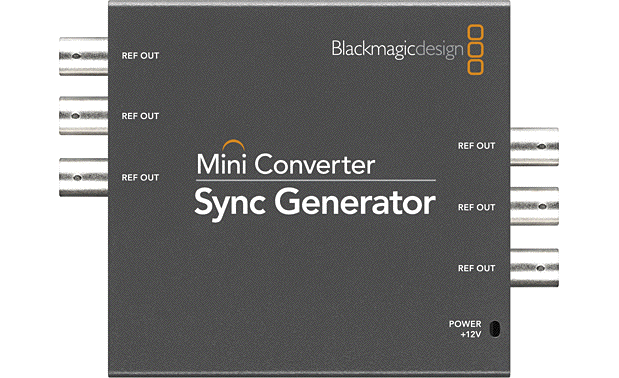
Blackmagic’s Sync Generator is part of their Mini Converter family and provides six simultaneous outputs, either black or tri-sync.
However, using genlockable cameras is not obligatory with the TCXD300. If you don’t send sync to the TCXD300, then it will automatically activate the frame synchronizers on each input. In any system, the use of frame synchronizers always means additional delay. As Jorge Dighero explained to me during his demonstration, the TCXD300 has inboard audio delays which compensate for the video delays in the frame synchronizers (when they are active), so there will be no lip sync issue in the recorded signal, or the broadcast or webstreamed signal. However, monitoring the the delayed output can be quite uncomfortable unless the control room is 100% acoustically isolated from the studio, since you would see a lip sync issue on the monitor (versus the live, acoustic audio). This is also troublesome in live applications where the output of the TCXD300 is connected to video projectors. That’s why it is recommended to use genlockable cameras, although some budget situations may have to go without genlock.
Non-genlockable HD-SDI cameras for TriCaster TCXD300
If you’re on a very tight budget and can stand the lip sync issue on your local program monitor (or have acoustically isolated your control room from your studio), you might consider the Sony EVI-HD1. This camera has direct HD-SDI output, is multi-standard to the max (including 720p25, 720p29.97, 720p50, 720p59.94, 1080p25, 1080p29.97, 1080i50, and 1080i59.94) and has a list price of US$4,028.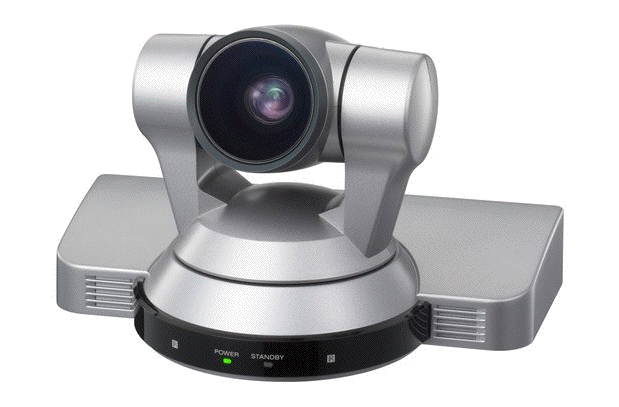
Sony’s EVI-HD1 robotic HD camera eliminates the cost of a tripod, lens controls, intercom, and potentially reduces the number of camera operators from three to one, for a 3-camera system.
The EVI-HD1 is robotic, and several can be controlled by Videobotics’ CosmosHD1 software which actually acts a a software based CCU for multiple cameras simultaneously for only US$1,199.95 plus a laptop and cabling. As of the publication date of this article, I have never seen the image from the EVI-HD1, but Jorge Dighero says that it works great with a TriCaster and has a very good image for its price. Also, Videobotics sells packages including the EVI-HD1 cameras with their CosmosHD1 software.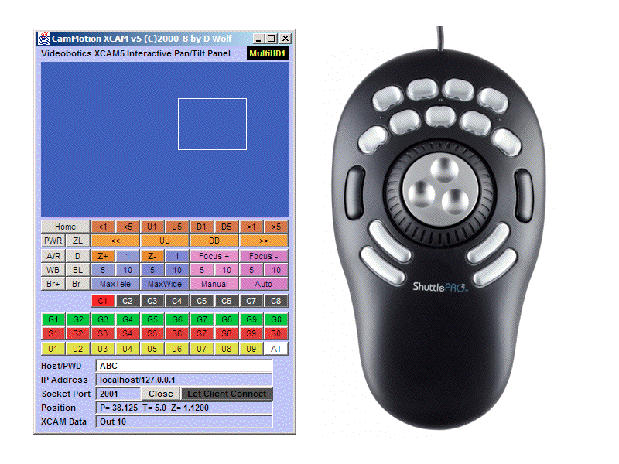
The CosmosHD1 software comes with a ShuttleProV2 which facilitates its use to control the cameras and recall presets and user-controlable macros. It can also be network-remote controlled (if you wish) from anywhere, including LAN or Internet.
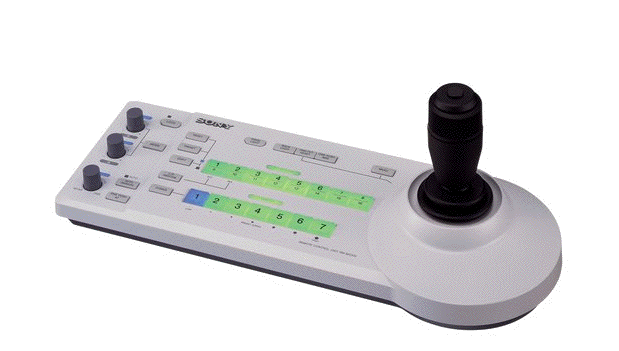
If you’d prefer dedicated hardware instead of a laptop, Sony offers the BR-RM300 for US$1,575 plus cabling. One BR-RM300 can control several EVI-HD1 cameras, both the pan/tilt and mini-CCU functions.
On the other hand, you might consider Sony’s recently introduced HXR-NX5 (the first NXCAM), which I announced immediately after its embargo ended, and then was later covered in much more detail by Adam Wilt here, and then updated here. Since Adam and I each had very different emphasis in our articles, I recommend reading all three links offered in the previous sentence, in order to get as much information as possible.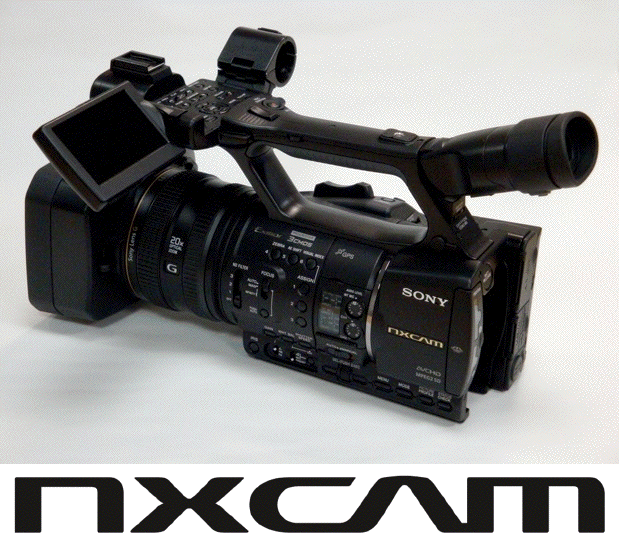
Sony’s HXR-NX5 (the first NXCAM)
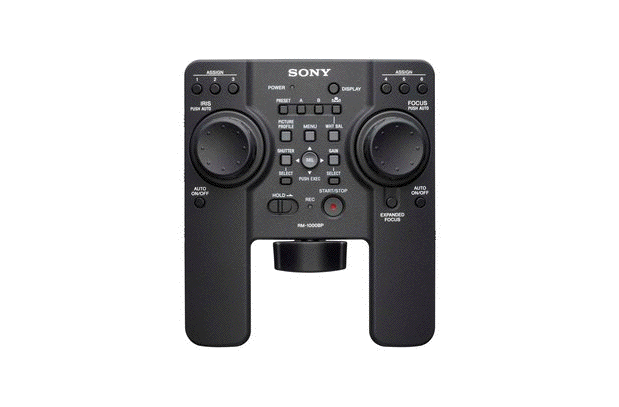
Sony’s RM-1000BP mini-CCU is compatible with the HXR-NX5, among many other Sony cameras.
The list price of the HXR-NX5 is US$4,950 (as opposed to US$4,028 for the EVI-HD1), so the difference per camera -at list price- is only US$922 per camera. However, you will pay over US$10,000 more for three HXR-N5 cameras once you add the cost of the tripods with lens controls, mini CCUs, and an intercom system, compared with the EVI-HD1 with remote/mini-CCU (not counting the savings in camera operators from three to one). Here is a comparison of these three cameras -at list price- to feed the TCXD300. I have left out the cabling, but that should easily be covered in either case by a discount you’ll get on the cameras.
3 EVI-HD1 HD robotic cameras US$4,028 x 3 = US$12,084
1 BR-RM300 remote control/mini-CCU (or ± Videobotics’ CosmosHD1 with a laptop) US$1,575
Total: US$13,659
3 HXR-NX5 US$4,950 x 3= US$14,850
3 RM-1000BP mini-CCU US$1,309 x 3 = US$3,927
3 tripods with lens controls at ±US$1,200 x 3 = US$3,600
1 Datavideo ITC-100 intercom system ±US$1,500
Total: US$23,877
So you would save about US$10,218 overall by choosing the EVI-HD1… or spend US$10,218 more if you choose the HXR-NX5. The HXR-NX5 probably has a slightly better picture, but for a studio situation, its design makes it much more costly than you might have first imagined, compared to the EVI-HD1.
Of course, if you choose to go without genlock, you could use even lower-cost cameras than the ones mentioned so far, as long as they at least have a live HDMI output. In that case, you’ll need a converter box that goes from HDMI to HD-SDI like the AJA HA5 (US$490 plus US$40 for power supply = US$530), Blackmagic HDMI-to-SDI (US$495 including power supply, per camera), Convergent Design nanoConnect (US$395 per camera, including power supply), or the Datavideo DAC-9 (US$400 per camera, including power supply). However, keep in mind that some cameras have a continuous, undefeatable menu superimposed over the live HDMI output, so make sure before committing to a particular camera.
Genlockable HD-SDI cameras for TriCaster TCXD300
If you’ve decided that you won’t be able to stand the lip-sync issue on your local program monitor and cannot isolate your control room acoustically from the studio… and are seeking the lowest price HD-SDI cameras with genlock on the market, then you might consider the following two categories:
Conventional HD cameras with included genlock and HD-SDI output, which will require mini-CCU/full CCU/triax, power supply, tripod with lens controls, camera operator, and studio viewfinder:
Robotic HD cameras with genlock, their “gotcha” HD-SDI output card, and remote/mini-CCU:
Videobotics also offers packages with the Sony BRC-H700 and BRC-Z700 and their CosmosHD software to control pan/tilt and mini-CCU functions.
Ahead in this article
- Virtual sets and virtual live cameras
- Character generator keyboard compatibility
- All about black level, setup, and pedestal
- Waveform monitor panic, and response
- Wish list
- Conclusions
Virtual sets and virtual live cameras
The TriCaster TCXD300 has a virtual set that to my eyes look as good as a CNN set… and that’s before seeing the demonstration of the virtual live cameras and the digital zoom. If you have a very good HD camera, you can set it for a wide shot, and then have the TriCaster TCXD300 zoom in electronically, and not see any visible degradation. When doing this electronic zoom with the TCXD300, the camera image and the virtual background or foreground are in perfect perspective sync, and move with the exact same speed. You can also preset a virtual close-up and then cut or dissolve from any of the other cameras to the close-up version. You have simultaneous access to the close-up and the wide shot.
Character generator keyboard compatibility
As a person who in a prior life configured Video Toasters in the Commodore Amiga computer with Spanish keyboards for Latin America, I was particularly concerned about the compatibility of the TriCaster TCXD300 with “foreign” keyboards. Back in the day, with the original Amiga Video Toaster, we had to perform three unusual tasks in order to achieve compatibility:
- Import Commodore Spanish keyboards from Germany, 100-pieces at a time. (The Amiga did not work with PC or Mac keyboards.)
- Hire a programmer to create a resident application to re-activate the so-called “dead” keys, since the original Video Toaster’s character generator in the Amiga would not recognize them. (On non-USA keyboards, the dead keys were born on the mechanical typewriter so that when typing a diacritical mark, the carriage would not advance, awaiting the character to be modified by the diacritical mark. This was then simulated on the computer versions of those keyboards.)
- Hire a program to create full ASCII fonts for the Amiga Video Toaster, since the original ones from NewTek were missing the extra characters used in other languages.
The above took a lot of time and money to make it happen. Fortunately, everything went smoother with the TriCaster TCXD300. I brought a Spanish ISO keyboard to the demo and explained the past situations to Jorge Dighero. We reconfigured the underlying operating system (Windows, which is normally invisible to the TriCaster operator) for the Spanish ISO keyboard, and everything worked wonderfully with the TCXD300 character generator.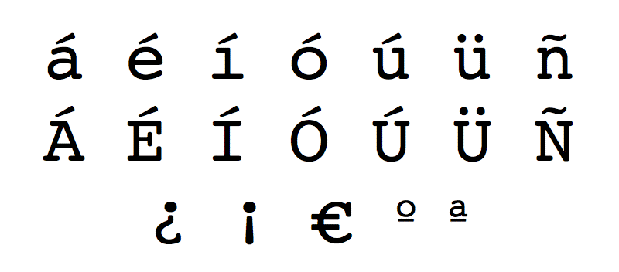
The 19 “extra” characters required to type in Castilian, which have direct access from the Spanish ISO keyboard, but not directly available on the standard USA keyboard.
I personally tested all of the 19 “extra” characters required to type in Castilian (many of which are common to Catalán, French, Italian, and Portuguese), and everything worked wonderfully with the TCXD300 character generator’s default font. What a relief! I gave the Spanish ISO keyboard to Jorge as a gift!
Sidebar: All about black levels, pedestal, and setup
Back in 2002, I published a 3-page article called Los negros todavía no tienen igualdad for the Latin American magazine Producción & Distribución. About a week later, Adam Wilt published a similar, 1-page article for DV magazine. If I remember correctly, Adam’s article was entitled We’ve been setup. Although both articles covered the same topic, each offered different types of solutions. About a month later, JVC Professional released a cute 5-minute tutorial called Dirty Little Secrets about the same topic which apparently was inspired by my article. It was extremely well done, although it neglected to cover the international aspects. (That would have been very difficult to do so gracefully, in such a short duration.)
Here’s a very concise summary:
7.5 ire is part of the analog NTSC signal in NTSC-countries in the Americas, but it does not exist at all in analog NTSC in Japan (sometimes called NTSC-J), analog PAL in any country, analog HD of any type in any country, or digital video of any type in any country. In a digital 8-bit system, standard black level must always be at digital level 16 in any country (regardless of whether an SD analog output may or may not have 7.5 ire pedestal, depending upon other factors). In a digital 10-bit system, the standard black must be at digital level 64 (regardless of whether an SD analog output may or may not have 7.5 ire pedestal, depending upon other factors). In fact, the standard black level on an HD-SDI signal from an HD camera must always be digital level 64, regardless of where the HD camera is sold or delivered anywhere in the world, since the HD-SDI standard is always 10-bit (even though certain JVC HD cameras actually derive the 10-bit signal from an internal 8-bit signal, even in live mode).I am including this sidebar to prepare you for the following alarm.
Why I was alarmed when I saw the TriCaster TCXD300’s waveform monitor
When I saw the graticule on the TriCaster TCXD300’s waveform monitor, I was shocked to see that there was a specific marker for 7.5 ire, since it didn’t belong there. I contacted NewTek’s executive VP of engineering, who acknowledged the above information, and responded to my alarm. His response is in the next section.
NewTek’s response about the TriCaster TCXD300’s waveform monitor
Andrew Cross, executive VP of engineering at NewTek, replied:
This is a great observation and what is actually a slight bug in the product. Currently, we show the 7.5IRE marking even when in PAL and NTSC-J mode where it is not very useful (either). The actual calibrated IRE levels should however be correct. We are about to release a patch for TCXD300 and this version will remove the 7.5IRE line from the “non-pedestal” graticule for the waveform monitor.
What a relief!
Wish list for improvements on the TriCaster TCXD300
- For internal recording, add the option to have the system record the separate audio among any of the following: AAC (M4A), MP3, WAVE, or AIFF.
- Remove the 7.5 mark on the waveform monitor (as has already been promised).
- For the proc-amps (which currently allow saving settings per project, per input), allow saving and recalling presets for specific shots. This request is only in case that capability is not present in a CCU or mini-CCU, which is certainly much better in terms of signal-to-noise ratio.
- The current waveform monitor & color vectorscope are very good (except for the “7.5 bug” which is about to be fixed). However, currently they are rather small even in the best size Jorge was able to show me. I would like a Camera Setup mode “A”, where three waveform monitors (corresponding to the three camera inputs) are arranged side by side in such a way that they are occupying almost the entire raster to facilitate matching luma levels and black levels. As stated earlier, these adjustments are best made at the camera head, via the CCU or mini-CCU located near the TriCaster, but in case that’s not available, there should be access to the TCXD300’s proc-amp directly below each waveform monitor, to adjust black level and luma level. Camera Setup “B” would be the same thing, but show three huge vectorscopes side-by-side, with the proc-amp below each one, accessing the chroma saturation and hue (in the case of composite or Y/C sources only). Camera Setup “C” would be a huge waveform monitor (almost full raster) with each camera input signal superimposed over each other, but each one in a different color: perhaps red for input 1, green for input 2, and blue for input 3, with the three appropriate proc-amp access windows below. Camera Setup “D” would be a huge vectorscope (almost full raster) but (unlike when viewing a single source on the vectorscope with the colors), it would have the same single color per channel as in mode “C”.
Conclusions
I already love the TriCaster TCXD300 for all of the reasons stated in this article. I will love it even more after NewTek adds the wish list items you just read!
Allan T©pper’s articles and seminars
Get a full index of Allan T©pper’s articles and upcoming seminars and webinars at AllanTepper.com. Listen to his radio program TecnoTur, together with Tanya Castañeda, Rub©n Abruña, and Liliana Marín, free via iTunes or at
Disclosure, to comply with the FTC’s new rules
None of the manufacturers listed above is paying Allan T©pper or TecnoTur LLC specifically to write this article, and so far, none has sent him any samples or demonstration items as a gift. Some of the manufacturers listed above have contracted T©pper and/or TecnoTur LLC to carry out consulting and/or translations/localizations/transcreations. At present, some of the manufacturers listed above are sponsors of ProVideo Coalition magazine, and others are not, but this did at not all affect T©pper’s criteria for evaluating the products mentioned.


Filmtools
Filmmakers go-to destination for pre-production, production & post production equipment!
Shop Now