

Filmtools
Filmmakers go-to destination for pre-production, production & post production equipment!
Shop NowDespite the Premiere Elements team’s denial about the existence of PsF in AVCHD, fortunately there are workarounds to handle AVCHD PsF properly with the sub US$100 Premiere Elements in many cases.

In parts 1-3 of the PsF’s missing workflow series, we introduced the terms benign PsF & malignant PsF, and revealed the PsF status of several AVCHD cameras from 3 manufacturers. In #4, we did the same with several HD recorders. In #5, we revealed how one recorder manufacturer is offering its own software to counteract the inappropriate signals offered over HDMI by many cameras. In #6, I published an open letter to all pro AVCHD manufacturers. In #7, I covered how to deal with PsF on a progressive sequence in Premiere Pro CS5.5. In #8, I showed how ClipWrap is an excellent solution for many Mac editors. Now in #9, I’ll discuss PsF with the sub US$100 Adobe Premiere Elements 10.
Tests made for this article
The observations and tests made for this article were done using the Mac version of Adobe Premiere Elements 10. To my knowledge, all observations would be identical with the Windows version, except when noted.
The terms Benign PsF and Malignant PsF
The terms benign PsF and malignant PsF were introduced in Part 1 of this series called PsF’s missing workflow. If you haven’t read it yet, please do, in order to understand the importance of proper handling of PsF, and be able to preserve the pristine quality of the footage you shoot throughout your workflow. It is a shame to degenerate your video by not having a good command of this important issue.
Can a professional really use Premiere Elements?
The answer is that it depends! I’ll be covering that in a separate article with that same name: Can a professional really use Premiere Elements?
Challenges to dealing with PsF properly in Premiere Elements
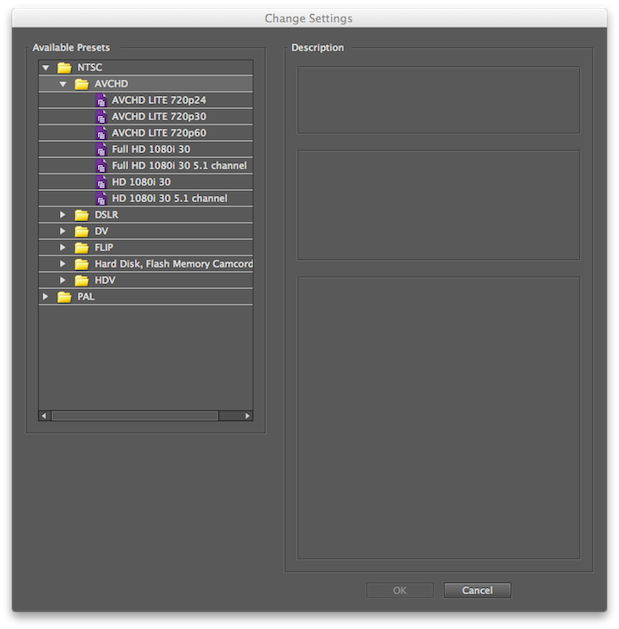
- The Premiere Elements team currently denies the existence of 1080PsF25 (aka 25PsF) and 1080PsF29.97 (“30PsF”) in consumer AVCHD cameras. As a result, none of the 1080 AVCHD presets in Premiere Elements 10 are progressive. Instead, they are all 1080i (interlaced). The Premiere Elements team even continued to deny the existence of 1080PsF25 and 1080PsF29.97 in consumer AVCHD after I proved that it existed with a popular consumer AVCHD camera from Sony (the VG10), where Sony (consumer) had recently corrected the information on the SonyStyle.com website after my clarification here in ProVideo Coalition magazine. The e-mail conversation with the Premiere Elements team went through the Adobe Public Relations company, so I cannot quote particular names of Adobe employees, since the names were removed from the e-mails that went through the P.R. group. The e-mail conversation actually happened when I was testing Premiere Elements 9 (before 10’s release), but my testing with Premiere Elements 10 reveals that they are still in denial about this topic. See Premiere Elements 10 AVCHD presets below:
- Unlike with Premiere Pro CS5.5, Premiere Elements 10 does not allow the user to create new project presets or to modify the existing ones manually. This fact is confirmed by the Premiere Elements 10 documentation. There is a way in Premiere Elements 10 to provoke an automatic change to a preset to make it progressive when you drag the first progressive or benign PsF clip onto the timeline, but don’t count on it. It turns out that it isn’t the best workaround for this situation, since it will often get you into trouble later upon export, since even though the project is supposedly progressive, upon export it is often still perceived as interlaced by the Sharing section, which causes unnecessary and undesired de-interlacing upon export to progressive targets, with no possible override. But don’t worry, there is a better workaround that is a sure thing!
- Fortunately, there’s no problem for 720p presets with footage from a 720p camera. Fortunately, there is no problem with the 720p presets with footage from a 720p camera (since 720p is -by definition- progressive). However 720p-only cameras are becoming quite rare, and the remaining 720p modes on 1080p cameras are generally used for shooting 720p50 (in ex-PAL countries) and 720p59.94 (in ex-NTSC countries), where there is no PsF (only native) and it is obviously progressive because -fortunately- there is no such thing as interlaced with 720p, so Premiere Elements 10 has no other alternative but to handle it as progressive.
- Additional denial regarding native 1080p23.976 in consumer AVCHD cameras (aka “24p”). The Premiere Elements team also denies the existence of native 23.976p in consumer AVCHD. That’s why there’s no AVCHD preset for that framerate either in Premiere Elements 10 as of publication time of this article, even though that popular HG10 (consumer model) from Canon offers it, for example. But don’t worry: Your workaround is just ahead!
The SonyStyle.com website continues to indicate that the VG10 (and now also the VG20) both record 1080PsF29.97, and they are only some examples of many consumer AVCHD cameras that do it. So much for deniability…
On page 2 of this article, you’ll see…
- The best workaround to edit native 1080p23.976 (aka “24p”), benign 1080PsF25, and benign 1080PsF29.97 (aka “30PsF”) from AVCHD in Premiere Elements 10
- What if I have malignant PsF from a Canon AVCHD camera?
- Best practices for exporting (Sharing) from your progressive 1080p project in Premiere Elements 10 for H.264 for web and mobile devices
- Best practices for exporting (Sharing) from your progressive 1080p project in Premiere Elements 10 for video disk delivery (video DVD or Blu-ray)
- Rather than shooting 1080PsF25 or 1080PsF29.97 in your Canon AVCHD camera, shoot native 1080p23.976 (called “24p” in the Canon menu) and then (as stated before) use a 1080p23.976 DSLR preset in Premiere Elements 10.
- If you’re on a Mac, buy ClipWrap (my full review is here) and let it re-wrap the raw Canon malignant PsF AVCHD footage on your camera or memory card into a native H.264 file with .mov extension while it copies your footage from your camera or memory card onto your disk array (or media drive), before you ingest it into Premiere Elements 10. If you import that rewrapped footage into the appropriate DSLR preset for your framerate (i.e. 1080p25p or 1080p29.97), then your workflow will be 100% progressive and therefore you won’t provoke any unnecessary/undesired de-interlacing upon ingest or upon export/encoding to your destination format.
- PsF’s missing workflow, Part 1: BENIGN PsF versus MALIGNANT PsF from October 23, 2011
- PsF’s missing workflow, Part 2: the Canon XA10 camera from October 26, 2011
- PsF’s missing workflow, Part 3: Sony’s AVCHD & NXCAM cameras from October 31, 2011
- PsF’s missing workflow, Part 4: file-based HD video recorders from November 10, 2011
- PsF’s missing workflow, Part 5: Átomos hires a stripper! from November 11, 2011
- PsF’s missing workflow, Part 6: T©pper asks the camera manufacturers… (An open letter to all professional AVCHD camera manufacturers) from November 14, 2011
- PsF’s missing workflow, Part 7: Adobe Premiere Pro CS5.5.x from November 28, 2011
- PsF’s missing workflow, Part 8: ClipWrap to the rescue from November 30th, 2011
The best workaround to edit native 1080p23.976 (aka “24p”), benign 1080PsF25, and benign 1080PsF29.97 (aka “30PsF”) from AVCHD in Premiere Elements 10
At present, the best workaround to edit native 1080p23.976, benign 1080PsF25, or benign 1080PsF29.97 in Premiere Elements 10 is to use the matching DSLR preset instead of any AVCHD preset. When I say “matching”, I mean the one that matches the framerate of your footage. Fortunately, using the DSLR preset is an indirect way of forcing a preset to progressive, since there are no interlaced options under DSLR. Performance will not be affected by using a DSLR preset for progressive or benign PsF (as defined in the prior articles in the PsF’s missing workflow series). But don’t count on this for malignant PsF for now. See alternatives just ahead.
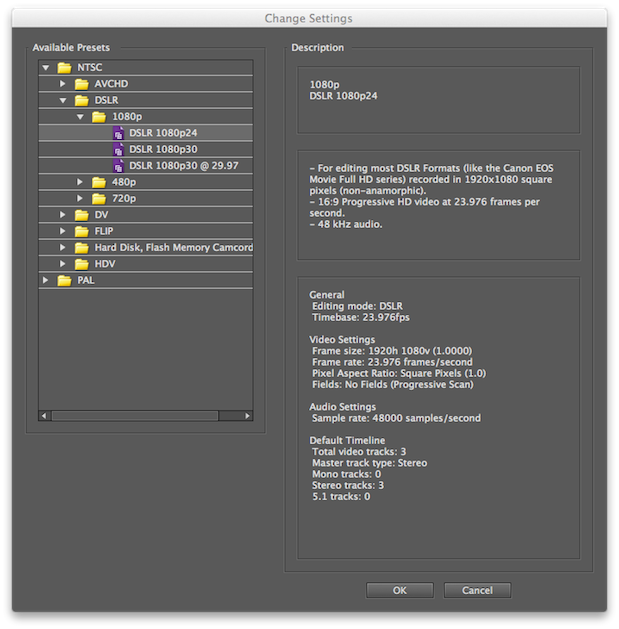
Use the “DSLR 1080p24” for your native 1080p23.976 projects.
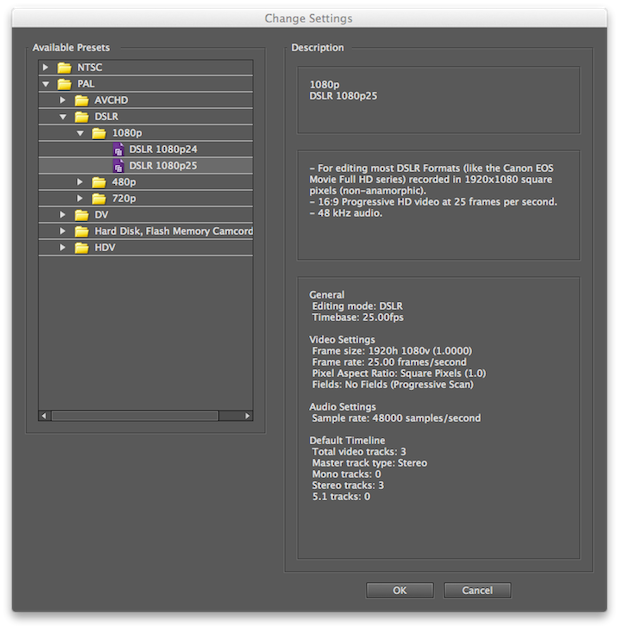
Use the DSLR 1080p25 preset for your benign 1080PsF25 projects (primarily in ex-PAL countries).
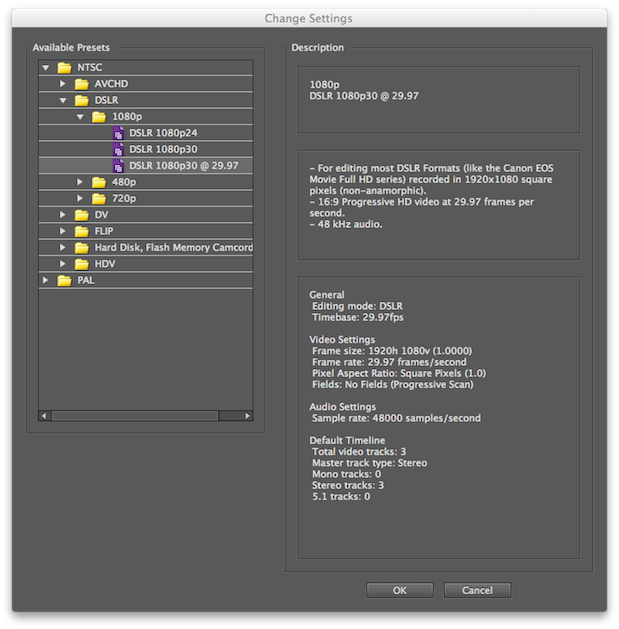
Use the “DSLR 1080p30 @ 29.97” preset for your benign 1080PsF28.97 projects (primarily in ex-NTSC countries).
What if I have malignant PsF from a Canon AVCHD camera?
Although Premiere Elements 10 does have a feature called Interpret Footage which is similar to the one in Premiere Pro CS5 and 5.5 (see PsF’s missing workflow, Part 7: Adobe Premiere Pro CS5.5), unfortunately the simplified version of the Interpret Footage in Premiere Elements 10 doesn’t have the option to interpret a particular clip as progressive the way the one in Pro does. Premiere Elements 10 also has a contextual menu called Field Options, but it includes all options except the one that we want. As a result, presently it’s a bad idea to import Canon’s malignant 25PsF or malignant 29.97PsF AVCHD footage directly even into a DSLR preset based timeline in Premiere Elements 10, since currently, the program will see it as interlaced. Until something changes either via a firmware update from Canon or an update in Elements to recognize the Canon PsF AVCHD footage as what it is, the only options I can recommend are (pick one of these):
Best practices for exporting (Sharing) from your progressive 1080p (“DSLR”) project in Premiere Elements 10 for H.264 for web and mobile devices
Even though Premiere Elements offers direct, easy export (and even automatic upload to web video sharing services), don’t use them because you won’t get the control -or the visible verification that you are indeed exporting your progressive timeline without any undesired de-interlacing. In addition, using these options often produces an innapropriate frame rate on the output, without any override capability. Instead, use the Mobile: Apple iPod, iPad and iPhone portion of the Sharing section of Premiere Elements 10, since that’s where you’re able to create your own presets, have very advanced control, and be able to confirm with absolute certainty that your timeline has been indeed detected as progressive, and that the output is also progressive. Be sure to match the output framerate manually for your output based upon your original footage and project setting, since unfortunately there is no “Same as source” option. [In the mentioned section (the Mobile: Apple iPod, iPad and iPhone portion of the Sharing section in Premiere Elements 10) you’ll be able to adjust all of the minutia associated with the ideal H.264 encoding for any particular situation, the details of which are outside the scope of this article. This article is focused upon how to handle PsF -and native 23.976p- in Premiere Elements 10.]
Best practices for exporting (Sharing) from your progressive 1080p (“DSLR”) project in Premiere Elements 10 for video disk delivery (video DVD or Blu-ray)
If you want to use Premiere Elements 10’s inboard basic authoring and burning for DVD or Blu-ray, do so at your own risk. This function offers very little manual control of your encode. For DVD, it offers the option of burning directly, or “burning” to a folder to be burned later (either 4.7GB for single-layer DVD or 8.5GB for dual-layer DVD) along with some basic presets, although fortunately there are presets for widescreen DVD. For Blu-ray, the only option is to burn directly to a disk. Both DVD and Blu-ray subsections fortunately offer the option of automatically calculating the bitrate to fit the available space depending upon the type of target. It is not completely clear whether they will properly make the target framerate 23.976p from such a project, but the presets certainly don’t imply it. To underline that, for Windows users only, a hacker has created extra presets to allow that. For best results, I’d go with the second (manual) option, which I cover in the next paragraph.
If you prefer to use another application for burning DVD or Blu-ray disks (with or without authoring), use the Computer: MPEG section of the Share mode, where you’ll get full control of the DVD-compliant MPEG2 or Blu-ray compliant H.264 or MPEG2, at any of the appropriate framerates (23.976p, 25p, or 29.97p). Remember that although the Blu-ray spec fortunately supports native 1080p23.976 (so make it native in that case), the Blu-ray spec sadly does not allow native 1080p25 or native 1080p29.97, so the best option is to create 1080PsF25 or 1080PsF29.97 at this point (upon final encode), which Premiere Elements 10 fortunately offers. That way, whatever software you use to author (if desired) and burn will see the file as Blu-ray compliant and only handle its other tasks.
Upcoming articles in the PsF’s missing workflow series
Upcoming articles in this PsF’s missing workflow series will reveal the different workarounds with other software programs, and my conclusions about this situation. To be sure you don’t miss any articles, sign up for my mailing list here.
Prior sections of the PsF’s missing workflow series and other related articles
Allan T©pper’s books, consulting, articles, seminars, and audio programs
Contact Allan T©pper for consulting, or find a full listing of his books, articles and upcoming seminars and webinars at AllanTepper.com. Listen to his TecnoTur program, which is now available both in Castilian and in English, free of charge. Search for TecnoTur in iTunes or visit TecnoTur.us for more information.
Disclosure, to comply with the FTC’s rules
None of the manufacturers listed in this article is paying Allan T©pper or TecnoTur LLC specifically to write this article. Some of the manufacturers listed above have contracted T©pper and/or TecnoTur LLC to carry out consulting and/or translations/localizations/transcreations. Many of the manufacturers listed above have sent Allan T©pper review units, and Adobe gave him an NFR (not for resale) license of the Adobe programs described, and Divergent Media gave him an NFR of ClipWrap. So far, none of the manufacturers listed above is/are sponsors of the TecnoTur programs, although they are welcome to do so, and some are, may be (or may have been) sponsors of ProVideo Coalition magazine. Some links to third parties listed in this article and/or on this web page may indirectly benefit TecnoTur LLC via affiliate programs.
Copyright and use of this article
The articles contained in the TecnoTur channel in ProVideo Coalition magazine are copyright Allan T©pper/TecnoTur LLC, except where otherwise attributed. Unauthorized use is prohibited without prior approval, except for short quotes which link back to this page, which are encouraged!