An ideal i/o device to capture up to 10 independent audio sources simultaneously, each on its own individual track.

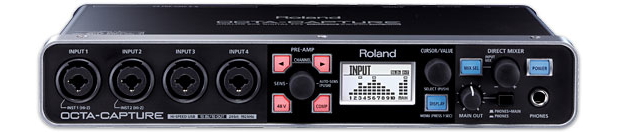
Many of the affordable pro audio interfaces that are available on the market have a maximum of two balanced microphone inputs, and few of them include hardware-based limiting, compression, or gating. Among the special features of Roland's OCTA-CAPTURE is the fact that it contains 10 total audio inputs, of which 8 are balanced microphone inputs. The OCTA-CAPTURE allows recording to a standalone audio recorder and/or to a computer. At least when used with a computer and a compatible piece of audio software, the operator can even record all of the available inputs on individual tracks, which provides extra flexibility in post-production, i.e. to mute a cough, or to re-adjust volume or equalization of any particular source after-the-fact without affecting any other source recorded simultaneously. The OCTA-CAPTURE also features onboard compression and gating. In this article, I'll cover the OCTA-CAPTURE's features, setup, preamp quality, compatible audio software, and then offer my conclusions.{C}
In this article
- OCTA-CAPTURE: description, specifications, and features
- Regarding the four virtual monitor mixes
- Use with a traditional telephone hybrid
- Setting up the OPTA-CAPTURE
- Preamp/ADC quality, and how I made my tests
- Audio test files to download
- Compatible Mac audio software to record each track independently on its own track
- Advice to colleagues who reject recording audio onto a computer
- Conclusions/About the author
OCTA-CAPTURE: description and specifications
Roland describes the OCTA-CAPTURE (US$699 list/US$599 street) as being a 10×10 24-bit/192 KHz hi-speed USB audio interface with eight “premium” mic preamps. Roland describes the OCTA-CAPTURE as being compact and having “pristine sound quality”. You'll read my opinion about their descriptive terms “premium” and “pristine” ahead in this article. Roland states that the OCTA-CAPTURE is for high-level audio production, and that it combines premium components, Roland-quality engineering, and proprietary preamp and streaming technology. Finally, Roland states:
Brimming with quality and performance that far exceeds its size and price, OCTA-CAPTURE is the next-generation audio interface.
Other features
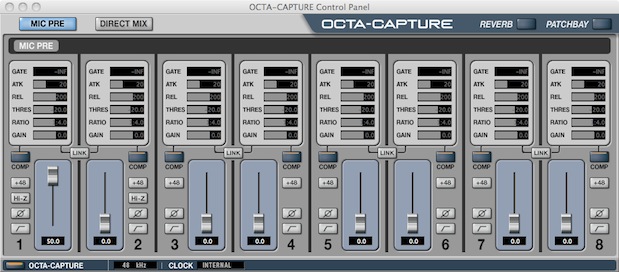
OCTA-CAPTURE's control panel.
- AUTO-SENS function intelligently sets optimal input levels for all preamps (I didn’t use that feature during my testing, but it would be appropriate in certain situations.)
- Extremely stable low-latency VS STREAMING driver
- Four independent software-controlled direct mixers for creating custom monitor mixes (more about that below)
- Support for major DAW (Digital Audio Workstation) platforms on Mac or Windows, including OSX 10.7 and Windows 7, through ASIO 2.0/WDM (Windows) and Core Audio (Mac) drivers (Later in this article I’ll describe which applications I tested on the Mac.)
- Rackmount ears included
- Bundled Cakewalk Production Plus Pack software
- Eight XLR/1/4-inch TRS phone inputs for the preamps, plus independent phantom power, low-cut filter, phase invert, and digital compression for each channel.
Regarding the four virtual monitor mixes
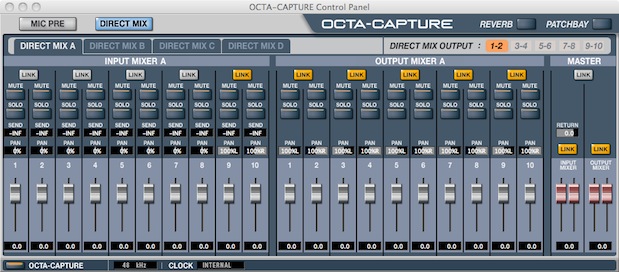
Each of the four virtual monitor mixes can be routed to any of the analog outputs of the OCTA-CAPTURE and can take advantage of the internal 40-bit DSP (digital signal processing). This feature can be used to send custom monitor mixes to headphones, speakers, or recording devices. Another potential application I envision for this feature would be to create a mix-minus signal to send as a return to a traditional telephone hybrid. That’s not something we currently need at TecnoTur (even though we do many telephone conversations with very high quality), since we use internet telephony’s natural lack of sidetone, but I have experience installing and configuring traditional telephone hybrids with mix-minus in other studios and I realize that at least one of our readers will prefer the more traditional method 🙂
Setting up the OCTA-CAPTURE
Unlike most other audio i/o interfaces I have tested, OCTA-CAPTURE requires the installation of drivers both for Windows and Mac. Other units have only required drivers for Windows, but not for Mac. Like most USB devices that require drivers, we are quite logically supposed to install the drivers before connecting the device… and like many USB drivers, a restart of the computer is required after installing them. Since the restart is required regardless with the OCTA-CAPTURE, I didn’t feel uncomfortable closing all of my apps before installing the drivers and app. Installation occurred without any snags and after restarting, my MacBook Pro running 10.6.8 recognized the OCTA-CAPTURE immediately.
On page 2 of this article
- Preamp/ADC quality, and how I made my tests
- Audio test files to download
- Compatible Mac audio software to record each track independently on its own track
- Advice to colleagues who reject recording audio onto a computer
- Conclusions/About the author
Click here to continue to page 2.
Preamp/ADC quality, and how I made my tests
For this review and several similar ones I am doing on other devices, I decided to use TecnoTur´s revered Heil PR-40 large diaphragm dynamic microphone as the reference microphone in order to evaluate the preamp and ADC (audio>digital converter) in each device. Since the PR-40 microphone is dynamic, I did not use any phantom power. To be fair with all of the devices, I left filters, compressors and limiters off during the tests. With all of them, I recorded the best audio level possible, although with some, there was not quite enough amplification even at maximum gain. Although generally when I record audio podcasts, audio spots, or audiobooks, I record at 44.1KHz, for any audio to be used with video, I do it at 48KHz, which is the standard for digital-audio-for-digital-video. That’s why I recorded all of the samples made for this and the other related reviews at 48KHz. Following you will find downloadable raw 48KHz WAV files to compare the audible quality of each. When I say ?raw?, I mean that no post-processing has happened on the original 48KHz, other than to export it as a mono 48KHz WAV file. Depending upon your browser, you can right-click and Download linked file as… or Save link as…:
- Edirol/Roland FA-66 (now discontinued). This is the audio interface we have been using for quite some time in the TecnoTur studio, and is the only one of this group that connects via IEEE-1394 (FireWire). The FA-66 is quite comfortable to use with a Mac, since it works natively, without installing any other driver. The FA-66 uses bus power, so it requires no other power source. Download FA-66 audio test file here.
- Edirol/Roland OCTA-CAPTURE. This is the main one being reviewed in this article and connects via USB 2.0. Download OCTA-CAPTURE audio test file here.
- Sony PCM-M10 standalone recorder with Heil PR-40 microphone connected directly (without a balancing transformer, floating the ground). Download PCM-M10 without balancing transformer audio test file here.
- Sony PCM-M10 standalone recorder with Heil PR-40 microphone connected via a Hosa balancing transformer to reject hum and radio stations when using a balanced microphone with a long cable with a recorder that has an unbalanced input. Download PCM-M10 with the Hosa balancing transformer audio test file here.
- Sound Devices USBPre2. Like the FA-66, this one also works natively with Mac, without having to install any other driver. Download USBPre2 audio test file here.
Feel free to download each recording and form your own opinion. Although the FA-66 has always sounded good to me and many other people (especially after the post-processing I use), all of the other ones I tested sound even better than it does. To be more specific, to my ear the OCTA-CAPTURE and PCM-M10 both sounded extremely good, while the USBPre2 sounded superb. Standby for upcoming articles about the QUAD-CAPTURE (a little-sister to the OCTA-CAPTURE), the PCM-M10, and the USBPre2.
Compatible Mac audio software to record each track independently on its own track
As stated in the introductory paragraph of this article, there are advantages to recording each source on its own track. Although the OCTA-CAPTURE comes bundled with Cakewalk Production Plus Pack software, I did not install it or use it. Instead, I tested this important feature of OCTA-CAPTURE using three different Mac audio software which are capable of recording each track independently, and with which I am more familiar. These applications are Adobe’s Audition CS5.5, Apple’s GarageBand ´09, and Apple’s QuickTime Pro 7. As illustrated in the following screenshots, the operator can assign each desired source channel from the OCTA-CAPTURE to a particular recording track in Audition or GarageBand before recording. There is no requirement to assign all of them. You can assign as few or as many as required.
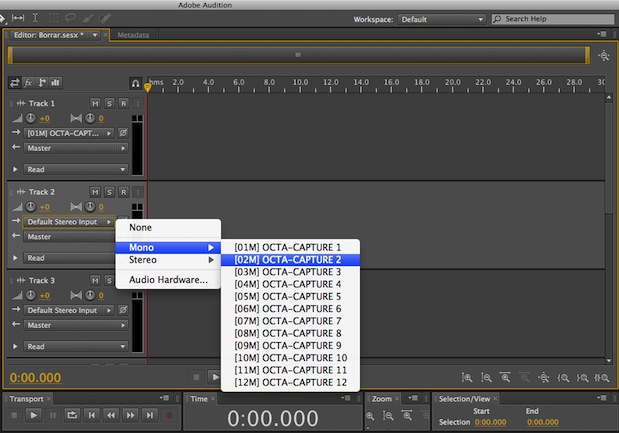
In the above screenshot, I had already assigned the OCTA-CAPTURE input 1 to track 1, and was in the process of assigning input 2 to track 2 in Adobe's Audition CS5.5.
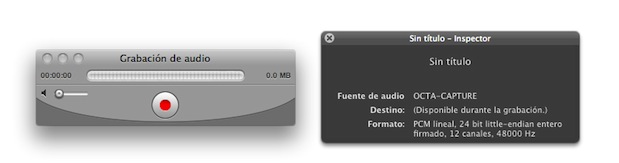
Here I was preparing to capture the entire audio stream with QuickTime Pro 7.
On the other hand, the multitrack recording in QuickTime Pro is a clone of the entire audio stream from the OCTA-CAPTURE, including all of the tracks. Of course, after recording that as an audio-only multitrack .mov file, you can import it into a program like Adobe´s Audition and convert the multirack to individual mono files, export them, and re-import them. Even though some operators may own high-end editing audio apps like Audition for editing, they may prefer the idiot-proof simplicity of QuickTime Pro´s multitrack recording in order to be sure that the recording is done perfectly, and then use Audition later, only in post-production. Others may prefer to do the multitrack recording directly in Audition to save steps.
Advice to colleagues who reject recording audio onto a computer
I have some colleagues who completely reject recording onto a computer and insist on recording to a standalone digital audio recorder. They have that opinion because in the past, they have lost an irreplaceable recorded interview when the program crashed. To you I say that you can always make a multitrack recording on your computer, and simultaneously send a stereo output of a device like the OCTA-CAPTURE to a standalone digital audio recorder like the Sony PCM-M10 or the Zoom H4n as your backup. That way you are covered either way, and can have your cake and eat it too 🙂
Conclusions
Up until now, I have been using the discontinued Edirol/Roland interface, the FA-66, which connects to the computer via IEEE-1394 (FireWire). I have been evaluating other interfaces which connect via USB 2.0 instead of IEEE-1394, since it´s likely that my next computer will no longer have any type of IEEE-1394. I would highly recommend the OCTA-CAPTURE to anyone who needs to record more than two microphones simultaneously and would like the flexibility of having each one on an individual track.
Upcoming articles, reviews, and books
Stand by for upcoming articles, reviews, and books. Sign up to my free mailing list by clicking here.
Si deseas suscribirte a mi lista en castellano, visita aquí. Si prefieres, puedes suscribirte a ambas listas (castellano e inglés).
My latest book (paperback + ebook)
My most recent book is available in two languages, and in paperback as well as an ebook. The ebook format is Kindle, but even if you don’t have a Kindle device, you can read Kindle books on many other devices using a free Kindle app. That includes iPad, Android tablets, Mac computers, and Windows computers. Although generally speaking, Kindle books are readable on smartphones like Androids and iPhones, I don’t recommend it for this particular book since it contains both color photos and color comparison charts. The ebook is also DRM-free.
In English:

In English, it is currently available in the following Amazon stores, depending upon your region:
- Amazon.com, for the US and other countries in the Americas that don’t currently have their own Amazon store, or anywhere if you simply prefer it
- Amazon.br for Brazil
- Amazon.ca for Canada
- Amazon.de for Germany
- Amazon.es for Spain pero a lo mejor lo preferirás en castellano, a continuación)
- Amazon.fr for France
- Amazon.in for India
- Amazon.it for Italy
- Amazon.co.jp for Japan
- Amazon.com.mx for México
- Amazon.co.uk for the United Kingdom
Or in your favorite bookstore by requesting ISBN–10: 1456310232 or ISBN–13: 978–1456310233.
En castellano:

En castellano, está disponible actualmente en las siguientes tiendas Amazon, según tu región:
- Amazon.com para EE.UU. y todas las Américas donde no existe ninguna tienda particular… o en cualquier parte si simplemente lo prefieres
- Amazon.com.br para Brasil
- Amazon.co.jp para Japón
- Amazon.de para Alemania
- Amazon.es para España
- Amazon.fr (Francia)
- Amazon.in para India
- Amazon.it para Italia
- Amazon.com.mx para México
- Amazon.co.uk para el Reino Unido
o en tu librería preferida al solicitar el ISBN–10: 1492783390 ó el ISBN–13: 978–1492783398.
Allan Tépper’s other books, consulting, articles, seminars & audio programs
Contact Allan Tépper for consulting, or find a full listing of his books, articles and upcoming seminars and webinars at AllanTepper.com. Listen to his TecnoTur program, which is now available both in Castilian (aka “Spanish”) and in English, free of charge. Search for TecnoTur in iTunes or visit TecnoTur.us for more information.
FTC disclosure
No manufacturer is specifically paying Allan Tépper or TecnoTur LLC to write this article or the mentioned books. Some of the other manufacturers listed above have contracted Tépper and/or TecnoTur LLC to carry out consulting and/or translations/localizations/transcreations. Many of the manufacturers listed above have sent Allan Tépper review units. So far, none of the manufacturers listed above is/are sponsors of the TecnoTur programs, although they are welcome to do so, and some are, may be (or may have been) sponsors of ProVideo Coalition magazine. Some links to third parties listed in this article and/or on this web page may indirectly benefit TecnoTur LLC via affiliate programs.
Copyright and use of this article
The articles contained in the TecnoTur channel in ProVideo Coalition magazine are copyright Allan Tépper/TecnoTur LLC, except where otherwise attributed. Unauthorized use is prohibited without prior approval, except for short quotes which link back to this page, which are encouraged!


Filmtools
Filmmakers go-to destination for pre-production, production & post production equipment!
Shop Now