How to transfer TiVo recordings to your Mac over Ethernet or WiFi for journalistic or other pro use

For a long time, I have had my eye on TiVo to use instead of the Comcast-provided Motorola DVR. I have known for a few years that the workflow required to re-purpose DVR recordings is much smoother, cleaner, and easier with a TiVo than what's feasible with a conventional DVR. Up until recently, the price for an HD TiVo unit -together with the monthly TiVo fee- had kept me away. However, in the month of September 2010, TiVo was giving away the latest entry level model known as TiVo Premiere when one signed up for a 2-year contract. Under this agreement, the TiVo monthly fee is only US$3 more than what Comcast charges for the old Motorola DVR rental, so the offer became irresistible. This article describes the process to upgrade from your conventional DVR to TiVo Premiere, and the available workflows to re-purpose content for personal or professional use, including the steps to enable editing in Adobe Premiere Pro CS5 or (with additional steps) with Final Cut Pro.{C}
In this article you'll discover
- TiVo Premiere's features, beyond just being a nicer DVR
- Professional applications for the TiVo Premiere
- What's a CableCARD, and how to get one
- How to link your TiVo Premiere via your network to your Mac
- How to transfer content from TiVo Premiere to your Mac, the official way
- How to transfer content from TiVo Premiere to your Mac, the unofficial way
- Editing workflow from TiVo-derived content
- My only criticisms about TiVo Premiere
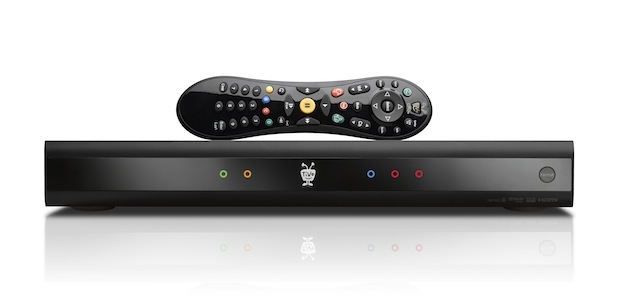
TiVo Premiere's front panel.
TiVo Premiere's features, beyond just being a nicer DVR
My main reason for considering TiVo at all was how much better I knew it is to re-purpose content either for personal, journalistic, or other professional use. As I covered in my review of Toast 10 Titanium Pro in March of 2009, this software package also includes two TiVo-related apps: TiVo Transfer (to transfer programs you have recorded “off of the air” or “off of cable” on the TiVo to your Mac), and Mac2TiVo (to move content that how have on your Mac to your TiVo). However, back then I didn't have a TiVo to test it. Now I have tested TiVo Transfer, together with a free alternative Mac application called iTiVo. More about the use of those apps ahead in this article.
Some other nice pluses of TiVo Premiere include :
- Amazon.com streaming
- Hulu Plus streaming (coming soon)
- Netflix streaming
- Pandora
- Podcast streaming and playback, audio or video
- YouTube streaming
There are many other apps, and others can be added. For full information, TiVo.com.
So far, I have tested Netflix, audio podcasts, and YouTube streaming. Overall, Netflix streaming performance has been good, although the encoding quality among Netflix streaming content varies greatly among different programs or movies. There were relatively few hiccups in the testing I have done so far, especially compared with reports from friends who have older TiVo models. I suppose that's due to a combination of factors: the new hardware in TiVo Premiere, the fast Comcast connection I have, and the fact that I connected the TiVo Premiere to my router via Ethernet. The longest buffering I have seen so far before watching a show has been about 13 seconds.
YouTube streaming works well, although the TiVo Premiere doesn't seem to be accessing the HD versions of clips (720p or 1080p), at least not yet, despite my Comcast download speed -measured from a California server to Florida- of 17.53 Mb/s by SpeedTest.net. I wrote TiVo customer service and despite a few rounds of discussion, I'm still awaiting a proper response.
Audio podcast streaming has worked well. However, if you want to subscribe to a podcast which is not yet in TiVo's directory, you must enter the podcast's RSS feed manually, which can be quite tedious using the TiVo Premiere's remote control. I looked in my TiVo account online to see if was possible to copy and paste RSS feeds there for my account or device, but found no section to do that (the way that one can add movies or programs to a Netflix cue on a computer, and then access from the TiVo). I have also searched for a page to submit audio podcast RSS feeds to TiVo's directory, but only found such a page to submit video podcast RSS feeds. I wrote to TiVo customer service. They confirmed that presently, only video podcast RSS feeds can be submitted, but took it as a suggestion for the future. In the meantime, the user must transcribe the RSS address manually using the TiVo Premiere remote control. You need to do that once, the TiVo Premiere then allows you to add it to Favorites, so the torture only has to happen once per audio podcast.
The current version of the TiVo Premiere unfortunately shows garbage characters when attempting to display words which contain accent marks and/or other diacritical marks, both in podcast descriptions (which appear perfectly when viewed in a web browser or on podcast apps on mobile devices) and in YouTube listings (which appear perfectly in any recent web browser). Fortunately, words with accent marks and/or other diacritical marks appear perfectly in the Netflix descriptions which appear on the TiVo Premiere's user interface. Evidently, TiVo needs to correct character encoding issues in those two branches of its system. I have written TiVo customer service, which acknowledged the issue and said the defect would be reported.
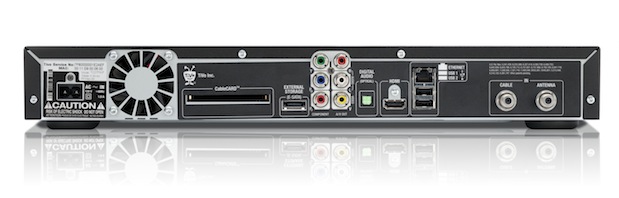
TiVo Premiere's rear panel, which include Ethernet and HDMI connections.
Professional applications for the TiVo Premiere
Obviously, TiVo sells its products mainly for people who want to timeshift. TiVo later added the capabilities to move content to a computer (and then to a DVD or Blu-ray) to help consumers keep certain programs in their permanent physical collection. But beyond that consumer need and solution, sometimes I need a clip or still from a program to accompany an article I'm going to publish (i.e. fair use). Also, I am frequently contacted by friends who are in the media and need footage for their demo reels, or were interviewed on the news. Before having a TiVo Premiere, I had to take the analog (ugh!) video output + audio and run those signals into an interface box which would encode in DVD-compliant MPEG2 over USB 2.0, which would plug into my MacBookPro. Then, I had to play the DVR and record on the Mac. This was not only cumbersome, but it also meant a D>A>D conversion (digital>analog>digital) plus a decompression and a recompression, all of which further degraded the image unnecessarily. Fortunately, I did it that way for the very last time a few days before the Premiere TiVo arrived, since it can do it all natively while remaining in digital, without any other video device or cabling.
What's a CableCARD, and how to get one
A CableCARD is a special card that allows consumers to view and record digital cable television channels on DVRs, computers and TV sets (as long as any of the aforementioned devices has a slot for it) without the use of any other equipment such as a box provided by your cable TV company. The CableCARD is provided by the local cable provider, usually for a nominal monthly fee. CableCARDs allow cable TV companies to comply with requirements established by the USA Federal Telecommunications Act of 1996, which oblige them to allow non-cable company provided devices to access their networks. Together with a unique number on the CableCARD which gets registered to your particular account, the cable TV company can control which channels you see, and which you don't. Although the original CableCARD handled a single stream (which were used with some older TiVos and TV sets), more modern TiVos like the TiVo Premiere require a multistream CableCARD under the CableCARD 2.0 spec.
When I first called Comcast to request a multistream CableCARD and to ask whether they allow self-installation (according to TiVo, some cable companies allow it and some don't), I was unfortunately misinformed by the representative who took my call, since she told me that Comcast had the older CableCARDs for the older TiVos. Fortunately, I knew that she was mistaken, and politely requested to speak with her supervisor. Her response was to put me on hold briefly, and then come back and say that no supervisors were available, but that she would fill out a request to have a supervisor call me back later that day. She said that while the system was generating the supervisor request form in her computer, she wanted to ask me a survey question: “Why don't you consider our DVR?” I was shocked to hear that question, considering that she had already opened my account. My response was: “I have had your DVR for years, and now I am upgrading to the TiVo Premiere.” Later that day, I received a call from a Comcast supervisor, who was also in doubt as to whether Comcast would have multistream CableCARDs, but when I informed him that TiVo already has several users with the new TiVo Premiere in South Florida who are connected to Comcast, he agreed to schedule an an installation for the following Monday in the morning. When the technician arrived on the stipulated day I was somewhat concerned that he'd really bring a multistream CableCARD. However, things were worse than that: He walked in, looked at the order that he had in his hand and said (in Castilian): “Oh, you need a CableCARD. I don't have that. Only the direct Comcast technicians have those.” Then he called his supervisor to see what should be done. His supervisor told him to tell me to call back Comcast to request another appointment. (No comment.) I called Comcast and explained the situation. The representative looked at the order in the system, couldn't understand how the first technician had arrived without a CableCARD, and promised that another technician would arrive later that same day with one. Later that same day, a second technician did arrive, installed the CableCARD (it fortunately was the multistream version), called in to register its unique number, and left, all in under 15 minutes. Mission accomplished! The moral of the story is: Don't believe any cable company representative who tells you that they don't have multistream CableCARDs! We may never know for sure whether this was simply ignorance on part of the first representative and her supervisor, or perhaps a policy to try to dissuade customers who consider TiVo, especially since the cable companies gain revenue when renting their own DVR, in addition to the potential income from on demand content from the cable company.
How to link your TiVo Premiere via your network to your Mac
I connected my TiVo Premiere via an Ethernet cable that I had run through the wall at least two years in advance, in anticipation of its arrival! Because of the congestion in the original 802.11 spectrum (2.4GHz) in the building where I live, I have had to acquire and install an 802.11n router which is simultaneous dual-band 5GHz and 2.4GHz (just for those devices which don't support 5GHz). Fortunately, modern MacBookPro computers support 5GHz 802.11n.
Any program which is going to access the TiVo Premiere needs to have the particular TiVo Premiere's 10-digit Media Access Code entered in its preferences. One finds the Media Access Code in the TiVo Premiere's menus, together with a legal warning:
DO NOT GIVE ACCESS TO THIS KEY to anyone outside your household. The TiVo license agreement allows you to transfer content to up to ten devices within your household, but not outside your household. Unauthorized transfers or distribution of copyrighted works outside of your home may constitute a copyright infringement. TiVo reserves the right to terminate the TiVo service accounts of users who transfer or distribute content in violation of this Agreement.
This article intends to give technical advice to readers who understand the meaning of fair use.
On page 2 of this article, you'll see:
- How to transfer content from TiVo Premiere to your Mac, the official way
- How to transfer content from TiVo Premiere to your Mac, the unofficial way
- Editing workflow from TiVo-derived content
- My only criticisms about TiVo Premiere
How to transfer content from TiVo Premiere to your Mac, the official way
The official way to transfer content from the TiVo Premiere to your Mac is by using the official app, called TiVo Transfer, which as stated earlier, comes bundled with Toast 10 Titanium Pro. In my experience, a one-hour HD program transferred from the TiVo Premiere to my MacBookPro in under forty minutes. The resulting file was an encrypted MPEG2-PS (program stream) file with a .TiVo extension, which can only be read by Toast and the Toast Video Player. The latter identified the file as 1280×720 at 59.94p. When accessed from the Edit button in Toast, the Toast Video Player application can also allow for simple trimming of the file. See more details in the Editing workflow section ahead. The encrypted file triggers limitations in Toast. These limitations only allow exporting full resolution of an HD file as an optical disk: DVD at 720×480 (when using TiVo in the NTSC world) or Blu-ray at 1280×720 (in the case of the particular program I was using). If you try to use Toast to export an HD file to another type of a file (i.e. uncompressed video or ProRes422), Toast will allow it, but up to a maximum of 640×480. If you need higher resolution but don't want to burn an optical disk and then have to rip the material from it, read the unofficial way in the next section.
How to transfer content from TiVo Premiere to your Mac, the unofficial way
Fortunately, there is a free Mac application called iTiVo which decrypts the file it extracts from the TiVo, TiVo HD, or TiVo Premiere. iTivo also offers to transcode and scale to one of different types of output formats. However, I was interested in getting a native, unencrypted file to which to be able to do more serious re-purposing (i.e. to make it available for an actor/actress's demo reel) without necessarily having to go first to an optical disk and then rip it back. To do that, I selected the Decrypt option in iTivo's preferences. The result of iTiVo's Decrypt option is a decrypted MPEG2-PS (program stream) file with an .mpg extension. It is in the native códec with its native spatial resolution (1280×720) and the native temporal resolution (59.94p). This decrypted file is more open to other use, as explained in the next section.
Another advantage of iTivo over TiVo Transfer is the fact that iTiVo indicates the estimated remaining time.
Editing workflow from TiVo-derived content
If all you want to do is slice out undesired material and possibly splice the remaining material, either the encrypted file from TiVo Transfer or the unencrypted file from iTiVo may be trimmed using the Toast Video Player, which comes bundled with Toast 10 Titanium Pro. You just have to access the Toast Video Player via the Edit button in Toast in order to be able to trim. After trimming the file, the exportation limitations of the encrypted file remain the same as stated earlier, and the unencrypted file remains completely open for other use.
If you need complete editing, I have determined that Adobe Premiere Pro CS5 accepts the decrypted MPEG2-PS (program stream) 1280×720 59.94p from iTiVo perfectly after creating a preset for it! On the other hand, QuickTime X, QuickTimePro and Final Cut Pro don't like MPEG2-PS files, even if you already have the optional AppleMPEG2Codec.component installed. (Apple sells this component separately for QuickTime for US$19.99, although it comes included with Final Cut Pro.) To clarify: Final Cut Pro and QuickTimePro will accept the MPEG2-PS (program stream) file if you have the AppleMPEG2Codec.component installed, but Final Cut Pro or QuickTime Pro won't be aware of the file's audio track. So if you want to edit this file in FCP, you will have to do one of two possible preliminary steps: 1) Transcode the original from MPEG2-PS to one of the ProRes422 variants using a tool like the free MPEGStreamClip. 2) Extract an AIFF audio file from the iTiVo file using a tool like the free MPEGStreamClip. Either one of those operations with the free MPEGStreamClip will require the AppleMPEG2Codec.component file. The first option will be slow and take lots of drive space, but it will result in smoother editing in FCP. The second option will be much faster and take very little extra drive space, but will be less smooth to edit with FCP. As stated earlier, the best tool to use for this is Adobe Premiere Pro CS5 if you have it.
My only criticisms about TiVo Premiere
I am generally very happy with the TiVo Premiere, and hope that they resolve the mentioned issues by:
- Allowing submissions of audio podcasts in TiVo's podcast directory
- Fixing the garbage characters which currently appear in the YouTube and audio podcast listings which contain accent marks and other diacritical marks
- Allowing HD playback of HD content from YouTube HD files
- Allowing HD playback from Vimeo HD files
Read Allan Tépper's latest book

Read Allan T©pper's latest book, Unleash GoogleVoice's hidden power for 3G, WiFi, and free international roaming. More info at books.AllanTepper.com.
Allan T©pper's consulting, articles, seminars, and audio programs
Contact Allan T©pper for consulting, or find a full listing of his articles and upcoming seminars and webinars at AllanTepper.com. Listen to his TecnoTur program, which is now available both in Castilian and in English, free of charge. Search for TecnoTur in iTunes or visit TecnoTur.us for more information.
Disclosure, to comply with the FTC's rules
None of the manufacturers listed in this article is paying Allan T©pper or TecnoTur LLC specifically to write this article. Some of the manufacturers listed above have contracted T©pper and/or TecnoTur LLC to carry out consulting and/or translations/localizations/transcreations. So far, none of the manufacturers listed above is/are sponsors of the TecnoTur programs, although they are welcome to do so, and some are, may be (or may have been) sponsors of ProVideo Coalition magazine. Some links to third parties listed in this article and/or on this web page may indirectly benefit TecnoTur LLC via affiliate programs.


Filmtools
Filmmakers go-to destination for pre-production, production & post production equipment!
Shop Now