Visual frame accuracy, picture quality, and recapturability are only some of the many advantages of HDMI capture.

For many reasons explained in my recent article, it makes a lot of sense to capture your HDV footage directly to an editing i-frame códec like ProRes422. One of the best way to do that nowadays from HDV is via HDMI. Editing directly from ProRes422 files (as opposed to hybrid editing or native editing, as explained in the prior article,) offers you visually frame-accurate editing, which is critical whenever your project includes:
- Critical multilayer editing
- Independently recorded 48 KHz audio which needs to be lip-synced
If you try to do either of those two things from your raw long-GOP HDV footage directly, you’ll find that what you see is rarely what you eventually get. This has nothing to do with choosing to shoot in HDV or not; but it has everything to do with how to post-produce your HDV footage, especially when your production will include either of those two demanding facets mentioned above. (If your production includes neither of those facets, and you are very short on space, then hybrid editing or native editing would work, but you would miss out on some of the other advantages you’re about to discover.)
Advantages of capturing via HDMI directly (or via HD-SDI) as opposed to other methods include :
- Avoiding unnecessary D>A (digital>analog) and A>D (analog>digital) conversions by keeping your HD signal as digital (as opposed to capturing via component analog). Click here to see a breathtaking comparison video, courtesy of Convergent Design and JVC Italy. The same HDV 720p25 footage was captured from the same HDV tape both via component analog HD and via HDMI>HD-SDI, and compared. This video is in 1280×720 in WMV. If you are on a Mac and have not done so yet, please download Flip4Mac’s free WMV component for QuickTime here, which will allow you to see WMV in your QuickTime Player.
- Taking advantage of the HDV deck’s correction circuit (which is unfortunately bypassed via IEEE-1394).
- You can get a more universal HDV player (see details later in the next article, Universal HDV deck, coming January 8th).
- You can save time and space (as opposed to capturing via 1394 and converting later)
- You retain Log & Capture, deck control, original timecode, and (as a result) recapture capability (as opposed to using FCP’s HDV-ProRes422 capture preset via 1394, where you sadly lose all of these four features)
In case you didn’t know, the HDMI interface was designed to transport uncompressed digital video signals (both standard definition video and full-raster high definition video, either at 1280×720 or at 1920×1080), with optional digital audio. With those features and quality, HDMI rivals both SDI and HD-SDI in many applications. There are differences, but few.
A few years ago, we saw HDMI outputs start appearing on certain DVD players and HDV decks, like JVC’s BR-HD50… and more recently on some of Sony’s HVR series HDV decks. Several HD camcorder manufacturers have added HDMI outputs, including Canon (consumer only… so far), JVC (consumer only… so far), Panasonic (consumer & professional), and Sony (consumer & professional). Also, several non-linear hardware manufacturers have added an HDMI output for monitoring. At the beginning, these HDMI outputs were destined to be connected exclusively to HDMI monitors, since no video production or post-production device had an HDMI input, until… (see page 2!)
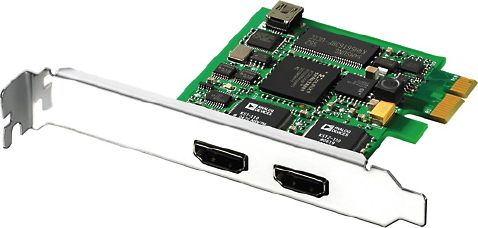
Blackmagic’s Intensity (pictured, for US$249) and Intensity Pro (same, but also includes analog audio/video input output for US$349) are ideal for brand-new tower systems (or older tower systems that previously used IEEE-1394 only) as long as they don’t ever require HD-SDI. If you need that too, consider AJA’s IoHD, Blackmagic’s MultibridgePro/MultibridgeEclipse, or Matrox’s MXO2.
Everything began to change starting at IBC 2006, when low-cost HDMI input devices were first announced from manufacturers like Blackmagic and Convergent Design. Later, AJA included an HDMI input to its IoHD product and in its HA5 converter, and both Blackmagic and Convergent Design introduced other products which included an HDMI input. For post-production, these new HDMI devices simultaneously solve several challenges that have previously existed for the HDV format, as explained on page 1. However, be careful about HDV format compatibility and deck control, as we cover in the upcoming articles, Universal HDV Deck (almost) and Controlling HDV when capturing HDMI or HD-SDI.
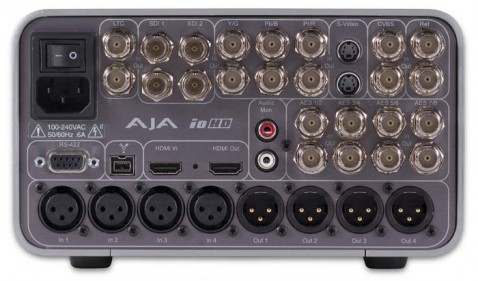
AJA’s IoHD (US$3,495 list price) is currently the only device capable of capturing HD signals directly to ProRes422(HQ) on a laptop, and fortunately has an HDMI input and output.
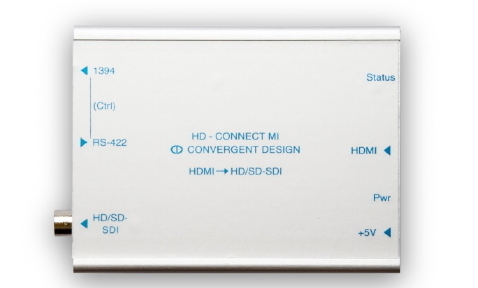
Convergent Design’s HD-Connect MI adds an HDMI input to an existing HD-SDI system, and offers lots of unexpected extra funtionality for US$595, as you will read below.
720p tricks via HDMI capture:
One special feature of Convergent Design’s converter boxes (US$395-US$595 depending upon the model) is their unique option to deliver real time 720p playback of HDV 1080 tapes played back on Sony’s HC3, HC5, and HVR-V1 camcorders. (I haven’t yet tried whether this works with the new Z5 or Z7 camcorders, but internal Sony documents indicate that it will, as long the HDV 1080 recording is at “24p”, “30p”, or “60i”, and in that case the signal will come out as 720p59.94i. I will update this after confirming.) There are many situations where a producer may want to create a 720p master, even though some or all of the raw material was shot in 1080, and this astounding feature saves time and hassle. The real time conversion from 1080 to 720p is not actually done in the Convergent Design product: The conversion is actually done inside the Sony camcorder by invoking a function not listed on the camera’s menu, but is available only by “whispering into its HDMI ear”. This only affects the camera’s HDMI output, and only temporarily. Of course, Sony’s HVR-M25A and HVR-M35 decks also offer these realtime conversion to 720p, and (unlike the HC3, HC5, and HVR-V1) do offer the option in their menu. In the case of the HVR-M25A, this conversion affects the HDMI output, while with the HVR-M35, it affects the HD-SDI output. The IoHD from AJA (US$3,495 list price) can also cross-convert from a 1080 source to 720p during capture, and is currently the only such device capable of capturing HDV from HDMI directly to ProRes422 or ProRes(HQ) with a laptop, thanks to the IoHD’s onboard hardware encoder.
Perceived competition among HDMI manufacturers:
Some readers may get the impression that the new HDMI devices from AJA, Blackmagic and Convergent Design are competitors, but that isn’t always true in all cases. The devices from Convergent Design often complement existing HD-SDI systems from AJA, Avid, Blackmagic, Canopus/Grass Valley, Matrox, and others, specifically when those systems don’t already have any HDMI input. It is true that some of the converter boxes made by AJA and Convergent Design may be directly compete (like AJA’s HA5 and Convergent Design’s nanoConnect), but the HD-Connect MI is unique at US$595 with its RS-422<>IEEE-1394 control conversion and tricky 720p conversion request that it “whispers in the HDMI ear” of certain Sony HDV camcorders.
Don’t miss the related articles:
- Revisiting HDV’s Virtues
- Universal HDV deck (almost) (coming January 8th)
- Controlling HDV when capturing HDMI or HD-SDI (coming January 12th)
- HDMI capture in live multi-camera production (coming January 16th)
- When 25p beats 24p
- When to edit native, When hybrid, When pure i-frame, and Why?


Filmtools
Filmmakers go-to destination for pre-production, production & post production equipment!
Shop Now