

Filmtools
Filmmakers go-to destination for pre-production, production & post production equipment!
Shop NowI compare an early 2009 and a late 2010 Mac mini with a three-year-old MacBook Pro.

At work, I have a big, snorting, hairy beast of a MacPro, but at home I want something small, quiet, and abstemious with the power—yet still capable of dual-screen HD editing with reasonable playback performance when I need it. I’ve tested two Mac minis, with GeForce 9400M and 320M GPUs, alongside my older 15″ MacBook Pro with a Radeon x1600 GPU, and the results are… interesting. They may be applicable to recent MacBooks with the same GPUs, too.
I use Final Cut Studio, and like to use the “Digital Cinema Desktop” option to put a full-size, pixel-for-pixel HD image on a second monitor to look at fine details in the image—for focus checking, looking at compression artifacts, and so on.
My three-and-a-half-year-old MacBook Pro, a 2.33 GHz Core 2 Duo with an ATI Radeon x1600 GPU, handles this task with aplomb, with only the occasional hiccup or dropped frame playing back 1080/24p and 1080/60i material. But my early 2009 Mac mini, with a 2 GHz C2D CPU and an NVIDIA GeForce 9400M GPU, stutters horribly when presented with this task, with freezes of up to a third of a second as the poor thing scrambles to catch up with the timeline: so jumpy and jerky as to be completely unwatchable.
What would a new-generation Mac Mini, with the GeForce 320M GPU, do?
Apple claims the newer GPU “delivers up to twice the performance of the previous generation.” However, “up to twice” includes “performs no better than.” I couldn’t find any metrics of FCP playback prowess for the two systems, on Apple’s site or anywhere else. I asked Rob-ART Morgan, Main Mad Scientist at Bare Feats, if he planned a comparo; he replied, “I was wondering if there was any interest.” But weeks went by, and no such test appeared on his otherwise excellent site; apparently there wasn’t enough interest to distract him from torturing MacPros and storage systems to within inches of their very lives.
Then, quite by accident, I espied a refurbished 2010 Mac mini server in the Apple web store—a rarity. The refurb had two 500 GB hard drives, the faster 2.66 GHz CPU, 4 GB RAM, and OS X Server for about what it would normally cost to get the basic, civilian-grade Mac mini upgraded to the faster CPU and a single 500 GB drive.
Purely in the interests of science, and at great personal expense, I bought it. Don’t say I ain’t never done nothin’ for you.
The test: Final Cut Pro 7.0.2, playing back 1080/24p and 1080/60i ProRes 422 HQ clips with continuous pans or zooms, the better to see any frame drops. The main monitor was 1600×1200 for the Mac minis, 1440×900 for the MacBook Pro. The second display, showing “Digital Cinema Desktop Preview” in pixel-for-pixel mode, was a 23″ 1920×1200 display in all cases. I burned timecode into my test clips, and shot the second monitor with a Panasonic DMC-GH1 in 720/60p mode.
I stepped through a few seconds of the GH1’s recordings and counted the number of drops where burned-in timecode skipped a frame or more.
• 2009 Mac mini: 2 GHz CPU, GeForce 9400M GPU. 24p: about 12 frame drops / second, with drops up to 6 frames long. 60i: about 16 drops / second, up to 9 frames long per drop.
• 2010 Mac mini: 2.66 GHz CPU, GeForce 320M GPU. 24p: about 4 drops / second, never more than a frame or two. 60i: about 7 drops / second, never more than a frame or two.
So the 2010 mini is far better; it’s quite usable for editing—though it’s not smooth enough to look for dropped frames in the clips themselves when doing dual-monitor playback (I’d want to use a proper video interface for that in any event, to avoid frame-boundary-crossing hiccups where the video frame rate and the monitor frame rate don’t quite sync up).
Even so, a several-generation-old MacBook Pro handily smoked it:
• 2006/2007 MacBook Pro: 2.33 GHz CPU, Radeon X1600 GPU. 24p: no dropped frames. 60i: maybe 1 dropped frame every four seconds or so, and that may be due to frame-boundary-crossing hiccups.
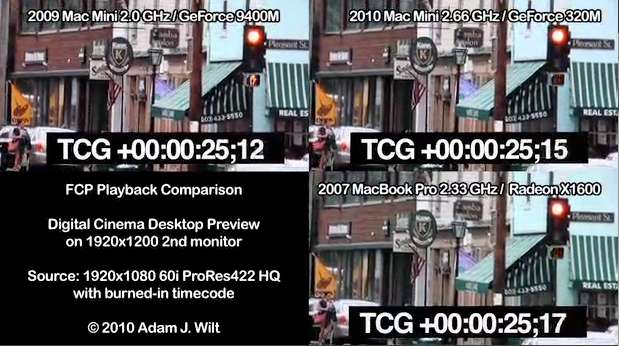
Here’s a three-way comparo of the results for a 1080/60i clip. There’s a pattern of faint, roughly horizontal lines in the pix due to moir© from shooting the screen with a separate camera; ignore that, and just look at the motion:
End result? The 2010 Mac mini is good enough (e.g., not distractingly hiccuppy) that I can use it to play back a full-screen HD clip on the second display to look for details and artifacts, and not become cross with it—and not have to pull out the MacBook Pro and clear enough space on my pathologically messy desk to set it up. Indeed, I’ve been logging and cutting some interviews with the 2010 mini the past few days, and it’s just fine.
Sure, I wish it performed as well as the older MacBook Pro does, but given that the 2010 mini burns 8 watts at idle and 20-36 working hard, whereas the MacBook Pro eats 22-27 watts at idle and 45+ when busy, I can’t really complain. For a machine that’s mostly used for email, web, text editing, Aperture, and a bit of Photoshop, FCP, and Color, it’s a perfectly acceptable tradeoff.
FTC Disclaimer: No material connection exists between me and Apple; I buy my Apple gear on the open market like any other schlub. Nobody has offered me any compensation or other blandishments for writing this article, though if enough people read it over time, it may earn me enough money to pay for the bold and daring science experiment it describes… yeah, the Long Tail, I’m counting on it… <grin>