
Some PMW-EX1s show back-focus changes when internal ND filters are used

[Updated 2008.03.29] I noticed in my unfair comparison of three cameras that the EX1’s outdoor shot wasn’t in focus. I was puzzled: I had zoomed in and focused carefully, then zoomed out and shot. Was back-focus that far off? It hadn’t been when I last checked it. Hmm…
Then, a day after my writeup hit the web, filmmaker Lenny Levy sent me an email: “My back-focus goes out whenever I engage the ND filters!” He said various people on DVInfo.net and DVXUser.com had observed the same thing.
I tested our EX1, and sure enough, it shows the following problem:
- When the camera is back-focused with ND Filter off, it holds focus during zooming with no ND filter, but with ND Filter 1 or 2, zooming wide pushes the focal point far.
- When the camera is back-focused with ND Filter 1 or 2, it holds focus during zooming with ND Filter 1 or 2, but with ND Filter off, zooming wide pulls the focal point near.
The problem is most apparent at wide lens apertures; as the lens stops down, it becomes less and less noticeable.
When we had moved outside during the Videofax test, I switched to ND Filter 1 or 2, to keep aperture at F2.8. I zoomed in to focus on Tim, sitting about 10 feet away, but when I pulled back to 17mm the focus shifted to the back wall of the garden perhaps 25 feet away, and Tim went soft instead of the background:
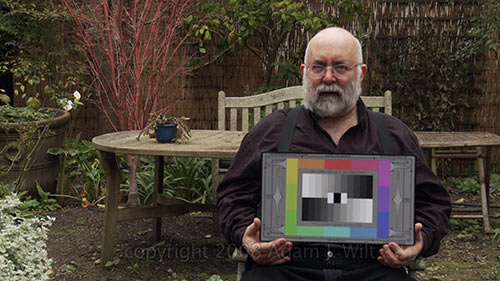
The EX1’s misfocused clip. It’s not too bad when scaled down to fit the screen.
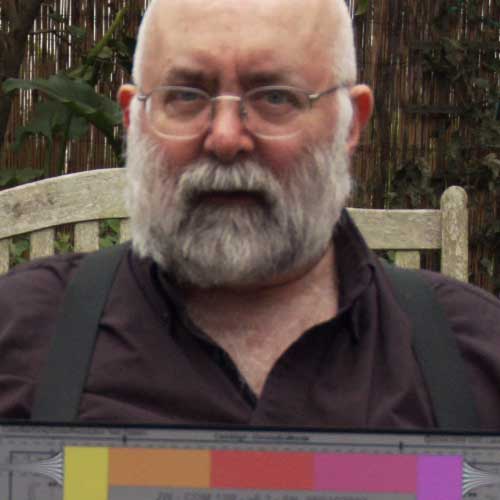
Blow it up to 1:1, however, and you can see how focus shifted back.
The good news? I can stop beating myself up for blowing focus on an easy shot. The bad news? I can start beating myself up for not checking back-focus more carefully!
In my testing today, I didn’t see any obvious difference in the back-focus setting when I switched between ND filters 1 and 2, but I did see it change quite a bit when I switched between “off” and either 1 or 2.
I don’t know if this is something that affects all EX1s, or just a limited number. Don’t assume yours has any issues without running your own tests.
If your EX1 shows this back-focus problem, how do you deal with it?
- Leave the built-in ND filters off, and use front-of-the-lens ND filters instead.
- Use faster shutter speeds instead of ND filters to keep bright scenes under control (of course, this affects motion rendering and motion blur).
- The EX1 has a maintenance menu with an automatic back-focus adjustment. Performing that adjustment may make your EX1’s back-focus significantly more consistent across all filter positions.
The first two options should be self-explanatory. The last one needs some discussion.
First, you run this procedure at your own risk. Use of the maintenance menus by mere mortals (myself included) is not supported by Sony nor by ProVideoCoalition.com. I provide this procedure for informational purposes only; there is the chance that you’ll make things worse instead of better by following it. Furthermore, activating the service menus exposes several things that you definitely do not want to play with, unless you like sending your camera to Sony at your own expense for a full, out-of-warranty recalibration!
I feel it’s OK to describe this method since other folks have revealed it in other forums, but I make no guarantees that it will help your EX1, and I emphasize that Sony has not approved this procedure for field use. Having said that, I found the following procedure helpful for our EX1, serial # 0103171.
- Set up a focusing target. The ideal focusing target is a Siemens star. [1]
- Put the camera on a tripod or other stable surface, facing your focus target, at least several feet away. [2]
- Turn on power to CAMERA position. Set ZOOM to servo. (Focus, Gain, Iris, and Shutter don’t matter; the camera overrides them all, but the zoom servo must be engaged.)
- Aim at the chart, zoom in, and focus (focusing may not be strictly necessary, but it doesn’t hurt).
- Enable the service menus: Press and hold MENU and CANCEL on the rear of the camera, then press SEL/SET in. The menus appear with three extra entries at the bottom: MN, RP, and IF.
- Select MN > Auto FB Adjust [3]. Press the thumbwheel in to reveal the submenu, and select Execute.
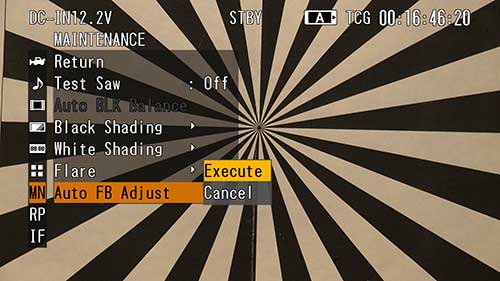
The EX1’s Maintenance menu with a Siemens star in focus.
- The EX1 will say “Executing…”, rack focus, pull back, rack focus again, and then report “OK” if it all worked. [4]
- Repeat for each of the three filter positions: Off, 1, and 2.
Notes:
[1] I don’t recommend using anything other than a Siemens star on a flat, featureless wall if you have the choice, but if you’re on location you may not have that luxury. Just bear in mind that using anything other than an ideal setup increases the risk of misalignment, possibly leaving you worse off than before you started. The target must be something that can be focused on unambiguously, with nothing else in the scene for the back-focus adjustment to lock onto (think of how autofocus behaves, and how it can get confused, and you’ll get an idea of how you need to set this up). While the Siemens star is the ideal target, I’ve also used chip charts and zone plates. A chap on DVInfo.net (see comments) used a 3×4 array of stars; I seemed to have the best luck with a 40-inch star made by shooting a star chart with my HVX200 and displaying it on my 40″ LCD TV.
[2] Some people say 12 feet, some say 75 feet; I’ve successfully run the procedure with the EX1 at distances from 4 to 50 feet. The HVR-Z7’s manual recommends 2-3 meters (7-10 feet) for back-focus adjustments.
[3] FB stands for “flange-back”, a.k.a. back-focus or flange focal depth.
[4] If it doesn’t work, you’ll get a different message, like “NG:Timeout” if it can’t find a focus setting.
You can cancel the adjustment at any time by pressing the Cancel button.
I found that after performing this adjustment several times (using the 40″ Siemens star and running the adjustment for all three filter positions) our EX1 holds focus perfectly with ND filters off, and holds it very closely with the filter in positions 1 or 2: as I zoom out, the subject remains in focus, but the in-focus zone isn’t perfectly centered on the subject’s distance; instead, it starts just in front of the subject and extends backwards from that point. This slight discrepancy is most noticeable at 10-15mm (at full wide, just about everything is in focus no matter what!). In any event, it’s good enough to be perfectly usable.
I don’t know what the “secret sauce” was: the big star target? running the adjustment for all three filters one after the other? repeating the entire procedure several times? No matter: our EX1 is now officially fixed and returned to service.
Your mileage, of course, may vary.
FWIW, this camera’s firmware is version 1.03 (you can see the version in the service menu by scrolling down the left side to IF (“information”). Updating to 1.05 may or may not be helpful (some who have had their EX1’s fixed by Sony report that the newer firmware was installed). Updating firmware must be done at a Sony service center; it’s not user-installable.
[Updated 2008.03.29: edited article and adjustment procedure to reflect eventual success. Previously said the camera could be adjusted for filters in or filters out but not both; this no longer appears to be correct. -AJW]


Filmtools
Filmmakers go-to destination for pre-production, production & post production equipment!
Shop Now


