

Filmtools
Filmmakers go-to destination for pre-production, production & post production equipment!
Shop Now
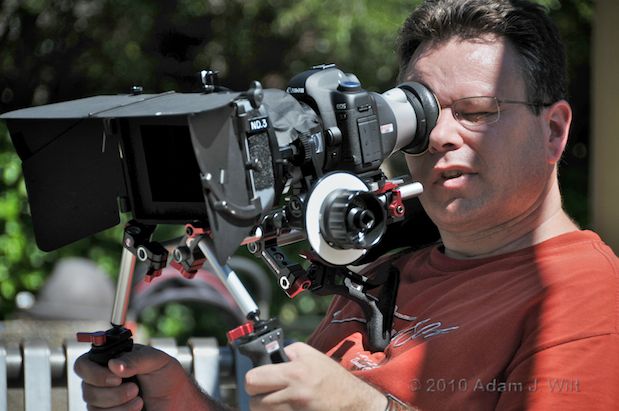
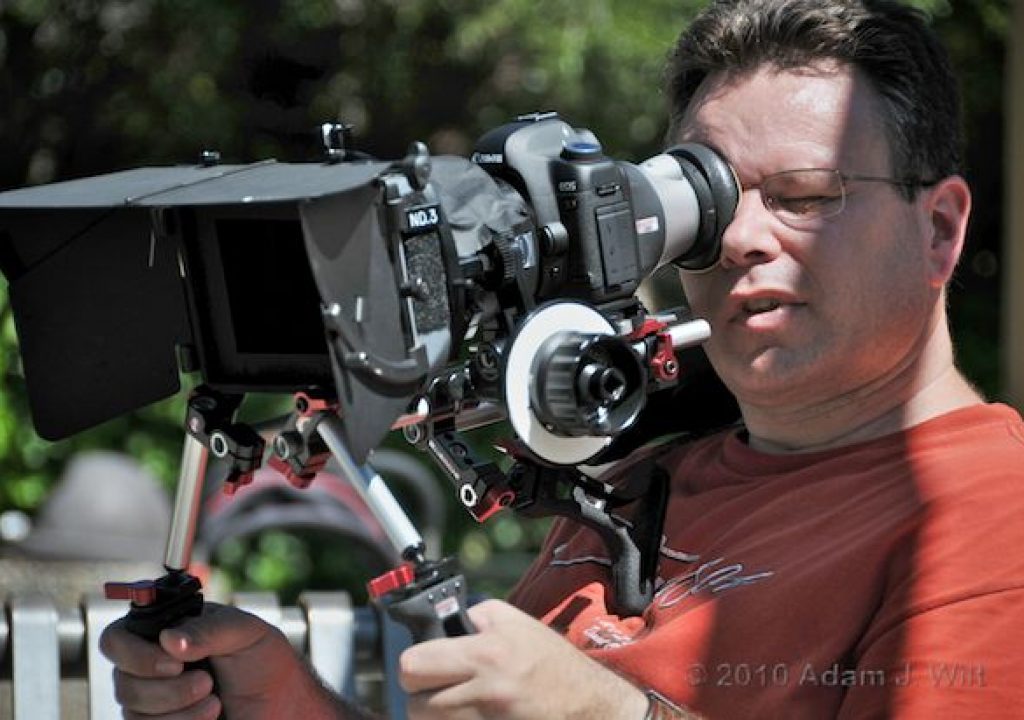
Art Adams wrestles a fully kitted-out Canon 5D Mk II with 85mm f/1.2 Canon prime.
Hybrids, HDSLRs, VDSLRs, EVILs, DSMCs, DILCs? There’s as much confusion about what to call these highly-affordable, large-sensor, interchangeable-lens, video-capable still cameras as there is about their actual usefulness. Some proclaim them the revolutionary future, doing to RED what RED did to the industry before it: bring large-format, shallow depth-of-field motion imagery to the masses at a price point previously inconceivable. Others reject them out of hand for their technical shortcomings and unsuitable ergonomics.
There are grains of truth in both viewpoints; versacams expand the mopix toolkit in surprising, exciting and affordable ways, but they come with considerable compromises in image quality and practical usability. Like any powerful tool—a chainsaw, an Aston-Martin One-77, a bazooka, a trained shark with a head-mounted laser raygun—versacams can yield excellent results when wielded well, but may equally deliver disappointment and disaster to those not conversant with their peculiarities.
As of the time I write this, I’ve had a Nikon D90 for 16 months, a Canon 5D Mk II for 11 months, a 7D for 8 months, and a Panasonic DMC-GH1 for 4 months. These four cameras run the gamut of “first-wave” versacams:
• The D90 was the first video-capable interchangeable-lens DSLR.
• The 5D Mk II is the 35mm-still-full-frame/8-perf/Vistavision-sized video-capable DSLR that really set the category on fire.
• The 7D is the DX/APS-C/4-perf/35mm-mopix-sized follow-on to the 5D Mk II.
• The GH1 is Panasonic’s MFT (micro-four-thirds), electronic-viewfinder still camera specifically optimized for video.
The D90 pioneered the field, for which kudos are due Nikon, but this primitive pioneer serves as a warning to the unwary about most of the things that can go wrong when a still camera is repurposed for video.
The 5D and 7D are the “industry standards” of HDSLR video as it stands today.
The GH1 steers around some of the pitfalls of its competitors, falls into some new pits all its own, and points to the future of the versacam category.
Terminology: there’s no single, commonly-used, entirely-accurate name for this whole class of cameras: large-sensor, interchangeable-lens still cameras with video-recording capability.
In The Beginning… there was the SLR: the single-lens reflex camera: “reflex” meaning that a mirror is employed to divert the light through the lens to a viewfinder; “single lens” because the taking lens is the same as the viewing lens (as opposed to twin-lens reflex cameras like the Rolleiflex). When a solid-state sensor is put in the film plane instead of, erm, film, the result is the digital SLR: DSLR. Add video capability, and you get VDSLR, which sounds like an unfortunate social disease (indeed, some professional imaging pros would argue that this moniker is perfectly appropriate); HDSLR—high-definition SLR—is less pejorative, and thus preferred by aficionados.
All fine and well… as long as the camera is an SLR. Cameras like the GH1 do without the mirror; their viewfinding is always “live” from the sensor, just like on most compact digital cameras. No mirror, no reflex: these aren’t HDSLRs. What they are is EVIL: Electronic Viewfinder Interchangeable Lens cameras.
HDSLR? EVIL? Is there a term that describes both? Some call ’em DILCs: Digital, Interchangeable Lens Cameras. RED Digital Cinema likes the term DSMC—Digital Stills & Motion Camera—perhaps due to its similarity to USMC (United States Marine Corps) and the militaristic connotations thereof. Hybrids? Could be, if you don’t confuse ’em with Priuses or mules. Flexicams? Flexible, sure, but not all are reflex. Versacams? Versatile they are, and the name plays off of Varicam, Panasonic’s line of variable-frame-rate HD camcorders. Go ahead, pick a term… I’ll stick with versacam for now.
Design and Controls
Normally, this is where you’d see the gear porn: full frontal shots! See everything! But in these cases dpreview.com has already done a bang-up job, covering the switchology and still-cam performance superbly:
• Canon EOS 5D Mark II In-depth Review
• Canon EOS 7D Review
• Nikon D90 Review
• Panasonic Lumix DMC-GH1 Review
All I’m going to do here is cover how these things work as video cameras. It’s not pretty, though the images that emerge can be (just go to YouTube and search for “[camera name] short film” or “[camera name] music video”. I’m going to say horrible things about these cameras, but they’re capable of making gorgeous work… if you know how to work with ’em).
I’m going to focus, for the most part, on using versacams with their own lenses (primes or zooms), though it’s possible to use cine lenses and third-party still lenses that make things easier in many respects.
Handling
Body and Controls
All these versacams have still-camera bodies: flat slabs perpendicular to the lens axis, with a fixed vertical handgrip on the right. They’re all shorter than 3 inches (75mm), 6 inches (152mm) or less wide, and 4.5 inches (114mm) or less tall. They’re very light by video/cine standards: their bodies run from 13.6 oz (385g) for the GH1 to 1.8 lb (820g) for the 7D.
They have single 1/4″x20 tripod sockets on their bases, without a receptacle for the small anti-rotation pin ahead of the tripod screw—if your camera support has an anti-rotation pin, you’ll either need to remove it, or use some sort of intermediate mount. I use Manfrotto 394 Quick-release plates with the anti-rotation receptacle drilled out, which allows me to use the camera on either 1/4″x20 or 3/8″x16 tripod screws, with or without pins (some folks prefer camera cages, which I discuss later).
These cameras use bayonet-mount lenses, in which the lens is inserted into the mount and rotated until it locks. The flange on the lens slides against the flange on the body; the registering surfaces—the mounting between lens and body that assures the proper spacing of lens and sensor—can and do wear with repeated use, unlike the non-moving contact between the lens and body in the breech-lock mounts used on professional film and video cameras. The mounting flanges themselves look pitifully small and fragile compared to the hefty flanges on B4 and PL-mount lenses; still-camera lens mounts have evolved for minimum size and weight and fast changes, and while they may be asked to attach large and heavy lenses, they aren’t mating a ten-pound lens to a ten-pound body as is common in video and cine work. When a large lens is attached, it’s more case of hanging a lightweight camera body off the back of a big lens, not coupling together two massive and ornery objects, each with a different idea of where it wants to go.
The mounts themselves are affixed to camera bodies lacking the customary rigidity of pro video or cine cameras. Again, light weight and small size trump dimensional exactitude; after all, a still photog (or his autofocus system) focuses through the lens and grabs a still frame, so any slight flexing of the lens mount or variance in flange-back (backfocus) distance over time is irrelevant: if it’s in focus when you mash the shutter button, you’ll have a sharp image, regardless of the focus scale on the lens body itself or any mechanical flexibility. Alas, for video/cine work, these perfectly reasonable design decisions may be less optimal.
The cameras have top-mounted accessory shoes, each with its own, proprietary interface for same-brand accessories such as electronic flashes or video microphones. Aside from that, they have no attachment points for accessories; if you want to hang a bunch of stuff on the camera, as film and video folks are wont to do, you’ll want to look at a camera cage or rig, or bring lots of gaffer tape to the shoot.
All but the GH1 have focal-plane marks on their top plates or viewfinders, but none are equipped with hooks for measuring tape.
Batteries load through the cameras’ bottom plates, and are often inaccessible when the camera is tripod-mounted (the Manfrotto QR plate allows easy access to the batteries on all but the GH1, where it protrudes just 2mm too far to allow the battery door to be fully opened). All the cameras use proprietary batteries, of course. The batteries, though small, last a reasonable amount of time, typically between one and two hours of continuous use.
All the cameras can be operated on wall power; the D90 uses an adapter that plugs into the side panel, while the others use battery eliminators that plug into the battery compartment. The GH1 comes with its battery eliminator, while the others require a separate purchase.
Recording media—CF cards for the Canons, SD/SDHC cards for the others—load though flip-open doors on the side of the handgrip. All these cameras have single card slots; there’s no ability to ping-pong between cards while recording as there is on dual-slot video cameras. Furthermore, no versacam can span a clip across multiple files, so once you’ve written 2 or 4 GB to a card, recording simply stops. If you’re coming from the film world of, say, 11 minute loads, you’ll be fine with this. If you’re used to hourlong takes on tape, disk, or multiple solid-state cards, well, you’ll have some mental readjustment to do.
Filter wheels: none. You can electronically adjust white balance, but you can’t filter for it in camera. Likewise, grope all you want for a slide switch or a filter wheel for neutral density: you won’t find it. If you want to add any filtration or ND, you do it in front of the lens.
Other stuff notable by its absence: mounting points for accessories other than the hot shoe, rosettes for handles or grips, top-mounted carrying handles, attachments for support rods, wireless microphone slots, XLR connectors of any sort, headphone jacks, genlock inputs, timecode in or out, BNCs for SDI output, DC connectors for video lights or lens motors, dedicated audio level dials, and tally lights. I’ve probably missed a few, too, but you get the idea.
Viewfinding
All but the GH1 have big, bright, optical viewfinders… which are completely useless in video mode. When shooting, the DSLRs’ mirrors flip up, exposing the sensor to light and blocking the viewfinder.
Instead, you’re left with a 3″ diagonal LCD, right behind the sensor on the back of the camera. The LCDs on the Canons and Nikon are 640×480 4×3 displays; nice SD monitors, if a little lightweight when it comes to HD critical focusing. The Canons resolve about 400 TVl/ph cleanly, with horizontal detail extinction around 600 TVl/ph but with vigorous vertical aliasing up to 1200 lines; even aliased detail is helpful for focusing. The Nikon performs similarly, but with aliasing in the horizontal as well as the vertical direction.
These LCDs are fixed on the backs of their cameras; they cannot be rotated or flipped.
The Nikon and Canons offer expanded focus at the push of a button, zooming into the image 5x or 10x (Canon) or up to 6.7x (Nikon). Expanded focus is not available while actually recording, however.
The Panasonic, being EVIL (grin), doesn’t have a tantalizing optical viewfinder that you can’t use. Instead, it has an RGB-sequential, 1.4 megapixel LCOS EVF, with a moderate, fixed amount of peaking. The EVF resolves about 400 TVl/ph cleanly in both directions, with aliased detail horizontally to 500 TVl/ph and vertically to 1200 lines or beyond. The EVF is finely-enough detailed for comfortable focusing, and it refreshes quickly enough that color fringing or shattering from the sequential RGB display is rarely apparent.
The GH1’s LCD is 3″ diagonally, but with a 1.5:1 aspect ratio (the traditional 35mm still-camera AR). It resolves only about 300 lines cleanly in both H and V directions, but has similar aliasing performance. The LCD has no peaking applied; the EVF is better for focusing. The GH1’s LCD, however, is hinged and pivoted at the side; it can be swung out 180 degrees, at which point it can be rotated through 270 degrees (straight down through straight forward) just like the flip-out LCDs on many video cameras. As with those video camera LCDs, the GH1’s can be closed facing inwards, to protect it from damage. It’s entirely possible to use the GH1 with the EVF alone.
When the GH1 is in manual-focus mode, rotating the lens’s focus ring (on lenses that communicate with the body) enlarges the image 5x; the control wheel on the body can then blow up the image to 10x. This expanded focus mode is not available in autofocus modes, nor while shooting.
Aside from this expanded-focus-until-you-actually-need-it capability, none of the cameras has any focusing aids: no peaking (other than the slight peaking in the GH1’s EVF), no focus bar, no distance readout in the display. Accurate through-the-lens focusing with versacams means coarse-focusing for visible sharpness, then fine-focusing using aliasing on finer details than the displays can cleanly resolve. Once you have something that’s visibly stairstepping, showing color fringes, etc., you know you’ve nailed it. It’s a bit disconcerting until you get used to it.
Data Displays and Actual Control
All these cameras offer comprehensive LCD data displays, including ISO setting, shutter speed, aperture (with own-brand lenses, and third-party lenses designed to interface with the camera’s electronics), battery level (as a several-segment gauge), and time remaining on the recording media.
The settings information is of varying value; on the D90, aperture and shutter speed relate to stills-mode operation only: the camera is always in programmed auto mode for video, and it’ll do whatever it feels like to get an exposure.
With the Canons, setting the mode dial to M (full manual) lets you control shutter, aperture, and ISO (gain) in video recording; for any other mode setting the camera is in full auto mode and the readouts only relate to stills capture.
The Panasonic’s mode dial includes a Movie setting (“Creative Motion Picture Mode”), in which you select full program, aperture priority, shutter priority, or full manual mode as you see fit; in all other mode dial positions, the camera is in control, not you, thanks just the same.
As previously mentioned, none of the cameras offers a focus readout of any sort. Got a zoom? Well, bully for you. Just don’t expect the camera to tell you where in the zoom range you are (and don’t go fumbling for a zoom rocker while you’re at it; with versacams, zooms are all manual, all the time).
All cameras let you superimpose a grid on the display. The Canons and the Panasonic have rule-of-thirds grids; the Canons offer a denser grid with a center crosshair while the Panny has a center crosshair grid with diagonals, as well as a crosshair with customizable position. The Nikon offers a four-by-four grid. Safe-areas grids? 4×3 protection grids? Sorry, no can do.
All the cameras have an exposure indicator, showing you how the camera’s current metering mode rates the scene compared to your current settings. The 5D Mk II and the GH1 can show you an exposure histogram; the 5D Mk II lets you see that as stacked R, G, and B histograms. The 5D Mk II’s histogram disappears as soon as the camera starts rolling, while the GH1’s remains visible.
The GH1’s histogram conveniently turns yellow when the GH1 disagrees with your exposure.
However, none of the cameras has zebras (they will all flash areas of overexposure at you during still-frame playback, but they offer no warnings on live images), spot readouts in percentages or IRE units, or false-color metering.
The Nikon D90 shows you the full, 1.5:1 (3×2) sensor image until you press the go-button, at which point top and bottom crop bars appear to show you where your 16×9 recorded image is coming from. The Canons and the GH1 can be set up to show you top and bottom video cropping marks even before recording commences, which makes life considerably easier. With the Canons and the Nikon, the area above and below the active picture is shown behind a gray mask, so you have lookaround room above and below the picture, just like on a RED or Alexa or a film camera (of course, those cameras show you side lookaround, too). The Panasonic uses a hard mask; you have no lookaround above or below, just as on a traditional video camera.
When you decide to start recording, the screens declutter to varying degrees:
•The D90’s active area can be cleared of everything but the time-remaining counter and the bottom of the pulsing red record indicator at the top of the picture.
Alternatively, you can keep most of the data displays, only the grid, or the grid and the data displays.
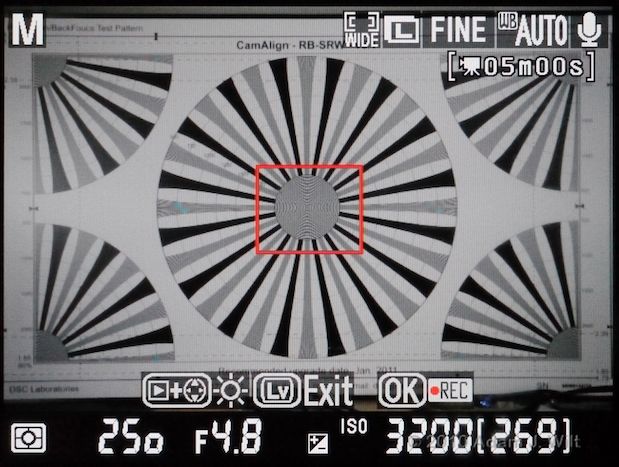
Live-view LCD display, Nikon D90.
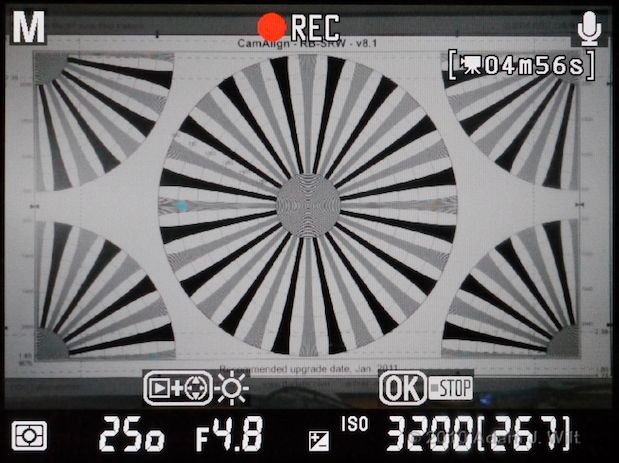
Recording view LCD display, Nikon D90. Mind you, none of the exposure info shown is pertinent!
• The 5D loses the grid, no matter what, and some of the less-relevant intruding data. You cannot get rid of the centered focus rectangle, of the red record indicator in the upper right corner.
• The 7D behaves like the 5D, except that in manual-focus mode, the focus rectangle magnanimously vanishes.
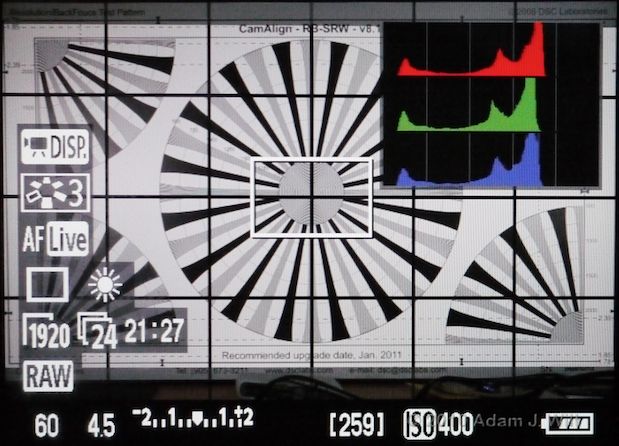
Live-view LCD display on a Canon 5D. 7D is similar, without histogram.
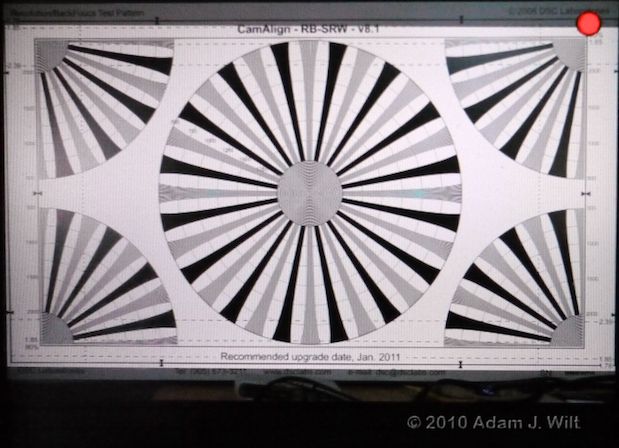
Recording view LCD display, Canon 7D uncluttered, manual focus. 5D is similar, but shows center rectangle even in manual focus mode. Both cameras show center rectangle in autofocus mode.
• The GH1 lets you declutter most of the display, but the top edge of the bottom row of data readouts overlaps the image if you have the display set to full-width (there’s another mode in which the active image is shrunk a bit and the lower line of text doesn’t overlay it, but doing so makes the active image smaller), and you get a big seconds-elapsed counter in the lower right and a recording indicator in the upper right. If you’re in an autofocus mode that uses a fixed onscreen target, you’ll see its focus rectangle, too.
Of course, the GH1 lets you keep everything onscreen if you so desire; as a live-view-all-the-time EVIL camera, it’s quite happy to show you grids, histograms, and the like whether it’s recording or not.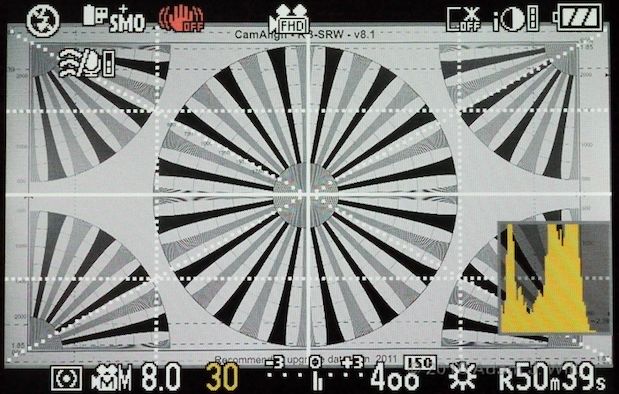
Live-view, Panasonic GH1, with all the bells and whistles turned on.
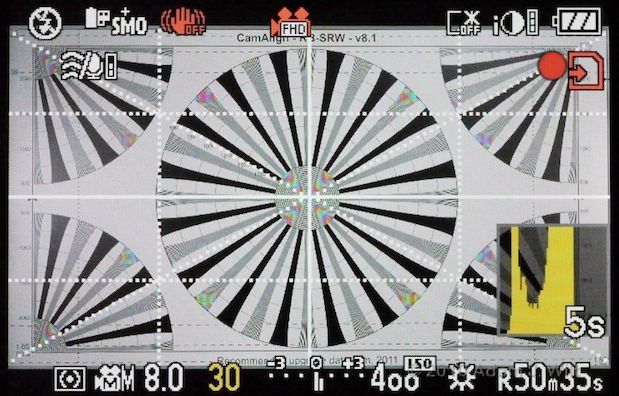
Recording view, GH1. Note the different LCD aliasing when in record mode.
Magic Lantern is a firmware hack for the Canon 5D that makes the camera more video-friendly in its displays, readouts, and some of its functions. Unfortunately, it doesn’t appear to support versions higher than 1.1.0, so it’s stuck with 30p recording only (correct me if I’m wrong). I haven’t worked with it.
Explore it if you wish, heeding well the note on the download page: THIS IS DANGEROUS AND MIGHT DAMAGE YOUR CAMERA. NO WARRANTIES. NO GUARANTEES. DO NOT TAUNT. IF IT BREAKS, YOU GET TO KEEP BOTH PIECES.
Offboard Monitoring
All the cameras have proprietary A/V output connections for composite video and audio, and mini-HDMI sockets for HD output.
• The D90 sends 720/60p to its HDMI output. The 4×3 LCD image is pillarboxed in the 16×9 output, so when the camera records, its 16×9 image is letterboxed within the 4×3 displayed output, so the resulting image is about 960×540. The video output is live whenever the D90 is in “live view”, video recording, or playback modes, and the LCD is turned off when a video cable is connected—so you’re eiter using the camera’s own display or an external one, never both at the same time.
• The 7D behaves similarly, except that it outputs 1080/60i. Its 1.5×1 LCD is pillarboxed in the 16×9 output, so the resulting dimensions of the displayed HD image as it’s being shot are about 1620×910. Using an external display blanks the LCD.
• The 5D Mk II is just like the 7D, except that when you start recording, the output drops from 1080i to 480p—the same resolution, in essence, as the LCD itself. The resulting HD image, while shooting, is roughly 640×360.
This all presents a bit of a poser if you’re trying to keep the operator happy yet also give the director a feed. Since the built-in display goes dark when external monitoring is hooked up, you’ll need to provide a separate on-board monitor for the operator and loop the signal though for video village. Problems: HDMI connectors tend to be a bit fragile, and there aren’t many HDMI monitors with a loop-through output allowing daisy-chaining.
Many folks are using offboard HDMI/HD-SDI converters like the $495 Blackmagic HDMI to SDI mini converter to turn the annoying HDMI signal into a set-friendly SDI signal. (The 5D’s resolution switch when entering record confounds the Blackmagic’s version 1.5 firmware; if you go this route, you may need to downgrade it to avoid a blank screen). This works, but it adds another box (with its own power feed) to your support package, and you have to find somewhere to stick it to keep it out of the way.
If you’re on the cheap, you can take the analog composite feed out of the camera instead of HDMI; that makes cabling a lot easier, but you give up the advantages of high-def monitoring.
• The GH1 ignores any output connections unless it’s playing back, so you’re stuck with the EVF or the LCD while recording. Of course, you can leave the HDMI cable connected and shoot using the camera’s own viewfinding, then just hit the playback button to screen the take for the director (and to sneak a peek at the big screen yourself, to see if you held focus or not). Turning frustrating limitations into advantageous workflows is the essence of indie filmmaking.
Audio
All these cameras record audio… after a fashion.
• The D90 captures a 16-bit mono track at a breathtakingly transparent 11.025 kHz sampling rate (!) with fully auto gain control, using a built-in microphone. The built-in mike captures camera-handling noises with astonishing clarity. There is no way to connect an external mike.
• The Canons capture 16-bit uncompressed stereo audio at 48 kHz. The 7D offers automatic leveling only, while the 5D gives you the choice of auto or manual gain control. The selection is conveniently buried in the menus where it’s inaccessible during recording. Clearly, a good Canon shooter will pre-plan his or her audio levels carefully, and ensure that the outside world conforms to the plan… or will either trust the auto gain or connect an external audio interface with its own gain controls.
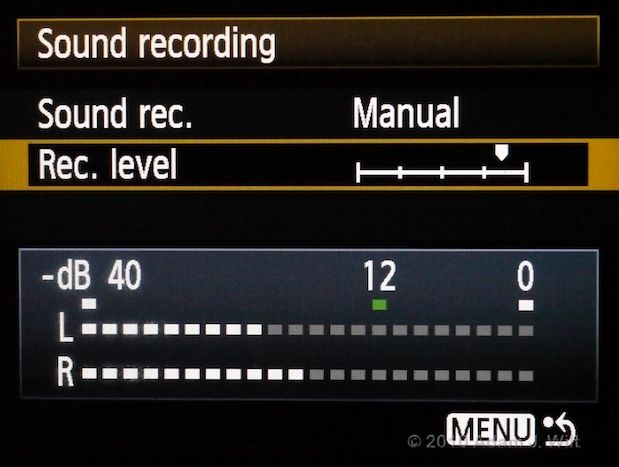
Deep in the 5D’s menus: the only place you can set or see audio levels in any of these cameras.
The Canons have built-in mono microphones, and a 3.5mm stereo minijack for connecting external microphones or other mike-level sources. The two mikes most often called out for on-Canon work seem to be the monophonic Sennheiser MKE 400, about $200, and the Rode Stereo VideoMic, about $250.
• The GH1 records stereo 48 kHz audio as a Dolby AC3 stream at 192 kbps. Audio level is controlled automatically only. The GH1 is the only camera of this bunch with stereo mikes built in. It also has a 2.5mm (yes, that’s 2.5mm, not 3.5mm) jack for external mikes or a wired remote control; I was able to connect my MKE 400 using a 3.5mm-to-2.5mm adapter cable for my Treo smartphone… as long as I didn’t push it in too far.
Aside from the 5D’s buried-in-the-menus level meter, there’s no audio monitoring of any sort on these cameras: no onscreen metering while recording, nor any way to listen to the sound while shooting (there’s no place to plug in headphones). On playback, you can listen using the cameras’ tinny little built-in speakers, or through an external display, but that’s it. I’ve recorded silence on my fair share of 5D run’n’gun clips by inadvertently leaving my external mike’s power off, and been none the wiser until I had the files loaded into my NLE. Oops.
Many people use the on-camera audio as a scratch track, preferring a separate, dedicated audio recorder. As the cameras have no timecode-jamming capability—or any timecode at all, for that matter—nor any sync input, double-system audio is perforce recorded wild, with a filmmaker’s slate, handclap, or other marker as the sole A/V sync reference.
Unadorned Handholding
Versacams work surprisingly well as unadorned handheld cameras. Indeed, the still-camera-style form factor for motion picture cameras is nearly sixty years old.
If you’re a solo operator, running ‘n’ gunning ENG-style, a versacam is as stably handholdable as a handycam-style camera, possibly more so (especially as the lenses get larger; SLR-style cameras tend to “scale up” ergonomically, whereas handycam-type cameras grow more unbalanced and unmanageable as their size and weight grow; I’ve ranted about this already).
True, your left hand has to do triple-duty as a lens support, focus actuator, and zoom controller (versacams being unprovided with a zoom rocker and power zoom), so realistically you’re either going to zoom during a shot or focus, rarely both.
Unless you’re shooting with a GH1 and its LCOS EVF, you’re also going to need an eyepiece loupe for the LCD. I like the Zacuto Z-Finder Pro 3x for its high magnification, but it’s only one of range of such items from Zacuto, Hoodman, LCDVF, Letus, Hood-Pro, and others.
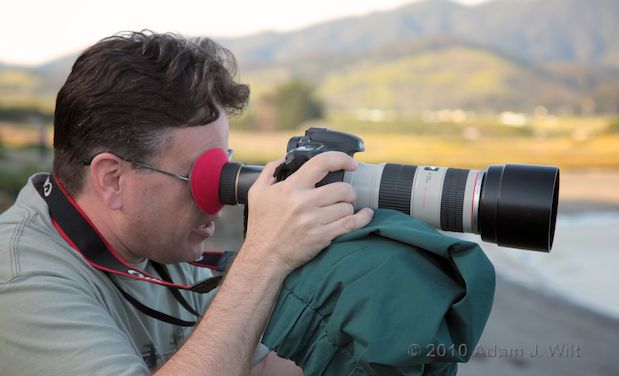
Art Adams using a Canon 7D with 70-200mm zoom and LCDVF LCD Loupe.
Bear in mind also (again) that you’re always going to be working a little bit blind and a little bit deaf: aside from the GH1’s histogram, none of these versacams show you any decent sort of exposure guide while recording nor has any audio level meter visible; and none let you monitor your audio live.
If you’re not a solo shooter—you have a 1st AC to pull focus, and/or you need to feed a video tap to the director—things aren’t so rosy. As previously described, getting video out for someone else to see kills the built-in display; practically speaking, you’re going to have to build up a rig of some sort to hold the operator’s monitor alongside the camera. The same hold true for focus assistance: you’ll need support rods for a follow-focus, which means a baseplate adapter of some sort; before you know it, you have a film-style rig with shoulder braces and handgrips. You’ll need that 1st AC because your hands are on the handgrips, not the camera, and you no longer have direct control over the lens.
Suddenly that affordable, small, handholdable camera has doubled in cost, and it’s no longer a small and handholdable package. Hmmm.
Using on Tripods and Rigs
The short baseplates and lightweight construction of these cameras makes them less stable when hard-mounted than a cast-iron film camera with a massive, long base. If you go the minimalist route (as I did with my Manfrotto QR plate or something similar), you’ll be OK as long as your support isn’t subject to sudden shock or vibration. Simple tripod work with a fluid head is fine, but car mounts, bouncy shoulder rigs with long lenses, and the like will need more secure, rigid attachments than the tripod socket alone affords: you’ll likely need a cage.
Versacams mount in cages using both the tripod socket and (ideally) a stabilizing attachment at the accessory shoe, reducing the camera’s tendency to flex and wobble at its base. Cage kits from Letus and Viewfactor provide this level of rigidity. These and other cages offer plenty of mounting points for accessories and support rods, and may provide added capabilities such as power conversion and distribution (so you can use pro batteries to power both camera and accessories).
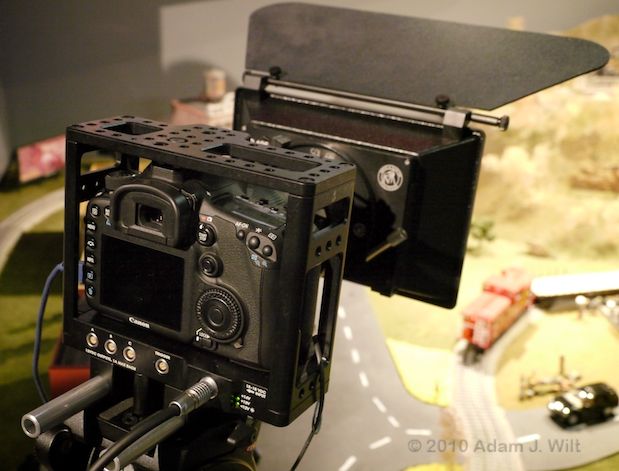
Viewfactor cage for a Canon 7D.
If you just need more real estate for accessories and/or a way to shoulder mount the camera, there are rig build-up kits to suit every taste from the likes of Redrock Micro, Cinevate, Letus, Habbycam, Zacuto, and more (probably five or six more since I started writing this!).
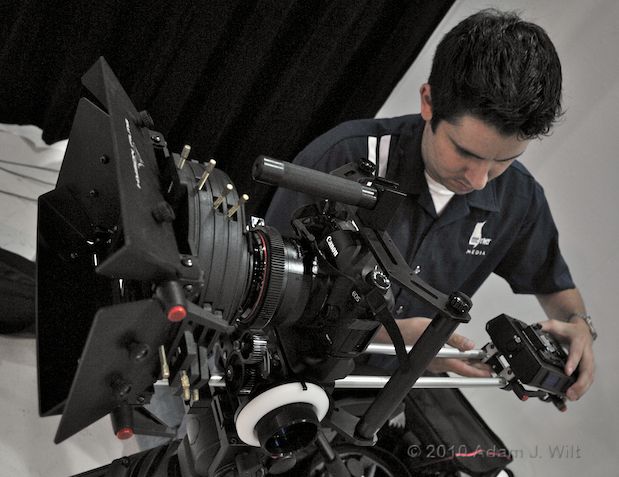
Marco Solorio preps his 5D rig in the summer of 2009 (I mention the date because, undoubtedly, his rig is fancier by now).
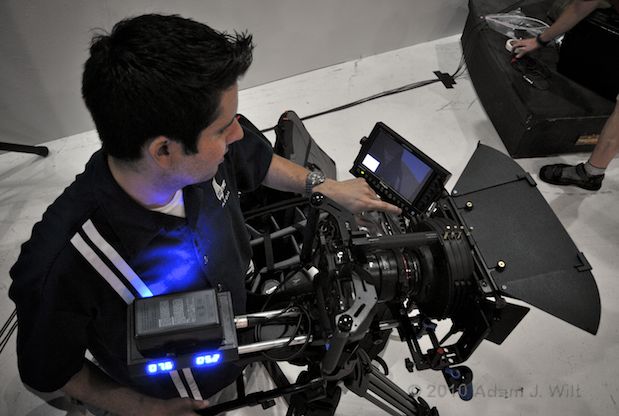
The whole thing winds up as big as a shoulder-mount camcorder, but if he likes it, who am I to argue?
Native Lenses
These cameras work with still-camera lenses: no surprise there. These lenses have the advantages of low cost and complete compatibility with their camera bodies, but have certain gotchas when used for video or cine work.
Still-camera lenses are built optimizing each one’s compactness, weight, and performance individually. There is no consistency of length, diameter, or placement of controls as there is on a cine lens, so swapping lenses means resetting your matte box and follow-focus position every time.
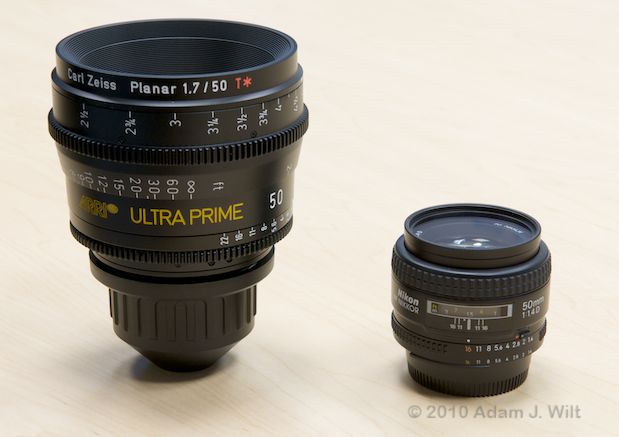
A cine prime vs. a still prime. The Ultra Prime is part of a system; the Nikon stands on its own.
Still-camera zooms come in two classes: short-range fixed-aperture zooms, and long-range variable-aperture zooms. If you want a fixed maximum aperture you can zoom through, you’re typically limited to 2x – 4x zooms, such as the Canon 24-70mm f2.8, Canon 24-105mm f/4, Canon or Nikon 17-55mm f/2.8, Lumix 7-14mm f/4, or any of the Canon or Nikon 70-200mm f/2.8 or f/4 lenses. If you want a longer, more video-friendly range of around 5x or more, you’re into what still-camera folks call “superzooms.” These lenses have max apertures that decrease as the lens is zoomed, for example the Canon 28-300mm f/3.5-5.6, Nikon 18-200mm f/3.5-5.6, or Lumix 14-140mm f/4-5.8.
Wide-ratio zooms with constant, wide apertures, like the RED 18-85mm T2.9 or the Optimo 24-290mm T2.8, aren’t to be found in still-camera lineups; still photogs don’t have the same pressing need to hold a constant aperture through a long zoom that cine folks do, nor do they want to handhold the bulky lens that results from maintaining a large maximum aperture.
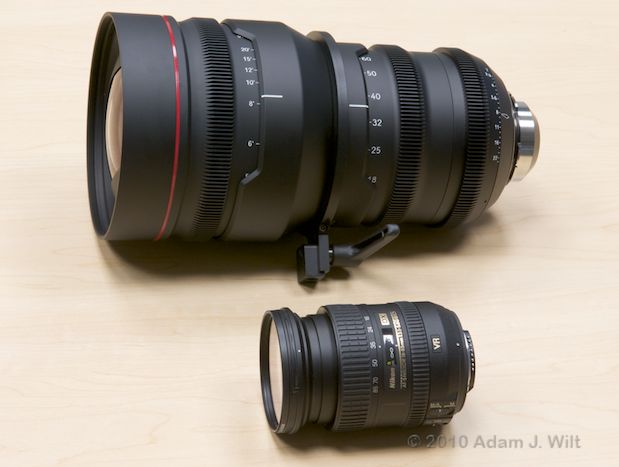
Nikon 16-85mm f/3.5-5.6 next to a RED 18-85mm T2.9. Which would you rather carry around all day?
On the other hand, the priciest lens in my list, the Canon 28-300mm, is only $2,689 (list), about a quarter of the price of RED’s insanely affordable 18-85mm ($9,975, a mere snip by cine zoom standards).
Canon lenses zoom and focus in the same direction as video and cine lenses; seen from the operator’s position, clockwise turns zoom wider and focus nearer. Nikon lenses are reversed in zoom and focus direction. Panasonic lenses zoom reversed (like Nikons) but focus “properly” (like Canon, cine, and video lenses).
Most modern still-camera lenses focus by wire; their manual focus rings are friction-coupled to the focusing mechanism, without hard stops, and their near-to-far focus throws are very short, typically 90 degrees from near to far focus limits. That’s fine for run’n’gun ENG work, but it makes preplanned, precision focus pulls very difficult. Furthermore, focusing scales tend to be compressed and sketchy, with only three to five scale marks on them.
All the focus-puller’s frustrations with fly-by-wire focus on prosumer camcorder lenses are here, in spades. Fitting a follow-focus requires add-on gearing, whether it’s a toothed belt from Zacuto or a clamp-on gear from Redrock. You’ll also need a compatible follow-focus, preferably one with settable hard stops to avoid overshooting the lens ring’s soft limits. And you’ll then need the patience to calibrate the follow-focus settings anew, sometimes on every shot.
Panasonic’s Lumix lenses have nice, long focus throws, like cine lenses—but they lack any end-stops and have no focusing scales at all; they’re entirely servo-driven, like the focus rings on low-end consumer camcorders. Their focus rings are rate-sensitive: turn them quickly and they move the focus point more than if you turn them slowly, so there is no positional repeatability at all—you must focus these lenses by eye since focus marks don’t hold. Adding insult to injury, the Lumix lenses reset to infinity when power-cycled; they won’t hold focus across power-downs.
Most modern lenses lack manually-adjustable apertures as well. In the current product lineups, only Nikon D-series lenses have aperture rings; Nikon G-series, Canon EF, and Panasonic Lumix lenses are bereft. If you want to pull aperture during a shot, only a fully manual aperture ring gives you the smooth motion needed to pull it off successfully (and at that, you still have to contend with click-stop detents at each full stop or half-stop position). Manual apertures are also important if you’re planning to use lenses with mount adapters, e.g. to put a Nikon lens on a Canon or a Panasonic. Without manual controls, or specialized adapters, you’ll be limited to using adapted lenses at single apertures, typically wide open (some people putting Canon lenses on the Panasonic use Canon bodies to dial in the desired aperture, and then remove the lens without shutting the camera down to leave the aperture fixed at its current setting. I’m not sure what that does to the longevity of the electronics in the camera or the lens).
Old, fully-mechanical Nikon F-mount prime lenses (from the 1950s through the 1970s) are sought after because they do have repeatable focusing performance as well as manual aperture rings. Most D-series Nikons, especially the primes, also have hard-stopped mechanical focus and aperture rings. Carl Zeiss make a range of fully-manual still-camera lenses in Nikon, Canon, and other mounts, too.
If you’re on the cheap and looking for a longish, wide-aperture lens, the Vivitar 85mm f/1.4 manual-focus, manual-aperture prime is worth a look (disclaimer: I have one). It has the world’s most annoyingly cheap lens hood and rear cap (grin), and minimum focus is 3.3 feet / 1 meter, but the focus ring is smooth, has a 120 degree throw, and is (by still-lens standards) generously supplied with distance markings. The Canon version focuses “properly” like Canon and cine lenses; the Nikon version focuses “backwards” like other Nikon lenses. Performance is pretty decent, too. At about $350 it’s the most affordable way to get that desirable, super-shallow depth of field—the depth of field that makes trendy DPs swoon, and 1st ACs pull their hair out…
Cine Lenses
It’s possible to use cine lenses on these versacams, with various limitations.
The flange depth of a cine lens’s PL mount is 52mm: there are 52mm from the back flange surface of the lens to the sensor plane (the film plane in a film camera. Actually, the physical distance on a digital camera may be slightly different due to the presence of optical low-pass and IR filters in front of the sensor, but that’s a quibble irrelevant to the point of this discussion). The Canon EF flange depth is 44mm, Nikon’s F mount is 46.5mm, and the Panasonic’s MFT mount has a 20mm flange depth. So there’s physically room to hang a PL-mount lens in front of all of these versacams.
However, that’s not all there is to it. Most PL lenses have rear elements protruding aft of the flange; as long as they clear the 45-degree rotating mirror shutter in a film camera, they’re OK. The mirror in a DSLR starts off at 45 degrees, but it swings up and forward to expose the sensor—and it would crash into those protruding rear elements. If that’s not bad enough, the diameter of the opening in a PL mount is a bit larger than the flange opening in a Canon or Nikon body; mirror aside, rearward-poking bits of a PL lens might not be able to fit at all. So something has to give…
Carl Zeiss‘s CP (Compact Prime) cine lenses are essentially their still-camera lenses rehoused in cine-friendly mounts. The CP.2 lineup, as well as the LWZ.2 15.5-45mm T2.6 lightweight zoom, can be fitted with PL, Canon EF, or Nikon F mounts as you see fit, so these cine lenses can be used on unmodified Canon and Nikon bodies.
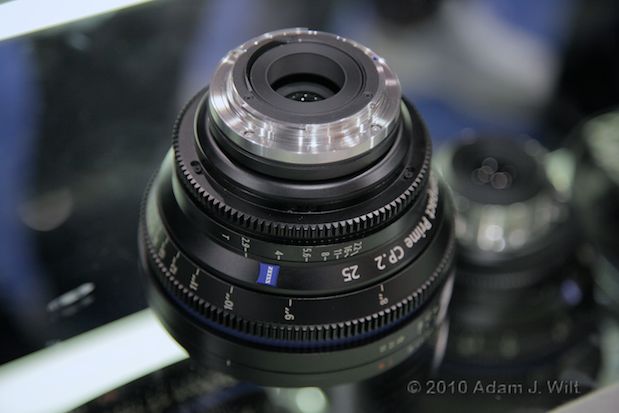
Zeiss CP.2 25mm T2.9 with Canon EF count.
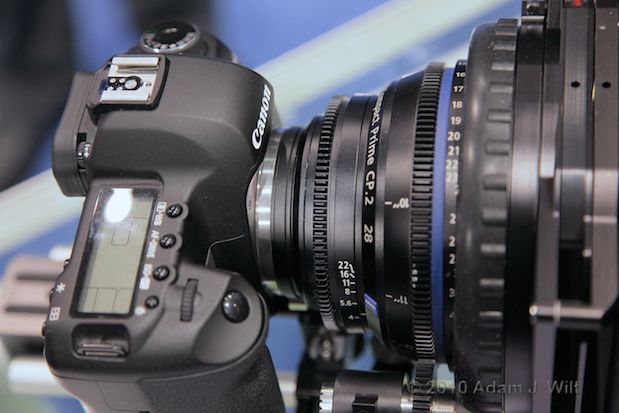
Canon 7D with an EF-mount Compact Prime lens.
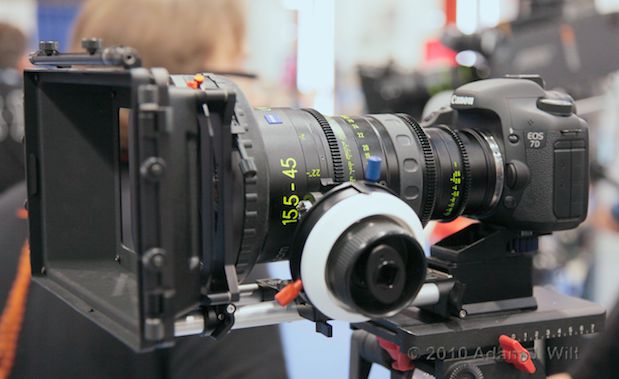
Zeiss 15.5-45mm EF-mount Lightweight Zoom on a Canon 7D
Alternatively, hack the camera (and by “hack”, I don’t mean hack the firmware, I mean hack with a hacksaw): Hot Rod Cameras modifies Canon 7Ds and 5D Mk IIs, removing the EF mount and the mirror and installing a PL mount. You can then use a variety of PL-mount lenses; see the info on their website for the lenses tested on the 7D and on the 5D. The Hot Rod folks will sell you a pre-modified Canon 7D for as little as $4800, or will hack up your existing camera starting at $3250 (7D) or $3650 (5D Mk II), and they’ll kindly return the removed bits to you in a plastic bag, should you want to put the EF mount back on in the future.
Mind you, this hack permanently removes the mirror; you won’t be able to use the optical viewfinder ever again. But it will let you use that Optimo 24-290mm on your 7D, if you won’t settle for anything less.
Scared, yet?
Consider the little GH1 and its MFT mount. The brilliance of the MFT system is that it is mirrorless: there’s no annoying little flippy thing behind the lens to get in the way, and the flange depth is shorter—a mere 20mm between lens flange and sensor. There’s plenty of room to stick a hefty PL mount in front of the camera, no modification needed, and that’s exactly what Hot Rod Cameras has done. The Hot Rod PL adapter starts at $1200, including tripod mount and 15mm rod adapter, and doesn’t require anything to be irreversibly hacked.
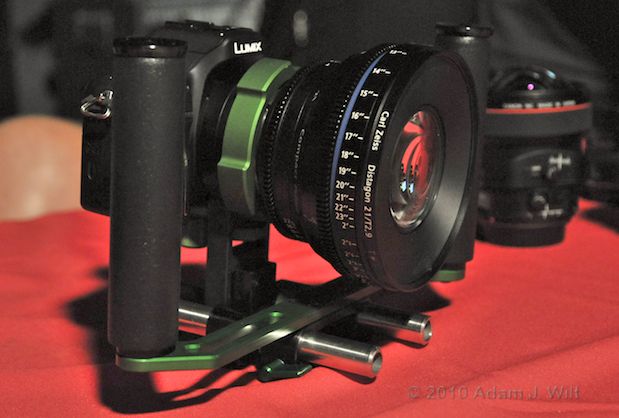
Hot Rod Cameras PL adapter for DMC-GH1 (deluxe version with grips).
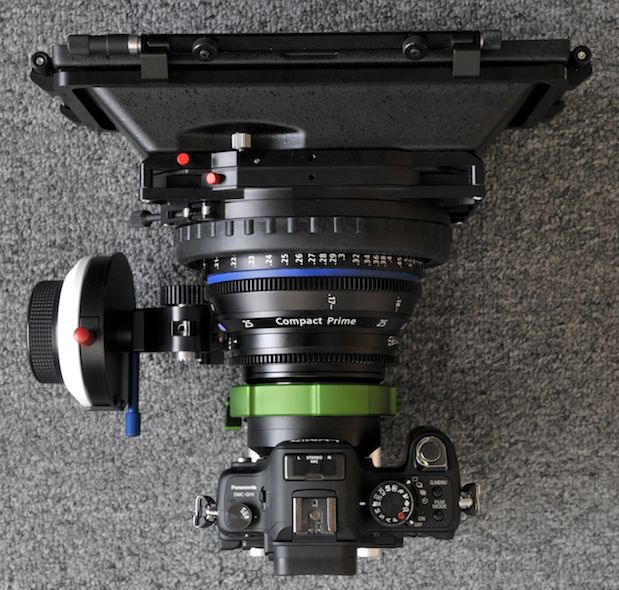
GH1 with Compact Prime on the Hot Rod Cameras PL adapter. You don’t put the lens on the camera so much as put the camera on the lens.
By the same token, the ample difference between the MFT flange depth and that of most other lens mounts makes adapters easy to build. There are adapters for Canon EF, Nikon F, Pentax and Leica screw mounts, and just about any other lens mounting system made. This flexibility opens up nearly the entire world of vintage lenses to GH1 users, if you don’t mind spending a bit of time on eBay or Craigslist or in the bargain bin at your local camera store to dig out the gems.
Next: Performance and Conclusions…
Performance
This is where things get, erm, “interesting”…
Look at two large-sensor video cameras: the RED ONE and the Arri Alexa. Both have cine-sized sensors of around 24x14mm size, just like these versacams (the 5D’s sensor is a bit larger; the GH1’s is a bit smaller). The RED’s sensor is a “4k” (image width) sensor of around 12 Mpixels total; the Alexa uses a “3k” sensor of around 5.6 Mpixels total. The RED’s sensor has roughly the same pixel count (technically, photosite count, but I’m using pixel as a shorthand) as the GH1 or the D90, while the 7D is a 16 Mpixel camera and the 5D Mk II is a 22 Mpixel camera.
The RED and Alexa weigh ten pounds each, are several inches long, and eat big power bricks like popcorn. The rear third of the Alexa is a heat sink; the entire RED is a heat sink—and it will keep your hands warm on a cold day. Both the big cameras have hefty fans whereas the versacams have none. The RED ONE will set you back about $30,000 (body, recording module and LCD included) while the Alexa starts around three times that.
The versacams are all under $2500, are two pounds or less, are 2 inches thick, and run off of tiny batteries. “Such a deal I have for you!” I mean, really: if a Nigerian princeling offered you one in an email, you’d turn it down, right?
What gives?
Imaging performance is what gives.
Bigger, faster, cheaper: pick two. The RED and the Alexa go for bigger and faster; they can read every photosite on their sensors at 24fps and faster. As a result, they can deliver clean images with superb sharpness and little or no aliasing; the RED handily delivers an honest 3.2K of usable resolution when shot in 4K modes. But the price you pay for this sort of performance is an expensive, high-speed chipset with a massive power draw, with the attendant heat dissipation and battery-emptying issues.
The versacams? They go for bigger and cheaper; they don’t do faster. When it comes to video, not to put it too finely, they cheat: all of them show evidence of coarse subsampling in their mad rush to get an HD frame’s worth of data off of their chip every 24th of a second, because they don’t have the power to read all 10, 13, 15, or 18 million photosites (depending on the camera) 24 times a second (when they’re doing their day jobs, they all have conventional focal-plane shutters that open and close to capture the image with whatever shutter speed is selected; once the shutter is closed, they can read the data off the sensor at their leisure).
When I say “subsampling”, I’m not specifying whether they’re skipping lines and/or photosites, or if they’re “binning” multiple photosites together as a single value, or whether they’re doing something else to shortcut the hard work of reading and deBayering the entire bleedin’ sensor. All I can say is that, when I look at the images, there’s some unfortunate stuff going on.
Resolution and Aliasing
I’m using a DSC Labs 4K test chart (the same one I describe in the RED resolution article linked above) for these tests. There’s so much interesting stuff happening well beyond the theoretical resolution limits of these cameras that it would be a great shame to limit our explorations to the 800 – 1200 line limits of conventional HD charts.
Here’s what a 1920×1080 shot of the chart should look like. It was taken with the DMC-GH1 in stills mode at 4352×2448 resolution, resized to 1920×1080 in Photoshop.
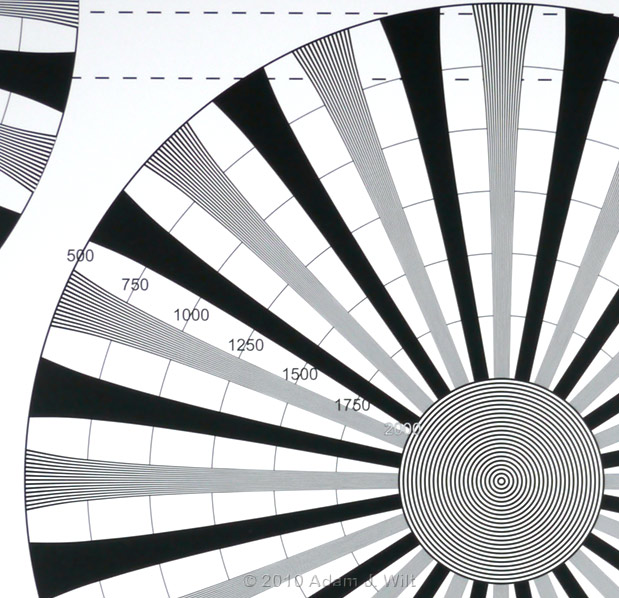
GH1 still image of DSC 4K chart resized to 1920×1080 in Photoshop, 1:1 sample.
Now let’s see what these cameras do in video mode; the Nikon D90 is in 1280x720p mode because that’s all it can do, whereas the others are all shooting 1920x1080p.
Nikon D90
23.6×15.8mm CMOS sensor (APS-C size; roughly the same as a 35mm cine frame), 12.3 million effective photosites.
For 16×9 video images: 4288×2412 photosites theoretically available; 10.3 million photosites total.
The D90’s maximum video resolution is 1280×720, so you’ll see more of the chart in a 1:1 image than with the other cameras.
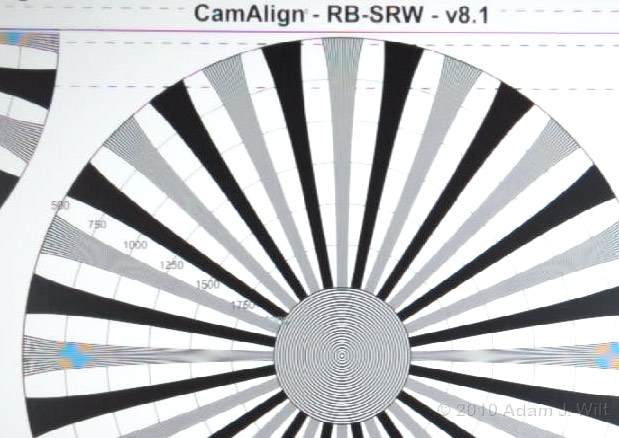
Nikon D90 video image of DSC 4K chart, 1:1 sample.
Canon 5D Mk II
36x24mm CMOS sensor (full-frame 35mm still-camera size), 21.1 million effective photosites.
For 16×9 video images: 5616×3159 photosites theoretically available; 17.7 million photosites total.
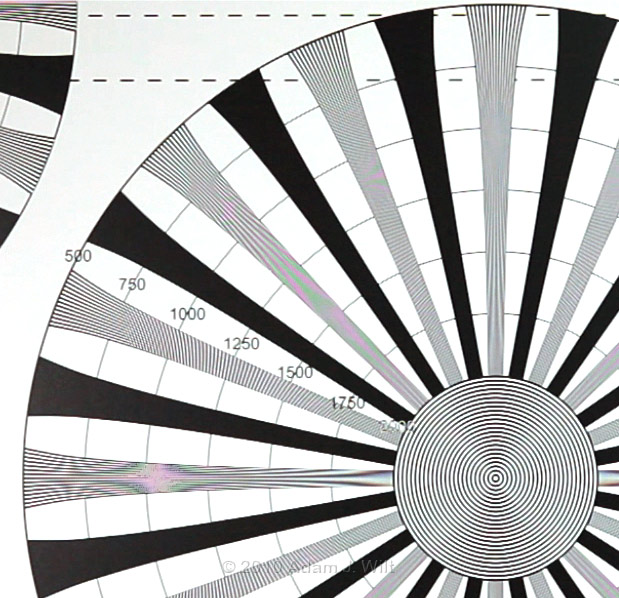
Canon 5D Mk II video image of DSC 4K chart, 1:1 sample.
Canon 7D
22.3×14.9mm CMOS sensor (almost APS-C size, roughly the same as a 35mm cine frame), 18 million effective photosites.
For 16×9 video images: 5184×2916 photosites theoretically available; 15.1 million photosites total.
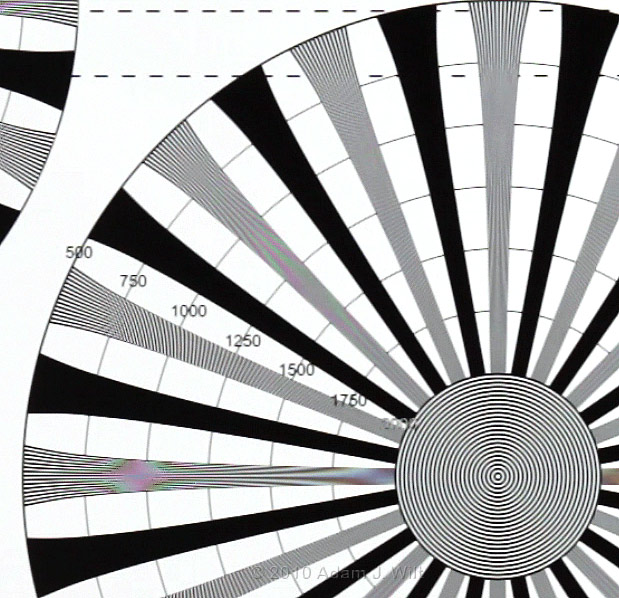
Canon 7D video image of DSC 4K chart, 1:1 sample.
Panasonic DMC-GH1
18x12mm CMOS sensor (half 35mm still-camera size, about 80% the size of a cine frame; actually the entire sensor area is larger, the size listed is the area used for 1.5:1 still-photo images, just to keep the comparisons fair), 12.1 million effective photosites.
For 16×9 video images: 4352×2448 photosites theoretically available; 10.7 million photosites total.
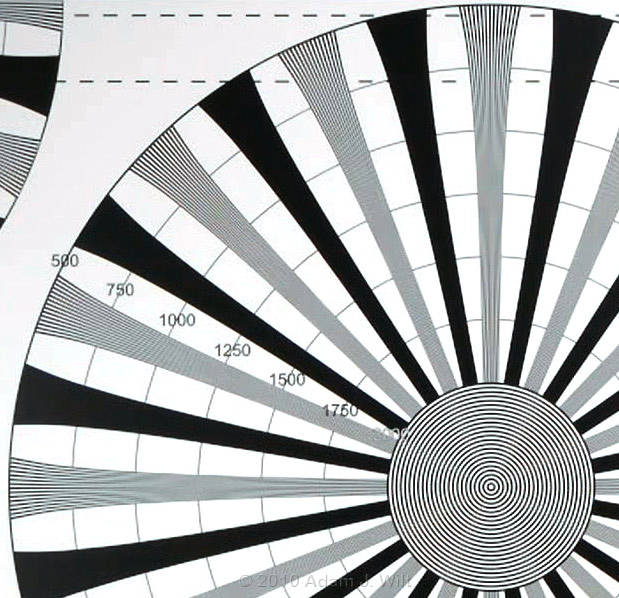
Panasonic DMC-GH1 video image of DSC 4K chart, 1:1 sample.
Crikey. Clearly, having all those photosites isn’t helping.
All these cameras have severe luma aliasing issues starting at fairly low resolutions, and the chroma moir© on all but the GH1 is fraught with danger.
The luma aliasing is nothing new; we’ve seen a lot of first-generation prosumer-level HD camcorders with sub-HD chipsets, resulting in softer-than-normal, somewhat stairsteppy images. Even so, the vigorousness of this aliasing and the frequencies to which it extends are impressive (note: the D90 with its discontinuous diagonals is an outlier; Nikons’s next HDSLR, the D300S, cured that particular defect).
In practice, it’s a problem that shows up mostly as stairsteps on slightly-tilted, near-horizontal fine lines, and as a shimmering moir© on gratings, grilleworks, shingled roofs, and the like. It shows up only in finely-focused shots. If you’re throwing everything but your subject even slightly out of focus (which is one of the reasons to use a large-sensor camera in the first place), the problem vanishes entirely: soft-focus looks just as good on the worst versacam as it does on an Alexa, a RED ONE, or on film!
If, however, you can’t defocus the offending bits, you’re stuck. A colleague of mine shoots talking heads with a 5D, and nine times out of ten the clips look superb. The tenth time, the subject is wearing some fine lace, or a tweed jacket with just the right weave density, and the resulting aliasing, swimming on the surface of the fabric, invariably and insistently captures your attention. There’s nothing for it but to reshoot with a different costume, or roto in a slight blur to tame the offending item.
The chroma moir©? That can be a killer, too.
After my unexpected success shooting video with a Canon 5D Mk II at NAB, I took the camera out to do some location scouting for an upcoming spot. My thinking was that if the scout looked good, I could shoot the actual background plates with the 5D instead of the RED ONE, and save a lot of hassle in the process. And the stills look fine…

Courthouse Square on the Canon 5D, still image, 1:1 detail after resizing to 1920 pixels wide.
Boy, was I ever surprised when I looked at the clips:

Courthouse Square on the Canon 5D, 1080/24p, unprocessed; 1:1 detail.
The resolution limitations and luma aliasing were bad enough, but those red and green artifacts popping up on horizontal and near-horizontal details were completely beyond the pale!
In this case, a simple chroma-blurring filter works to clean up the chroma, though of course the luma aliasing remains:

Courthouse Square on the Canon 5D, chroma blur +12, saturation 110%; 1:1 detail
Chroma-blurring only worked because the smears of color were fairly small. Look at the res charts for any of the cameras (the colorlessly-clean GH1 excepted) and you’ll see that, depending on the spatial frequency of the detail exciting the moir©, the resultant color smear can be quite large.
These are the sorts of thing that can sneak up and bite you in the rump with big dark teeth when you’re least expecting it. They aren’t always predictable, either; minor variations in the size, angle, color, and/or contrast of an alias-provoking detail can make a disproportionate difference in the visibility of the resulting defect.
For ENG work, the occasional glaring alias probably isn’t a showstopper. But for EFP and cine work? You’ve got to ask yourself one question: “Do I feel lucky?”
One chap on the cinematography mailing list says he now takes his HDSLR and his three-chip, 2/3″ professional shoulder-mount camcorder to every shoot; he likes the look the large-sensor camera gives him, but he’s always got a predictable, dependable video camera with him just in case.
Oh, my Courthouse Square plates? They’re gonna be shot with a RED ONE M-X, and to heck with the hassle.
Rolling Shutter
I set up all the versacams shooting a vertical white stripe, and did whip-pans with high shutter speeds (to preserve sharp edges). I also threw in a Sony PMW-EX1 for comparison purposes. I shot all the cameras in their available HD modes only.
I pulled the clips into Final Cut Pro, and overlayed a vertical grid marking off every ten pixels. I measured the stripe movement from frame to frame (giving me the pixels moved in one frame’s time) and the horizontal skew from top to bottom within that frame (giving me the pixels moved in the time it took to read the frame from top to bottom.) By comparing the ratio of the two pixel counts, I was able to derive the time it took to scan the frame; the shorter the scan time, the less skew or “jellocam”.
I did this for six frames in each test, three panning right and three panning left, and averaged the results. I chose frames with fairly constant motion between them (for example, I chose three frames with inter-frame displacements of 31, 34, and 32 gridlines respectively, instead of another pan with displacements of 21, 27, and 32 gridlines) to avoid measurement errors due to acceleration. Using both left and right pans caused any residual dutch-angle errors, or differences in performance due to panning direction, to cancel out.
Due to coarseness of measurement (I measured to every tenth pixel, not every individual pixel) as well as the variation in panning speeds, I’d rate the results accurate to between +/- 3% on the 24p measurements and +/-10% for the 60p readings; consider these results to be broadly indicative of variance between cameras and frame rates, not take-it-to-the-bank predictive:
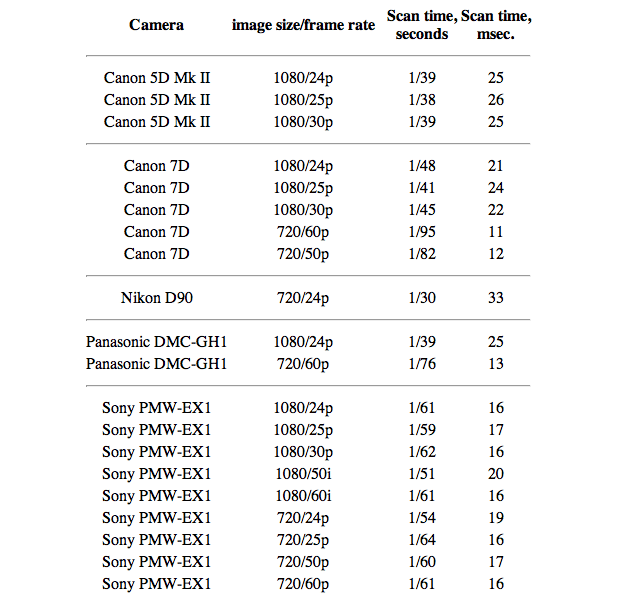
In their highest-resolution modes, all the versacams are struggling to get out of their own way. The Canon 7D holds up a bit better than the Canon 5D Mk II and the Panasonic GH1 do (1/48 sec vs. 1/39 sec or so, at least at 24p).
The poor Nikon D90 wobbles around at 1/30 sec, and the D90 is shooting 720p to boot.
When you consider than the EX1 is clearing its frame at about 1/60 in any 1080-line mode, all these repurposed still cameras are going to suffer by comparison.
Bump the 1080p-capable versacams down to 720p, though, and things get more interesting. Since they’re “cheating” to make their images anyway—line-skipping, binning groups of photosites together, whatever—they’re able to slurp 720p off their sensors faster than they can 1080p. You’ll definitely see less jello at the smaller sizes—as long as you don’t mind shooting 30p, 50p or 60p. Heck, the 7D and the GH1 record 720/50p or 720/60p with less skew than the EX1 does; if rolling shutter is your primary problem, the versacams outperform!
(And look at the EX1’s 720/24p number: 1/54 second. I went back and double-checked it, and got the same result. I consider it odd, especially since the EX1’s 1080/24p number was 1/61 sec. I blame some artifact of the camera’s clock-divider circuit used at this frame rate and frame size, and hope that this daunting technical terminology will handily obscure the fact that I haven’t a clue as to what’s actually going on, grin.)
Recording
Except as listed, all image formats are 1.77:1 (16×9), and recording bitrates are maximum observed bitrates including audio.
Nikon D90
• SD and SDHC cards; one slot. Clips are limited to 2GB in size. Card class/speed is not specified, but the manual warns that “depending on memory card write speed, shooting may end before this length is reached.” I have an ancient 50x SD card in my D90, and it works fine.
• 1280×720/24p MJPEG .AVI files, VBR up to about 22 Mbit/sec, 8-bit 4:2:2 sampling, 5 minute max record time.
• 640×424 and 320×216 24p also available; 20 minute max record time.
• 16-bit, 11 kHz monophonic audio.
The Nikon’s MJPEG files show moderate but not obtrusive compression artifacts. They play back and edit smoothly in FCP.
The Nikon shoots 24.000 fps. The North American version, at least, cannot be switched to 25p. Its menus clearly describe the available formats: 1280×720 (16:9), 640×424 (3:2), 320×216 (3:2).
Canon 5D Mk II
• CF cards; one slot. Maximum clip size 4GB. CF card should have a read/write speed of at least 8 MB/sec. I’ve used an old card with 133x speed, and it’s been fine.
• 1080/24p, 1080/25p, and 1080/30p h.264 .MOV files, VBR up to about 44 Mbit/sec, 8-bit 4:2:0 sampling. 12 minute max recording time.
• 640×480 (1.33:1 aspect ratio) 25p and 30p also available, about 17 Mbit/sec, 24 minutes max recording time.
• 16-bit, 48 kHz stereo audio.
The 5D’s .MOV files import directly into FCP, but playback performance is poor due to long-GOP h.264 encoding (many other NLEs will play these native files back with less effort; FCP’s Log And Transfer transcodes the files into editing-friendly ProRes). The clips are very clean looking, though they appear to favor highlights to shadows in terms of bit allocation and compression quality. Pushing the files around a lot in post (tonal and color changes; sharpening) tends to show noise and blocking in shadows, and reveals compression block boundaries.
The “NTSC”-mode 5D originally shot 30.000fps (only) in “NTSC” mode; in March 2010, firmware version 2.0.4 added 24p and set all “NTSC” speeds to 1000/1001 values: 23.98 and 29.97 fps. The 5D can be switched between “NTSC” and “PAL” frame rates in its menu. Once a video standard is selected, the available formats are clearly shown as 1920×1080 30, 1920×1080 24, 640×480 30, etc.
Canon 7D
• CF cards; one slot. Maximum clip size 4GB. CF card should have a read/write speed of at least 8 MB/sec.
• 1080/24p, 1080/25p, and 1080/30p h.264 .MOV files, VBR up to about 44 Mbit/sec, 8-bit 4:2:0 sampling. 12 minute max recording time.
• 720/50p and 720/60p h.264 .MOV files, VBR up to about 44 Mbit/sec, 8-bit 4:2:0 sampling. 12 minute max recording time.
• 640×480 25p and 30p also available, about 17 Mbit/sec, 24 minutes max recording time.
• 16-bit, 48 kHz stereo audio.
The 7D’s clips look and behave just like the 5D Mk II’s clips.
The 7D is switchable between “NTSC” and “PAL” formats in its menus, and its “NTSC” frame rates are all fractional rates: 23.98, 29.97, and 59.94 fps. Its menus are as clear as the 5D’s.
Panasonic DMC-GH1
• SD/SDHC cards; one slot. Speed Class 6 or higher recommended for motion pictures. Maximum clip size 2 GB.
• AVCHD: 1080/24p @ 17 Mbit/sec and 720/60p @ 17, 12, or 8 Mbit/sec h.264 MTS (MPEG Transport Stream) files, all VBR, 8-bit 4:2:0 sampling. Recording stops when 2 GB have been consumed.
• Motion JPEG: 720/30p, 848×480/30p, 640×480/30p, and 320×240/30p Motion JPEG .MOV files, VBR, 8-bit 4:2:0 sampling, up to 26 Mbit/sec. Recording stops when 2 GB have been consumed.
The AVCHD clips are stored as transport streams deeply buried in a DVD-like folder structure; on the Mac they play in VLC, but not in QuickTime. The JPEG clips are stored as MOVs in the same folder as the camera’s stills, and they play in QuickTime without problems.
The 1080/24p files are recorded as 60i, so they have 4:2:0 interlaced chroma. Furthermore, the codec is bit-starved both by the low data rate and the 60i encoding; it’s hard-pressed to handle detail. Static shots look OK, but if any motion is present in the shot, subtle fine detail, such as the textures of rivers, distant foliage, or fur, gets smoothed over and lost: an artifact known as “mud”. GOP-length “breathing” is sometimes visible, too, as the detail in the image “twitches” slightly every half-second as a new I-frame gets recorded, with the image improving slightly as the GOP progresses. Further stressing of the codec causes fuzzing of tree branches and outright failure, leading to momentarily torn, pixellated, abstract-expressionist pictures.
At first glance, the GH1 is unusable for any serious 1080p work; its AVCHD codec is simply too fragile to capture an adequate image. However, GH1s built before June 2010, using firmware versions 1.32 and earlier, can be hacked (in the firmware sense, not the hacksaw sense) to become “GH13s”. This hack (quick instructions here) allows you to record native 24p (instead of 60i, so all the bits are being usefully employed and 4:2:0 progressive encoding is used); boost the AVCHD bitrate to 24 Mbit/sec (which is the highest that will play back in camera) and beyond; increase the Motion JPEG bitrate; play with the GOP length and structure; change 720p frame rates; and more.
I tried out a 24 Mbit/sec, 24p-native GH13 alongside a stock 17 Mbit/sec, 60i GH1 (and by “alongside”, I mean I mounted the two cameras on a Manfrotto 131DDB arm and walked around, shooting handheld). The differences are impressive.
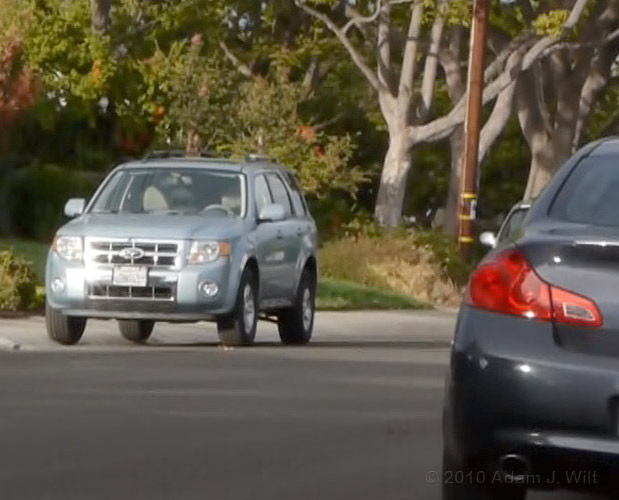
GH1, 17 Mbit/sec 1080/24p-on-60i AVCHD, 1:1 sample.
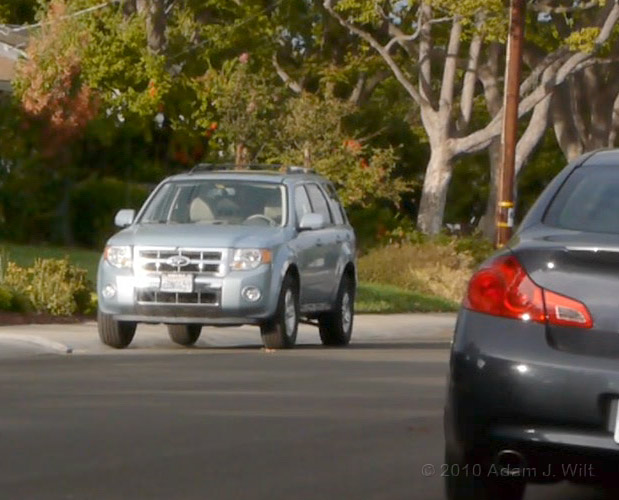
GH13, 24 Mbit/sec 1080/24p-native AVCHD, 1:1 sample.
Note the difference in chroma stairstepping on the taillight (interlaced vs. progressive 4:2:0 encoding); the mudding of the street, sidewalk, and foliage in the GH1 image, and the better detail overall in the GH13’s picture.
With some fairly extreme shakycam, the differences were even more stark:
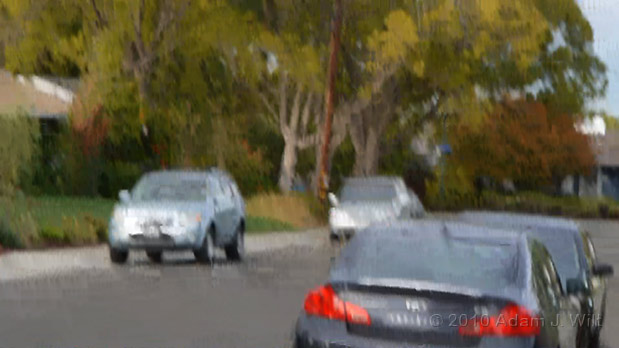
GH1, 17 Mbit/sec 1080/24p-on-60i AVCHD, 1920×1080 resized to fit.
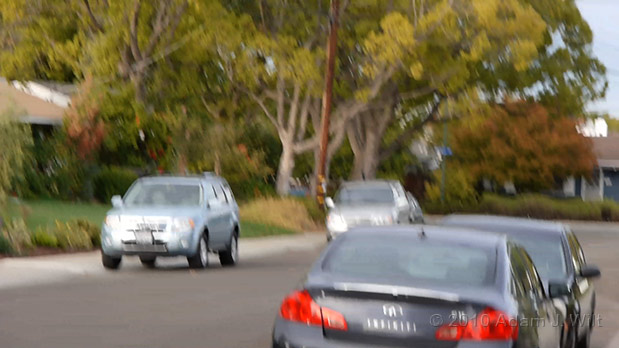
GH13, 24 Mbit/sec 1080/24p-native AVCHD, 1920×1080 resized to fit.
The GH1’s compression wasn’t able to keep up with the rapid scene changes during this fast diagonal move anywhere near as well as the hacked GH13 (shutter speeds were around 1/120, so there’s not much motion blur).
The bad news: Cameras manufactured since June 2010 are not hackable (so far), and may never be.
It’s a pity; with the GH13 mods, the GH1 is a superb 1080p versacam; with no distracting chroma moir©, its images are roughly comparable to those from an HVX200.
Without the hack, the 1080p GH1 is mud.
The GH1’s Motion JPEG clips hold up much better under stress, but they only allow 30p recording at a maximum size of 1280×720. They still show some compression artifacts, mostly mosquito noise around fine details, but it’s not obtrusive. Being intraframe-coded, they don’t degrade with motion, just with increased static detail.
Overall
All these cameras record “delicate” images that won’t hold up to a lot of abuse in post. Trying to push the color or tone around too much quickly reveals the limits of highly-compressed 8-bit images; you start seeing color banding, mosquito noise, compression block boundaries, and shadow posterization.
In general, these are WYSIWYG video cameras: What You Shoot Is What You’ll Get. Many folks started off shooting them in the flattest possible contrast curve and with sharpness settings turned all the way down, to protect both highlights and shadows and to avoid overenhancement. Unfortunately, boosting contrast in post too readily reveals banding and quantization, while adding sharpening causes a dynamic tile-like appearance as the edges of adjacent compression blocks are emphasized.
Evolving best practice favors setting up the white balance, color, and “look” of the camera the way you want to see it in the finished show, with only a slight flattening of contrast and sharpness for protection, if any. These aren’t necessarily WYPIWYR cameras—What You Protect Is What You’ll Regret—but they’re close.
Gain, Dynamic Range and Noise
Check the dpreview articles for specifics on the gains and transfer curves for these cameras (I did some quick tests and agree with their numbers). In general, they capture around 8.5 stops of dynamic range, though the GH1 falls about 2/3 stop short of this DR in its usable modes, with the shortfall showing as a harsher highlight clip than the other cameras show. When shooting a scene with a bright blue sky gradient, the Nikons and Canons shade from blue to white with only a slight drift into cyan before clipping occurs, while the GH1 shows a more prominent cyan halo around the whited-out area, more similar to a traditional video camera than to its DSLR companions.
Low light capability is one thing versacams are praised for. In a previous test I found that the Canon 5D held up very well through ISO 3200, becoming more marginal at 6400 and noisy but still usable in a pinch at ISO 12800. The 7D is about a half a stop worse, overall; still pretty darned good.
The Nikon D90 runs everything in full-auto mode when shooting video, so it’s hard to rate it, but it does fairly well. It’s probably not quite as good as the 7D (it’s hard to do a direct comparison because the overall image qualities are so different), but it’s happy in low light nonetheless.
The GH1 falls down on the low-light score due to fixed-pattern noise more than anything else. At low ISOs it makes a very clean image, but by ISO 400 there’s a trace of horizontal striping in the shadows. ISO 800 is as high as I’ll go with the GH1, and that only under protest; row and column noise stripes become more prominent and chroma noise builds rapidly. The GH1’s highest video ISO is 1600, but at that level, even playback on the camera’s LCD looks like a clip projected onto a screen of coarsely-woven fabric.
Image Tweaks
All the versacams offer basic controls over their “looks”, from white balance and tint controls to a basic selection of gamma curves. However, they do not offer the control over knees that most prosumer and all professional camcorders offer.
Conclusions
Two viewpoints:
Versacams have revolutionized motion imaging, and versacams shall rule: for something in the range of $900-$2500, you can buy a large-sensor body that’ll take highly affordable interchangeable lenses and shoot 24p clips. They’re easily handholdable; they’re inconspicuous; they work well in low light; they possess shallow depth of field. Clearly, the days of RED, Arri, Sony, etc., are numbered.
You get what you pay for, and you ain’t payin’ diddly-squat: sure, they’re cheap, and for a reason. You get variably lousy picture quality with luma aliasing, chroma moir© (both rather unpredictable), limited dynamic range, and rolling-shutter jellocam (both highly predictable). You get fragile, low-bitrate recordings that fall apart under heavy manipulation. Revolutionary? Indeed: they free you from the cruel oppressions of live focusing aids, 1st AC-friendly native lenses, zebras, flexible video monitoring, mounting points for cine accessories, power zooms, raw recording, 10-bit recording, full-bandwidth chroma, audio level control while shooting, and the tedious annoyance of live audio monitoring… Viva La Revolución!
A painter uses several kinds of tools. For painting, the most commonly useful tool is the brush: it affords the greatest level of control, the most precision, the most delicate feel. For mixing paints, the palette knife is just the thing: it’s great for squidging stuff around on the palette, though it’s usually too coarse and clumsy to paint with—but sometimes it’s just the thing for putting paint to canvas. The trick to being a painter (well, one of the tricks, grin) is knowing which tool to use, and when and how to use it.
DP Gale Tattersal exploited the particular strengths of the Canon 5D Mk II for House—5Ds were small enough to work in cramped quarters, they were silent, they had the extremely shallow depth of field that show called for, they worked well in low light. By many accounts the resulting footage needed a fair bit of cleanup in post, to remove artifacts and improve sharpness, but the end result was worth the effort.
Your correspondent used the Canon 5D Mk II in exactly the situation that made the press agencies ask Canon for a video-capable camera in the first place: running ‘n’ gunning at NAB, shooting both stills and video as a solo operator, traveling light. For this purpose, the 5D was the perfect tool.
But when your correspondent tried to shoot an in-focus architectural background plate for a high-end commercial? Whoops, needed a brush, used a palette knife.
Pros
• Large sensors for shallow depth of field; the “film look”.
• Interchangeable lenses with many affordable lens options.
• Very affordable by video standards.
• Well suited to solo operator run’n’gun work.
• Inconspicuous; they look just like still cameras, and don’t annoy the natives.
• Smallest large-sensor mopix cams; great for cramped spaces.
• Excellent low-light performance (except for GH1).
• GH1 can mount almost any lens in existence with the right adapter.
• GH1 and 7D have minimal skew / jellocam in 720P modes.
Cons
• Lower than expected resolution; excessive luma aliasing.
• Scary chroma moir© possible (except for GH1).
• Limited dynamic range by cine and pro-video standards.
• Ill suited for multi-person crew workflows (operator, 1st AC, director with monitor).
• Handheld use requires add-on viewfinder loupe or monitor (except for GH1).
• Relatively poor-performing and fragile codecs (especially on unmodified GH1).
• Using PL-mount lenses requires expensive camera mods (except for GH1).
• No manual audio gain (except for 5D); no audio monitoring; miniplug audio inputs.
• Poor zoom / focus / aperture controllability with native lenses; difficult to control smoothly while recording.
• Poor exposure monitoring aids; no focusing aids while recording.
• Excessive skew / jellocam in highest resolution modes.
Cautions
• Image defects are unpredictable in their occurrence and severity.
• Lack of audio monitoring makes it easy to mess up audio recording.
• No timecode or genlock capability.
• Limited file size / recording time limits.
• No external recording capability (no clean, full-raster live image output).
• GH1: no external video monitoring while recording.
• 5D: external monitoring drops to 480p while recording.
• Equipping camera with support rods / follow-focus / shoulder mount / cage / etc. can cost several times what the camera itself costs.
• Comparatively low equipment costs overall may encourage overeager acquisition, and you may wind up with more lenses and cameras than you know what to do with.
Would I buy one? Actually, I bought one of each camera discussed here, along with, yes, more lenses than I know what to do with.
For video work, here’s how I’d rate them:
• Canon 5D Mk II: biggest sensor and shallowest depth of field; best low-light camera. The 5D gives you more of what you buy a versacam for.
• Canon 7D: best external monitoring (1080i output even while recording); somewhat better ergonomics overall than the 5D; closest match to a cine sensor’s size, so it’ll intercut more easily with a RED or Alexa; broadest range of image sizes and frame rates; less jellocam than the others.
• Panasonic GH1: best ergonomics of the bunch; smallest / lightest / cheapest; no chroma moir©; built-in lens distortion correction with Panasonic lenses; allows broadest range of third-party lenses; allows use of the totally awesome 7-14mm f/4 zoom (disclaimer: I can’t be objective about this lens; it’s sweet).
• Nikon D90: lightweight, affordable APS-C DSLR with nice live-view capabilities… but don’t get it for video work.
What of the future? There are two things happening that will soon obsolete all the cameras I’ve discussed.
One: affordable large-sensor, interchangeable lens camcorders are coming to market.
Sony is already shipping the $2000 consumer-oriented NEX-VG10 AVCHD camcorder.
The Panasonic AG-AF100 uses the same size sensor as the GH1 and GH2, and the same MFT mount. It also uses a 24 Mbit/sec AVCHD codec, but there the similarity stops: it has all sorts of video-friendly features like focusing and exposure aids, HD-SDI output, and image processing similar to other Panasonic camcorders. It’ll set you back around $5000, or $6000 with a PL-mount adapter. It’s supposed to ship at the end of the year.
Sony has announced both an AVCHD-based large-sensor pro camcorder with a rumored price of under $6000, and a considerably pricier PMW-F3. Both these cameras are due next year.
Two: versacams are getting better.
These first-wave versacams are simply the initial attempts at making large-sensor still cams shoot video. Their successors will be better in every way.
The Panasonic DMC-GH2, for example, continues with the advantages of the GH1—working EVF, tilt-and-swivel LCD, small and light and affordable, MFT mount capable of adapting to almost every lens in the world—while improving usability and adding about two stops of usable sensitivity, manual audio, a 24 Mbit/sec 24p-native AVCHD mode with performance reportedly superior to a hacked GH13 even at the GH13’s highest bitrate, and even limited variable frame rate recording.
Nikon created the category with the D90, and it’s been improving its offering with every step. The latest model, the D7000, adds 1080/24p using h.264, with full-time autofocus capability, reduced skew, and possibly the best low-light performance available for an APS-C sized sensor.
Canon’s new 60D adds an articulated tilt-and-swivel LCD, like the Panasonics have.
Sony’s SLT—Single Lens Translucent-mirror cameras used a fixed mirror and a second top-mounted sensor for full-time live view, so it can be held to the eye just like the Panasonics. And its NEX series cameras combine a shallow, mirrorless mount (thus providing room for third-party lens adapters) with a large sensor and video capability.
The advent of relatively affordable large-sensor mopix cameras, with mopix image tweaks, I/O, and ergonomics, will make them the obvious choices for many situations. But they won’t displace versacams altogether: versacams will remain the chainsaws of choice when low cost, small size, still-camera use, and/or inconspicuousness are important factors.
Large-sensor mopix cameras and versacams will coexist, side by side. And they’ll all just get better and cheaper as time goes by.
Viva La Revolución, indeed.
See also:
The BBC’s initial evaluation of the Canon 5D: http://thebrownings.name/WHP034/pdf/WHP034-ADD39_Canon_5D_DSLR.pdf
Sensor size comparisons:
http://www.cambridgeincolour.com/tutorials/digital-camera-sensor-size.htm
http://blog.abelcine.com/wp-content/uploads/2010/08/35mm-digital-sensors-chart_final_1200.jpg
Interactive field-of-view comparator:
http://www.abelcine.com/fov/
Art Adams using a Canon 5D on a Zacuto shoulder-mount rig.
FTC Disclaimer: No material connection exists between me and any of the camera and lens manufacturers, accessory vendors, and/or review sites mentioned in this article. I purchased all the cameras and lenses I use myself, getting no special deals on anything. I received no vendor support in writing this article, and no compensation or other blandishments have been offered for a positive writeup of any of the products mentioned.