
(Page 1 of 1 pages for this article )

Tuesday, August 02, 2011

Filed under: GentryMedia Sister SitesProVideo CoalitionMotion GraphicsTraining

After Effects Apprentice Free Video: The Wiggle Expression

Chris and Trish Meyer | 08/02

This very simple expression can be used to add randomness to virtually any parameter.

As we mentioned earlier, we’ve been busy this year creating an extensive, multi-course video training series based on our popular beginner’s book After Effects Apprentice. Each course has two or more movies that are free for all to view; we’re re-posting those videos here on PVC to make sure you don’t miss them. This movie demonstrates how to use one of our favorite expressions: Wiggle.

The ninth Apprentice course focuses on what we feel is one of the most powerful yet seriously underused portions of After Effects: Expressions. With expression, you can easily hook up parameters to follow each other, allowing you to keyframe just one property and have a number of other properties or layers follow along - in turn making it much easier to create complex, coordinated animations that are easy to update in response to client whims.

Many artists shy away from expressions, believing they require knowledge of programming and math. It’s true that expressions are based on JavaScript - but in most cases, After Effects writes the necessary code for you. And it is true that a bit of math will help you get more out of expressions - but most of the time, we’re talking elementary school level math. In After Effects Apprentice, we focus on this class of easy but highly useful expressions, getting no more difficult than typing in words like “wiggle”, “loop” and “pingpong.”

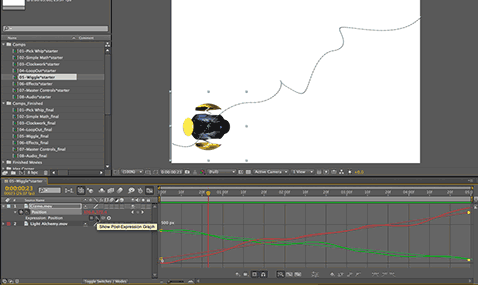
The movie above from the AEA09 video course demonstrates how to use the wiggle expression, which allows you to add a user-adjustable degree of randomization and imperfection to your animations. Wiggle auto-animates without the need for additional keyframes, and randomizes per layer allowing you to easily create swarming-type animations.

If you’re completely new to expressions, a couple of years ago we posted a video overview to expressions from the second edition of our After Effects Apprentice book. If you are looking for more advanced expression applications, here is the index to our Deeper Modes of Expression series derived from our deeper Creating Motion Graphics book. Enjoy!


The content contained in After Effects Apprentice - as well as the CMG Blogs and CMG Keyframes posts on ProVideoCoalition - are copyright Crish Design, except where otherwise attributed.

(Page 1 of 1 pages for this article )


You must be registered to comment. This is an effort to reduce spam. Please REGISTER HERE.

I really want to learn aftereffects. I reacently try a tutorial at ontwerpen voor geld . But is it possible to use 3d max files in after effects?

Great post!

Posted by ontwerpen voor geld  on  08/05  at  06:38 AM


There are no After Effects tutorials in the above link (which will be deleted soon). However, for those who do care about the subject, it is very possible to use 3D Studio Max files with After Effects; we give examples of this in our more detailed book Creating Motion Graphics with After Effects (Bonus Chapter 40B on the disc on 3D Channel Effects).

Posted by Chris Meyer  on  08/05  at  07:13 AM


Great tutorial – very well written and with great result.

Posted by konoozi  on  08/05  at  09:01 AM


Name:

Email:

Location:

URL:

Smileys

Remember my personal information

Notify me of follow-up comments?

Submit the word you see below:


After Effects Apprentice Free Video: Rendering a 4:3 Center Cut Movie from a 16:9 Composition
After Effects Apprentice Free Video: Using Parenting to Animate Layers as a Unit
After Effects Apprentice Free Video: Working with Nested 3D Compositions
After Effects Apprentice Free Video: Copying Paths from Illustrator to After Effects
After Effects CS6 Tutorial: Exporting 3D Camera Tracker Data to Cinema 4D
After Effects CS6 Tutorial: Targeting Properties in the new Ray-Traced 3D Engine
After Effects CS6 (P)Review
After Effects Apprentice Free Video: Exploring Shape Effects
After Effects Apprentice Free Video: Drawing Parametric Shapes
After Effects Apprentice Free Video: The Puppet Starch Tool
After Effects Apprentice Free Video: Eraser Tool Modes
After Effects Apprentice Free Video: Tracking with mochaAE
After Effects Apprentice Free Video: Performing a Motion Track
After Effects Apprentice Free Video: Creating 3D Objects using Adobe Repoussé
After Effects Apprentice Free Video: Understanding Axis Modes
Using After Effects as an Advanced Titler for Premiere Pro
After Effects Apprentice Free Video: Creating an Orbit Camera Rig
CMG Hidden Gems: Chapter 45 – What’s Your Preference?
CMG Hidden Gems: Chapter 44 – Prerendering and Proxies
CMG Hidden Gems: Chapter 43 – Advanced Rendering
CMG Hidden Gems: Chapter 42 – Render Queue
CMG Hidden Gems: Chapter 41 – Video Issues
CMG Hidden Gems: Chapter 40B – 3D Channel Effects
CMG Hidden Gems: Chapter 40 – Integrating with 3D Applications
CMG Hidden Gems: Chapter 39 – Integration 101
After Effects Apprentice Free Video: Multiple Playback Speeds
CMG Hidden Gems: Chapter 38 – Import and Interpret
CMG Hidden Gems: Chapter 37B and 37C – Expressions and Scripting Bonus Chapters
CMG Hidden Gems: Chapter 37 – Expressions
CMG Hidden Gems: Chapter 36B – Audio Effects


After Effects Apprentice Free Video: Working with Nested 3D Compositions

Chris and Trish Meyer | 05/07

How you can be two places at once inside After Effects

As we mentioned awhile back, we’ve been busy the past year and a half creating an extensive, multi-course video training…

Expression Shorts - loop

David Torno | 05/06

Learn how the loop expressions work.

image

Looping is a very common task in our industry and is mostly associated with video footage of some…

After Effects Apprentice Free Video: Copying Paths from Illustrator to After Effects

Chris and Trish Meyer | 05/01

Revealing Illustrator paths requires a few intermediate steps, involving After Effects masks and effects.

Buried in the shuffle over the announcement of After Effects CS6 is that we concluded the video training series for our book After…

After Effects CS6 Tutorial: Exporting 3D Camera Tracker Data to Cinema 4D

Chris and Trish Meyer | 04/27

You can export the results of the new 3D Camera Tracker to any application that has a way to accept AE keyframe data.

One of the major new features in After Effect CS6 (which we previously previewed here) is a built-in 3D Camera Tracker. Rather than track a specific…

To be considered for listing, contact pr (at) provideocoalition (dot) com


Copyright © 2012, HD Expo, LLC a division of Diversified Business Communications. DBA Createasphere

All rights reserved. HD EXPO, High Def EXPO, Createasphere, E-Tech, Entertainment Technology Exposition, 3D Production Workshop, VariCamp, P2 Camp, ColorCamp 101, and Lighting, Filters & Gels for HD are all trademarks of HD Expo, LLC.

Terms of Use  |  Privacy Policy

Check PageRank