
(Page 1 of 1 pages for this article )

Friday, January 27, 2012

Filed under: GentryMedia Sister SitesProVideo CoalitionMotion GraphicsTipsTraining

After Effects Apprentice Free Video: Drawing Parametric Shapes

Chris and Trish Meyer | 01/27

The same tools you’ve used to create masks can also be used to create Shape Layers - with far more options than you might have imagined.

As we mentioned awhile back, we’ve been busy the past year and a half creating an extensive, multi-course video training series based on our popular beginner’s book After Effects Apprentice. Each course has two or more movies that are free for all to view; we’re re-posting those videos here on PVC to make sure you don’t miss them. In this movie, Chris shares a number of tips and tricks for creating parametric shapes.

The fourteenth Apprentice course (currently available by subscription to lynda.com; the individual course will be available for purchase soon from Class on Demand Online) covers one of our favorite recent features in After Effects: Shape Layers. Shape Layers provide the ability to create and animate vector-based artwork directly inside After Effects. These shapes may be as simple as lines and lower third bars, or as complex as a cartoon character. In the overall course, we walk you through creating shape paths, applying shape effects, and reordering shape operators to get the desired result. After demonstrating the basics, we then lead you through a series of exercises using shape layers to create common motion graphics elements.

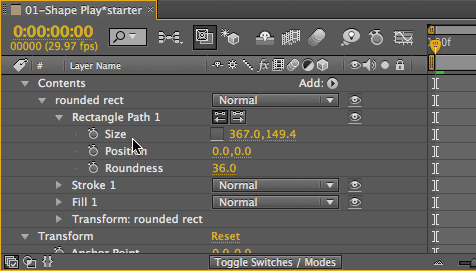
In the movie above, Chris covers creating so-called “parametric” shapes: rectangles, ellipses, polygons, and stars. There are a number of modifier keys you can use while dragging out a shape to control its position, symmetry, roundness, number of sides, and the such. After a shape path has been created, it is then highly editable. Chris shows how to dissect a shape layer’s construction: It’s actually a series of modules, and the order of those modules - such as Fill and Stroke - can have a big impact on how the final graphic renders.

FTC Disclosure: We make a bit of money whenever you purchase one of our courses from Class on Demand, or have a lynda.com subscription and watch one of our courses. We do not make any money from either when you watch these free videos. We’ve worked with Adobe over the years, and they give us free access to their software in exchange for testing and consulting, but they did not subsidize the creation of these videos or the book they are derived from. We’re just trying to pay the bills by sharing what we’ve learned from using After Effects in the real world since version 1.0.

The content contained in After Effects Apprentice - as well as the CMG Blogs and CMG Keyframes posts on ProVideoCoalition - are copyright Crish Design, except where otherwise attributed.

 

(Page 1 of 1 pages for this article )


You must be registered to comment. This is an effort to reduce spam. Please REGISTER HERE.

Name:

Email:

Location:

URL:

Smileys

Remember my personal information

Notify me of follow-up comments?

Submit the word you see below:


After Effects Apprentice Free Video: Exploring Shape Effects
After Effects Apprentice Free Video: Drawing Parametric Shapes
After Effects Apprentice Free Video: The Puppet Starch Tool
After Effects Apprentice Free Video: Eraser Tool Modes
After Effects Apprentice Free Video: Tracking with mochaAE
After Effects Apprentice Free Video: Performing a Motion Track
After Effects Apprentice Free Video: Creating 3D Objects using Adobe Repoussé
After Effects Apprentice Free Video: Understanding Axis Modes
Using After Effects as an Advanced Titler for Premiere Pro
After Effects Apprentice Free Video: Creating an Orbit Camera Rig
CMG Hidden Gems: Chapter 45 – What’s Your Preference?
CMG Hidden Gems: Chapter 44 – Prerendering and Proxies
CMG Hidden Gems: Chapter 43 – Advanced Rendering
CMG Hidden Gems: Chapter 42 – Render Queue
CMG Hidden Gems: Chapter 41 – Video Issues
CMG Hidden Gems: Chapter 40B – 3D Channel Effects
CMG Hidden Gems: Chapter 40 – Integrating with 3D Applications
CMG Hidden Gems: Chapter 39 – Integration 101
After Effects Apprentice Free Video: Multiple Playback Speeds
CMG Hidden Gems: Chapter 38 – Import and Interpret
CMG Hidden Gems: Chapter 37B and 37C – Expressions and Scripting Bonus Chapters
CMG Hidden Gems: Chapter 37 – Expressions
CMG Hidden Gems: Chapter 36B – Audio Effects
CMG Hidden Gems: Chapter 36 – Working With Audio
Upgrading to After Effects CS5.5?
CMG Hidden Gems: Chapter 35 – The Puppet Tools
After Effects Apprentice Free Video: The Wiggle Expression
CMG Hidden Gems: Chapter 34 – Roto Brush
CMG Hidden Gems: Chapter 33 – Paint and Clone
After Effects Apprentice Free Video: What Could Go Wrong?


Expression Shorts - Trigger Event Based On Layer’s Speed

David Torno | 02/18

Use one layer’s speed to trigger another layer event or animation.

image

In this episode we look at how how fast a layer…

Expression Shorts - Wiggle Only One Direction

David Torno | 02/12

Wiggle a multi-dimensional property in only one direction.

image

The most popular After Effects expression that nearly EVERYONE uses…

Expression Shorts - Numerical Readout

David Torno | 02/05

Create numerical readouts for use in HUD style graphics.

image

With this Expression, I will show you how to feed numerical property information…

After Effects Apprentice Free Video: Exploring Shape Effects

Chris and Trish Meyer | 01/31

An overview of five of the simpler shape operators that can turn your basic outline into something quite twisted.

As we mentioned awhile back, we’ve been busy the past year and a half creating an extensive, multi-course video training…

To be considered for listing, contact pr (at) provideocoalition (dot) com


Copyright © 2011, HD Expo, LLC a division of Diversified Business Communications. DBA Createasphere

All rights reserved. HD EXPO, High Def EXPO, Createasphere, E-Tech, Entertainment Technology Exposition, 3D Production Workshop, VariCamp, P2 Camp, ColorCamp 101, and Lighting, Filters & Gels for HD are all trademarks of HD Expo, LLC.

Terms of Use  |  Privacy Policy

Check PageRank