
(Page 1 of 1 pages for this article )

Thursday, January 12, 2012

Filed under: GentryMedia Sister SitesProVideo CoalitionMotion GraphicsTipsTrainingVisual Effects

After Effects Apprentice Free Video: The Puppet Starch Tool

Chris and Trish Meyer | 01/12

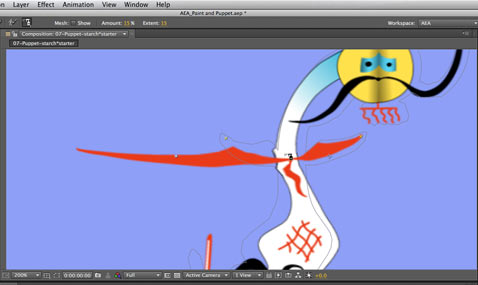
Not happy with how Puppet kinks and bends your image? The little-known Starch tool helps you straighten it out.

As we mentioned awhile back, we’ve been busy the past year and a half creating an extensive, multi-course video training series based on our popular beginner’s book After Effects Apprentice. Each course has two or more movies that are free for all to view; we’re re-posting those videos here on PVC to make sure you don’t miss them. In this movie, Chris demonstrates using the Starch tool to clean up problems that can appear when creating Puppet distortions in After Effects.

The lucky thirteenth Apprentice course (available by subscription to lynda.com and now for individual purchase through Class on Demand) introduces a series of creative tools inside After Effects: Paint, Puppet, Brainstorm, and Cartoon. The centerpiece is Paint, where Trish will demonstrate how to use the Brush, Eraser, and Clone Stamp tools to draw on a layer, remove portions of it, or repeat elements around a composition. These can be used for artistic purposes as well as to repair problem areas in footage. Chris then shows off the Puppet tools for distorting layers, Brainstorm to break through creative blocks, and the Cartoon effect to lend an illustrative look to live footage or 3D renders.

In the movie above, Chris demonstrates the third of the three Puppet tools: Starch. Not all problems that creep up using Puppet can be cured by altering the number of triangles used to define the distortion mesh. The Starch tool allows you to target specific areas to make stiffer or looser, helping create more predictable (and desired) distortions.

FTC Disclosure: We make a bit of money whenever you purchase one of our courses from Class on Demand, or have a lynda.com subscription and watch one of our courses. We do not make any money from either when you watch these free videos. We’ve worked with Adobe over the years, and they give us free access to their software in exchange for testing and consulting, but they did not subsidize the creation of these videos or the book they are derived from. We’re just trying to pay the bills by sharing what we’ve learned from using After Effects in the real world since version 1.0.

The content contained in After Effects Apprentice - as well as the CMG Blogs and CMG Keyframes posts on ProVideoCoalition - are copyright Crish Design, except where otherwise attributed.

 

(Page 1 of 1 pages for this article )


You must be registered to comment. This is an effort to reduce spam. Please REGISTER HERE.

Name:

Email:

Location:

URL:

Smileys

Remember my personal information

Notify me of follow-up comments?

Submit the word you see below:


After Effects Apprentice Free Video: Exploring Shape Effects
After Effects Apprentice Free Video: Drawing Parametric Shapes
After Effects Apprentice Free Video: The Puppet Starch Tool
After Effects Apprentice Free Video: Eraser Tool Modes
After Effects Apprentice Free Video: Tracking with mochaAE
After Effects Apprentice Free Video: Performing a Motion Track
After Effects Apprentice Free Video: Creating 3D Objects using Adobe Repoussé
After Effects Apprentice Free Video: Understanding Axis Modes
Using After Effects as an Advanced Titler for Premiere Pro
After Effects Apprentice Free Video: Creating an Orbit Camera Rig
CMG Hidden Gems: Chapter 45 – What’s Your Preference?
CMG Hidden Gems: Chapter 44 – Prerendering and Proxies
CMG Hidden Gems: Chapter 43 – Advanced Rendering
CMG Hidden Gems: Chapter 42 – Render Queue
CMG Hidden Gems: Chapter 41 – Video Issues
CMG Hidden Gems: Chapter 40B – 3D Channel Effects
CMG Hidden Gems: Chapter 40 – Integrating with 3D Applications
CMG Hidden Gems: Chapter 39 – Integration 101
After Effects Apprentice Free Video: Multiple Playback Speeds
CMG Hidden Gems: Chapter 38 – Import and Interpret
CMG Hidden Gems: Chapter 37B and 37C – Expressions and Scripting Bonus Chapters
CMG Hidden Gems: Chapter 37 – Expressions
CMG Hidden Gems: Chapter 36B – Audio Effects
CMG Hidden Gems: Chapter 36 – Working With Audio
Upgrading to After Effects CS5.5?
CMG Hidden Gems: Chapter 35 – The Puppet Tools
After Effects Apprentice Free Video: The Wiggle Expression
CMG Hidden Gems: Chapter 34 – Roto Brush
CMG Hidden Gems: Chapter 33 – Paint and Clone
After Effects Apprentice Free Video: What Could Go Wrong?


Expression Shorts - Trigger Event Based On Layer’s Speed

David Torno | 02/18

Use one layer’s speed to trigger another layer event or animation.

image

In this episode we look at how how fast a layer…

Expression Shorts - Wiggle Only One Direction

David Torno | 02/12

Wiggle a multi-dimensional property in only one direction.

image

The most popular After Effects expression that nearly EVERYONE uses…

Expression Shorts - Numerical Readout

David Torno | 02/05

Create numerical readouts for use in HUD style graphics.

image

With this Expression, I will show you how to feed numerical property information…

After Effects Apprentice Free Video: Exploring Shape Effects

Chris and Trish Meyer | 01/31

An overview of five of the simpler shape operators that can turn your basic outline into something quite twisted.

As we mentioned awhile back, we’ve been busy the past year and a half creating an extensive, multi-course video training…

To be considered for listing, contact pr (at) provideocoalition (dot) com


Copyright © 2011, HD Expo, LLC a division of Diversified Business Communications. DBA Createasphere

All rights reserved. HD EXPO, High Def EXPO, Createasphere, E-Tech, Entertainment Technology Exposition, 3D Production Workshop, VariCamp, P2 Camp, ColorCamp 101, and Lighting, Filters & Gels for HD are all trademarks of HD Expo, LLC.

Terms of Use  |  Privacy Policy

Check PageRank