
(Page 1 of 1 pages for this article )

Tuesday, January 27, 2009

Filed under: CS4Motion GraphicsTrainingVisual Effects

The Differences Between AE CS3 and CS4

Chris and Trish Meyer | 01/27

A free chapter for Creating Motion Graphics owners that details the differences.

The short version:

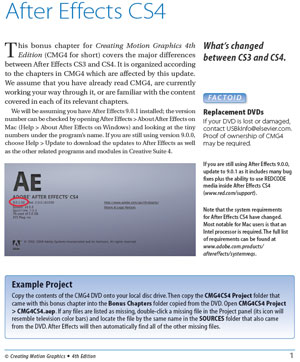
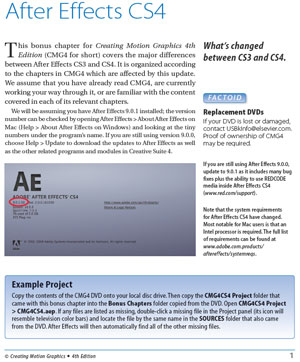
A free chapter by us outlining in detail the differences between After Effects CS3 and CS4 - with project files - is now available on our publisher Focal Press’ web site.

The long version:

We normally update our book Creating Motion Graphics (CMG for short) for every other version of After Effects (AE). The most recent edition - CMG4 - was for AE CS3.

However, we decided to try something different this time. Rather than update the entire book, we created a bonus chapter outlining the differences between AE CS3 and CS4, including many examples and tutorials. We made the PDF and accompanying project file available for free on the Focal Press After Effects micro-site - click through the link for Free Chapter Download. The project file assumes you have the disc that came with CMG4, as it uses source files from that disc. (Note: Some problems have been reported with using Apple Preview to read the PDF file; we suggest you download and use Adobe Reader.)

We hope this makes the transition from AE CS3 to AE CS4 easier, plus protects your investment in purchasing a copy of CMG4. Our intention has always been to make Creating Motion Graphics a reference volume that every After Effects artist should have on their desk.

Some other links that may be of interest:

We will continue to post articles (and the occasional video) here on PVC as issues come up in After Effects. For example, we’re overdue on writing a big piece on the background and implications of the new pixel aspect ratios in CS4…

A very special thanks must go out to Todd Kopriva of Adobe for providing a raw list of new features in CS4, which made it possible for us to be far more thorough than planned (i.e. this was supposed to just a 16 page chapter; it ended up being 48 pages!).

The content contained in our books, videos, blogs, and articles for other sites are all copyright Crish Design, except where otherwise attributed.

(Page 1 of 1 pages for this article )


You must be registered to comment. This is an effort to reduce spam. Please REGISTER HERE.

Do not use, crashes Preview. Crashes Safari when trying to print from web page.

Hmmm. Must use Acrobat? Are the Adobe folks sticking it to the Apple users in retaliation for the lack of Flash support on the iPhone?

I am seeing a trend. I can not play Layers Magazine tutorials in Safari either.

Maybe it’s just a bad product. ( Adobe’s Flash ).

Safari 3 passed the Acid 3 test so if you are going to post a link at least get it right. It is unprofessional to post a link that crashes a computer, especially a .pdf file. Come on now!

Ed

Posted by HV Media Solutions  on  01/29  at  07:47 AM


I think you’re being a little bit paranoid about Adobe and Apple (smile). The scoop is, we used the latest version of Acrobat, which happens to have a security option that not only crashes Apple’s Preview (Apple’s bug), but also potentially earlier versions of Acrobat (Adobe’s bad). It works perfectly fine in Adobe Reader 9 or Acrobat 9, as well as in Firefox and Safari here.

All that said, yesterday we provided Focal Press with a new version of the PDF file that has compatibility back to Acrobat 5 - and with Apple’s Preview. Sorry for the hassle in the meantime.

Posted by Chris Meyer  on  01/29  at  10:02 AM


No problem, I really like your book. Now if I can only play the tutorials in Layers Magazine….I am sure they can fix their little javascript re-direct.

Ed

Posted by HV Media Solutions  on  01/29  at  04:36 PM


We’ve updated the file on the Focal Press site to be compatible all the way back to Acrobat 5. I just tested it in Preview, and I’m happy to say it does not crash my system (unlike the previous version).

take care -
Chris

P.S. Regardless of what tests Safari may or may not pass, unfortunately I find it has problems with some Flash-based sites and media. Whether that is Safari’s fault or not, I don’t know, but I do know these sites tend to work okay in Firefox.

Posted by Chris Meyer  on  01/30  at  12:19 PM


Name:

Email:

Location:

URL:

Smileys

Remember my personal information

Notify me of follow-up comments?

Submit the word you see below:


After Effects Apprentice Free Video: Rendering a 4:3 Center Cut Movie from a 16:9 Composition
After Effects Apprentice Free Video: Using Parenting to Animate Layers as a Unit
After Effects Apprentice Free Video: Working with Nested 3D Compositions
After Effects Apprentice Free Video: Copying Paths from Illustrator to After Effects
After Effects CS6 Tutorial: Exporting 3D Camera Tracker Data to Cinema 4D
After Effects CS6 Tutorial: Targeting Properties in the new Ray-Traced 3D Engine
After Effects CS6 (P)Review
After Effects Apprentice Free Video: Exploring Shape Effects
After Effects Apprentice Free Video: Drawing Parametric Shapes
After Effects Apprentice Free Video: The Puppet Starch Tool
After Effects Apprentice Free Video: Eraser Tool Modes
After Effects Apprentice Free Video: Tracking with mochaAE
After Effects Apprentice Free Video: Performing a Motion Track
After Effects Apprentice Free Video: Creating 3D Objects using Adobe Repoussé
After Effects Apprentice Free Video: Understanding Axis Modes
Using After Effects as an Advanced Titler for Premiere Pro
After Effects Apprentice Free Video: Creating an Orbit Camera Rig
CMG Hidden Gems: Chapter 45 – What’s Your Preference?
CMG Hidden Gems: Chapter 44 – Prerendering and Proxies
CMG Hidden Gems: Chapter 43 – Advanced Rendering
CMG Hidden Gems: Chapter 42 – Render Queue
CMG Hidden Gems: Chapter 41 – Video Issues
CMG Hidden Gems: Chapter 40B – 3D Channel Effects
CMG Hidden Gems: Chapter 40 – Integrating with 3D Applications
CMG Hidden Gems: Chapter 39 – Integration 101
After Effects Apprentice Free Video: Multiple Playback Speeds
CMG Hidden Gems: Chapter 38 – Import and Interpret
CMG Hidden Gems: Chapter 37B and 37C – Expressions and Scripting Bonus Chapters
CMG Hidden Gems: Chapter 37 – Expressions
CMG Hidden Gems: Chapter 36B – Audio Effects


After Effects Apprentice Free Video: Working with Nested 3D Compositions

Chris and Trish Meyer | 05/07

How you can be two places at once inside After Effects

As we mentioned awhile back, we’ve been busy the past year and a half creating an extensive, multi-course video training…

Expression Shorts - loop

David Torno | 05/06

Learn how the loop expressions work.

image

Looping is a very common task in our industry and is mostly associated with video footage of some…

After Effects Apprentice Free Video: Copying Paths from Illustrator to After Effects

Chris and Trish Meyer | 05/01

Revealing Illustrator paths requires a few intermediate steps, involving After Effects masks and effects.

Buried in the shuffle over the announcement of After Effects CS6 is that we concluded the video training series for our book After…

After Effects CS6 Tutorial: Exporting 3D Camera Tracker Data to Cinema 4D

Chris and Trish Meyer | 04/27

You can export the results of the new 3D Camera Tracker to any application that has a way to accept AE keyframe data.

One of the major new features in After Effect CS6 (which we previously previewed here) is a built-in 3D Camera Tracker. Rather than track a specific…

To be considered for listing, contact pr (at) provideocoalition (dot) com


Copyright © 2012, HD Expo, LLC a division of Diversified Business Communications. DBA Createasphere

All rights reserved. HD EXPO, High Def EXPO, Createasphere, E-Tech, Entertainment Technology Exposition, 3D Production Workshop, VariCamp, P2 Camp, ColorCamp 101, and Lighting, Filters & Gels for HD are all trademarks of HD Expo, LLC.

Terms of Use  |  Privacy Policy

Check PageRank