

Filmtools
Filmmakers go-to destination for pre-production, production & post production equipment!
Shop NowOn squishing icons, and approaching multimedia on a (physically) large scale.

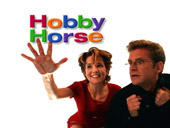
Back in 1997 – still fairly early in our motion graphics career – one of our more enjoyable gigs was creating promotionals for NBC. These promos didn’t appear on television; they were destined for the Big Screen – namely, NBC’s huge AstroVision screen in Times Square. Rather than showing upcoming episodes of specific shows, they often took the form of puzzles, trivia, and other bits of information about their stars (see the sidebar “Multithreaded Information” for more musings on that subject). As a result, each clip usually took the form of a simple animation or site gag. Well, they look simple – some of them took a bit of thought to pull off. This is the story of one of those gags.
The Mondo Shoot
For their own promotional work, NBC regularly gathers together their stars for what they call the “mondo shoot.” In the earlier, more lighthearted days, this often included filming the actors and actresses performing a number of amusing actions, such as dancing, playing with a giant TV remote, pantomiming catching or throwing away an object, and generally hamming it up; today the look tends to be more serious. Text, show clips, and the ubiquitous NBC Peacock are then later composited with these clips and edited together to create their promos.
Back then, NBC’s promos had an identifiable “look” including a solid white background, compared to the more urban look of today. As a result, most of the mondo clips back then were shot against a seamless white backdrop, or even in a completely white room. In some shots, the talent stood on a translucent floor or ledge, with the camera underneath them or swinging around them. This use of white also happened to make compositing easier: It only took a simple setting of a threshold or levels filter to clear out any imperfections and make the background solid white. Once you have that, it was easy to use a “multiply” blending mode to composite these clips on top of each other; with some further manipulations of their levels and maybe some edge treatments, you could also keep the background white and make the actor solid black, resulting in a quick luminance matte for more complex composites.
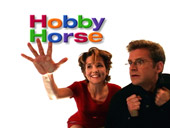
Quite often NBC would direct different actors to make the same general move, such as the leaping-towards-the-camera theme that appeared in many of their TV promos during the 1997/1998 season. We looked for these groups when it came time to create headers and bumpers for general classes of clips, such as a certain header style for all the trivia questions. In our case, we were creating a class of clips known as “Hobby Horse” where you try to guess the hobby of a particular star. We decided to use a series of shots of stars trying to squash an imaginary bug on a transparent floor or wall between them and the camera. NBC dubbed us a BetaSP copy (they used D3 internally at the time), we digitized it from our Sony UVW-1800 through our Radius VideoVision SP (an early component video capture system for Macs) onto disk arrays. Even though we had to live with compressed video back then instead of uncompressed D1, the nice thing about the solid color backgrounds was that they were data-efficient and compressed very cleanly.
Mr. Mercury and the Peacock
The other visual requirements for the bumpers were simple: We needed the NBC Peacock (so you could tell what network we were promoting), and we needed the segment name: Hobby Horse. To create a visual hook to grab attention, we decided to have the stars squash the peacock, and then have it to reassemble into the words.
A good After Effects-compatible filter to simulate the “liquid” action of a squash is Mr. Mercury. Back then it was part of the MetaCreations Studio Effects and Final Effects Complete packages; today versions of it come bundled with After Effects as well as with the Boris version of Final Effects Complete (we blogged about the differences between the two back at the end of February). In reality, it is a variation of their other particle effects, in that pieces are ejected from an object, with user control over velocity, gravity, air resistance, etc. What makes Mr. Mercury different is that the pieces are actually warped blobby sections of the original source layer, with some coloration to make them look sorta like blobs of mercury.
Since it is a particle system, experience with other CC or Boris FEC particles can be directly transferred. For example, it pauses two frames before particle start to get ejected, so you have to offset your effected layer appropriately. We wanted particles to squirt away quickly once they appeared, so we cranked up the velocity. However, we didn’t want the blobs to keep flying away; they had to stay in the frame to re-assemble back into the name. So, we moved one second out on the timeline past the squash, and cranked up the viscosity to slow the blobs down after initial ejection. These two parameters take a little balancing against each other; we ended up with settings of velocity = 5.5 and resistance = 0.67.
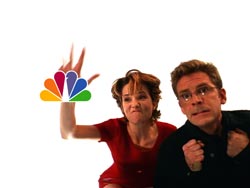
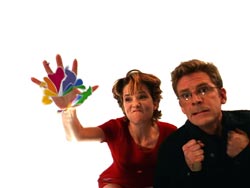
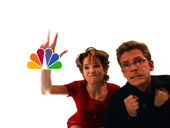
Caroline (Lea Thompson) and Richard (Malcolm Gets) from the old NBC show “Caroline in the City”, squashing the NBC Peacock.
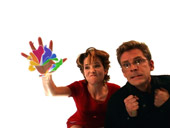
There are a couple of problems with Mr. Mercury. One is that it is very hard to make the result not look like blobs: You have to really crank up the particle size to much larger than you want for the actual blobs. This makes it hard to go smoothly from an un-blobbed object to a blobby one. We usually end up quickly cross-fading from an untreated to the treated object; in this case, since the action was so fast, we just cut from the straight peacock to the blobbed one, as seen in the sequence above. Second, Mr. Mercury always colorizes the source to try to look more like mercury. This color shift can give away the crossfade. So, we counter-acted it by increasing the saturation and lightness of the object, as seen in the side-by-side comparison below. AE’s old Color Balance HSB filter with settings of lightness = 20 and saturation = 35 worked in that case; today we would have used the newer Hue/Saturation effect.
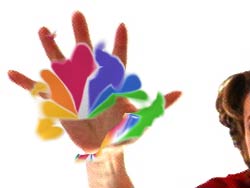
Mr. Mercury adds colorization to the original object. In the second image, we cranked the lightness and saturation of the peacock back up so it would better match its pre-Mecury state.
The next two set of problems were that we wanted the object to change from the peacock to the titles, and we wanted to blobs to go out and re-assemble back into a solid shape. The shape change was accomplished by cross-fading in a previous composition from one to the other, and then blobbing the result. Since the aspect ratios are so different, we also animated the height and width of the title from the aspect of the peacock to its normal shape after the crossfade.
Mr. Mercury itself also only runs forwards, ejecting blobs. To run it backwards, you have to turn the layer backwards in the timeline. We wanted it to go forwards and then backwards. We could have tried to use AE’s Time Remapping to turn it around mid-splat, but we also wanted the source layer to keep running forwards from the peacock to the title – a contradiction. Rather than try to unravel this time travel problem (actually, we did try for an hour, but then gave up), we decided to cheat.
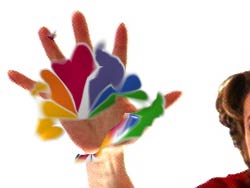
We set the particle life for the original peacock-to-title effect to die off after roughly a second, dissolving the original blobs away. We then created a fake blob containing the final title, animated it to fly away from the point of impact just as the real blobs did, and then unravel into the title (see the two figures below). To create this fake blob, the first step was again animating the aspect ratio of the title, this time from a small square to its final shape. We bent it into a sphere using the Final Effects/CC Lens filter, and further twisted it using AE’s Twirl filter. The Lens and Twirl were unfurled as it moved from the point of impact to its final resting place. Of course, there were others ways we could have distorted it, but this method was quick and easy to control.
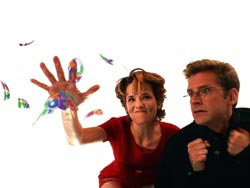
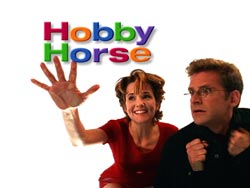
The first image show not quite half way through the gag. You can see the blobs have been crossfaded from the peacock to the Hobby Horse title. The fake blob is under Caroline’s index finger. The second image show the title after it has been fully unfurled from the fake blob; the real blobs have expired and faded away.
Once we had this basic gag down, it was easy to copy and paste it on top of the other mondo clips of other stars smashing the bug. We just had to spot the time and position their hand hit the glass, move the new start time and center point for our objects there, and set where the final unfurled title should end up in the frame.
Deconstruction
When you deconstruct the move frame by frame, it is easy to see the crossfade from the original peacock to the blobbed one, crossfades in the blobs from the peacock to the title, and the emergence and unfurling of the fake blob. But when it all happens over just a second in time, with the added distractions of an actual human smashing it and motion-blurred blobs flying all over the place, it looks believable. Remember that time is on your side in animation versus still work – and you can use the quick passage of it to your advantage when trying to sell alternate realities.
Special thanks to Jim Goss of NBC On-Air Promotions for permission to use the Caroline & Richard shots, and for letting us have so much fun in the first place.
Multithreaded Information
One of the original attractions of “multimedia” was the ability to provide additional details and background information about a subject without forcing interruptions in the linear unraveling of the central narrative (as I do here with my frequent parenthetical asides). Examples of this include allowing the user to click on hot words or photos in a CD-ROM application (do any of you still remember those?) or on a web page to take you to another page with tangential content, or attempts to present multiple media streams at once – such as text, photos, and sound – to give a wider gestalt to the story.
So where does established, linear, big media – i.e. broadcast television – fit into this picture? Although the economics are different, many of the same goals applied, even ten years ago: You have a linear central story (the program), but other details you could provide…even something as simple as outtakes from filming the program, or background on the stars. Fan magazines, newsgroups, web sites, and even TV Guide help fill this roll. NBC, in their own way, started doing the same back in the late 90s. For example, their “NBC2000” group was one of the first to put the alternate screen boxes at the end of television shows, sometimes containing outtakes or promos of other programs. With their AstroVision sign, they went further.
Initially, NBC tried “repurposing” their existing TV promos onto the sign. However, as many multimedia producers also found out back then, you can’t always take a message from one medium to another and expect it to hold up. In this case, the lack of sound, as well as the differences in attention span between someone at home and someone in Times Square (or Epcot Center, or sporting events, where they also play these promos), rendered the original promos less effective than they were on TV. In response, NBC started designing alternate content for the sign – such as trivia puzzles, word games, and factoids about their stars. Each one is then followed by a few seconds of the program the star appears in, along with the name of the show, television network, and night it plays. It ain’t exactly a hot link, but it does give you the pointer you need to follow up on a thread you might have found interesting. And if you’re already a fan, it gives you some additional background information to widen your experience of the show.
It wasn’t the “grand convergence” many preached about back in the 90s (or even today), but neither was it a bad idea – especially for the time. I know it is still popular to say the medium is the message, but perhaps some of us would be better served by focusing more on the message, and then figuring out how to use the mediums at our disposal to better disseminate it.
The content contained in our books, videos, blogs, and articles for other sites are all copyright Crish Design, except where otherwise attributed.