

Filmtools
Filmmakers go-to destination for pre-production, production & post production equipment!
Shop Now
In part one of Audition: Made for Video, I demonstrated how developing a workflow can save you time and money – when time is of the essence. We explored how to bring single clips, multiple clips, and complete sequences from Premiere Pro to Adobe Audition – with and without video. We took a look at the roundtrip process of bringing audio back into Premiere, as well as the process of going back and forth between the two applications to make changes, sweeten the audio or master the final mix.
In part two of Audition: Made for Video, we took a look at some of the features of Adobe Audition that we use on a regular basis when producing motion+connect.
In the final segment of Audition: Made for Video, we’re going to take an in-depth, step-by-step look at the process of integrating Adobe Audition and Premiere Pro, where the pitfalls are in the current release, and hopefully provide insight as to why these issues exist from a technical perspective.
When Time is of The Essence
 Once again, you’ll see me using the phrase – when time is of the essence. This concept originated from a session I gave several years back called When Time is of the Essence: Creating Motion Graphics on a Deadline. For me, the silver bullet is taking advantage of Adobe Production Premium to create custom workflows for the projects I create for motion+connect, motion.tv, and motion.
Have you developed your own custom workflow yet? Start thinking about it now. It will come in handy – when time is of the essence.
Premiere Pro | Audition Workflow
In some ways, I view Audition CS5.5 as a ‘version one’ product release. While the CS5.5 release retained many of the features in Audition 3 (Windows only), it also lost functionality due to the complete rewrite and developer time constraints. I believe Adobe will bring back the important features that were not included in this release, but I’m even more excited at the potential direction Adobe Audition could take, because of being completely rewritten.
Number one on my ‘wish-list’ for the next release, is control surface integration – a major feature missing in this release. But just a tad bit behind that on my wish list, is for Audition to include features common to Adobe Dynamic Link, creating a more succinct and efficient workflow.
For those of you not familiar with Adobe Dynamic Link, wiki describes this as “a feature that eliminates intermediate rendering between programs”. Currently, Dynamic Link integration exists between Premiere Pro, After Effects and Encore.
But better yet – what if all applications included in the Production Premium Creative Suite could be integrated with Premiere Pro or After Effects utilizing their native file format?
For example, the native format for Illustrator is .ai, Photoshop is .psd, .sesx for Audition, and so on. If you’d like to read more about the concept of a completely integrated Suite, take a look The Ultimate Production Premium CS as part of the When Time is of the Essence series – and then join in on the conversation on the motion.tv group on LinkedIn.
But since the ‘ultimate’ Production Premium CS is not yet a reality, in the interim, learning how to best use the existing tools to simulate this process will help you work faster and smarter. Let’s take a more in-depth, step-by-step look at the workflow techniques we discussed in part one, including:
- creating a new audio file in Audition?
- sending the new audio file to Premiere?
- editing a clip from the Premiere timeline in Audition?
- editing a sequence from the Premiere timeline in Audition :: with or without video
- revisions: roundtrip workflow between Premiere and Audition
Feel free to download the Premiere|Audition Integration PDF I’ve created as a guide to work from when you’re learning the process.
Creating a new audio file in Audition. Currently, there is no option to create a New Audition file from within Premiere Pro. Instead, you have to first create a new audio file in Adobe Audition and then import it into Premiere. The downside? If this was integrated in Premiere Pro, the new file created in Audition would automatically have the same sample rate, bit depth, and mix (mono, stereo, or 5.1) as your Premiere project.
Using motion+connect as the concept for our project, let’s create an audio file that we will use for the motion+connect intro sequence. These are the steps:
Sending the new audio file to Premiere. Now that we’ve created a new audio file in Audition, we need to bring it into Premiere. My preference would be to be able to send the files back to Premiere exactly as they appear in Audition – audio segments, on multiple tracks with applied effects. Volume levels would be sent as keyframe metadata. But the current release of Audition does not have this option. Instead, the audio is sent back as either stems (converts the full timeline duration of each track into a single clip) or a mixdown.
To export audio from Audition to Premiere, follow these steps:
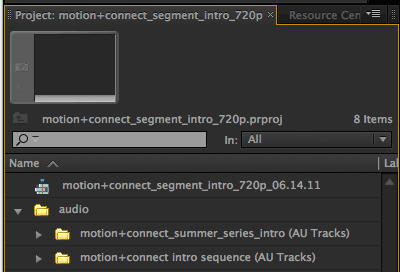 In the project panel (pictured at right), you’ll also notice a new folder with a file name that ends in (AU Tracks) – unless you named it differently. This folder contains the Audition XML file, and the audio file assets. If you double click on the XML file, it will open as a new sequence in Premiere. The video track will be blank, but the audio tracks will contain the exported audio tracks.
Editing a clip from the Premiere timeline in Audition. There are two options when editing audio in Premiere Pro. You can 1) edit a clip, or 2) edit a sequence. In Premiere, the term ‘clip’ is used to define either an audio file (ie .wav, .aiff, etc.) or a movie clip that contains audio.
My preference would be for all audio editing to be native. For example, if I edit an audio file in Premiere, I’d want the actual audio file to open in Audition, where I make my modifications, save the file, and it’s automatically updated in Premiere.
Unfortunately, that’s not how it currently works. Instead, when you edit a clip in Audition CS5.5, Premiere Pro generates a new ‘Extracted’ audio file that is sent to Audition. In Audition, you make your changes, save the file, and the new version of the file is automatically updated in Premiere Pro. These are the steps:
note: There are several things to be aware of. Each time you edit a file from Premiere, it creates a new version in adding ‘Audio Extracted’ to the file name. For example, if your track was named ‘voiceover’, the first time you edit, it would be renamed ‘voiceover Audio Extracted’. In the second edit, it is renamed ‘voiceover Audio Extracted Audio Extracted’.
In an ideal workflow, the original file would be updated in Audition, and the changes would be reflected in Premiere. If you needed to undo an edit, all you would need to do is ‘undo’ in Audition, and re-save the file.
While it’s not the ideal workflow, you can clean up the unused audio files in Premiere by going to Project > Remove Unused. This will remove all of the unused audio files (as well as any other files in your project that are unused. Use with caution!)
Also, as you recall, we imported this file into Premiere straight from Audition. This was a .wav that was part of the earlier Audition Multitrack file we created. But when we sent it, we sent it as a mixdown. If we would have sent it as stems, we would have more flexibility to edit back and forth between the two applications.
Editing a sequence from the Premiere timeline in Audition – with or without video. A second option is to Edit a Sequence in Audition from Premiere Pro. With this, you have the option to include a reference video, or just send the audio.
Once again, my preference would be that all elements in the Premiere sequence are sent to Audition – similar to how this works integrating After Effects and Premiere Pro with Dynamic Link. Without rendering the video or audio, I’d want the file to be open in Audition, make my modifications, save the file, and have it automatically update in Premiere.
Technically, there is a substantial difference between what’s happening with the After Effects/Premiere integration, and the ideal integration I’ve defined. With the After Effects/Premiere integration, when you edit the original AE file from Premiere, all of the elements that are being edited were part of the original .aep file.
On the other hand, video is not a native element in Adobe Audition. In fact, in most cases, the audio you edit from Premiere did not originate as an Audition .sesx file. More often than not, the audio track is part of a video file.
So how could this possibly work? Premiere would need to generate an Audition .sesx file that contains the same audio and video tracks that you have in Premiere. And, to make it even more complicated, for reference purposes, the tracks would need to include existing transitions and effects that you’ve already make in Premiere.
While this is extremely complicated, I believe Adobe can do it. And it’s high on my wish list for a future release.
Instead, Adobe came up with an innovative ‘next best’ way of achieving integration between Premiere and Audition. When you edit a sequence in Audition, a rendered video file is created that includes your edits, transitions, and any effects that you’ve applied. Now we know why it takes so long to process!
Additionally, an XML file is created that serves as the Audition .sesx file. Now, here’s the cool part – each audio track is brought in with the same cuts, tracks, effects, and transitions that you’ve already applied in Premiere! And…it uses the same sample rate, bit depth, and mix that you’re using in Premiere. Ok, I’ve gotta say – Adobe came pretty close to my ideal integration. For a ‘first version’ release – I am truly impressed.
Where I think Adobe developers ran out of time, was on the roundtrip process back to Premiere. It’s not as elegant.
As you recall, when editing a single clip, Premiere duplicates the original file, and replaces the original with the edit in the timeline. This is not the case with a sequence. When editing a sequence, Adobe demonstrates the ’roundtrip’ process by creating a new sequence in Premiere – in which they’ve already placed a preview video. They export the new Audition multitrack mix to this sequence. And we’re all amazed at how quick and easy it was to do – plus the fact that we didn’t have to bounce the audio first. But with the exception of mastering a final cut, it’s not really a typical workflow.
What you’re really getting in the new sequence is 1) the final video file you’ve manually rendered from Premiere as your video track, and 2) either ‘stems’ – each Audition audio track as a full length separate track or a single track mixdown in your desired format: mono, stereo, or 5.1.
Once again, from a technical perspective, I understand why this is happening. Remember when we brought the project into Audition? Premiere could easily send the audio tracks with all of the cuts, tracks, effects, and transitions that you applied in Premiere to Audition. This is because natively, Audition contains tracks, the ability to cut, add transitions – and includes all of the audio effects that are included with Premiere.
But as you also recall, Premiere had to render a single composite video file that contained the cuts, effects, and transitions that were made in Premiere since Audition does not natively handle video cuts, transitions, and effects. Now, we’re facing the same issue – in reverse. Premiere does not have the capabilities that are included in Audition, so instead, Audition has to render a single composite audio file for each track (stem), or mixdown.
On the next page, we’ll revisit my original idea on integration, and ask the questions that need to be asked.
Let’s revisit my original idea on integration, and ask the hard questions that need to be asked:
Q. Is it important to me to have the same video tracks that I see in Premiere, when I’m editing audio in Audition?
A. No. All I really want is to avoid the render time required when bringing a file with video preview into Audition.
Q. Is it important to me to be able to bring edited Audition audio tracks back into Premiere just as they are in Audition instead of as stems or a mixdown?
A. Yes.
Q. Can you see a way to make this happen?
A. Yes. Premiere can handle audio transitions, and cuts. The only thing it’s missing is all of the effects that are included in Audition. By including the same effects as part of Premiere, you would be able to send the tracks back to Premiere – exactly how they are in Audition.
Q. But if you included all of the effects that are in Audition in Premiere – why would you need to edit audio in Audition?
A. Good question. I’m glad you asked. For some video editors, editing audio in Premiere will meet their needs. But for power users, people with audio editing experience, or studios that hand their video files off to sound people for sweetening and the final mix, what Audition has to offer provides the best workflow. If you think about it, beyond adding the effects that are in Audition, to provide a true audio editing environment, Premiere would also need to include all of the menu items that are part of audio editing. That would be a lot of menus for one application, and tons of code behind the application.
Q. Is this starting to sound like Microsoft Office?
A. Yes. And bloat is not an intuitive user experience.
Q. Well, is there any other way to make this happen without these issues?
A. Yes. Here’s what I would recommend. Instead of sending files back as composite audio tracks (stems or mixdown), render each audio segment with the applied effects, and send each audio segment back to Premiere – just as it appears in Audition with each audio segment pre-rendered, and on its corresponding track. Audio level information including fades can be brought back into Premiere as XML metadata and handled as keyframes in Premiere.
Q. Do you think there’s anything you’ve overlooked technically with this solution?
A. Yes. I’m sure there is. But, I’m confident Adobe engineers will be able to figure it out.
Q. One last question. Do you always talk to yourself like this?
A. No. But it does help when I’m thinking through a process like this.:-)
Having said that, this is the current way editing a sequence is handled between Premiere Pro and Adobe Audition:
note: We have a similar issue to the one we had with editing individual clips. Audition is sending a new version with each edit. That means, there will be a lot of new Audition folders with XML files and assets. And many times, they are nested in one another.
After you have replaced your clips on the timeline with your new clips, make sure your Audition folder/files are not nested. You can safely delete old Audition folders with their XML and assets.
Revisions: roundtrip workflow between Premiere and Audition. So how are multiple revisions handled between Audition and Premiere?
Assuming we imported our files from Audition originally as stems (not a mixdown) we have the option to open the file as a single audio file in the Waveform Editor for changes you want to make just to that audio file, or alternatively to open the Audition multitrack session that created the file.
The good news is if you choose to edit the single audio file in the Waveform Editor, when you save, it is automatically updated in Premiere. And…even better, the original file in the Multitrack mix gets updated as well. The process for editing using the original Audition multitrack session…isn’t that bad either. 🙂
These are the steps:
note: Each time you repeat this process, it creates a new copy of the Audition XML folder, file, and assets in the project panel. It’s safe to remove the previous Audition XML folders that are no longer in use.
Change is Hard
I was a long time Final Cut Pro user starting with Version 1. While I had been using many of the other tools in Production Premium such as After Effects, Flash, Photoshop and Illustrator for many years, about 18 months ago, I made the decision to give Adobe Premiere Pro a try.
Based on my experience of transitioning to Premiere, I wrote the article: The Age Old Debate: Final Cut Pro or Adobe Premiere Pro. Here is an excerpt…
Most film production houses are either using Final Cut Pro or Avid (according to some, the split is 21/79). Sure, Adobe Premiere has also been used to edit Hollywood features, including Dust to Glory, Captain Abu Raed, Superman Returns, and more recently – parts of Avatar. But more importantly for my workflow, Premiere Pro is also being used by television powerhouses like the BBC and The Tonight Show.
Why is this more important to me? The projects I create for motion, motion.tv, and motion+connect have one distinct commonality: the turn around time is extremely fast. This parallels the world of broadcast, where shows are cranked out at breakneck speed – as I’m sure the editors at the BBC and The Tonight Show can attest to. This ultimately became the primary reason I decided to make the switch. The work I do for the motion picture industry can be easily exported for Final Cut Pro if need be, so there is no issue here. But more importantly – the work I do for the motion group can take advantage of the unique workflow, only available by using Adobe’s Production Premium suite, including Adobe Premiere Pro.
And now, I can add Adobe Audition to the mix as well.
But I’ll be the first to admit, change is hard. Yes, Pro Tools is the most widely used DAW, and it is used in professional recording studios more than any other application. But is that to say it’s better? McDonald’s sells more hamburgers than any other hamburger franchise. But does that mean their burgers taste better? Perhaps it just means that they were the first to capture the market.
From my experience, Audition does everything Pro Tools can do – easier and with a more elegant interface. And it’s getting better all the time. Plus, you can use all the VST plug-ins that are growing in number every day. There are free VST plug-ins available as well. To get started, check out the Top-10 Free VST Plug-ins for Mac and PC. Our friends at Toolfarm offer a wide variety of amazing commercial VST plug-ins as do many other commercial vendors online.
Change is hard. But making the decision to create an optimized workflow that is faster and smarter…is a no-brainer.
Where Do We Go from Here?
If you’re a seasoned Adobe Audition user who’s been working with Audition on Windows for years, learning to integrate with Production Premium is simple. In fact, pretty much everything you need to know was covered in the first part of Audition: Made for Video. What will be new for you are some of the new features as well as aspects of the user interface. Also, because Audition was completely rewritten from the ground up, you can expect to see substantial speed improvements as well. Take some time to check it out. I think you’ll be pleasantly surprised how integrating the two products saves time and improves your workflow.
If you’re a Mac user like me, who’s coming from using ProTools or a different sound editor, you’re going to love Adobe Audition – and the ease of integration with Production Premium.
Want more? Some great resources…
from Adobe:
- Working with Video Applications – Adobe Audition CS5.5 Help document
- Editing Audio with Adobe Audition – Adobe Premiere Pro CS5.5 Help document
from the motion group:
This summer in the motion+connect Summer Series, we’re taking a look at some of the new features in Adobe Production Premium CS5.5. You’ll have the opportunity to get ahead of the curve by learning first hand how these new features work and how to integrate them in your next project.
The next motion+connect in our Summer Series happens to be on Premiere Pro and Adobe Audition integration! It will be a great addition to the topics we discussed in this article. Pssst – we’ll also be giving away a copy of Audition!
If you want the full Adobe Production Premium workflow experience, be sure to check out The Adobe Post Show. It’s 2.5 days of intermediate to advanced Adobe Production Premium workflow sessions designed specifically for pros in the film, broadcast and game industries. Naturally, Adobe Audition is part of the mix. No pun intended ;-).