
(Page 1 of 1 pages for this article )

Monday, August 30, 2010

Filed under: compressionEditingPost ProductionSoftwareFinal Cut Pro

Rarevision 5DtoRGB vs MPEG Streamclip for transcoding

Matt Jeppsen | 08/30

Another handy tool for DSLR footage transcoding

image

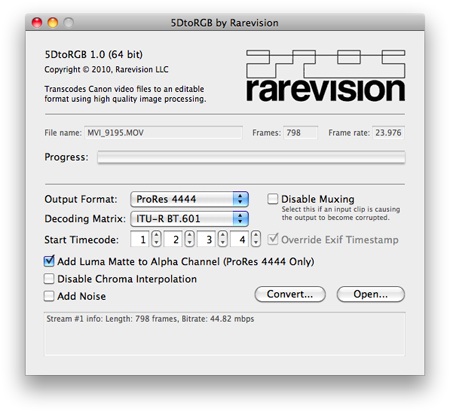
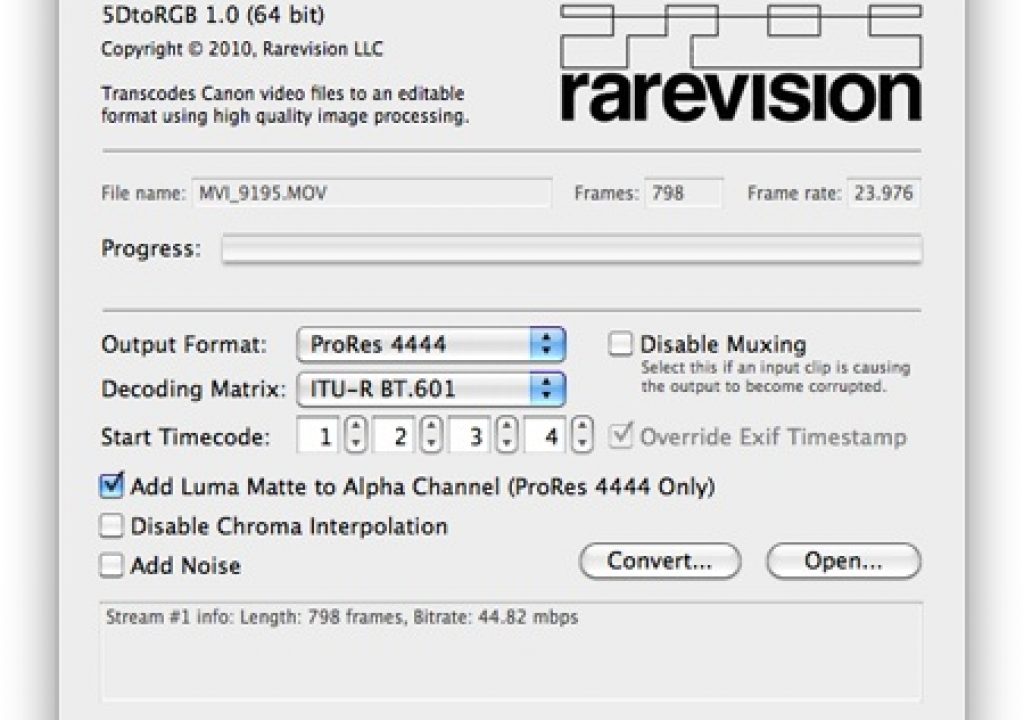
There’s a new transcoding tool making the rounds on that newfangled Twitter thingy the kids are using these days, it’s called Rarevision 5DtoRGB. It’s a free app for Mac users that they claim offers a much higher quality conversion from H.264 DSLR raw footage to an editing codec (ProRes is a common choice, in one of several flavors and bitrates). Two blogs have done some comparison testing between this new tool and MPEG Streamclip (another popular free option), and I wanted to point them out here for your pixel-peeping enjoyment…

16x9 Cinema has a comparison in which they show a visible quality increase using the Rarevision tool, at the expense of conversion time. To be fair, Rarevision makes no bones about their tool being slower…it is clearly aimed at users who want to eke the highest quality out of their footage and don’t mind the increase in transcode times. Which are not insignificant….Robin Schmidt has a comparison blog post up, and says conversions are about 8x slower (that is, MPEG Streamclip does the job in about 12% of the time that Rarevision’s 5DtoRGB tool takes to transcode the same footage).

Robin goes on to rave: ”...the 5DtoRGB is stunning. I can’t really explain how fantastic the transcode is. But believe me, it’s phenomenal.” And provides zoomed in screencaps to illustrate the difference. The quality difference is clear to see in these examples, and I, for one, am ready to give this new tool a shot on my next project. Most interesting to me is the improvement in jaggies and moire that is evident in Robin’s screencaps. However, given that MPEG Streamclip can transcode in essentially realtime, Rarevision’s tool is not something I could use on every project. There will always be a need to balance speed vs quality, so I’m happy to see that new tools are emerging to cater to both sides of that equation.

You can check out Rarevision’s 5DtoRGB tool here and MPEG Streamclip is available here. Of course if you are a Premiere Pro user, you might not want to worry about transcoding, as it appears to handle native H.264 file editing rather nicely. But for the rest of us FCP flunkies, these tools are an invaluable addition to the Applications folder. Check ‘em out and report in the comments below.

UPDATE: here’s a link to a H.264 vs Streamclip vs EOS Log & Transfer vs Rarevision 5DtoRGB comparison on the Cinema5D boards. In this comparison, the differences appear very minor, though there seems to be less artifacting when using the Rarevision tool. It also seems to noticeably lift the mids, in addition to the typical Quicktime gamma wonkiness that ensues when using various tools.

Another UPDATE: Jerome Stern has written extensively about how Rarevision affects Quicktime gamma and color accuracy.

(Page 1 of 1 pages for this article )


                    Clip to Evernote


Redrock Micro’s ultraCage for the C300

Clint Milby | 02/07

New Cage Fits New Camera Like A Glove

image

At the 11th Annual San Francisco SuperMeet, I was able to actually lay hands on the

DP Alex Buono Talks C300 At SF SuperMeet

Clint Milby | 01/31

SNL Veteran, Talks About Using the C300 For Network Television…

image

Recently I attended the 11th annual San Francisco Supermeet. Beyond some great lectures by some great speakers, there were a variety of different hardware manufacturers and software companies to…

Book Review: “The DSLR Filmmaker’s Handbook: Real-World Production Techniques”

Jeff Foster | 01/22

By Barry Andersson and Janie L. Geyen

There’s little more popular these days than being a budding Indie filmmaker slinging a 5D MkII over your shoulder and firing off hours of footage that you can then spend months editing to make your masterpiece come alive! The biggest problem is that MOST folks entering this endeavor are totally…


You must be registered to comment. This is an effort to reduce spam. Please REGISTER HERE.

Jaggies are much better. Moire still there.

Posted by .(JavaScript must be enabled to view this email address)  on  08/30  at  09:18 PM


Hi Matt

There is another aspect to transcoding which is difficult to get consensus on. How necessary is it to transcode video for colour correction?

Adobe says if you have CS5 you need not transcode, but the pros doing the CC for the Zacuto DSLR shootout seemed to emphatically say it makes a huge difference.

Editing is really only part of the workflow so is there any downstream benefit to transcoding?

thanks for posting!

trev

Posted by .(JavaScript must be enabled to view this email address)  on  08/31  at  02:55 AM


Hey Trevor, I don’t personally transcode from H.264 (or any format for that matter) because of color correction, per se. I choose to transcode for simplicity of editing and realtime performance, and the benefits of quicker render times while editing.

I don’t push my images that much, generally, and haven’t noticed any improvement in CC results in transcoded footage (ProRes generally) vs acquisition footage (H.264 generally). Ultimately, even if you take H.264 into ProRes 444, you are still originating your material in an 8-bit codec, and you’ll never just magically make those extra bits of color info appear out of nowhere. Beyond a small benefit of chroma-smoothing or slight jaggy reduction that seems to happen in the transcode, there aren’t any appreciable image quality benefits to transcoding.

The benefit of transcoding to me is the realtime performance and quicker renders. And since I generally just set my machines to transcode/ingest overnight, I’m not sitting at the edit desk waiting for renders…it’s not on my schedule…I just push that render time to the machine’s schedule while I do something else, and then get realtime performance when I edit. I feel that’s a better use of my time.

It’s my experience that H.264 timelines on FCP are slightly slow on renders, and occasionally wonky when outputting. I’ve had issues with General Error on export, or effects that just simply quit working. The fix is nearly always to take it into a more editable codec like ProRes, and everything just magically seems to work. So that’s what I do now, unless it’s a very simple and short cut and I’m comfortable knocking it out from the original H.264s.

Hope that makes some sense,
-Matt Jeppsen

Posted by Matt Jeppsen  on  08/31  at  09:04 AM


Hey Trevor - I spent some time wondering this myself. I started a few conversations in different places and did some of my own testing and the general idea is pretty much exactly what Matt says. I couldn’t tell any differences in the quality of the renders, or in the ability to ‘push’ a grade, but CPU load is another story. In my own testing, I found that even on a fast system, h264 at 1080p just isn’t responsive enough for the way I work (even in Premiere CS5). I tend to shuttle back and forth pretty fast when I’m working and need it to be instant - probably from my days editing tape-to-tape - and h264 simply wasn’t responsive enough for me. In After Effects, renders took about 1.5x longer with the h264 footage.

Like Matt, if the edit is quick and simple, then I will consider native, but usually I transcode to Prores when working with most any heavily compressed format.

I’m very curious to try out this tool though.

Posted by .(JavaScript must be enabled to view this email address)  on  08/31  at  10:06 AM


Thanks for the great answers guys. I’ve been experimenting with this tool for a while now (even when the beta was very limiting) under the impression that there was resolution to eek out or degradation to limit. If I’ve been deluded, I’m overjoyed. Thanks again for participating in the debate… I follow with interest.

Posted by .(JavaScript must be enabled to view this email address)  on  08/31  at  12:38 PM


Since I dived in and acquired a 550D for shooting I’ve been transcoding in MPEGStreamclip constantly, but recently we’ve been shooting a lot of green screen for compositing and while the result is pretty good, I’m wondering if using Rarevision will significantly improve keying?

I’m having to seriously choke the mattes in AE to get clean edges. Does anyone know if this improves matters?

Posted by .(JavaScript must be enabled to view this email address)  on  09/01  at  11:36 AM


Hi Richard - I haven’t tried any greenscreen with it myself, but looking at the results of 5DtoRGB conversions vs others (on my own footage as well as tests posted), it has less noise - so it very well could be a help. I’d say it’s worth a download and a test with a few clips at the very least!

Posted by .(JavaScript must be enabled to view this email address)  on  09/02  at  11:53 AM


After giving this a test I can say that the quality is noticeably better than MPEGStreamclip. I cranked out a DPX of some greenscreen footage we shot a couple of weeks ago using the 550D and the keys were spot on. Very little choking and feathering needed. The one drawback I’d say 5DtoRGB has is the lack of batch processing that is available in MPEGStreamclip, it’s a pain to go into the Terminal and raise numerous instances of 5DtoRGB. Hopefully they’ll release a version with this feature soon.

Posted by .(JavaScript must be enabled to view this email address)  on  09/03  at  09:22 AM


Name:

Email:

Location:

URL:

Smileys

Remember my personal information

Notify me of follow-up comments?

Submit the word you see below:


Redrock Micro’s ultraCage for the C300

Clint Milby | 02/07

New Cage Fits New Camera Like A Glove

image

At the 11th Annual San Francisco SuperMeet, I was able to actually lay hands on the

DP Alex Buono Talks C300 At SF SuperMeet

Clint Milby | 01/31

SNL Veteran, Talks About Using the C300 For Network Television…

image

Recently I attended the 11th annual San Francisco Supermeet. Beyond some great lectures by some great speakers, there were a variety of different hardware manufacturers and software companies to…

Book Review: “The DSLR Filmmaker’s Handbook: Real-World Production Techniques”

Jeff Foster | 01/22

By Barry Andersson and Janie L. Geyen

There’s little more popular these days than being a budding Indie filmmaker slinging a 5D MkII over your shoulder and firing off hours of footage that you can then spend months editing to make your masterpiece come alive! The biggest problem is that MOST folks entering this endeavor are totally…

Working Pros Discuss the Canon C300

Matt Jeppsen | 01/16

Rodney Charters, Drew Gardner and Lan Bui discuss the Canon C300

image

What happens when you get three working professionals together late at night with the Canon C300 camera and liquor? They shoot camera tests. And that’s exactly what happened when…

To be considered for listing, contact pr (at) provideocoalition (dot) com


Copyright © 2011, HD Expo, LLC a division of Diversified Business Communications. DBA Createasphere

All rights reserved. HD EXPO, High Def EXPO, Createasphere, E-Tech, Entertainment Technology Exposition, 3D Production Workshop, VariCamp, P2 Camp, ColorCamp 101, and Lighting, Filters & Gels for HD are all trademarks of HD Expo, LLC.

Terms of Use  |  Privacy Policy

Check PageRank