
(Page 1 of 1 pages for this article )

Wednesday, December 02, 2009

Filed under: EditingHardwarePost ProductionTips

Release the Hidden Graphics Processing Power in your Macbook Pro

Matt Jeppsen | 12/02

Why you might not be getting max performance from your MBP, and how to fix it!

image

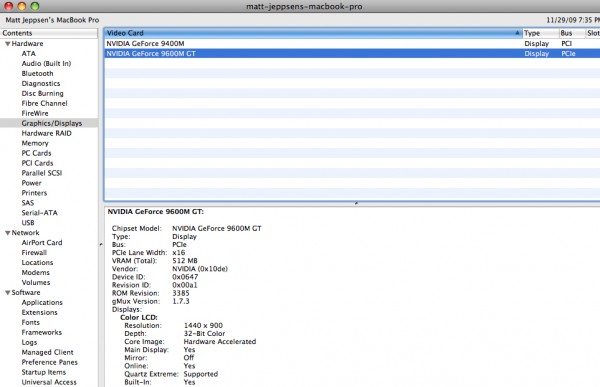
Since sometime in late 2008, Apple’s 17” and select 15” Macbook Pro models have included not one but two graphics processors, the nVidia 9400M and 9600M GT. It is my understanding that by default the laptop uses the integrated lower-wattage 9400M, which includes 256MB RAM and helps extend battery life. It will run the main laptop display and push an external display as well. The additional nVidia 9600M GT graphics option is actually a discrete internal PCI-E card featuring 512MB of RAM and offers significantly faster Motion GPU rendering performance. You can see both of these cards listed separately in your System Profiler. So how do you tell which card you are using, and how do you switch between the two cards? I’m glad you asked, grasshopper. Read on and I’ll tell you how…

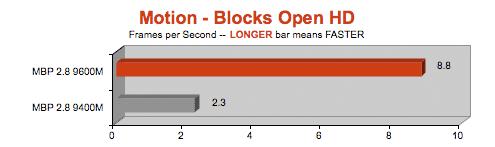
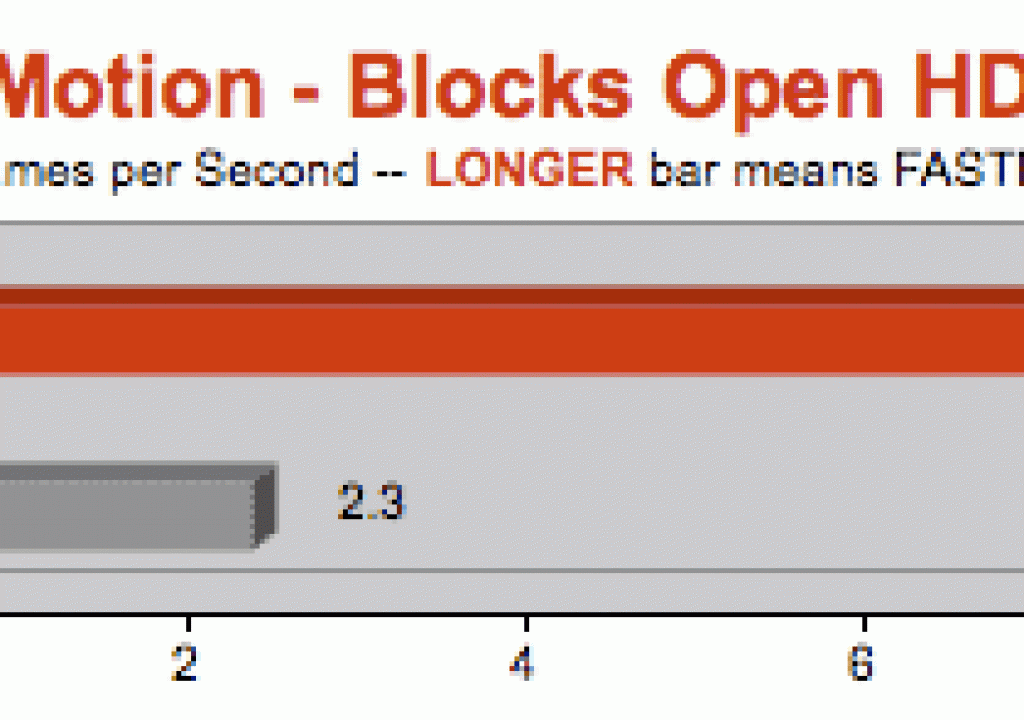
First off, how much of a performance difference is there between the two graphics cards? Quite a bit, actually. Mac benchmarking gods Barefeats have benchmarked the 9400M and 9600M GT in an Apple Motion GPU rendering task (using one of the included HD templates), and saw approx 2.5x to 3.5x faster render times using the 9600M option. That is quite a difference. I was not able to find any benchmark numbers for Compressor or FCP-specific tasks, but we know that FCP leans on the GPU for RT performance. And Barefeats has also benchmarked the two cards for 3D gaming. Again, the 9600 spanked the 9400 by a wide margin. So it stands to reason that you’d see performance gains across the board with the 9600M when using Apple’s Pro Apps (at the expense of battery life, of course. Also, your lappy may run a little hotter.).

Now that we’ve established that the 9600M GT option is A Good Thing for those of us working in post-production, it’s time to check which card is currently in use. Open up your System Profiler. This can be found by clicking the apple in the top left of your screen > About this Mac > More Info > Graphics/Displays. This will show both your graphics cards (if so equipped). Clicking on a graphics card in the list will show the displays currently active on the card. You should see the Macbook’s “Color LCD” and any connected external displays listed in the panel below. For the purposes of this tutorial, we’ll assume that yours shows the 9400M card connected to your display(s).

image


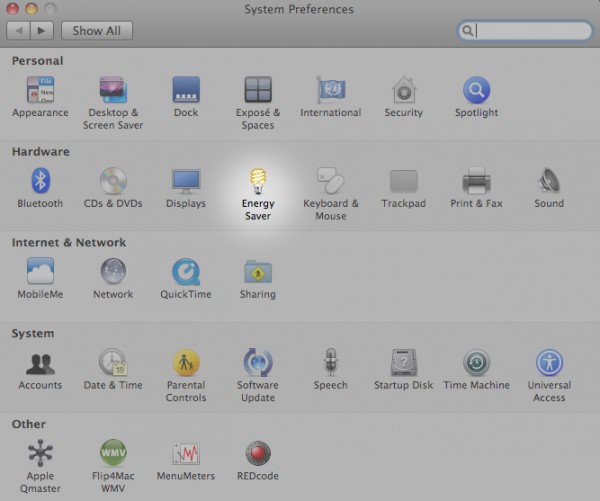
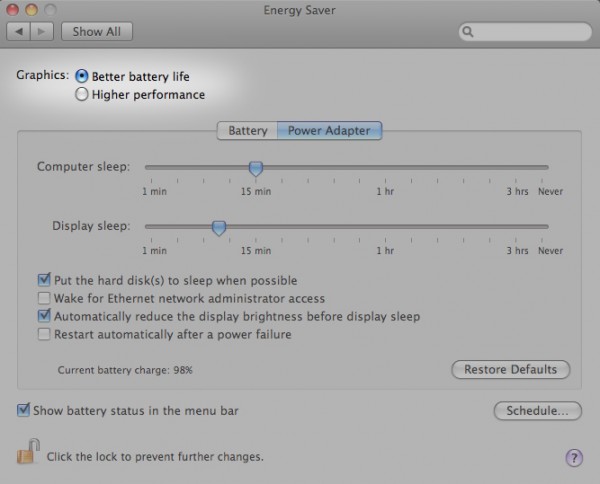
Switching between graphics cards is a simple process, but annoyingly you must logout for the changes to take effect. So first you should save and close any current work. Now go to your System Preferences and click on Energy Saver.

image


At the top of the Energy Saver window you’ll see two toggles for Graphics: Better Battery Life and Higher Performance. You can mentally read these options as 9400M and 9600M GT, respectively. Tick the Higher Performance option to enable the 9600M GT, and you’ll be prompted to save your work and logout.

image


That’s it. Once your Macbook logs you back in you can confirm the graphics card switch in your System Profiler.

Enjoy your newfound GPU processing power!

(Page 1 of 1 pages for this article )


                    Clip to Evernote


Q and A with Bunim/Murray’s Mark Raudonis about their recent Avid switch

Scott Simmons | 02/07

If you haven’t heard they have moved from FCP7 to Media Composer

Back in January news broke that reality television producers Bunim/Murray were switching their post-production facilities from Final Cut Pro to Avid Media Composer. This probably didn’t come as a great shock to anyone who follows post-production as the release of Final Cut Pro X had left many people (especially those…

Kicking the tires on the Final Cut Pro X 10.0.3 Multicam update

Scott Simmons | 02/05

The ease of setup and managing multicam clips makes this the best FCPX update yet

image

As we all know by now Apple released their promised update to Final Cut Pro X that added multicam. It’s only been a week and there’s already a lot of articles and tutorials about how…

Blackmagic Design Releases Support For Final Cut Pro X 10.0.3 Broadcast Monitoring

PVC News Staff | 02/01

Broadcast monitoring in Final Cut Pro 10.0.3 allows video output to external monitors and other equipment

image

Blackmagic Design today released Desktop Video 9.2 beta 1, a software update for its capture and playback products that adds broadcast monitoring support with the new Final Cut Pro X 10.0.3 update.…


You must be registered to comment. This is an effort to reduce spam. Please REGISTER HERE.

Name:

Email:

Location:

URL:

Smileys

Remember my personal information

Notify me of follow-up comments?

Submit the word you see below:


Q and A with Bunim/Murray’s Mark Raudonis about their recent Avid switch

Scott Simmons | 02/07

If you haven’t heard they have moved from FCP7 to Media Composer

Back in January news broke that reality television producers Bunim/Murray were switching their post-production facilities from Final Cut Pro to Avid Media Composer. This probably didn’t come as a great shock to anyone who follows post-production as the release of Final Cut Pro X had left many people (especially those…

Kicking the tires on the Final Cut Pro X 10.0.3 Multicam update

Scott Simmons | 02/05

The ease of setup and managing multicam clips makes this the best FCPX update yet

image

As we all know by now Apple released their promised update to Final Cut Pro X that added multicam. It’s only been a week and there’s already a lot of articles and tutorials about how…

Blackmagic Design Releases Support For Final Cut Pro X 10.0.3 Broadcast Monitoring

PVC News Staff | 02/01

Broadcast monitoring in Final Cut Pro 10.0.3 allows video output to external monitors and other equipment

image

Blackmagic Design today released Desktop Video 9.2 beta 1, a software update for its capture and playback products that adds broadcast monitoring support with the new Final Cut Pro X 10.0.3 update.…

Update Alert: Final Cut Pro X goes to 10.0.3

Scott Simmons | 01/31

A big update adds multicam, manual relinking, broadcast monitoring and the ability to move a project over from FCP7

image

Is it early 2012? It is and Apple has kept its promise with an update that takes Final Cut Pro X to 10.0.3. The promised features…

To be considered for listing, contact pr (at) provideocoalition (dot) com


Copyright © 2011, HD Expo, LLC a division of Diversified Business Communications. DBA Createasphere

All rights reserved. HD EXPO, High Def EXPO, Createasphere, E-Tech, Entertainment Technology Exposition, 3D Production Workshop, VariCamp, P2 Camp, ColorCamp 101, and Lighting, Filters & Gels for HD are all trademarks of HD Expo, LLC.

Terms of Use  |  Privacy Policy

Check PageRank