

Filmtools
Filmmakers go-to destination for pre-production, production & post production equipment!
Shop Now
There are many times when it makes more sense to shoot and edit video at 25p than at 24p, regardless of the final framerate(s) to be delivered to various distribution formats, even if you live in an NTSC (or ex-NTSC) country. You may know that “24p” video is almost always really recorded at 23.976p (although Apple and some camera manufacturers often like to round it to “23.98p”). This article is about:
-
- Why and when you would want to shoot low framerate video at all.
-
- In many of those cases, why it often makes more sense to shoot and edit at 25p instead of 23.976p.
-
- The reasons why with certain “segregated” camcorders, you are much better off purchasing or renting the 25p/50Hz version, even if you live in an NTSC or ex-NTSC country.
-
- 25p workflows: How to go from your 25p universal master to all imaginable output formats.
Why and when to shoot low framerate video at all
When I say low framerate, I’m referring to anything 25p or lower. When I say medium framerate, I mean 30p (29.97p). When I say high framerate, I’m referring to 50p or 60p (59.94p). (I am a progressive guy, but I will mention interlaced later on!)
If you live in the (up until now) NTSC world, the main reasons why you might want to shoot low framerate video for your “normal” footage (as opposed to your slow-motion footage) are:
-
- To achieve one of the many aspects of the “film on video” look (This is equally feasible whether you shoot at 23.976p or at 25p, since the look is the same).
-
- To have an easier path to filmout (This is equally feasible whether you shoot at 23.976p or at 25p, since both will require a slight audio pitch adjustment when exporting for filmout at true 24.000p with a 1:1 frame relationship–more details later).
-
- To be able to deliver on NTSC “24p” DVDs or “24p” Blu-ray disks, both of which are really 23.976p (Both are equally feasible whether you shoot at 23.976p or at 25p using a similar audio pitch adjustment upon export).
-
- To be able to deliver full-raster 720p-HD to the current AppleTV device. [Despite the imprecise information posted at Apple’s USA, UK, Spain, Latin America, and Australian websites, the current AppleTV will actually accept full raster 1280×720 at a maximum framerate of 25p. Those four Apple websites imprecisely indicate that the maximum supported HD signal is 1280×720 @24p. (Apple is underrating the product.) I have personally verified with several AppleTV units in the USA, and they have always worked fine with full raster 1280×720 @25p footage, even when matched with a 60Hz-only monitor or projector via HDMI. With anything higher than 25p, the current AppleTV needs you to downscale the spatial resolution of your HD footage to 960×540 to keep up with the higher framerate. If you have clicked the above links and it now says 1280×720@25p (or 25fps), it means that Apple has now corrected their websites 🙂 ]
Why and when to shoot high framerate
If you are not really looking for a 24p/25p “look”, or deliverability to filmout, “24p” DVD/Blu-ray, or full-raster HD AppleTV, and especially if you are producing sports or news, you probably want a high framerate. You may know that (partially) for that reason ABC, ESPN, and Fox (who obviously prefer progressive video, as I do) chose to broadcast 720p60 (59.94p)… and that the EBU (European Broadcast Union) recommends broadcasting in 720p50p, at least until broadcasting 1080p50 becomes feasible someday. (Of course, you can always broadcast low framerate video over a high framerate video transport, either by simple or complex conversion, without losing the low framerate look, so they can still broadcast dramatic-looking programming too!)
Undercranking
Even when you are shooting low framerate footage for any of the reasons listed in the low framerate section (on page 1), if you are looking for good slow motion, you need the highest temporal resolution (framerate) you can get for those scenes. When experienced film directors (who shoot their “normal” film footage at 24.000p) need good slow motion, they overcrank (use a higher film frame rate). 30 is higher than 24 or 25, but (of course) 50 or 60 is higher than any of those. If your camera doesn’t offer high framerate progressive options like 50p or 60p (59.94p), you may decide to sacrifice spatial resolution for those scenes and specifically shoot your slow-motion scenes in interlaced at 50i or 60i (50.94i) to gain higher temporal resolution… and then convert those fields into frames in post-production, even though the original vertical resolution will have dropped to 540 pixels/field in all of the moving shots. Hopefully, the audience will pardon the 1/2 spatial resolution in those scenes, since they are part of a slow-motion scene.
Sidebar: The irony of 100/120Hz HDTVs and monitors
I find it particularly ironic that while some producers/directors desperately seek the low framerate look, a wave of monitors and HDTVs marketed as 100Hz in the PAL or ex-PAL countries (and as “120Hz” in the NTSC or ex-NTSC countries) have appeared. These devices offer to interpolate and add the missing temporal resolution, so that the original framerate will be either doubled, quadrupled, or even quintupled! In other words:
- “24p” (23.976p) gets quintupled to “120p” (119.98p)
- 25p gets quadrupled to 100p
- “30p” (29.97p) gets quadrupled to “120p” (119.98p)
- 50p gets doubled to 100p
- 50i gets de-interlaced and converted into 100p
- “60p” (59.94p) gets doubled to “120p” (119.98p)
- “60i” (59.94i) gets de-interlaced and converted into “120p” (119.98p)
I suppose the grass is always greener at the opposite extreme of the temporal resolution spectrum! But seriously, this is somewhat analogous to the fact that 24.000p film gets projected in a movie theater at 48.000p via a shutter in the projector to reduce flicker. They have just extended the concept, both in factor (2x, 4x or even 5x) and in the technology used in some of these devices. Some people find it to be too much correction.
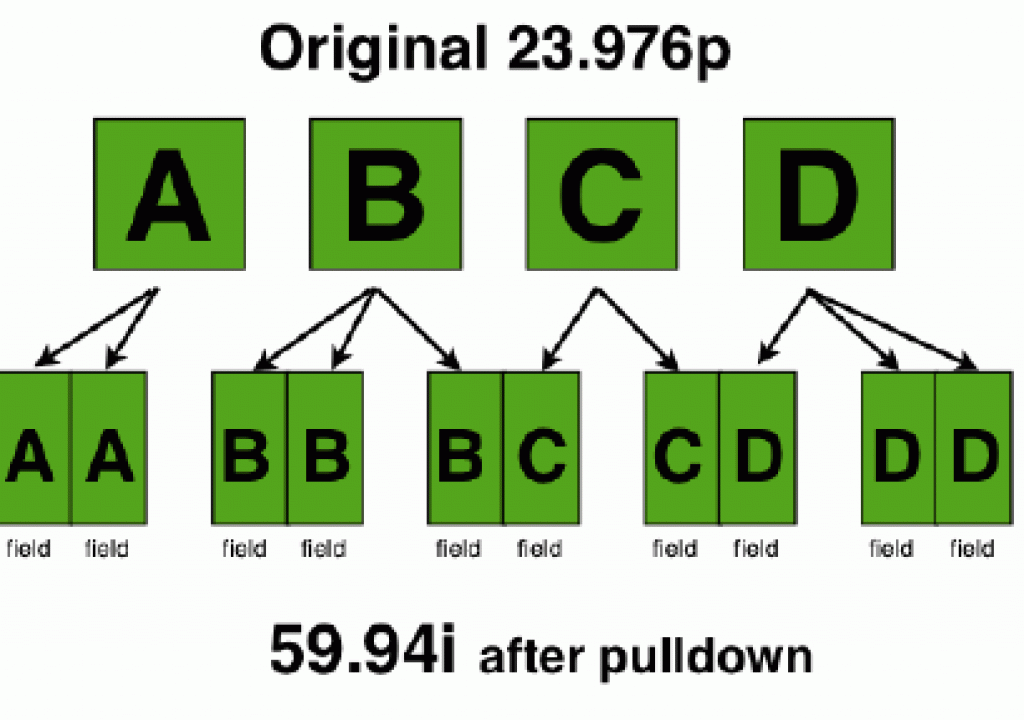
Making 23.976p fit in 59.94i
As stated before, with very few exceptions, “24p” video really isn’t recorded at true 24.000p, but at 23.976p. Most tape-based camcorders that record 23.976p do it over a 60i (59.94i) transport, using one of several different methods. One these methods uses a simple pulldown which gives you standard NTSC playback compatibility, but difficulty in post if you plan to edit on a 23.976p timeline. The other methods (which vary among the different professional camera manufacturers, and in some cases, the generation within a single manufacturer) attempt to help your NLE to extract the 23.976 frames out of the 59.94 fields. For example, the Panasonic AG-VX100 (and its successors A, and B) offers an advanced pulldown. With JVC’s HDV camcorders, they chose to follow the MPEG2 standard for flagging skip frames. Even though it takes a while (sometimes up to 18 months), the NLE developers have eventually caught up with these different purposeful methods used by the professional camera manufacturers. In the meantime, some informed producers just shot 25p instead.
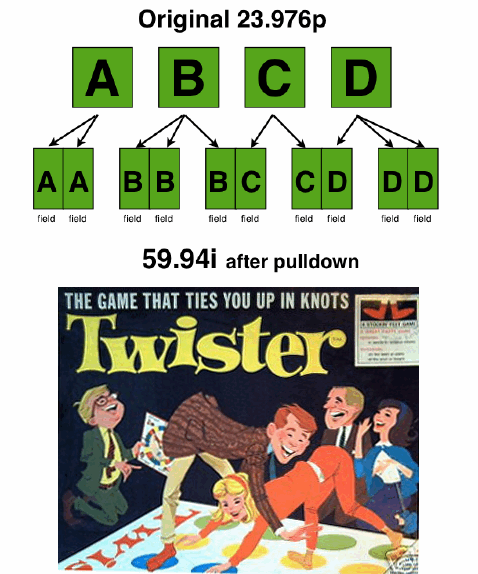
Sidebar: What do Pulldown and Twister have in common?
?Full disclosure: I have absolutely no stocks or other interest in the Twister game or in its owner, Hasbro Inc. However, I have often seen a distinct similarity between the pulldowns used with 23.976p over 59.94i and the Twister game. I think you will see you the same similarity in the following diagrams.
The instructions for the pulldown (i.e. “Put the first progressive frame in both fields of the first video frame. Now, put the second progressive frame in both fields of the second video frame in the first field of the third video frame, then…”) seem as twisted as the Twister game.
The exception: Native 23.976p recording on tape
There are some exceptions, where 23.976p really gets recorded onto a tape without being placed over a 59.94 transport, so the NLE doesn’t have to extract any extra frames later. To my knowledge, the first time this happened on tape was with Sony’s SRW-1 HDCAM-SR portable deck, which can natively record 23.976p and actually adjust the tape speed accordingly. Similarly, Sony recently released three new HDV camcorders which offer a mode which records progressive 23.976p on an HDV tape, and then delivers true 23.976p over IEEE-1394 (i.LINK, FireWire) without pulldown or extra frames, although the tape speed and bit rate is maintained. This is the case with the HVR-S270, HVR-Z7, and HVR-Z5 cameras, and with the newer Sony HDV decks: HVR-M35, HVR-M25A, HVR-M15A (the “A” suffix indeed matters in those cases where it appears). However, this only happens with the IEEE-1394 outputs of these cameras and decks. All of the other outputs from these cameras and decks still contain pulldown (including the HVR-M35’s HD-SDI output), in order to maintain universal monitor compatibility. I have not personally tried Sony’s pulldown-free 23.976p over 1394 (since all of my low framerate HDV clients are shooting at 25p, both with JVC and Sony HDV), but Sony assures us that they have clients who are successfully using their native 23.976p over 1394 with Final Cut Pro. So if your intention is to capture the native Sony long-GOP true 23.976p signal via 1394, this is ideal. However, if your intention is to capture the HDMI output (or the HVR-M35’s HD-SDI output) directly to ProRes422(HQ) while retaining timecode, Log & Capture, and recapture capability, either directly (i.e. with an AJA IoHD, Blackmagic Intensity, IntensityPro, or Multibridge2, all of which which have HDMI inputs) or indirectly (with a Convergent Design HD-Connect MI box that converts from HDMI to HD-SDI into any HD-SDI input you may have on your system), you are still better off shooting and editing with 25p instead of 23.976p, since 25p will just work, with no hassles at all, no matter how you capture. (Although AJA HD products can remove pulldown on the fly when capturing 24PsF over HD-SDI using RP-188 ancillary data, this is not helpful in this case since none of the listed Sony models puts out a 24PsF signal over HD-SDI.)
If you are wondering When to edit native, when hybrid, when pure i-frame, and why, click here for my other article.
Native 23.976p recording on chip or drive
Some HD cameras from Panasonic (AG-HMC150, AG-HMC151, AG-HPX170, AG-HVX200, AG-HVX200A, AG-HPX500, AJ-HPX2000, AJ-HPX3000) and Sony (EX1, EX3, PDW-F355) offer native 23.976p recording on a chip or drive. If you are going to record 23.976p using your camera’s onboard recorder, this is absolutely the best way do do it. The advantages are:
-
- No extra frames are recorded/no pulldown in the file.
-
- No extra frames/pulldown need to be removed by your NLE, so the files will drop without framerate conversion or pulldown removel to your 23.976p timeline. (See the upcoming section: Why bother putting your low framerate video on a low framerate timeline? on page 7, just 2 pages ahead from here!)
-
- The best quality is achieved, since no filler frames are sharing the bandwidth. Therefore, the real frames are compressed less.
Be careful: in the cases of the AG-HMC150, AG-HMC151, AJ-HPX2000, AJ-HPX3000, EX1, and EX3, only the lowest compression/highest quality mode offers native 23.976p recording together with full raster (no subsampling) recording… and in the case of the AJ-HPX2000, you’ll need the optional AJ-YBX200G códec card to record full raster. In the other Panasonic cases listed, you can’t get full raster inboard recording at all (since the DV100 códec always subsamples), but at least you can get native 23.976p recording.
Next page: Cameras that are both 24p-challenged and “segregated”
Cameras that are both 24p-challenged and “segregated”
The following are segregated HD cameras that are also 24p-challenged:
-
- Canon HF10
-
- Canon HF11
-
- Canon HF100
-
- Canon HG21
-
- Canon HR10
-
- Canon HV20
-
- Canon HV30
-
- Sony HDR-FX1000
-
- Sony HVR-V1U or HVR-V1N
Some of these cameras record on HDV tape, others on internal hard drive, and others on chip. I call them “24p-challenged” because they don’t make native recordings, nor do they help the NLE to extract the 23.976p frames to edit on a 23.976p timeline, as many other professional cameras from several manufacturers do. As a result, to use challenged 23.976p footage on a 23.976p timeline with a popular program like Final Cut Pro involves several challenges. Initially with FCP in was necessary first to capture, then leave Final Cut Pro and do a very complex pulldown removal procedure with Apple’s Cinema Tools, which comes with Final Cut Studio. Later, there was a slightly simpler procedure with Apple’s Compressor, which also comes with Final Cut Studio. However, with both of those procedures, you sadly lose the original timecode, so not only do you have to spend extra time in a separate application before you even start editing, you can forget about being able to recapture automatically. You can’t even have a specific reference to a specific location on the original tape.
Fortunately, starting with Final Cut Pro 6.02, Apple added a special capture mode that automatically removes the 3-2 pulldown from the HVR-V1’s 23.976p over 59.94i footage during capture, while transcoding to ProRes422 (or to AIC, Apple intermediate códec, but that’s really legacy and inferior to ProRes422 in many ways). This is much better than the prior torture, but unfortunately it still:
-
- Disallows Log & Capture. (Instead you have to capture everything on the fly, until the tape stops or until you click Escape, whichever comes first.)
-
- Ignores the original timecode and applies a new one on each transcoded clip.
I call these cameras “segregated” because the 60Hz version (the one commonly sold in NTSC or ex-NTSC countries) don’t offer 25p, and the 25p/50Hz version (the one commonly sold in the PAL or ex-PAL countries) don’t offer “24p” (23.976p). Informed readers who want to edit on a native progressive low framerate timeline will obviously be better served with the 25p/50Hz version of these cameras in order to have a perfectly smooth 25p workflow, even though they may eventually output to true 24.000p filmout, or “24p” DVD or Blu-ray. For AppleTV, you can just leave it at 25p.
Next page: Why bother putting your low framerate video on a low framerate timeline?
Why bother putting your low framerate video on a low framerate timeline?
Some people ask me a good question: Why should I care about putting my low framerate video on a low framerate timeline, when I can simply shoot “24p” over “60i” (which is really 23.976p over 59.94i) and retain the low framerate look? The reasons to use a native low framerate timeline, be it at 23.976p or at 25p are:
-
- To maintain the proper cadence in transitions. (59.94i cadence doesn’t esthetically match 23.976p cadence.)
-
- If you expect to deliver to filmout, full raster HD on AppleTV, or “24p” DVD/Blu-ray, you ideally need your master in 23.976p or 25p to avoid conversions and degradations.
Of course, if you don’t care about any of the above, and you like the clash in cadence, you can shoot 23.976p over 59.94i for the look, and just deliver 59.94i.
Next page: How to go from your 25p universal master to all imaginable output formats
The 25p workflow (summary 1)
-
- Shoot 25p
-
- Capture 25p
-
- Edit 25p
-
- Deliver 25p to all of your PAL, broadcast HD stations that accept 25p, and all AppleTV destinations
The 25p workflow, supplement for “24p” (23.976p) DVD or Blu-ray
-
- Export a standalone movie at “current settings” from FCP
-
- Create a new sequence
-
- Import the exported standalone 25p movie into the new sequence
-
- Invoke the command “Conform 25 to 24”
-
- Export a standalone movie, which will be 23.976p
-
- If you are going to “24p” DVD, import the file into Compressor and ask for a “23.98p” MPEG2 for DVD. Continue to DVD Studio Pro or whatever other DVD authoring application you prefer that supports “24p” DVDs.
-
- If you are going to Blu-ray, follow your normal workflow to encode, author, and burn for that.
FCP’s “Conform 25 to 24” uses the CinemaTools engine, and automatically compensates the audio pitch for you. It does all of this in the blink of an eye without processing or changing your audio or video. It just changes the metadata to make the same file play at 23.976p.
Comments: It is important to export the standalone movie as indicated above and re-import it into a new sequence because FCP’s “Conform 25 to 24” command is destructive. Doing this protects you from affecting your original media. Also, this feature in FCP depends upon CinemaTools having been installed. If it is not installed in your system, the option will be grayed out in FCP. Also, this works for i-frame códecs like ProRes422(HQ), not with long-GOP códecs. See my article: When to edit native, when hybrid, and when pure i-frame, and why for more info.
The 25p workflow, supplement for filmout
Check with your transfer house. Some will want you to send it in 25p. Some will want you to convert it to 23.976p, and yet others will want you to convert it to 24.000p, with the audio at 48048Hz instead of 48000Hz (48KHz). (The latter will eventually happen no matter what, but it may or may not happen in your own Mac, depending upon your transfer house’s procedure.)
The 25p workflow, supplement for 59.94i videotape when the exact duration of the program doesn’t matter
-
- Create a new 59.94i sequence in FCP 6.04 of the resolution for your videotape target. If it’s a DV25 format (DV, DVCAM), make that the códec. If it’s an analog format or digital format with SDI input, use ProRes422(HQ).
-
- Import the 23.976p standalone movie you created above, and put it on the timeline. If FCP offers you to make the sequence match the clip you are editing, say NO!
-
- Render all.
-
- Go to tape they way you normally do.
The 25p workflow, for 59.94i videotape, when the exact duration of the program must be maintained
-
- Open Compressor and choose an appropriate NTSC códec for the videotape format as indicated above.
-
- Import the 25p standalone movie.
-
- Have Compressor make the conversion to NTSC.
-
- Create an appropriate 59.94i sequence in FCP, matching the códec you chose.
-
- Import the NTSC file you created in Compressor.
-
- Put it on the timeline. If FCP offers you to make the sequence match the clip you are editing, say YES! (This is different from the above workflow.)
-
- Go to tape the way you normally do.
Next:
-
-
- Little known facts & tips about 25p, 50Hz, segregated cameras… and even segregated HD monitors
-
Little known facts & tips about 25p, 50Hz, segregated cameras
-
-
-
- Make sure wherever you purchase your 25p, 50Hz segregated camera, they include the following:
-
-
-
-
-
- An appropriate power cable for your country (unless you are purchasing a separate charger for your country). This costs under US$10.00, but is obviously a must.
-
-
-
-
-
- An international, global warranty.
-
-
In the case of the Sony HVR-V1 25p/50Hz, you will find that it includes a video output cable that is optional with the 60Hz version!
Monitoring 25p while you edit
All of the professional HD monitors I have ever checked support 25p/50Hz with no problem, even in the USA. The first and second generations of consumer HDTVs also did. However, the last time I did an unofficial inspection at a local large department store, the only consumer brand of HDTVs that would still accept 25p/50Hz was the -levia, which is no longer in production (but is still available in many stores). Also, the Samsung monitors in the USA that have HDMI inputs (but no tuner) still accept 25p/50Hz. But if at all possible, stay with professional models of HD monitors.