
(Page 1 of 1 pages for this article )

Monday, August 22, 2011

Filed under: GentryMedia Sister SitesProVideo Coalition

After Effects Script of the Week: KeyTweak

Mark Christiansen | 08/22

A huge time-saver to fix drifting motion tracks and animated masks that need repositioning

Note: This is an ongoing series that features one After Effects script a week. For an overview on scripts, check out the debut post.

Just this morning, I found myself stuck. I had a good corner pin track of a handheld cell phone screen that needed to be replaced, but there was a problem; the visible, trackable object was the hand holding the phone rather than the phone itself, and the hand moved and changed its angle as the shot progressed. Fixing this in MochaAE, where the track was created, was difficult, because Mocha was doing its job correctly.

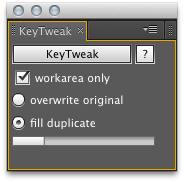
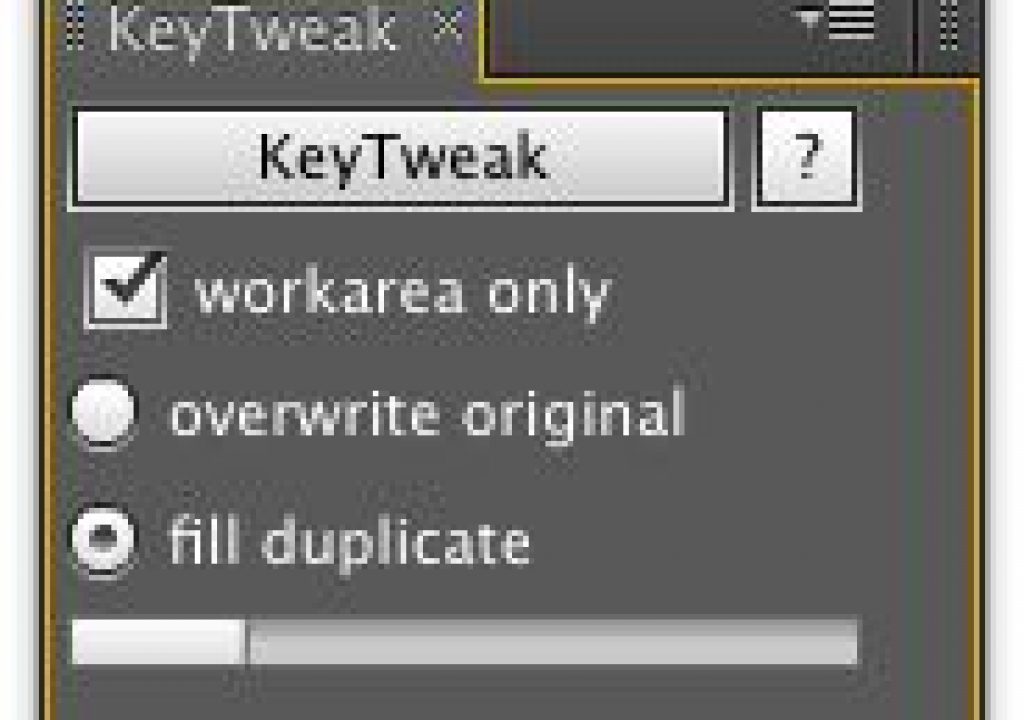
Instead, I used KeyTweak (Shareware, current suggested price $5) to change the frame-by-frame motion track data over time.

All I had to do was make a duplicate of the layer with all of the tracking frames. I then went in and deleted all but a few keyframes, leaving one roughly every 10 frames or so. I manipulated those to new positions to roughly block in the correct points for the Corner Pin and Position properties. Then, by selecting each key framed property on both the original a duplicate layer, I only had to open the KeyTweak panel and press the KeyTweak button, and all of the motion of the intermediate frames was recreated, but adjusted to hit the adjusted position points.

It’s hard to believe that this actually works, but it does; you can often get away with very few adjusted keyframes, and you can even adjust an entire Mask Shape property, which makes this effect a great companion to Tracker2Mask, which I’ll profile in some future script-of-the-week column. So if you ever find yourself with lots of keyframes that are basically correct but drift out of place, KeyTweak will save you a lot of tedious, painstaking work to correct the problem.

(Page 1 of 1 pages for this article )


You must be registered to comment. This is an effort to reduce spam. Please REGISTER HERE.

Thanks for the info Mark.

Also to add a quick note, mocha AE does have the “adjust track” module which is also very useful for fixing tracking drift, offset tracking data and correcting very difficult tracks.

Here is a link to a tutorial on adjust track: http://www.imagineersystems.com/videos/04_advanced_tracking.m4v/view

Best,
Ross

Posted by .(JavaScript must be enabled to view this email address)  on  08/23  at  11:48 AM


Name:

Email:

Location:

URL:

Smileys

Remember my personal information

Notify me of follow-up comments?

Submit the word you see below:


Adobe Media Encoder - another hidden gem?
After Effects Script of the Week: Add Parented Null to Each Selected Layer
Use Dynamic Link to bring Warp Stabilizer to Premiere Pro CS5.5
After Effects Script of the Week: Tracker2Mask
After Effects Script of the Week: rd_MergeProjects
After Effects Script of the Week: Get Sh*t Done
After Effects Script of the Week: pt Panorama
After Effects Script of the Week: pt TextEdit
After Effects Script of the Week: Change Render Locations
After Effects Script of the Week: pt ExpressEdit
After Effects Script of the Week: MochaImport
After Effects Script of the Week: KeyTweak
After Effects Script of the Week: pt EffectSearch
After Effects Script of the Week: Immigration
Script of the Week: Shortcut Key Reference
Script of the Week: True Comp Duplicator
Script of the Week: 3D Extruder
Script of the Week: BG Renderer
Introducing: After Effects Script of the Week
Red Giant’s newest Plot Device: Magic Bullet Looks 2
Free Stereo Footage from Artbeats, and an After Effects tutorial showing how to use it in CS5.5
Premiere Pro for DSLR in a few easy steps
ASSIMILATE announces Mac support for SCRATCH, updates product line and prices
After Effects CS5.5 in Production
ASSIMILATE SCRATCH first out of the gate with RED Epic HDRx support
Foundry Releases CameraTracker and Kronos 5.0 Plug-ins for After Effects
Innovation and Cinema 4D Part Two: William Dudley on Virtual Sets
Innovation and Cinema 4D Part One: William Dudley and Peter Pan 360°
Pixel Farm to Launch “Radical New Approach to Tracking” at SIGGRAPH
The Foundry unveils 3D Camera Tracker for After Effects


10 Final Cut Pro things FCP editors might be missing in Adobe Premiere Pro CS6

Scott Simmons | 05/11

These are a few of the things that I found myself searching for as I’ve been moving over to Premiere Pro CS6 as a FCP 7 replacement

image

Adobe is making a big play for Final Cut Pro users with their CS6 release of Premiere Pro. It’s vastly improved over the Premiere Pro of old and is a lot like Final…

After Effects Apprentice Free Video: Working with Nested 3D Compositions

Chris and Trish Meyer | 05/07

How you can be two places at once inside After Effects

As we mentioned awhile back, we’ve been busy the past year and a half creating an extensive, multi-course video training…

Expression Shorts - loop

David Torno | 05/06

Learn how the loop expressions work.

image

Looping is a very common task in our industry and is mostly associated with video footage of some…

After Effects Apprentice Free Video: Copying Paths from Illustrator to After Effects

Chris and Trish Meyer | 05/01

Revealing Illustrator paths requires a few intermediate steps, involving After Effects masks and effects.

Buried in the shuffle over the announcement of After Effects CS6 is that we concluded the video training series for our book After…

To be considered for listing, contact pr (at) provideocoalition (dot) com


Copyright © 2012, HD Expo, LLC a division of Diversified Business Communications. DBA Createasphere

All rights reserved. HD EXPO, High Def EXPO, Createasphere, E-Tech, Entertainment Technology Exposition, 3D Production Workshop, VariCamp, P2 Camp, ColorCamp 101, and Lighting, Filters & Gels for HD are all trademarks of HD Expo, LLC.

Terms of Use  |  Privacy Policy

Check PageRank