
(Page 1 of 1 pages for this article )

Wednesday, August 31, 2011

Filed under: GentryMedia Sister SitesProVideo Coalition

After Effects Script of the Week: MochaImport

Mark Christiansen | 08/31

Much more than a workflow enhancer, this one unlocks new possibilities for using mocha for After Effects

My number one tip for anyone who needs to do tracking in After Effects is to break open the installation of mocha for After Effects (or “mocha AE”) that ships with the application (and has since CS4). Nominally a “planar tracker” used for screen replacements and so on, it can actually be used to track just about anything with more intelligence than the point tracker built in to After Effects. The thing that keeps most people from doing this is:

a. they do not know that mocha AE is included with After Effects
b. they don’t know how to use mocha AE
c. they don’t know what to do with the tracking or corner pin data once it’s generated

Let’s consider (a) solved, assuming you read the first paragraph, and resources are available to address (b). That leaves (c).

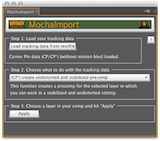
Enter MochaImport, available as shareware with a suggested $20 price at aescripts.com. At the simplest level, it solves the awkward transfer of data from mocha AE to After Effects; it’s self-explanatory interface allows you to choose the .txt document you export from mocha AE and apply it in one of several ways:

  • - as a simple Corner Pin animation
  • - as a CC power pin
  • - as raw track point data
  • - as Red Giant Warp data

That’s a huge help to anyone baffled by the basic pipeline and options. But for the more advanced user, including owners of Red Giant Warp, there are much more powerful options to isolate the tracked area as an undistorted and stabilized precomp. That option opens the door to a very elegant way to composite and rotoscope: by letting the tracker take care of the motion and working on a locked-off piece of moving footage. This video tutorial shows how it works.

MochaImport is yet another script that really might as well just ship with After Effects. It is that essential and useful.

(Page 1 of 1 pages for this article )


You must be registered to comment. This is an effort to reduce spam. Please REGISTER HERE.

Name:

Email:

Location:

URL:

Smileys

Remember my personal information

Notify me of follow-up comments?

Submit the word you see below:


Adobe Media Encoder - another hidden gem?
After Effects Script of the Week: Add Parented Null to Each Selected Layer
Use Dynamic Link to bring Warp Stabilizer to Premiere Pro CS5.5
After Effects Script of the Week: Tracker2Mask
After Effects Script of the Week: rd_MergeProjects
After Effects Script of the Week: Get Sh*t Done
After Effects Script of the Week: pt Panorama
After Effects Script of the Week: pt TextEdit
After Effects Script of the Week: Change Render Locations
After Effects Script of the Week: pt ExpressEdit
After Effects Script of the Week: MochaImport
After Effects Script of the Week: KeyTweak
After Effects Script of the Week: pt EffectSearch
After Effects Script of the Week: Immigration
Script of the Week: Shortcut Key Reference
Script of the Week: True Comp Duplicator
Script of the Week: 3D Extruder
Script of the Week: BG Renderer
Introducing: After Effects Script of the Week
Red Giant’s newest Plot Device: Magic Bullet Looks 2
Free Stereo Footage from Artbeats, and an After Effects tutorial showing how to use it in CS5.5
Premiere Pro for DSLR in a few easy steps
ASSIMILATE announces Mac support for SCRATCH, updates product line and prices
After Effects CS5.5 in Production
ASSIMILATE SCRATCH first out of the gate with RED Epic HDRx support
Foundry Releases CameraTracker and Kronos 5.0 Plug-ins for After Effects
Innovation and Cinema 4D Part Two: William Dudley on Virtual Sets
Innovation and Cinema 4D Part One: William Dudley and Peter Pan 360°
Pixel Farm to Launch “Radical New Approach to Tracking” at SIGGRAPH
The Foundry unveils 3D Camera Tracker for After Effects


Expression Shorts - Trigger Event Based On Layer’s Speed

David Torno | 02/18

Use one layer’s speed to trigger another layer event or animation.

image

In this episode we look at how how fast a layer…

Expression Shorts - Wiggle Only One Direction

David Torno | 02/12

Wiggle a multi-dimensional property in only one direction.

image

The most popular After Effects expression that nearly EVERYONE uses…

2D Footage with a Stereo 3D Rig in After Effects CS5.5

Jeff Foster | 02/10

Edit and Optimize 2D Stereo Pairs from a 3D Video Camera or Twin Cameras with a Modified Stereo 3D Rig in After Effects CS5.5

Adobe included a 1-step option to create a 3D Stereo Camera Rig in After Effects CS5.5, to everyone’s enthusiasm for a simpler workflow in 3D space. Great if you are working in 3D space in After Effects, but what about an easy option for 3D Stereo pairs captured by a 3D camera…

Expression Shorts - Numerical Readout

David Torno | 02/05

Create numerical readouts for use in HUD style graphics.

image

With this Expression, I will show you how to feed numerical property information…

To be considered for listing, contact pr (at) provideocoalition (dot) com


Copyright © 2011, HD Expo, LLC a division of Diversified Business Communications. DBA Createasphere

All rights reserved. HD EXPO, High Def EXPO, Createasphere, E-Tech, Entertainment Technology Exposition, 3D Production Workshop, VariCamp, P2 Camp, ColorCamp 101, and Lighting, Filters & Gels for HD are all trademarks of HD Expo, LLC.

Terms of Use  |  Privacy Policy

Check PageRank