2 specialized alternatives to Basecamp are in late beta and already in use in production. Here’s my experience using one of them

The days of cobbling together a database to track shots, assets and progress are numbered. Although nowadays it has become common for many post-production projects to be managed with Basecamp, it’s an application hardly specialized to our industry.
Two web based tools currently in late beta anticipate the needs of post production more directly. Shotgun has been adopted at large facilities around the world and will be profiled separately; this article focuses on ShotRunner, and my own experiences using it as a visual effects supervisor on a pair of feature films.
The most essential thing you can do when managing a project that will require the efforts of a team is to name and organize the shots in a clear and visual way so that you and your artists can keep track of assets and time.
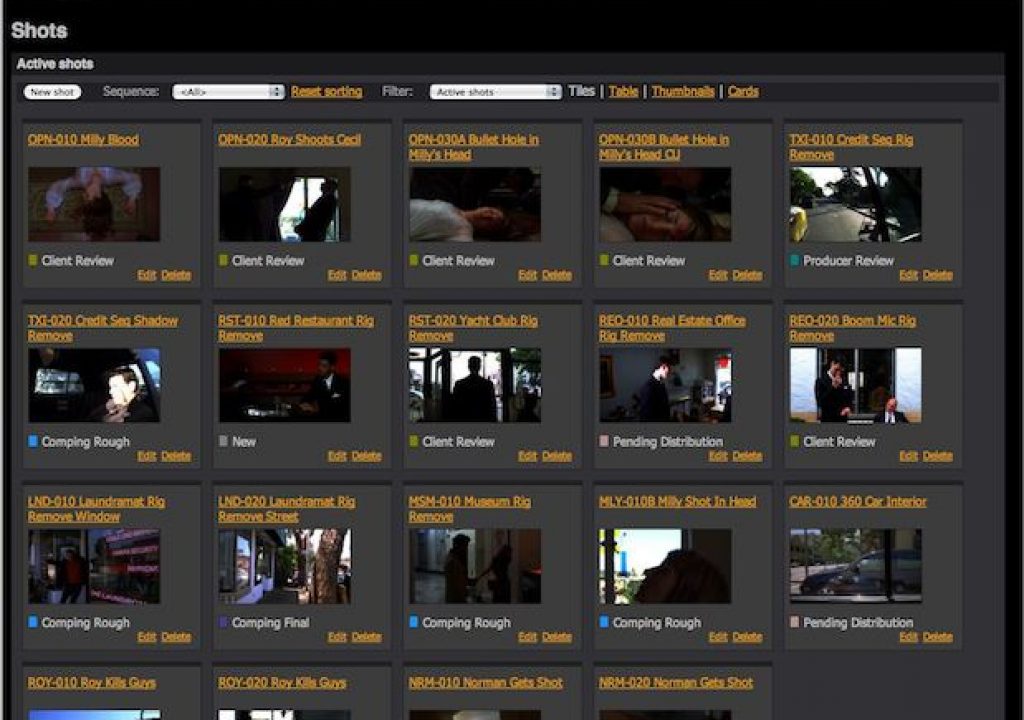
The first step in ShotRunner after setting up an account is to name sequences and shots, as you would on any big budget Hollywood feature. The other step that is very helpful at this point is to create a thumbnail image of each source shot, or background plate; we work in a visual medium, after all, and seeing the shots all arrayed out before you lets you scan the battlefield whenever you feel a need to assess the big picture.

The status of each shot is color-coded; the system anticipates our production process so the options in the Status menu include the gamut of post-production processes from Layout, Tracking and Comping Rough to Color Timing, Review in Edit and Producer, VFX Supervisor, Director or Client Review. These are, of course, customizable, but you’re not left reinventing the wheel each time you start a new project.
The shot status is not viewed or maintained only by the supervisor as would be a private database; individual artists assigned to the project can be subscribed to given shots and update their own status. As the shot evolves and elements are added to be used with it, or comments or questions come up, those updates are emailed to everyone subscribed to that shot. The notes themselves remain on the server for easy review, and all responses are also posted on the server; as with Basecamp, email is merely a reminder system to save you having to log in just to see what’s new.

At the highest level, the Project Overview page offers a bar graph whose color coding corresponds to the statuses on the Shots page as well as a list of all of the latest updates, feedback and comments. This operates more like a to-do list than a scheduler.

One thing that is particular complicated about visual effects production is how assets such as 3D models and matte paintings might be created and revised independent of several shots in which they might appear. ShotRunner makes it simple to list assets and attach them to given shots so that anyone working on an associated shot can also access information about what elements are available, and the current status of those elements.
Likewise, either a shot or an element will have individual tasks which might be assigned to specific artists. This is ShotRunner at the most granular level, where it becomes a to-do list for an individual which a supervisor can also look in on to assess progress.

A ShotRunner account includes upload capacity for review files. On the project shown in these examples we kept a separate SFTP server for moving big data, which also had to travel around on big drives. Although it is not yet practical to use ShotRunner for file management, that feature set is currently being redone according to the product manager, Cameron O’Rourke. It will reportedly utilize a shared file system using secure cloud storage (which he is careful to emphasize will not use the Amazon S3 system). Says Cameron, “Every project and vendor will be completely firewalled off for security. This will open the door to folks using ShotRunner as their primary file storage for projects, and later on we’ll be integrating Aspera to provide fast and reliable file transfers and sync.”
There’s no option to install ShotRunner locally to your own server; instead, the application is intended to be low-cost, which is better served by basing it from a central server (which doesn’t require the support and infrastructure of a local installation). Now being rolled into ShotRunner is a Python API, allowing clever technical people using tools that have a Python component to add batch processing or even incorporate the use of Microsoft Project.
If ShotRunner is aimed at small and independent production, Shotgun is designed predominantly for large studios, many of which have adopted it. Producers and production coordinators get access to gantt charts and many other project management and scheduling tools – but at a cost that is at a high premium to ShotRunner (roughly 10x). For large shows it avoids being stuck with a generalized tool like Microsoft Project.
Supervisors on the art/post-production side, on the other hand, tend to have a certain allergy to this granular type of project management, and on smaller projects it’s hardly worth the trouble, provided everyone understands their deadlines. The projects I brought to ShotRunner each had a couple dozen individual effects shots shared by half a dozen or so artists, and so for my uses the software was just right: not requiring me to enter more data than I needed, but flexible enough that I could manage a team whose members included artists on the other side of the country, or on another continent.
What would I have done without ShotRunner in these cases? I would certainly have spent a lot more time emailing back and forth with individual artists and attempting to use a normal to-do list with some project containing clips and the latest takes of shots. The greatest advantage offered by ShotRunner has been peace of mind, being able at a glance to know where everything related to a project is at, and knowing that my team members have access to the same information. We artists are not generally fond of bar charts, and yet the satisfaction that comes watching a project progress toward completion as measured by shot status – now that’s worthwhile.
Pricing and other information about ShotRunner can be found here.


Filmtools
Filmmakers go-to destination for pre-production, production & post production equipment!
Shop Now