
(Page 1 of 1 pages for this article )

Monday, July 25, 2011

Filed under: GentryMedia Sister SitesProVideo Coalition

Script of the Week: True Comp Duplicator

Mark Christiansen | 07/25

Huge stumbling block of the layer/comp approach is removed from After Effects.

image

Note: this is the fourth in a series featuring one After Effects script a week, now appearing at the beginning of each week. For an overview on scripts, check out the debut post.

An astonishing amount of the work that gets done in After Effects is theme and repetition work. You create something, and then there is the need to create 1, 2, 10 or 147 more of them, and for each to be similar yet unique. This generalization clearly applies to motion graphics work, in which pattern forms are part of the deal, but it applies equally well to a visual effects scene with, say, a crowd or a bunch of green screens taken with the same setup.

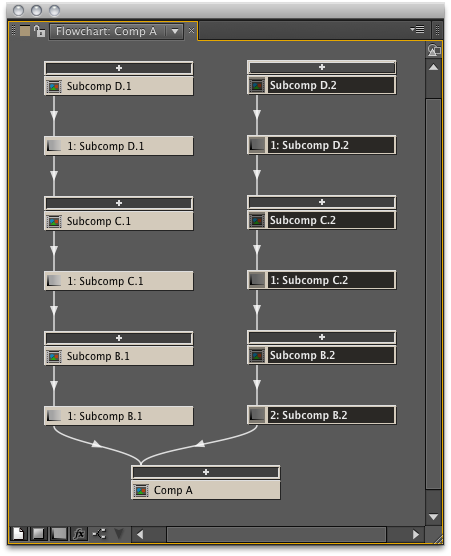
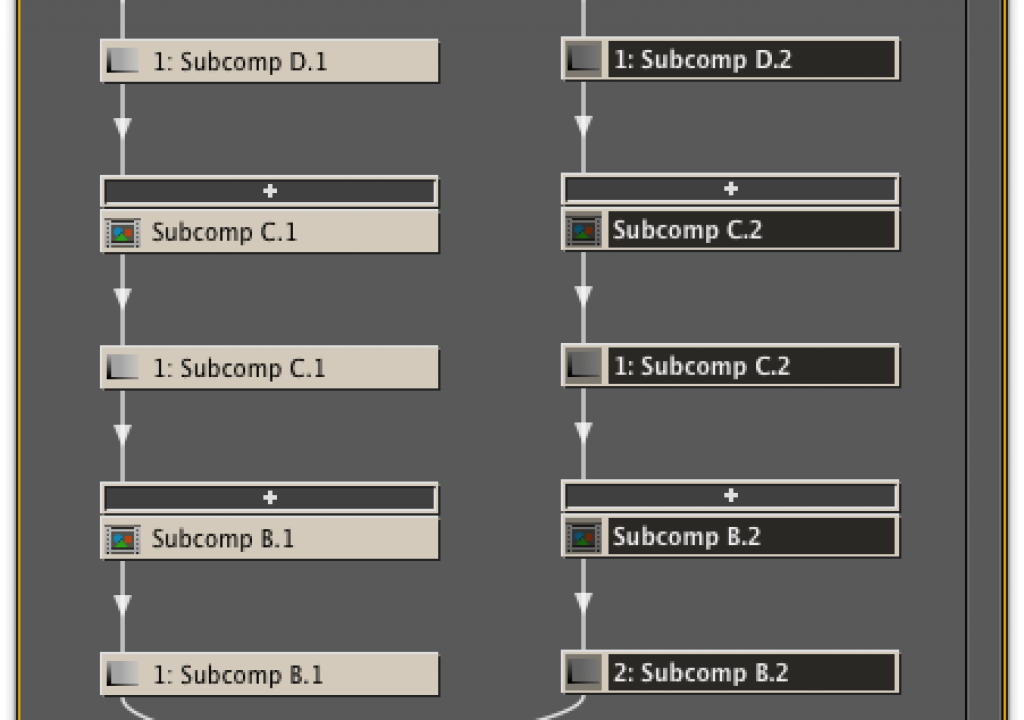
You can duplicate a comp and re-use it, no problem. But if you’re doing your job correctly in After Effects, that one comp may very well not contain all of your work, but is likely to contain sub-comps that contain all of the detail you’ve put into individual elements. These sub-comps often go three or four layers deep, but when you duplicate the master comp, only that one is duplicated; if you also want the sub-comps to be unique - which, more often than not, you do - you need to do that by hand.

And any time you think that thought when working in After Effects, “I guess I need to do this by hand,” try training yourself to think “I must find a script that does this,” and thank me later. Here is a classic example of a workflow problem, plain and simple, that because of how it is implemented in After Effects, can lead not only to painstaking effort but also careless errors (particularly if you loathe repetitive tasks as much as I do, in which case careless errors are a particular Achilles heel).

In Nuke, when you select a set of connected nodes and copy/paste them, all of the components in the new branch are unique (although the file path to any source footage is also copied over, which is easily repleaced). True Comp Duplicator recreates this behavior in After Effects, treating the elements of a comp like the nodes on that Nuke tree, and does it one better by allowing you to choose how the new names are formed.

Sounds trivial, right? Indispensible is more like it. And if you are clever about naming your files, the result can even automatically increment the duplicates in a way that makes logical sense. The UI for this script (when installed into the ScriptUI Panels subfolder, see the first post in this series for details) lets you specify where in the name to increment and even allows you to replace one text string from the source comp with another, which is as good as a custom script for any nodal compositing app.

This is the first script featured in this series that uses the “Name Your Own Price” scheme on aescripts.com; it is shareware, as are the majority of After Effects scripts, despite the recent trends to serialize the most valuable among them. This means you’re not prevented from grabbing it if you’re in a facility where a purchase order would be required to actually buy it on a deadline, and you’re free to kick a few bucks to the developer at any time to encourage more of these great workflow enhancements to be devised and shared.

(Page 1 of 1 pages for this article )


You must be registered to comment. This is an effort to reduce spam. Please REGISTER HERE.

The need for a hack like this is further evidence of the paucity of After Effects composition paradigm.

Posted by Charles Angus  on  07/25  at  10:10 PM


Name:

Email:

Location:

URL:

Smileys

Remember my personal information

Notify me of follow-up comments?

Submit the word you see below:


Adobe Media Encoder - another hidden gem?
After Effects Script of the Week: Add Parented Null to Each Selected Layer
Use Dynamic Link to bring Warp Stabilizer to Premiere Pro CS5.5
After Effects Script of the Week: Tracker2Mask
After Effects Script of the Week: rd_MergeProjects
After Effects Script of the Week: Get Sh*t Done
After Effects Script of the Week: pt Panorama
After Effects Script of the Week: pt TextEdit
After Effects Script of the Week: Change Render Locations
After Effects Script of the Week: pt ExpressEdit
After Effects Script of the Week: MochaImport
After Effects Script of the Week: KeyTweak
After Effects Script of the Week: pt EffectSearch
After Effects Script of the Week: Immigration
Script of the Week: Shortcut Key Reference
Script of the Week: True Comp Duplicator
Script of the Week: 3D Extruder
Script of the Week: BG Renderer
Introducing: After Effects Script of the Week
Red Giant’s newest Plot Device: Magic Bullet Looks 2
Free Stereo Footage from Artbeats, and an After Effects tutorial showing how to use it in CS5.5
Premiere Pro for DSLR in a few easy steps
ASSIMILATE announces Mac support for SCRATCH, updates product line and prices
After Effects CS5.5 in Production
ASSIMILATE SCRATCH first out of the gate with RED Epic HDRx support
Foundry Releases CameraTracker and Kronos 5.0 Plug-ins for After Effects
Innovation and Cinema 4D Part Two: William Dudley on Virtual Sets
Innovation and Cinema 4D Part One: William Dudley and Peter Pan 360°
Pixel Farm to Launch “Radical New Approach to Tracking” at SIGGRAPH
The Foundry unveils 3D Camera Tracker for After Effects


10 Final Cut Pro things FCP editors might be missing in Adobe Premiere Pro CS6

Scott Simmons | 05/11

These are a few of the things that I found myself searching for as I’ve been moving over to Premiere Pro CS6 as a FCP 7 replacement

image

Adobe is making a big play for Final Cut Pro users with their CS6 release of Premiere Pro. It’s vastly improved over the Premiere Pro of old and is a lot like Final…

After Effects Apprentice Free Video: Working with Nested 3D Compositions

Chris and Trish Meyer | 05/07

How you can be two places at once inside After Effects

As we mentioned awhile back, we’ve been busy the past year and a half creating an extensive, multi-course video training…

Expression Shorts - loop

David Torno | 05/06

Learn how the loop expressions work.

image

Looping is a very common task in our industry and is mostly associated with video footage of some…

After Effects Apprentice Free Video: Copying Paths from Illustrator to After Effects

Chris and Trish Meyer | 05/01

Revealing Illustrator paths requires a few intermediate steps, involving After Effects masks and effects.

Buried in the shuffle over the announcement of After Effects CS6 is that we concluded the video training series for our book After…

To be considered for listing, contact pr (at) provideocoalition (dot) com


Copyright © 2012, HD Expo, LLC a division of Diversified Business Communications. DBA Createasphere

All rights reserved. HD EXPO, High Def EXPO, Createasphere, E-Tech, Entertainment Technology Exposition, 3D Production Workshop, VariCamp, P2 Camp, ColorCamp 101, and Lighting, Filters & Gels for HD are all trademarks of HD Expo, LLC.

Terms of Use  |  Privacy Policy

Check PageRank