

Filmtools
Filmmakers go-to destination for pre-production, production & post production equipment!
Shop NowGet your preferences set the way they probably should just be by default.


Today’s tip is a simple one. I even kinda hope you already know about it.
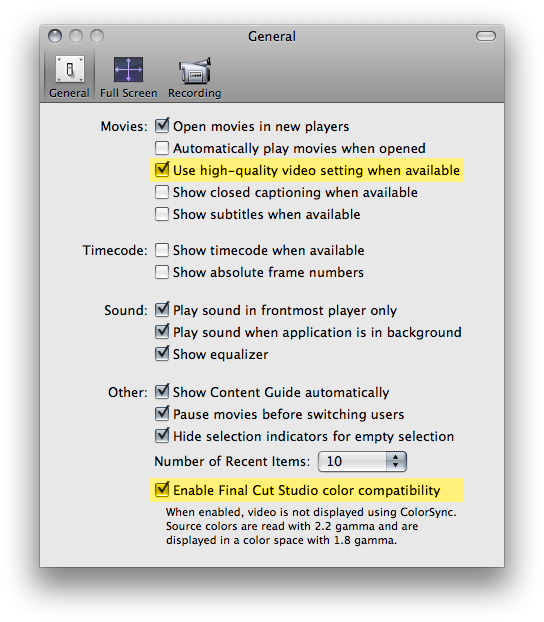
QuickTime includes two preferences which are mistakenly (in my opinion) disabled by default.
The first is Use high-quality video setting when available – toggle this on.
The only reason that I know of not to check this is to get faster playback at the expense of poorer quality. We are professionals with speedy machines – and when I say speedy, I don’t mean you need a Nehalem i7 machine to justify enabling this. If you’re using QuickTime Player to evaluate professional work, you want this setting on. Always.
The second is available only to Final Cut Studio owners: Enable Final Cut studio color compatibility – toggle this on as well.
Now this certainly will not end all of your myriad woes color matching QuickTime movies from one application to the next – it’s really up to Apple to solve that, and I’m not holding my breath – but it will at least eliminate an obvious point of confusion. Who expects a gamma shift from one Apple application to another?
And what about the fact that you can’t ensure that someone else, on another system, has enabled these settings? Next Friday’s tip will cover that, and more.
(See? There’s even a story arc.)