
(Page 1 of 1 pages for this article )

Tuesday, April 28, 2009

Filed under: Post ProductionTips

Convert RED Camera R3D Footage Losslessly, Painlessly, Confidently

Mark Christiansen | 04/28

Do it the way Autodesk recommends and don’t fret about lost data

If you’re a regular at this site you may recall 5 Tips to Maintain Sanity in RED Post.. The key point of that article was to assert that since you cannot write an R3D file, you must convert and it is best to do so early in order to save many wasted cycles processing full 4K (when the output is actually HD or less). Today’s tip tells how to convert an R3D losslessly to either 10-bit Cineon or 16-bit TIFF, and it’s backed up by a whitepaper from Autodesk.

It should be noted that there is a big difference between preserving color data and preserving color intent. The latter remains challenging with R3D, but as long as no DP or Director insists on the exact color seen on an on-set preview monitor, this workflow does preserve all color information and thus give you the dynamic range needed to get there without having to hold on to the R3D through your pipeline.

For this article I will assume the use of REDAlert, but the same settings work whether you’re converting an entire project with Crimson or Monkey or instead working in another tool that can apply settings directly to an R3D.

16 bit TIFF

The TIFF format’s 16 bits make for a file that is 60% larger than the equivalent 10 bit DPX (yes the math really is that simple, and it adds up across a shot or sequence), but the colors will look correct on your monitor with no LUT or conversion applied and thus this format is the most popular. Set the Color Space to REDspace and the Output LUT/Gamma Space to Rec709.
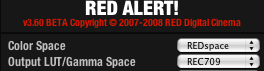
The resulting image will look a little dark if shot for 320 ISO, but you can optionally open the Histogram and boost Brightness until just below the point where you see clipping (indicated by rectangular red, green or blue flags at the right of the histogram).


That red square on the right indicates clipping in the red channel; don’t export until you’ve eliminated it.


In this case, simply raising DRX to balance the highlights eliminates the clipping.

Standard Cineon Log DPX

To convert to the standard film workflow, and in the words of the Autodesk document, “get the tone scale approximately correct,” set the Color Space to REDspace (or CameraRGB), use any ISO and Kelvin settings specified in the camera report and set Output LUT/Gamma Space to PDlog 985. Reduce Exposure 2 stops: -2.00 setting.
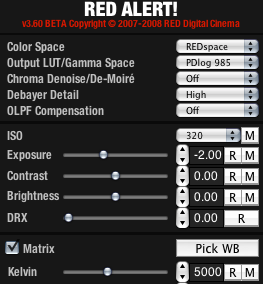
The Autodesk paper also cautions that “colors will seem washed out compared to film capture” and recommends a boost to saturation (which may best be done during color matching/correction, not at conversion, to avoid any clipping).

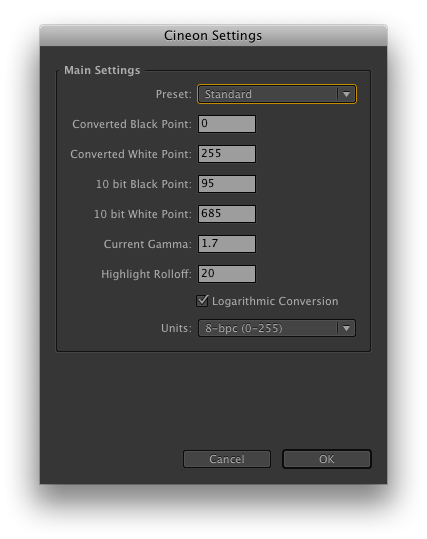
In After Effects, open Interpret Footage, Color Management tab and click Cineon Settings. If it’s not already selected, use the Standard profile with all the defaults and click OK.
So which format is best?

TIFF is best if you can’t stand working with images that don’t look right when simply double-clicked and opened, and if your destination is digital video. Cineon Log is appropriate when going to film or in any pipeline that anticipates using this format, such as certain color correction suites. As a final note, RED is technically a 12 bit format, but that linear 16 and log 10 have the capacity to handle the data effectively losslessly.

(Page 1 of 1 pages for this article )


You must be registered to comment. This is an effort to reduce spam. Please REGISTER HERE.

I’d not recommend doing a linear light export to a 10bit DPX. Basically, you are throwing away 2 stops in the shadows, and you will therefore see posterization down there in the dark blacks through loss of those bits.

The REDLog curve was specially designed to preserve precision when going to 10bit formats like DPX, and that it does well. Even a REC709 gamma is pretty good (but not as good) at preserving precision into a 10bit format.

If you do need linear light, stick to 16bit TIFF.

Graeme

Posted by Graeme Nattress  on  04/28  at  05:09 PM


Thanks Graeme - I have edited the article to omit that portion; the appeal of that approach was when demonstrating to students the actual numbers in Cineon and how they correspond, but it should have been readily apparent that it would quantize when 10 bit does not in fact have to do so.

Posted by Mark Christiansen  on  04/28  at  07:21 PM


another update we are looking for. I hope this time there is no more ridiculous problems.
Lakeside Home Search

Posted by .(JavaScript must be enabled to view this email address)  on  08/31  at  09:42 AM


Hi… I followed the steps in After Effects but did not work at all for me… well, I am new working with DPX but I think it looks better if I export as Over Range instead of Standard… in Standard, after import again and change the Cineon Settings to Standard and apply the Cineon Converter Plugin it looks too overbright to work….

...is exporting as Over Range a good option for film-out…? ...I just changed this setting in the workflow described above and looks good to work with…

Thanks… wink

Posted by .(JavaScript must be enabled to view this email address)  on  11/09  at  03:11 PM


Import as Standard make my highlights clip at 1….

Posted by .(JavaScript must be enabled to view this email address)  on  12/02  at  04:46 AM


Name:

Email:

Location:

URL:

Smileys

Remember my personal information

Notify me of follow-up comments?

Submit the word you see below:


Adobe Media Encoder - another hidden gem?
After Effects Script of the Week: Add Parented Null to Each Selected Layer
Use Dynamic Link to bring Warp Stabilizer to Premiere Pro CS5.5
After Effects Script of the Week: Tracker2Mask
After Effects Script of the Week: rd_MergeProjects
After Effects Script of the Week: Get Sh*t Done
After Effects Script of the Week: pt Panorama
After Effects Script of the Week: pt TextEdit
After Effects Script of the Week: Change Render Locations
After Effects Script of the Week: pt ExpressEdit
After Effects Script of the Week: MochaImport
After Effects Script of the Week: KeyTweak
After Effects Script of the Week: pt EffectSearch
After Effects Script of the Week: Immigration
Script of the Week: Shortcut Key Reference
Script of the Week: True Comp Duplicator
Script of the Week: 3D Extruder
Script of the Week: BG Renderer
Introducing: After Effects Script of the Week
Red Giant’s newest Plot Device: Magic Bullet Looks 2
Free Stereo Footage from Artbeats, and an After Effects tutorial showing how to use it in CS5.5
Premiere Pro for DSLR in a few easy steps
ASSIMILATE announces Mac support for SCRATCH, updates product line and prices
After Effects CS5.5 in Production
ASSIMILATE SCRATCH first out of the gate with RED Epic HDRx support
Foundry Releases CameraTracker and Kronos 5.0 Plug-ins for After Effects
Innovation and Cinema 4D Part Two: William Dudley on Virtual Sets
Innovation and Cinema 4D Part One: William Dudley and Peter Pan 360°
Pixel Farm to Launch “Radical New Approach to Tracking” at SIGGRAPH
The Foundry unveils 3D Camera Tracker for After Effects


After Effects Apprentice Free Video: Working with Nested 3D Compositions

Chris and Trish Meyer | 05/07

How you can be two places at once inside After Effects

As we mentioned awhile back, we’ve been busy the past year and a half creating an extensive, multi-course video training…

NAB 2012: RED

Adam Wilt | 05/07

RED’s Ted Schilowitz discusses 2012’s products, and a photo gallery.

RED’s “Leader of the Rebellion” Ted Schilowitz held a press conference at NAB on Monday, describing the projects and products RED is working on. Rather than paraphrase him, I’ve got him on card (well, it’s not “on…

Expression Shorts - loop

David Torno | 05/06

Learn how the loop expressions work.

image

Looping is a very common task in our industry and is mostly associated with video footage of some…

Color Correction Practice Game

Steve Hullfish | 05/05

Test your skills, improve your eye

image

I found a very cool little site that tests your ability to match a specific color based on hue, saturation and brightness. At first, I thought it was just kind of cute,…

To be considered for listing, contact pr (at) provideocoalition (dot) com


Copyright © 2012, HD Expo, LLC a division of Diversified Business Communications. DBA Createasphere

All rights reserved. HD EXPO, High Def EXPO, Createasphere, E-Tech, Entertainment Technology Exposition, 3D Production Workshop, VariCamp, P2 Camp, ColorCamp 101, and Lighting, Filters & Gels for HD are all trademarks of HD Expo, LLC.

Terms of Use  |  Privacy Policy

Check PageRank