
(Page 1 of 1 pages for this article )

Monday, April 06, 2009

Filed under: Tips

Tip: Use iChat to McGyver Back to your Mac

Mark Christiansen | 04/06

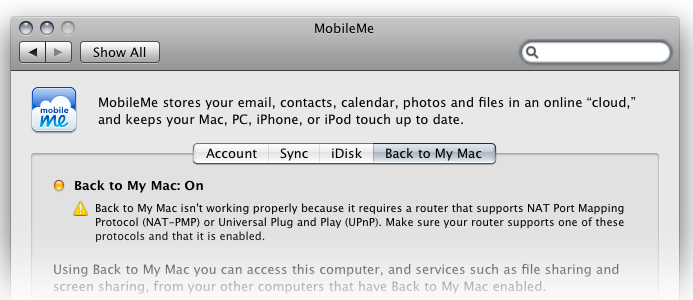
Back to My Mac not working for you? Me neither. Until it’s fixed, try this.

I love the idea of Back to My Mac, including with a MobileMe account (there is also a Windows equivalent I haven’t tried). Unfortunately, I have never gotten the green light on both ends of an attempt to link one Mac back to another.

Networking two computers together hasn’t been a big deal for 20 years or so, but taking control of a machine which is part of some network somewhere remote is, you have to admit, a formidable request. The ability to do this was a major reason I re-upped for a MobileMe account, so imagine my disappointment when I could not get that indicator in System Preferences to turn green.
While MobileMe continues to get its act together, there is an alternative. It’s hacky, it crashes, there’s no way to enable it if it’s not already set up when you leave the remote location - but boy, is it ever a sweet option when it works.

The key is iChat and Applescript - and 2 IM accounts. By logging in on the workstation and installing the script, you can make that machine auto-accept requests to share a screen under the Buddies menu. The script makes it so that only your account can successfully make the request.

I find it works about 75-80% of the time; the key is not to let iChat crash on the remote system, and I find I’m getting better at neatly closing the session so I can reopen it later. I have even made iChat a Startup Item so that I don’t forget to have it running when I leave. If I really want to sneak in unnoticed, I use the relatively new “Invisible” status on iChat.

Now let’s give credit where credit is due with this link to the original article detailing how to actually do this.
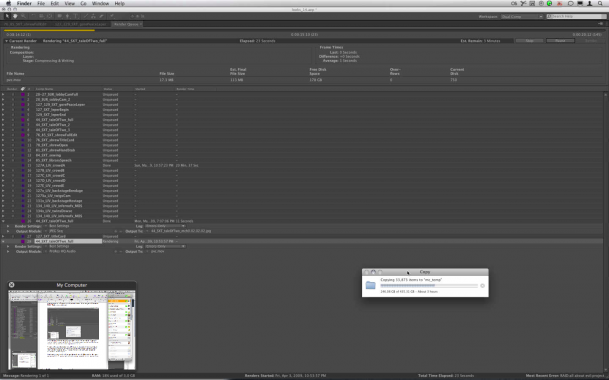
Thanks to Matt Notaro at Kontent Films for this great pick.

UPDATE: Barend Onneweer recommends via Twitter logmein.com - I’ve tested the free version briefly, and it seems potentially more reliable if more sluggish than the above method. It apparently is not only cross platform Mac/Windows, but will even work via iPhone. Interesting.

And Mel Matsouka let me know that Read Pixel makes products specifically to do machine control from another Mac or an iPhone: RemoteTap and SpyMe. I tried these and have the same difficulty as with Back to my Mac getting them to work from a separate network.

(Page 1 of 1 pages for this article )


You must be registered to comment. This is an effort to reduce spam. Please REGISTER HERE.

If you have a fixed IP address you can also very easily access a remote computer with the “screen sharing” application in OSX.
here’s a little trick, find the hidden app in:
Macintosh-HD\System\Library\CoreServices\Screen Sharing.app
drag it to your dock to make it easily accessible, launch it, enter the IP address of the remote machine and voila,
hope this helps.
e.

Posted by eric Peltier  on  04/08  at  04:12 PM


I use logmein.com and ichat in combination. Once connected with logmein, I initiate an iChat between both machines. That way I have a direct connection for file transfers (in both directions) as well as remote machine control. Plus I can easily talk with the remote operator if required.

Posted by Rob Birnholz  on  04/09  at  05:32 PM


Name:

Email:

Location:

URL:

Smileys

Remember my personal information

Notify me of follow-up comments?

Submit the word you see below:


Adobe Media Encoder - another hidden gem?
After Effects Script of the Week: Add Parented Null to Each Selected Layer
Use Dynamic Link to bring Warp Stabilizer to Premiere Pro CS5.5
After Effects Script of the Week: Tracker2Mask
After Effects Script of the Week: rd_MergeProjects
After Effects Script of the Week: Get Sh*t Done
After Effects Script of the Week: pt Panorama
After Effects Script of the Week: pt TextEdit
After Effects Script of the Week: Change Render Locations
After Effects Script of the Week: pt ExpressEdit
After Effects Script of the Week: MochaImport
After Effects Script of the Week: KeyTweak
After Effects Script of the Week: pt EffectSearch
After Effects Script of the Week: Immigration
Script of the Week: Shortcut Key Reference
Script of the Week: True Comp Duplicator
Script of the Week: 3D Extruder
Script of the Week: BG Renderer
Introducing: After Effects Script of the Week
Red Giant’s newest Plot Device: Magic Bullet Looks 2
Free Stereo Footage from Artbeats, and an After Effects tutorial showing how to use it in CS5.5
Premiere Pro for DSLR in a few easy steps
ASSIMILATE announces Mac support for SCRATCH, updates product line and prices
After Effects CS5.5 in Production
ASSIMILATE SCRATCH first out of the gate with RED Epic HDRx support
Foundry Releases CameraTracker and Kronos 5.0 Plug-ins for After Effects
Innovation and Cinema 4D Part Two: William Dudley on Virtual Sets
Innovation and Cinema 4D Part One: William Dudley and Peter Pan 360°
Pixel Farm to Launch “Radical New Approach to Tracking” at SIGGRAPH
The Foundry unveils 3D Camera Tracker for After Effects


Autodesk Offers All-In-One Solution with NLE Suites Part II

Clint Milby | 03/16

Smoke 2012 for Mac offers an all in one solution to save you time and money

image

Basic Training
Now that I steeled myself to learn Smoke, I was ready and determined to get down to business. Fortunately, Autodesk has provided several…

Autodesk Offers All-In-One Solution with NLE Suites Part I

Clint Milby | 03/16

Smoke 2012 for Mac offers an all in one solution to save you time and money

image

Recently I’ve had a chance to visit with some of the brightest minds in post production today.  These gentlemen arrived at this point in their careers from…

From start to finish – an arsenal of tools

Marc-Andre Ferguson | 01/25

Finishing options from mobile workstations to pimped out desktops.

MOTU Debuts Its First Product with Thunderbolt™  Technology

PVC News Staff | 01/12

MOTU adds Thunderbolt™ Technology to HDX-SDI Video Capture Device

image

MOTU, Inc. introduced the HDX-SDI with Thunderbolt™ technology, a professional video interface that turns a Thunderbolt technology enabled Mac or PC into a powerful HD/SD video production workstation…

To be considered for listing, contact pr (at) provideocoalition (dot) com


Copyright © 2012, HD Expo, LLC a division of Diversified Business Communications. DBA Createasphere

All rights reserved. HD EXPO, High Def EXPO, Createasphere, E-Tech, Entertainment Technology Exposition, 3D Production Workshop, VariCamp, P2 Camp, ColorCamp 101, and Lighting, Filters & Gels for HD are all trademarks of HD Expo, LLC.

Terms of Use  |  Privacy Policy

Check PageRank