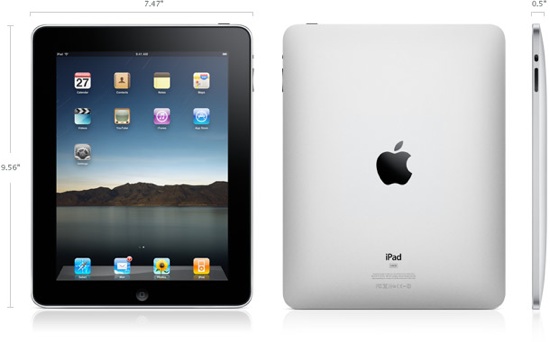
OK, this one’s a two parter. Part One is just the practical details of what it is, what it costs, what it does. Part Two is what it means for users like us – now and in the future. Overall, I think the Apple iPad is interesting, I think it is useful, it demos damn cool and as of today I don’t expect to buy one, and why you may not want to either. Read on for the details.
Updated a couple of times – come back and read the bottom
Last night I stayed up late and wrote about what I thought of the possible device and some potential shortcomings here – you may want to read that as a backgrounder. I had no backdoor info or leaked anything, just what I found on the usual gadget blogs. So here’s the practical details of what it is:
Some basic links first:
Features-(includes list of apps it comes with)
Design (includes pics of dock, keyboard dock, and carrying case)
App Store-(runs current iPhone apps, 140,000+, as well as new, exclusively iPad fullscreen apps)
Gallery– pics from all sides
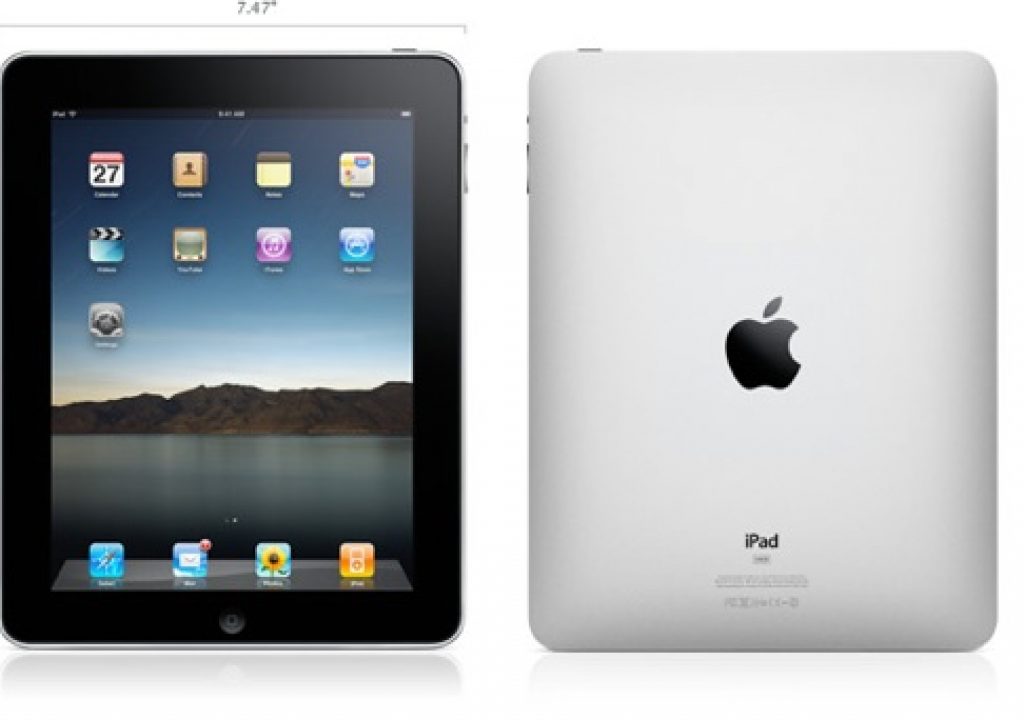
Tech Specs – (includes dimensions, weight, etc.)
Pricing
OK, lets get into the meat of it:
What It Is
A pound and a half color touchscreen, capable of full screen video, games, web browsing, etc. Think Really Big iPhone, But Not A Phone. Faster and with better battery life. 1024×768 res 9.7 inch multi-touch color screen, 10 hours of video playback on a single charge, 30 day standby charge. It is similar to the iPhone in that it has a multi-touch screen, an accelerometer (tilt sensor), a compass (for navigation), speakers and a microphone. You can drive a projector on it.
What Isn’t It?
It isn’t a netbook. It isn’t a Mac OS X machine. It isn’t a phone. It doesn’t have a camera, so it isn’t a videophone/videoconferencing device. Some models don’t have 3G, which is a good option to have or have not. It isn’t 4G/LTE for data speeds, meaning it downloads data as fast as an iPhone would (in theory). It isn’t multi-tasking, as far as I can tell from the demos – if it were, they would’ve showed it being so. Not to say it won’t be in a future OS update, but isn’t today. It isn’t a high quality presentation driver – only 1024×768 over VGA with adapter (DVI/DisplayPort not mentioned in tech specs). It isn’t an HDTV driver AFAIK – video out is mentioned as 480p/480i with a composite cable.
What’s It Cost?
It costs $500, $600, or $700 for 16/32/64 GB models, add another $130 for 3G connectivity – so $630, $730, $830. Outstandingly cheap data plans for 3G – $15 for 250GB/month, $30/month for unlimited data – but keep in mind, that is at 3G speeds, not WiFi speeds. AT&T only US provider, but cancellable at any time with early termination fee. Also means no subsidized plans – you buy it unlocked, it is yours, but you pay full price up front. You CAN use it on other networks with a micro SIM card – data plans? Unknown.
Great! When Can I Get One?
60 days for WiFi only models, 90 days for WiFi and 3G models.
What can I do with it/run on it?
Runs “almost all” existing iPhone apps, including games, running iPad specific apps for things like web browsing, email, games, picture & video browsing/viewing, and other iPod capabilities. It’ll do calendaring, To Dos, mapping, etc. iWork has been ported and will be available at launch. It uses a virtual keyboard onscreen, like the iPhones but bigger and more fully featured, and multi-touch capable, of course. There is a new, specfically for iPad touch interface version of iWork that’ll ship for $30 (or $10 per Numbers, Pages, or Keynote). Many more full screen, iPad specific games and apps under development.
What’s it good for?
Web browsing – very nice Mobile Safari implementation – as long as you are in a WiFi hotspot, OR spend an extra $130 plus $15-30/month for the 3G hardware and monthly connection rates. And then, only if you are getting a 3G signal.
Picture and video viewing – can be in local storage, and has very nice touch/flick/pinch/zoom interface – the best photo frame on the market for viewing pics. Watch movies (even buy from iTunes, but only over WiFi) on the device. YouTube also!
Music – headphone jack and speakers (quality of speakers TBD). iTunes Store, buy directly and download directly to device. Overall, it is a big, nice iPod, with a lot of iTunes like controls and access to your content. Nice! Imagine iTunes (the playback and store parts) running on a slate with touch interface – that’s what you’ve got here. DAMN nice.
App Store – buy more apps! Slightly tautological feature, but hey, it is convenient!
iBooks – OK, here’s something new – books in ePub format (DRM almost assuredly there), an open format. there’s an ePub reader. Will there be a Kindle app to read content? Likely, unless Apple blocks it as “confusing” to customers – which I doubt they’d get away with. With the tiltable screen, and 1.5 pound weight, and long battery life if just reading screen content, it’ll be good for ebooks. So who cares? Students – see this – my lifelong friend Charlie saved $130 by getting to use an eBook instead of buying the hard copy. Students buying $500 16GB, no 3G versions and living on that instead of a netbook? Count on it.
Maps – With a 3G model and 3G connection and turn by turn app (surely there’ll be an iPad specific one), this’ll be the nicest GPS ever. Excuse me, EVV-ARRRRR!!!! Question – if you’re on WiFi and plot out a route, will it buffer all the intermediate screens so you can get there? I hope so. Oh, WAIT! Does it even have GPS??? I haven’t seen that mentioned! FLAG!
Notes – better have a real keyboard to use this “for reals.”
Contacts and Calendar – syncs with all the stuff – probably integrates with MobileMe for integrated, anywhere/anytime access
Homescreen – duh, how you get to everything. Looks like it spaces out icons to use available space, rather than living on a fixed grid like iPhone does. Can you get more than one screen’s worth? With 64GB of storage, I’d hope so!
Spotlight – good, you can search everything/everywhere on your iPad. With no directly accessible file system as far as I can tell, you’ll be needing this, even if the other contextual access is really good.
Email – looks really good – some excellent touch integration, and rotating from horizontal to vertical lets a single mail go full screen if you want to focus on it. About writing…
The Keyboard – as compared to the iPhone the good thing is that it is much bigger, and conducive to touch typing. The bad thing is that it is a multi-touch screen, so you have to hover your fingers, rather than resting them on the home row. And since it is so much bigger, you can’t single handedly enter text (hold and type with a single hand to keep the other hand free). Unless you want to hunt and peck while holding with the other hand, you have to put it on something to type. The carrying case (optional) can tilt it up for typing or comfortable on table viewing (but not both at same time). The optional dock, or better yet the optional keyboard dock is the way to go. Does the optional dock have a USB port to plug in a regular keyboard? Doubt it.
What This Means for People Like You And Me
OK – so here it is. It is definitely more than an iPhone, without actually being a phone. Or a camera. Or a definitive data connection via 3G (since 3G is optional in hardware, and a separate month to month payment to AT&T for data services….or another provider). It is less than a laptop – doesn’t include a real keyboard, a fully featured OS, an accessible file system, etc. (and can you even just copy generic files to it? I don’t think so, since syncs with iTunes – has to be a blessed format that syncs like MP3, H.264, AAC, JPEG, etc., or emailed to it).
It is definitely the inbetween device, as Jobs pointed out – not an app phone, not a laptop.
So who is it good for?
It looks to be a good entertainment device – hang one on the back seat for the kids and let’em go with movies, music, and games. It looks like it’ll be a blessing for anyone who wants a serious touch app, or an app with more space. Maps and navigation will rock on this. It looks to be a killer media browser- pictures and nearly HD res video. It is a communicator (email, and undoubtedly chat apps when connected), and a pretty good web browser, if you’re OK with the 1024×768 res and no real keyboard (the zooming does ameliorate the resolution limitations, fortunately).
But you can’t run OS X or Windows apps on it. You can’t access the file system, and anything you want to look at better be in the specific formats supported – AAC, MP3, H.264, MP4, JPEG, and for mail attachments,” .jpg, .tiff, .gif (images); .doc and .docx (Microsoft Word); .htm and .html (web pages); .key (Keynote); .numbers (Numbers); .pages (Pages); .pdf (Preview and Adobe Acrobat); .ppt and .pptx (Microsoft PowerPoint); .txt (text); .rtf (rich text format); .vcf (contact information); .xls and .xlsx (Microsoft Excel).”
So it is DEFINITELY in the middle. So again, who is it good for? For 80% of laptop users, 80% of the time, this will probably be Good Enough – that in itself is a business model, definitely. For your Mom or Dad, this is pretty good. But they better have another computer if they want to sync photos and videos, otherwise they are stuck with what they can get from iTunes. So no loading their own pictures and video and their own MP3s and other music, etc. that wasn’t purchased off of iTunes. So you can’t really call it a laptop replacement (and Apple doesn’t really want to, either). If you had a desktop system and no laptop, this might be appealing – it is lightweight and has long battery life, but text entry is cumbersome if anything other than “casual.” So a data-tethered pseudo-laptop. Would this work for students during the day? eBooks yay, note taking with a keyboard dock.
All that said – this device looks darn easy to use and figure out. For a lot of people, the sit ‘n flick usability of it will open up a lot of doors. I can see this being a device seniors can figure out better on their own, and not even bother getting a “proper” computer.
OK, so for people like you and me – media professionals – how does it stack up?
It isn’t a laptop relacement – other than emails and chat when connected, it doesn’t replace any of the pro apps we use. It doesn’t have expandable storage, and won’t read any source media format – only processed compressed ones.
What about for presentations? If you can’t all gather around the screen, it’ll only drive 1024×768, and that only over VGA. What about video? Only standard def – and only composite, the lowest quality of SD connections. Connect a DVD over composite sometime and cry when you see how bad it looks.
How about for viewing video directly? The screen is 1024×768 – amazing for a phone, weak for a laptop. It is also 4:3, not 16:9, which is the size most of us are creating for (at least I am). Video quality is also somewhat capped – 720p at about 5 megabits for video, but at least, unlike AppleTV, it can go up to 30fps. At H.264 ONLY, MP4 has lower datarates and frame sizes.
If you have a desktop, don’t need any professional apps, and just want to stay connected and have an entertainment device, it is decent, and surely eye catching. Flip case looks to be MANDATORY for practical transpo, and the keyboard dock for any real data entry – how much RSI damage from wrist hovering over the touchscreen? How much neckstrain from hunching over? See here for Gizmodo’s excellent (and spot-on, considering pre-release!) analysis of different ways of holding/utilizing this thing. Keep in mind we only have the standard keyboard onscreen, not their interesting alternatives.
But this inbetween-ness thing is what bugs me – it is nice, nifty, cool, flashy, potentially useful, but doesn’t replace the laptop. More importantly, IT DOESN’T FIT IN MY POCKET. Anything bigger than pocket sized requires carrying in your hand or in a bag. Since it is delicate, it needs some protection as well. If I’m already carrying a bag, the difference between a MacBook and this is about 3 1/2 to 4 pounds. Yeah, that is definitely lighter, but if I’m carrying something over my shoulder, is it that big of a deal? Especially since as a media professional, so far I’ve found I HAVE to have a fully featured notebook – a tablet wouldn’t suffice if I had any “real” work to do.
My Macbook and iPhone are aspirin, iPad is a vitamin
A story – I went to seminar during the dotcom boom, and a VC (venture capital) guy was talking about travelling. You fly somewhere, check into a nice hotel. You have a headache, probably from dehydration on the plane. You go down to the little gift shop in the hotel, and hooray! They have aspirin. For about $9 a pill. God dammit, what a ripoff! But you buy it – because you NEED it. You gotta make the pain go away. You will notice, he said, that they don’t offer vitamins in this store. Because they couldn’t charge $9 a pill. Because vitamins are nice – you should take them, they are good for you, your life will improve, you’ll live longer, etc. BUT…you don’t HAVE to have them RIGHT NOW. Aspirin is a must have. Vitamins are a “that would be nice.” but they are gravy, to (purposefully) mangle his metaphor. He then continued to say VC was only interested in investing in aspirin companies, not vitamin companies – because that was where the real money was made. The iPad is a vitamin. A MacBook or an iPhone is an aspirin.
Also – the touch interface – on a phone, it was MANDATORY to get more usability – it is incredibly freeing. Why? Because there was no ROOM for control devices – a mouse, a trackpad, two buttons etc. The gravy of pinch/zoom, etc., is slick and nice, but we HAD to have touchscreen to get any power on a phone sized device. OK, that’s GREAT. Now, scale it up to this tablet size – uh, OK. There’s room for some controls once you get into roughly this device size. YES, you can dedicate the entire surface to screen, and that is cool. but put a folding lid on it (adds what, maybe a pound?) and suddenly you have a full sized, dedicated keyboard, and a trackpad and buttons to boot. Maybe make it fold/swivel to tuck/hide around back so it’ll run full-on tablet style. Nah, too messy, not Apple Clean, so won’t happen. So at this size, touch is definitely cool, definitely useful, definitely optimal use of hardware real estate….but not ESSENTIAL. And I think that’ll be part of the downfall of this device. So to continue the above analogy, touch on a phone is aspirin, touch on a tablet is a vitamin.
I think this will be the next in line of Apple’s marginal products – I think it’ll do better than the Cube and AppleTV, but this is no Second Coming of the iPhone, which was the Second Coming of the iPod, which was the Second Coming of the iMac, which was the Second Coming of Apple (arguably). Apple, in order to sustain it’s meteoric growth, needs to come out with a Jesus Product every few years. But I don’t think this is it.
Maybe I’ll change my mind when I play with one (in about 2 months).
To Be Determined.
-mike
See previous article (linked at beginning of article) about my ownership of Apple products and Apple stock, if that concerns you.
UPDATE
WAIT! You never really answered who it is good for!
Oops, you’re right – because I’m not really sure. Desktop owners who don’t want a laptop? iPhone app freaks who want more screen without weight of a laptop? Gadgeteers with disposable income? I think this one smells like the Cube – cool, but overpriced for what it DOES. What it does is really cool, but they need to find new things to do with a touchscreen that are cooler than this. An always on pervasive 4G/LTE model with camera and Back To My Mac would fit that bill for me.
Thinking on this some more – what does this do I can’t do elsewhere? Lets look at their own feature list, from here –
Safari – got it on Macbook and iPhone. Touch interface IS nice, tapping to zoom is better than the laptop. Bigger screen on laptop is more convenient than tablet. Bigger screen on tablet more convenient than iPhone. But I can access info from either. The data plan on the 3G models is nice, and better than the Macbook can do if out of WiFi range. But I can buy a data dongle, and even over a year it is still cheaper than buying a tablet (although that makes an interesting proposition – and yo, AT&T! If we can data plan on iPad for 250GB a month for $15, where the hell is our promised iPhone tethering you said we’d have in 2009!!!). In any case, iPad=vitamin on this one. A tie and sometime winner arguably. But oh yeah – apparently NO FLASH. Oops. Lose.
Mail – READING of mail looks to be best on iPad – very elegant UI. But WRITING? I’d need a real keyboard to do any serious missives. The keyboard dock (hello, price? $99 to $129 probably! Apple accessories are always high margin) would be mandatory. Mail on iPhone? Marginal for reading but it works, is very inefficient for anything but quicky few line replies. Don’t lay out your corporate strategy on one. Vitamin at best – laptop still best for this task.
Photos – the touchscreen interface is VERY nice for viewing, browsing, zooming, so it almost gets the win for the iPad. But you can’t import, edit, manipulate, etc – it is strictly a viewer. My laptop screen is bigger and higher resolution as well. iPhone is way behind the others on this. But still, vitamin compared to laptop.
Video – haven’t seen the screen so can’t definitely say, but it is an inbetween device on this count as well from what I can tell – not as big or high res as the laptop. Already have a store available over WiFi. iPad=Vitamin
YouTube – same thing as video. Streaming 3G is a bump though over a laptop. Hmm – conspiracy theory – is iPhone tethering back burnered in order to support iPad data?
iPod – touchscreen for iPod functionality ROCKS. I’d say iPad is best for iPod media delivery (barring HD video, of course). Better than iPod for access, screen size for video. Oh, wait, it doesn’t fit in my pocket, which was the whole point of an iPod vs. lugging a laptop around. Lose. Vitamin.
iTunes – as good (perhaps better?) interface than the software iTunes. But still, Vitamin!
App Store – we have this on the other devices. I imagine overall this could be nicer environment for browsing/selecting than a laptop. But still – vitamin!
iBooks – at last, our first potential aspirin! Content producers are desperate to get away from the straightforward web for two reasons:
1.) non-DRMable environment on open devices that the DRM is readily hackable anyway
2.) people have a gut level expectation that anything in a web browser=ought to be free
This gives content creators (newspapers, magazines, books, video/movies) a playground where they can SAY it is new. The electronic media world NEEDS to be on a pay-for-play basis – advertising CLEARLY has not evolved online sufficiently to support advertising only supported high end content creation. Network TV did it because of ubiquity (everybody had it) and limited choices (only 3-5 channels until cable TV arrived). The advantage is with advertisers now – lots of places to advertise, and doesn’t cost much. So magazines and newspapers DESPERATELY want to get away from giving away their content online only supported by marginal ad revenue. They think they can solve their problem in this new playpen.
Oh, and throw in book publishers, including textbooks, into this pile. (don’t you think e-textbooks would be one of the most hotly bootlegged types of content?)
IF exclusive deals are cut, this is the biggest potential market so far – Apple wasn’t accidental in pointing out how many tens of millions of people already understand the UI (from iPod Touch and iPhones), Apple already has a relationship with them AND THEIR CREDIT CARD with the iTunes Store, and the device cost is about double that of a Kindle…but with a rich full motion color screen, games, email, web, etc. etc. etc.
So if If IF exclusive deals can be cut (we heard about the TV network deal getting shot down for a cable replacement for Apple), THEN this becomes the first place where you can get content you can’t on iPhone/Mac/PC/AppleTV/set top box.
But wait….why should it be? From a consumer standpoint, I’d love it if I could access all these kinds of materials on my Mac or PC desktop or laptop, or my iPhone, or my AppleTV. The ONLY reason we can’t? Content producers don’t trust us, in aggregate (and sometimes with good reason). Who was it – O’Reilly started selling their ebooks without DRM and sales still doubled year over year over year? Maybe that is a lesson to be learned. So in this one instance, this is a potential aspirin win, even though from a consumer standpoint, it shouldn’t be. Much like HD movie rentals only on AppleTV.
End of rant on that one.
Oh and hey….I never heard Text-To-Speech capabilities, did you?
Maps – yep, they’ll rock, especially with the super-smooth UI response. Get me an iPad specific turn-by-turn, announced streets, giant touchscreen version, and this’ll be the best nav system EVER. Presuming you either download the entire map (should be an option!) or have a 3G model and 3G plan and actual 3G network availability. But again – best of breed is only aspirin for some – a vitamin for the rest of us – I’m quite satisfied with my iPhone’s default nav, even in tough to get around Los Angeles.EDIT – NO IT WON’T – NO GPS!!! Yep – Assisted GPS (Wi-Fi + 3G model) – no real GPS, whatsoever. So maps is maps, not GPS. Blammo!
Notes – vitamin, exactly between iPhone and laptop
Calendar – in realistic use, probably better than laptop for speed and ease. Better than iPhone for sure – but still – vitamin!
Contacts – same as above – vitamin – at least equal functionality to the laptop but at 1/3 or less the weight.
Home Screen – akin to Dock in OS X. Umm….slight nod to the iPad, since touching easier than mouse/click. But no OS X apps? Bummer. Vitamin again.
Spotlight – vitamin – feature match, with less format support
Advanced? Hell yes. Good price for what it is? Yes/does. Do I want one? Kinda barely – don’t want to lug it around. Will I get one? I don’t think so.
Also, the financial factor – I paid $600 for my 8GB iPhone (1st gen) – and at the time, was happy to do so. I was upgrading from an ancient dumb phone – I could, um, dial, call up contacts, send texts (painfully on non-QWERTY keyboard) and play Q-Bert. That was it. I graduated to an ever present (if slow) cellular data network, the ability to email and surf the web over WiFi when available, play video and audio better than any of my previous four iPods, eventually got more Apps, it was great. I skipped the iPhone 3G, and waited for my contract to end and then got the 3GS. Love. It. But the iPad is too much inbetween that and a laptop, with not enough reason to get it – you get a phone cause ya gotsta have one nowadays, so throw in all the other goodies too – delicious vitamins. Sometimes ya gotsta work away from the office – so you need a laptop if more than casual mail writing and simple browsing. And I wouldn’t want to poke around a spreadsheet or do graphic layout with a touch display – way too inaccurate!
Its the economy, stupid – in 2007 things were upbeat and bright. 600 bucks for a phone? Yeah, that’s a lot, but it IS a cool toy, and does things I couldn’t before. Nowadays? In this economy? From a market wide perspective (on the scale of enough to affect Apple stock valuation) even if folks had $600 laying around for new gadgetry, this would be in LIEU of a MacBook, not IN ADDITION for most purchasers, I’d think. The same way the higher functionality iPhone has been eating into iPod sales (which Apple is cool with), I think iPad will do the same to MacBooks.
Now? I look at all the functionality I’d get from a iPad, vs my iPhone and MacBook, and I gotta say…no thanks. Not this go-round. Touch is great – mandatory on a phone now, bonus (vitamin!) on a laptop sized device. The low weight and long battery life are nice, but the lack of dedicated, convenient keyboard (am I really going to balance the keyboard dock on my lap at a conference taking notes? Nope! Tipover city!), small, low res screen makes me say…feh. Not enough. If I DIDN’T have a laptop and iPhone, I’d certainly think about it.
So What Would It Take To Make Me Buy One?
A random list of things I’d want:
Camera – front and back, with a WiFi video calling app. Not that this is a make-me-buy-it feature, but it’d be cool and easy to add.
Hello, VOIP app? Anyone? Anyone? Bueller, you there?
Back To My Mac linkage somehow over MobileMe – let me get my stuff
Lower price – start at $300. Regardless of technical feasibility, that’s my comfort level to consider it – and at 16GB, that’s half the storage in my iPhone – ugh
Higher resolution – even the e-ink Kindle has higher res on a smaller screen – if gonna be an e-book, GOTSTA have tight, small pixels!
For Reals GPS – yep, this one doesn’t have it, amazingly – therefore yeah “Most” iPhone apps will run, but location aware ones will be troubled at best
Make the iBook stuff work on everything else I have, too – no exclusivity – same for all other content
Faster data! LTE/4G for $30/month, and I’ll THINK about it (see previous article about data connections – add up your cable bill, broadband bill, Netflix bill, land and cellphone bill, etc. to see how much you pay for bit delivery each month).
Apple keeps calling this “magical” – Steve did it repeatedly onstage, and it is repeated in the video available here. I don’t think so. I think it is cool, excellent tech built on their previous outstanding iPhone work, but it is jut a logical extension – extending an iPhone TOWARDS a laptop without reaching that far. And I don’t think that is magical. I think it is interesting, powerful, useful, impressive, groundbreaking, speedy, responsive, state-of-the-art, and other flowery praiseful words and whatnot. But it is distinctly, IMHO, NOT magical. iPhone had that magically glitter. This does not. And as of now, I ain’t buyin’ one.
Paraphrasing something I just wrote in a comment –
Again, this thing needs to be able to boldly stab a stake in the ground and proudly roar “I can do this better than anyone!” and totally kick butt at it.
It hasn’t done that yet.
Not that it CAN’T, just that it hasn’t YET, to my observation.
Segway 2010, indeed. iPad, you can display any color, but you are a Ginger at heart.
UPDATED 4PM
All that said, the future possibilites of using this for video stuff are interesting – as pointed out in the comments, viewing dailies on set (if something else compresses the footage, like a Codex box), showing clients stuff, having a review application, using it as a control surface, the best damn smart slate ever, metadata entry/capture, etc. are all there, just waiting to be done. But for now…we wait.
-mike
Pre-launch thoughts here:
https://www.provideocoalition.com/index.php/mcurtis/story/apple_islatesegway_2010/
Follow up thoughts here:
https://www.provideocoalition.com/index.php/mcurtis/story/ipad_follow_uo_thoughts_thoughts_on_v2_hardware_and_v15_software/


Filmtools
Filmmakers go-to destination for pre-production, production & post production equipment!
Shop Now