


Filmtools
Filmmakers go-to destination for pre-production, production & post production equipment!
Shop NowGetting Video to the masses


Sorenson – known widely for its compression software, Squeeze, has recently launched a video publishing server service that integrates with Squeeze, but can also be used with nothing more than a web browser to encode files. The new service is called Sorenson 360.
Most magazines or blogs prefer to separate interviews from tutorials from reviews, but this article will be a unique hybrid offering a little of all three. To start, we’ll learn a little about the service from my interview with Sorenson Media’s VP of Product Development, David Dudas.
PVC: What need did you see this fulfilling for your customers.
DD: We’ve got this wide swath of customers who (use Squeeze) for encoding video and increasingly our customers wanted to get video on-line, or they’ve got clients that they want to show their videos to for review and approval. And they were basically running into roadblocks there. They had looked at some solutions that were way, way too pricey, or way too complicated, or they tried to roll their own solution or set up their own server or tried using an ftp account, things like that to get videos on-line or transmit or distribute videos digitally to their customers or clients and they were really frustrated by not having a solution out there that met their needs. So that led us to develop 360, which is really tightly integrated with Squeeze.
PVC: What are the benefits to those customers that they now have 360?
DD: There are some real differentiators. One is just simply quality and control over quality and control over the video format and codecs. If you look at other service providers, you upload a file to them and they encode it for you and you have absolutely no control over it. Most service providers encode to Flash video at their chosen frame size, their chosen resolution, their data rate.
Well if you think about the Squeeze user, that really contradicts everything they’re about. If a guy encodes a video and spends all his time making the video look just great, he wants to control all the parameters that Squeeze allows somebody to dial in. They upload the file. They can choose the output format, the bit rate, the data rate, the frame size the resolution. They have full control over all that.
PVC: What did you want to include to make this product better than anybody else’s products?
DD: If you look at the space and you go to websites and service providers, the pricing isn’t listed in most cases. And if it is listed, it’s really complicated. For example you might get 10gigs of bandwidth per month for $299, or something like that. It just occurred to us that these pricing schemes that are out there are kind of like cell phone bills. If I tell you you get 10gigabits of bandwidth every month, how can you translate that for me? So we just took a different approach which is just based on streams. Our entry level plan is $99 a month and you get up to 10,000 streams for that. That’s it. That’s all you need to know.
PVC: What are some of the features that you’re glad got into the product?
DD: Well definitely, support for multiple formats, for one. With 360 we support Flash, MP4, H.264, so you have more control over the formats and all the data rates and so forth. In addition to that, a real distinction is that have the client-side encoding. I know you’re familiar with Squeeze so, the user can use Squeeze and Squeeze automatically uploads to 360. But we also have web-browser based encoding. So Squeeze is a real power tool. We also have web-browser based encoding and you don’t even have to purchase Squeeze. You can just open up your web-browser. You can drag and drop a file on top of it once you log onto 360 and what we’ve done is, we’ve actually created a lite version of the Squeeze encoding engine that runs inside the web-browser. But what’s going on it, when you drag a file onto that web page, we quickly install a mini-version of the Squeeze encoding engine. The same one that Squeeze desktop actually uses. ANd that will encode the file right there on your local machine, in your webbrowser, before it gets uploaded. So in both cases, whether you’re using the browser or whether you’re using Squeeze, in both cases it’s client-side encoding. And there are really three benefits to that 1) quality and control, 2) just the speed, because if you have a really, really large source file and you have to upload it to, say, a Brightcove before you encode it or compress it, that upload is going to take a very, very long time.
PVC: What are the benefits to the more power user, professional person?
DD: We have real time metrics. So if you’re concerned or interested in measuring the performance of your videos, when are your videos being watched, what is the abandonment rate? let me give you an example. You encode a video, you send it out to 10 or 50 or 100 of your peers or your customers or your clients. The moment they watch it you can log in to your 360 account, go to your metrics dashboard and it will show you a graph Basically, it shows you if it’s a 2 minute long video and people stop watching it after 27 seconds, you’ll see a steep drop off at the 27 second mark, so as a content creator, what we understand from our customers is that it’s really important for them to understand, “Are people watching the video all the way through? Am I losing them after 5 seconds? Am I losing them after 1 minute?” And if so, that’s really great intelligence to use in order to maybe re-edit the video, cut it differently, figure out what’s in there that’s causing people to drop off, so things like that you obviously can’t get from an ftp site
We also have realtime syndication control. Let’s say that you put up a video and overnight it goes viral and you wake up in the morning you find out that it’s been embedded in 10,000 different websites, because they grabbed the embed codes and posted it on Twitter and it’s all over the internet. In some cases you may want that. That might be great, but in other cases you may not, so in those cases we have realtime syndication control. You can log on to your 360 account and there’s a “retire” button, so all you have to do is press one button that says “retire” and instantly, all over the internet every single one of those videos will no longer be available. And it extends to other things as well, like maybe you’ve got rights to the video for 30 days and on the 31st day you need to pull it down, or something like that. So that’s just another example of the thought that we’ve put into it based on the needs that our customers. That’s just not the kind of stuff that you can easily do if you’re simply just using an ftp server or just cobbling together your own solution.
Some of our customers are using 360 for a Review and Approval workflow and they’re sending the video to their client and they don’t want ANYBODY to see it unless they explicitly approve it. So in that case our customers can customize the functionality of the player and they can remove the embed code, they can remove the Permalink, they can remove the Send to Friend feature. And for every single video, you can specify a password and then when the viewer receives the video, they actually have to enter the password in the player before it will allow them to view it. So the features, the sharing functionality all those things in the player can be enabled or disabled to fit the individual needs of the client.
 Sorenson 360 allows you to choose one of three different players, or skins for your video. The player can also be branded, so if, for example, a customer wants to add their own corporate identity or their own icon, or their own branding to the player, they can upload their own logo. They can specify the web address of their website and that will automatically be included in their player, so when people are watching that video, they can click through and be directed to the company’s website straight from the video. So that’s a nice kind of branding, upsell opportunity for your clients.
So how do you use this service? Well, I’ll assume that most of our readers are pretty savvy and own Sorenson Squeeze already. (If not, check out the browser-based version called Squish, at www.sorenson360.com and choose “encode” at the top of the page.) You can sign up for a 14 day trial.
From Squeeze 5, Sorenson 360 is easy to add as part of any of the workflows, or by adding it as a process to any of your regular Squeeze encoding jobs.
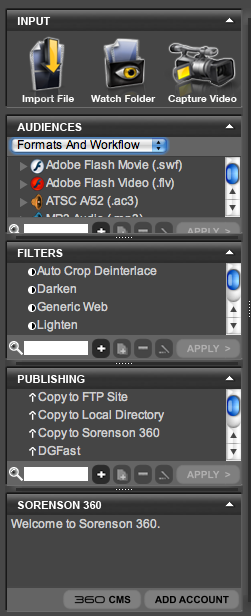
First, either drag and drop a video onto Squeeze or capture video from a camcorder or even your webcam. To compress it for 360, the easiest way is to use the pulldown menu in the Audiences panel on the left side of the interface (see figure at left). The Audiences panel is configured using the choices that are in the pulldown menu. You can choose straight Formats, Workflows, Formats and Workflows, Sorenson 360, or Custom.
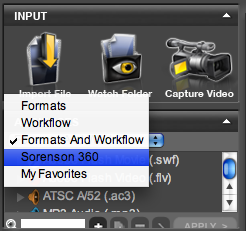 For ease of use, choose Sorenson 360. This will display a list of pre-configured options for compressing your video to a number of formats. Obviously these can all be customized if you are the type that likes to do a little tweaking. Each preset in the Sorenson 360 Audience selection already has an action that automatically uploads your video to your Sorenson 360 account when the encoding is complete.
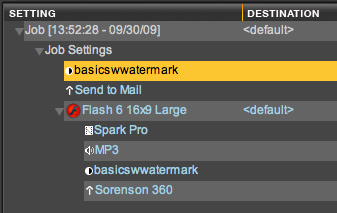 You can also add filters – such as deinterlacing, adding watermarks, and basic color correction – and other actions to your encoding parameters to do things like sending the video to an ftp site, a specific local directory, an application or even emailing it.
Once you’ve picked your video and determined your settings, simply hit the “Squeeze It” button in the bottom corner. This process runs through the encoding using all of your filters and actions including uploading it to your 360 account where it is ready for deployment.
You can log on to your 360 account from the bottom of Squeeze, or simply by going to the website (www.sorenson360.com) and entering your name and password. You can see and manage the entire history of the files uploaded to 360. On the next page, I’ll show what’s where in the dialog:
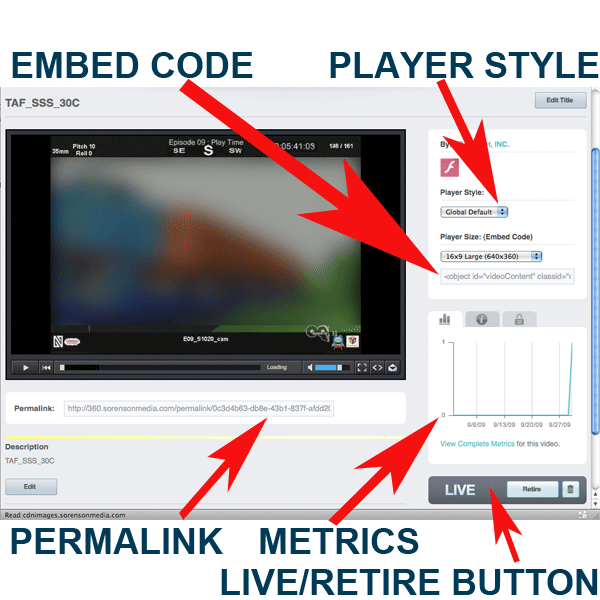
Sharing the file is as easy as copying the permalink code for the video and pasting it into an email. It is possible to password encode the video if you are concerned about unauthorized viewers. If you want to have the video play on your website or someone else’s website, then copy the embed code and paste it into the html code of your website. This is a similar procedure to embedding a YouTube video. If you look very closely, you can see that one of the cool features of Squeeze 5 is the ability to watermark your videos with your company logo. Mine is placed very small in the bottom right corner, but placement, size and transparency are all customizable parameters. It’s nice that this watermarking is part of the encode process because you can create a “clean” video file and only watermark the versions of encoded files that you believe may be at risk.
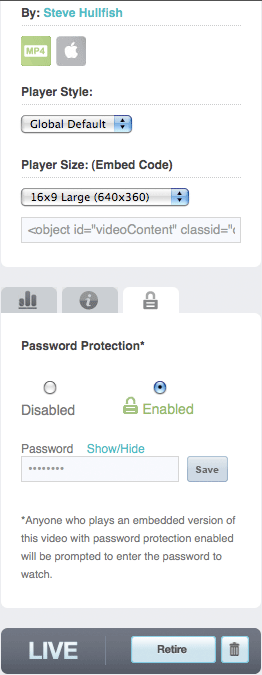 The ability to enable passwords for specific videos is a great thing. To do this, select a video that is already up on your 360 account. On the right side, above the metrics graph, is a series of three logos on tabs, including a lock tab. Click on that to reveal the password protection choices. The default is “Disabled.” To enable password protection, click the radio button for “Enabled,” type in your preferred password and hit “Save.” This is one of the few apps that I’ve seen where it only requires a single entry of the password, so make sure you don’t “fat-finger” the keys when you type your password, or nobody will be able to view it. It might be a good idea to copy and paste the password from someplace else instead of typing it in. Now, even someone watching the video on an iPhone will need to enter the password to view the video.
One of my issues with 360 is that you have to go to the website and click through to your video in order to have access to the Permalink and embed codes. It would be much more convenient for these to be delivered to you in a more automatic fashion once the encoding and publishing was complete. Hopefully this is something they’ll address in a future release.
Sorenson’s monthly serving plans are definitely easy to understand and seem to be reasonably priced, but there are definitely a lot of people out there who do NOT need 10,000 streams of video in a month and it would be great to see some kind of plan for those of us who are simply using it for review and approval or other low volume applications.
Setting aside 360 for a moment, I also have to complain that the documentation for Squeeze is abysmal. Luckily for most Squeeze users – and for Sorenson’s customer support reps – the software is very intuitive. But finding the last 10% of functionality will be a futile exercise except through the how-to posts of your favorite bloggers or maybe user community Q&A. Another mitigating factor in my distaste for Squeeze’s documentation is that if you order the latest version of Squeeze, it comes with very good instructional DVD course in compression in general and using Squeeze in particular, so kudos to Sorenson for that.