
(Page 1 of 1 pages for this article )

Sunday, October 16, 2011

Filed under: AppleFinal Cut ProEditingGentryMedia Sister SitesMac CoalitionProVideo CoalitionPost ProductionSoftware

A lesson learned from my FCPX to Resolve roundtrips

Scott Simmons | 10/16

FCPX can lose its links to media (and send clips offline) if the files are modified by another application.


image

I learned a hard lesson today about Final Cut Pro X after doing some roundtrip testing between FCPX and the newly released Resolve 8. That lesson was to be very careful when using clips that FCPX is referencing in other video applications. If some piece of metadata is modified in the file, even if the video stays exactly the same, FCPX may not be able to see it. Also, if you’re doing extensive audio mixing in FCPX be aware that the mixed clips won’t roundtrip.

Yesterday I posted an update alert about Resolve 8 and some roundtrip tests that use the new FCPX XML. That’s an XML into Resolve, grading done and XML out of Resolve, back into FCPX for final finishing … if that is desired. Some further work today brings up two other issues.

Be careful of externally modified files

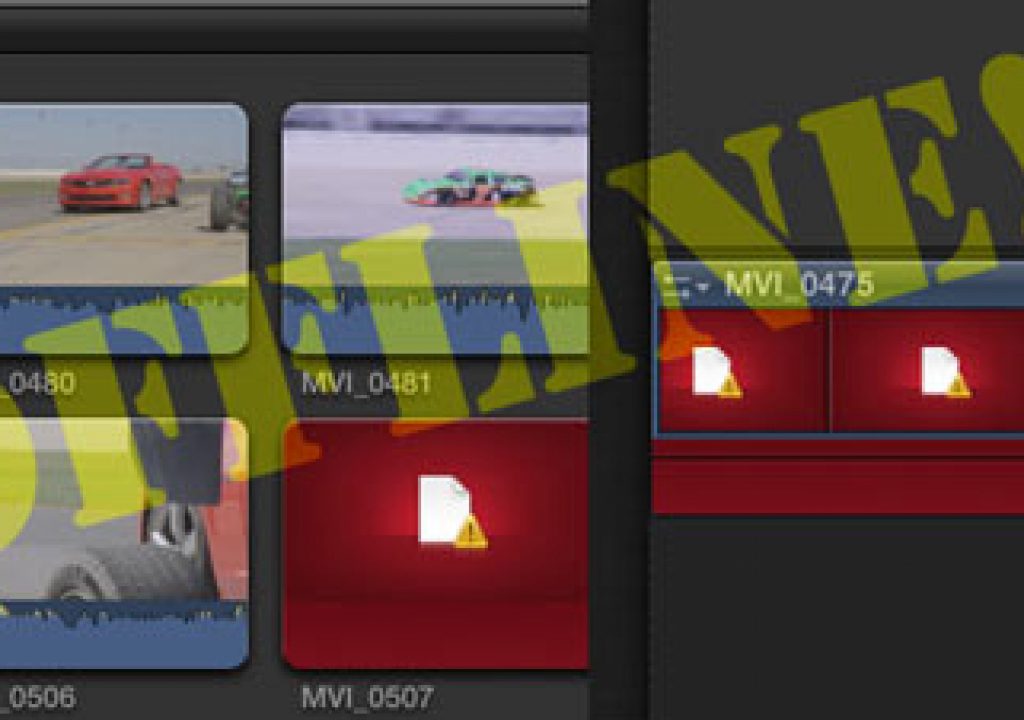
The first issue came up when I reopend the roundtrip tests from the day before. There were a lot of clips offline:
image

This little test shoot had maybe 40 shots and I had used 8 or so for the test. All of those files were offline so that meant a couple of the shots in the real edit I was doing with the footage were offline too, not just the test edit.

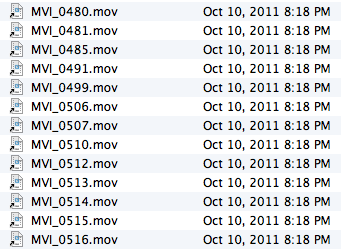
What had happened was this: I imported several of the original clips into Avid Media Composer via Avid Media Access. That means I was linking to the same original H.264 Canon 7D media that FCPX uses. In doing this Avid modifies the metadata of the file in such a way that FCPX couldn’t relink to it when I reopened FCPX. If you look at the clips in the Finder you can see that the modified date has changed on those clips I brought into Avid:
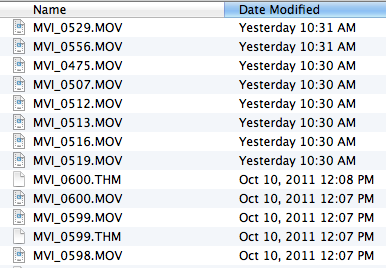
image

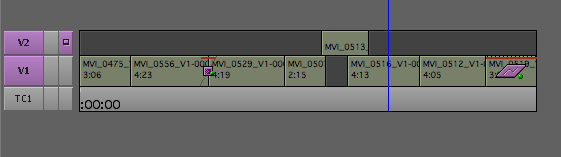
And these are the clips used in the Avid test edit:
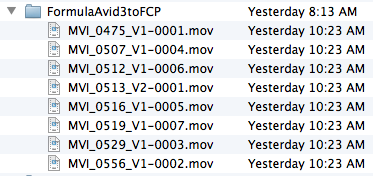
But if you look in the FCPX media folder the alias files that FCPX uses to track the original media hadn’t changed from when they were originally created:
image

These are alias files as I chose not to copy the media into the Final Cut Events folder as I had already organized the clip on my main media drive.

Unfortunately there’s no way to force a relink / reconnect in FCPX. All the original lengths and time codes remain the same so in theory a force relink should work if only FCPX had such an option.

The same thing happened when I imported my roundtrip lists from Resolve into Adobe Premiere Pro. I imported both a Final Cut Pro 7 XML and Avid Media Composer AAF into Premiere Pro to see if it could conform the graded edit from Resolve. It worked great but PPro somehow modifies those files as well. When I opened FCPX back up those test conforms had gone offline. I could see this again when looking at the modified date of the files. As you can see in the image below, the original folder and files was created at 8:13 AM but then the files were modified (by Premiere Pro) at 10:23 AM:
image

I’m not really sure if there is anyone to blame for this more than it is something important to be aware of if working with FCPX. It would be nice if other applications wouldn’t modify the file metadata but it’d be even nicer if FCPX was smart enough to see these were the same clips with the same media with the same durations and time codes and be able to force a reconnect. Thankfully we don’t have to do the reconnection dance with FCPX but there are times when a force relink would be nice when we the editor knows better than FCPX.

Be aware of your audio mix on a FCPX roundtrip

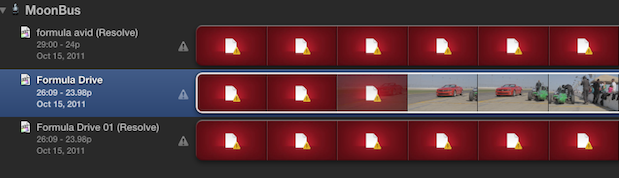
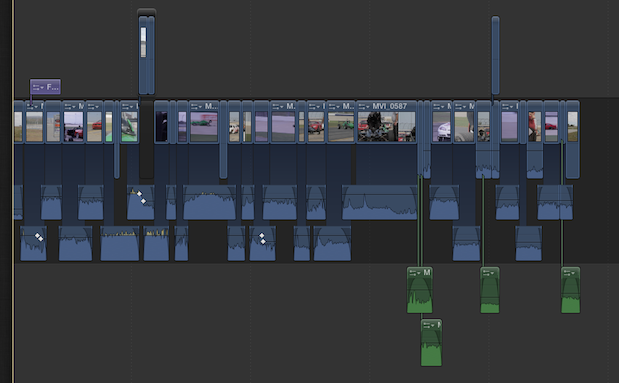
The other issue I ran into was with the roundtripping of an audio mix. I went back and recut the edit that went offline and did an audio mix inside FCPX. I then sent that to Resolve and round tripped back to apply the titles and export with the audio mix. This is the timeline before Resolve:
image

And this is the timeline after roundtripping back into FCPX:
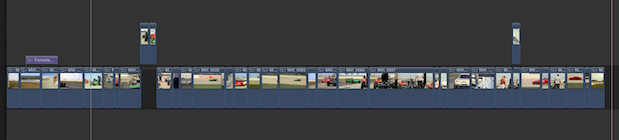
image

You can see the problem in that all the audio mixing I did before didn’t translate into the after. I guess this isn’t really anyone’s “fault” as at the current time the FCPX XML doesn’t carry over all the audio data … at least not enough to do a roundtrip. But that begs the question of how do I get that audio mix into my color corrected sequence? In any other track based editor I would just copy/paste or edit in only the audio tracks … but as we know FCPX isn’t track based. I could export an audio only file but then I would have a mix down. Fine for this edit but not desirable in many cases. This is a place where Roles might come in handy but I didn’t take time to assign Roles as I was working. FCPX assigned all the audio Roles to dialog and I exported that as Multitrack QuickTime with audio only but FCPX (nor Quicktime Player for that matter) could open it.

The other idea I had was to use the Break Apart Clip Items to break the audio away from the video but this didn’t leave any of the audio editing intact:
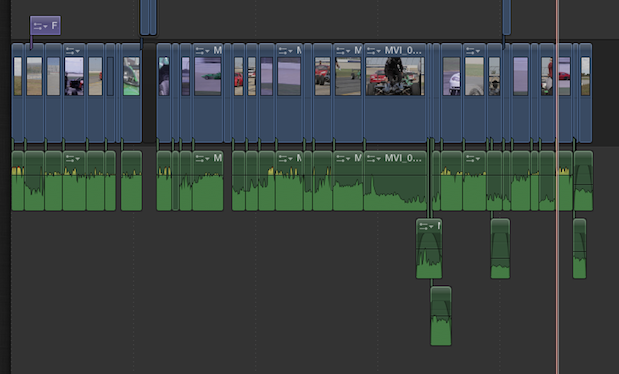
image

The solution was to use the Detach Audio command as that just dropped the audio down onto its own set of “tracks” for copy/pasting into the final graded sequence:
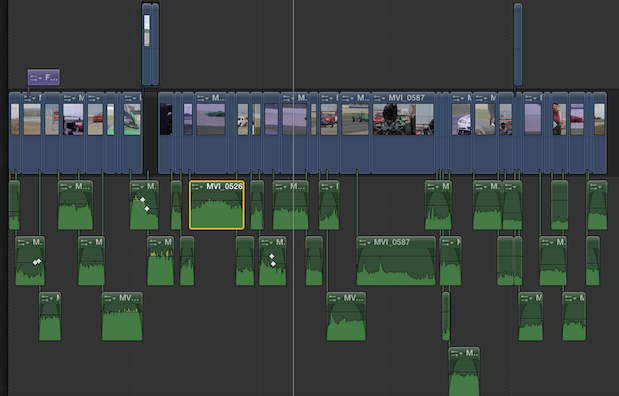
image

Thankfully that worked. It’s definitely an extra step to “detach” the audio for this copy/paste method but I could select whole groups of clips at a time so they didn’t have to be detached one at a time. In fact I’ve come to realize that while working in FCPX I seem to almost always end up detaching the audio for more detailed editing. I wish FCPX had a default command to edit clips into the timeline with the audio already detached.

(Page 1 of 1 pages for this article )

                    Clip to Evernote


The Editing of “Courageous” Part One

Steve Hullfish | 10/14

The off-line edit of a RED feature film

image

Last October, I had the rare opportunity to edit a feature film called “Courageous,” which is in theaters now. “Courageous” was the number one new movie the weekend it opened (September…

Tip Tuesday: Disable a clip in the Avid Media Composer timeline

Scott Simmons | 02/21

It’s not as nice as a built-in clip enable / clip disable contextual menu but it works.

image

In honor of TipTuesday over on Twitter I thought I’d share this simple Avid Media Composer tip that I…

Drobo B800i At The 11th Annual San Francisco SuperMeet

Clint Milby | 02/15

New B800i, Safe Guards Against Failing Hardware and Human Error

image

At the 11th Annual San Francisco SuperMeet, Justin Russo of Drobo, showed off the new Drobo B800i, 8 Bay, iSCSI SAN storage. This unit is optimized for small businesses…


You must be registered to comment. This is an effort to reduce spam. Please REGISTER HERE.

I discovered the same offline craziness after simply importing one of the source clips into AE. As you say, FCP’s media handling shouldn’t be this fragile and reject the relinking based just on the file modification date! The file should be scanned and assessed for changes just like FCP7 did.

Posted by Martin Baker  on  10/16  at  11:33 PM


I guessed that was probably the case Martin as Adobe apps must all modify that creation date. It’s interesting when we think about Avid’s and FCPX’s media management being very similar now with the way FCPX works (That’s Avid’s direct mxf support and not AMA linking). Big different is Avid makes (mostly) proprietary files that you don’t work with as much in other applications unless they are specifically designed to work with those Avid compliant mxf files.

It seems like an easy thing to give FCPX a relink button right in the inspector since it can see that there are missing files!

Posted by Scott Simmons  on  10/17  at  04:32 AM


Really useful report Scott, much appreciated.

Cheers
Andy

Posted by Andy  on  10/17  at  07:05 AM


Right now, I feel audio editing and mixing in FCP X is pretty close to useless compared with all other NLEs. The danger of detaching audio tracks (I agree it’s a necessary workaround) is that you can easily move audio out-of-sync. There are no sync indicators nor any “move/slip into sync” features like in FCP 7.

But to your point, any app that accesses these files and creates any minor alteration will send the clips offline in FCP X. That’s because it no longer matches the FCP X database and is viewed as a new and different file.

- Oliver

Posted by Oliver Peters  on  10/18  at  05:43 PM


Hi Scott and thanks for the info.

To try relink the video have you tried the following:
1. create a new Event
2. reimport the “modified” clips in the new event
3. from the project settings, Click on “Modify Event References”
4. See if you can relink the clip in the Event references

It would be nice to know, but unfortunately I cannot test this on my own as I do not have the right software installed.

Posted by .(JavaScript must be enabled to view this email address)  on  11/01  at  04:26 AM


Name:

Email:

Location:

URL:

Smileys

Remember my personal information

Notify me of follow-up comments?

Submit the word you see below:


Tip Tuesday: Disable a clip in the Avid Media Composer timeline
Testing the 7toX Final Cut Pro 7 to Final Cut Pro X conversion
Q and A with Bunim/Murray’s Mark Raudonis about their recent Avid switch
Kicking the tires on the Final Cut Pro X 10.0.3 Multicam update
Update Alert: Final Cut Pro X goes to 10.0.3
Adobe teases Prelude at the San Francisco Supermeet, FCPUG changes its name
Tangent Element panels are now shipping
Avid Media Composer 6 review online
Update Alert: Magic Bullet Suite 11.2
Update Alert: FxFactory 3.0
The new Fotoshop by Adobé can change the way you look!
Did you know MPEG Streamclip could convert YouTube videos?
New That Post Show: Edit Pro Supergood
Clean those Adobe Media Cache Files
Christmas Gift Ideas for the Editor in Your Life
Kicking the Tires on Avid Media Composer 6
The Adobe Premiere Pro timeline for Final Cut Pro users
Avid Media Composer 6 is announced and it’s moving into the future
All of the Automatic Duck plug-ins are now free
A report on Walter Murch’s talk at the Boston SuperMeet
A lesson learned from my FCPX to Resolve roundtrips
Update Alert: DaVinci Resolve 8.1: FCPX support, lots of little things
A Few Recent Avid Media Composer Finds
A short Q and A with Automatic Duck about their Adobe move
Steve Jobs 1955 - 2011
$995 Final Cut Pro to Media Composer crossgrade ending very soon
Kicking the tires on the Final Cut Pro X 10.0.1 update
You may move your Get license to Boris Soundbite
Detailed demo of the Baselight for FCP7 plug-in
Phonetic dialog search returns as Soundbite from Boris


The Editing of “Courageous” Part One

Steve Hullfish | 10/14

The off-line edit of a RED feature film

image

Last October, I had the rare opportunity to edit a feature film called “Courageous,” which is in theaters now. “Courageous” was the number one new movie the weekend it opened (September…

Tip Tuesday: Disable a clip in the Avid Media Composer timeline

Scott Simmons | 02/21

It’s not as nice as a built-in clip enable / clip disable contextual menu but it works.

image

In honor of TipTuesday over on Twitter I thought I’d share this simple Avid Media Composer tip that I…

Drobo B800i At The 11th Annual San Francisco SuperMeet

Clint Milby | 02/15

New B800i, Safe Guards Against Failing Hardware and Human Error

image

At the 11th Annual San Francisco SuperMeet, Justin Russo of Drobo, showed off the new Drobo B800i, 8 Bay, iSCSI SAN storage. This unit is optimized for small businesses…

Testing the 7toX Final Cut Pro 7 to Final Cut Pro X conversion

Scott Simmons | 02/12

We finally get a tool to do what we thought would be possible from FCPX v1.0.0

image

When Apple released the latest Final Cut Pro X update there was a very important 3rd party utility released right alongside the 10.0.3 update that finally allowed the importing…

To be considered for listing, contact pr (at) provideocoalition (dot) com


Copyright © 2011, HD Expo, LLC a division of Diversified Business Communications. DBA Createasphere

All rights reserved. HD EXPO, High Def EXPO, Createasphere, E-Tech, Entertainment Technology Exposition, 3D Production Workshop, VariCamp, P2 Camp, ColorCamp 101, and Lighting, Filters & Gels for HD are all trademarks of HD Expo, LLC.

Terms of Use  |  Privacy Policy

Check PageRank