If you need to gather tracking data to pass to FCP then this is the app for you

I am not a VFX artist. I think that if I could plug a data pipe straight into my brain and download an entire profession right into the gray matter ala The Matrix it might be some level of visual effects expertise. It’s amazing what you can do with affordable desktop software but even something as accessible as Adobe After Effects can take a whole career to master. It’s also amazing at the level of quality that one can achieve with all of the other desktop applications that are out in the world today. I received a copy of Imagineer Systems’ mocha for Final Cut a while back but I hadn’t had the time or the need to really use it. But at a recent automotive shoot for The Garage Blog we were looking at footage and someone commented that we should have put our own logo license plate on the cars before we drove them (never mind the fact that such a license plate doesn’t exist). Idea! I can do that in post and mocha for Final Cut will be the perfect tool.
Now I know what many of you are thinking … license plate replacement really isn’t that difficult. It’s basically a bit of tracking and corner pinning so anyone with a little bit of talent and maybe even less time could perform such a task in Adobe After Effects or Apple Motion with only a minimal amount of effort. Maybe, depending on how clean and clear the footage is. The ease or difficulty with which logo replacement can be achieved is dependent on many factors like movement, perspective and clarity of the footage to be tracked. If you’ve got a square surface that never moves off-screen which also includes tracking markers then it can be a breeze. If you’ve got a shaky little square that zips off-screen then it can be more difficult. As a creative offline editor I’ve never had to track shots that were too difficult to work with, be it from camera movement or the image within the frame. When shots go too complex for my limited visual effects skills they were either replaced with a more simple shot or sent out to a more experienced vfx artist. It’s been a great way to work but now I sit in an era with, quite frankly (and quite often), less money to spend on post and quite a bit crappier footage. To be fair this footage that I had to work with on these license plate replacement examples was shot by me on a small Canon HV20 and converted to ProRes. I can only blame myself for the shakiness so that made it even more challenging.
First I had to decide in which shots I wanted to attempt the license plate replacement. We shot maybe 10 cars over the two days so it wasn’t conceivable to replace them all. I chose a handful of shots for both their ease and complexity of movement. This ranged from a simple camera float up to the plate moving off-screen both slowly and quickly. I thought that these would give me the most bang for the buck with the limited time I had given myself to try and make this work.
The key thing that lets mocha for Final Cut work its automagic so well is that it doesn’t track points in the frame like trackers built into After Effects or Motion. Those point trackers rely mostly on high contrast points on-screen and as those point areas move the tracker tracks them. Very simple in concept. As the points begin to move quickly, incur motion blur or move off-screen the point trackers have trouble and have to often be adjusted by hand. mocha is what Imagineer Systems calls a planar tracker in that it tracks a plane within the frame and not a point. By tracking planes it can compensate for things like rotation and perspective change automagically with relative ease and make a vfx noob like myself feel like they are really accomplishing something special! It’s not a one-click does all task but it does take some of the frustration out of getting the tracks right.
The first shot I wanted to attempt was just a short clip at the front of a BMW Z4 as it closed its convertible hardtop:
There was barely a hint of camera float and the plate didn’t move off screen. The integration between Final Cut Pro and mocha for Final Cut (as far as getting your clips into mocha) isn’t particularly elegant so what I found to be the most trouble free way to get a clip into mocha was to make a self-contained QuickTime from the clip I wanted to track. It was usually just a few seconds of a much longer clip and while you can set in and out points on your clip from within mocha I preferred a more idiot-proof method (with me being said idiot) of making the self-contained QT from my desired clip and editing that back into my timeline. From there you can use the Reveal in Finder command and drag the clip to mocha’s icon. You’re then presented with a few steps that tell mocha how to properly handle the clip. Since I was working with full raster HD material I was able to pretty much leave the settings at their default. Once inside mocha for Final Cut I was intimated a bit by the interface:
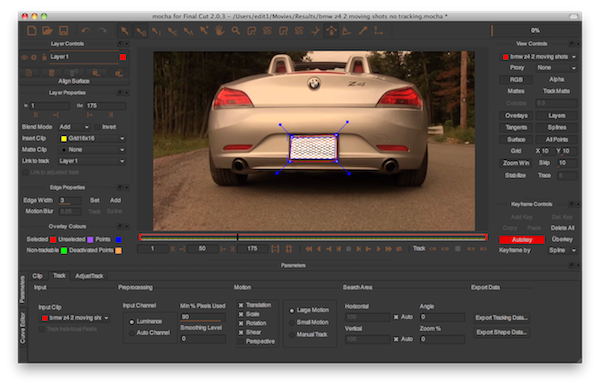
It looks like a serious visual effects application because it is. It looks to me like mocha for Final Cut is essentially the same as most of the other (and more expensive) versions of mocha only with export options removed. You can’t, for example, track a shot in mocha for Final Cut and then give that tracking data over to a Quantel system. There’s a separate version of mocha for that. mocha for Final Cut exports xml data that is meant to be brought into FCP and at only $200 it’s a stunningly powerful piece of software at a very affordable price. I say stunningly powerful as I’ve tried similar tracking duties before only to get a bit frustrated at the lack of time I had to learn the craft and the difficultly it took to track some shots like this in some traditional point trackers. mocha makes it much easier.
**UPDATE** Imagineer Systems is running a special throughout November where you can get 50% off of mocha for Final Cut and the mocha shape fx plug-in for Final Cut. Click over to the Imagineer Systems store for more details.
Next up: making the track and getting it into Final Cut Pro
I began this first shot by simply using the X-Spline tool to draw an area around the license plate. Select the tool and it’s a few clicks to outline the plate with a right+click to close the shape. The X-Spline tool differs from a traditional Bezier-curve based too in that it sort of creates the curves for you and you don’t have to make as precise an outline as you might make with Bezier-curves. You don’t have to be super accurate as you draw this initial area.
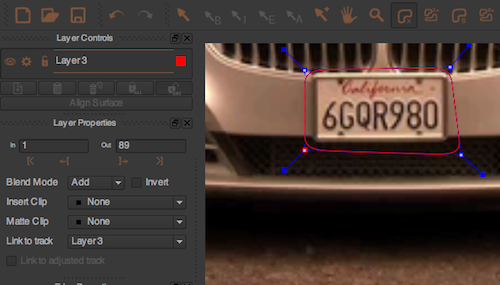
An outline drawn around the license plate with the X-Spline tool
Since this would be a corner pin type operation, as I would pin the 4 corners of my replacement license plate into the area on-screen, I would set the exact corner locations after tracking the plate. After I drew the tracking area I hit the track forward button and away mocha went, perfectly tracking the license plate. You can track forward one frame at a time for complex shots or, as in this shot, let mocha move forward on its own. Once the track was done I tuned on one of the many different layers to check where the corners would be pinned. I was able to adjust the exact 4 corner points without changing the overall tracking of the plate. mocha allows for the user to see a lot of information with various layers that can be toggled on and off for things like the matte you will create, the splines that outline your track and the tangents or handles that you can use pull the edges of a corner point. The Surface layer allows you to see exactly where the corners will land:
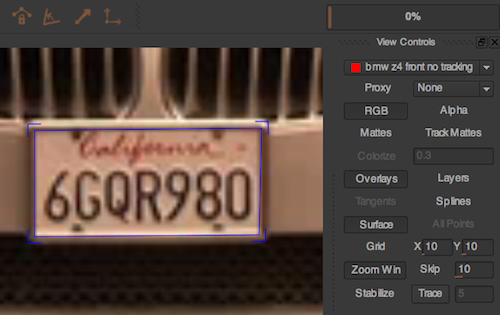
The Surface Overlay turned on for placing the 4 corners of the corner pin
When I turned this layer on I would zoom in an adjust those corners into precise position. I really like mocha’s zooming and moving abilities as you hold the z key to zoom and the x key to move and use the mouse in the image area. It’s simple and intuitive and you don’t have to click a specific tool in order to achieve these actions. You can also insert an object into your track before leaving mocha to get an idea of how well it works. Objects include grids of various sizes or you can import your own. I found that the logo was the most helpful (it inserts the mocha logo) and seemed the most natural:
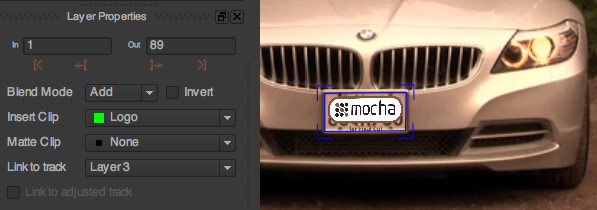
This logo is inserted by the application only as a reference to see how your track is working
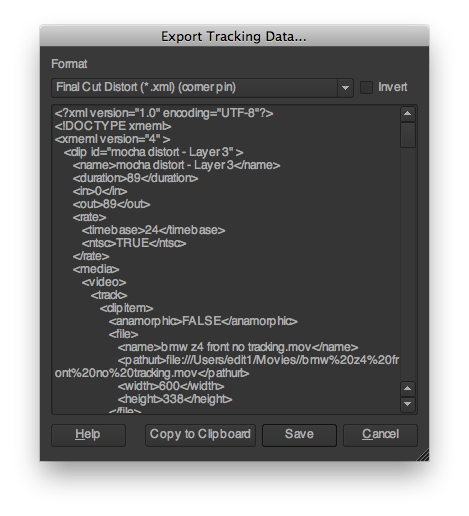
Once I was happy with my tracking it has to be exported for use in Final Cut Pro. Under the Track tab is the Export Tracking Data… button. I chose Final Cut Distort (corner pin) and that exported an XML:
Back in FCP I imported the XML which produces a new clip in the browser. You’ll get a clip called mocha distort with a layer name so I liked to rename the clip to be more descriptive of what I was tracking. Open that in the Viewer and you can see exactly what mocha did, it scaled and distorted the clip to fit into the corner pin:
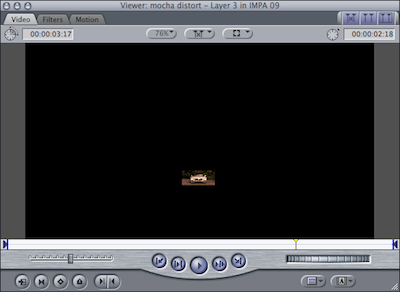
This is what the imported XML clip from mocha will look like loaded into FCP’s Viewer
It’s this data that will be copied into the graphic that will replace the license plate. To prepare for the final tracking I have my original clip on V1 and the license plate that I created in Photoshop on V2. Then it’s a simple copy/paste operation. Copy (command + c) the newly created clip from the mocha XML (I liked to drop my clip into the timeline) and then Paste Attributes (OPTION + v) and paste only the Distort data onto the license plate. There it is, a perfect track. At this point the quality of the final clip was really only limited by the quality of the license plate that I created in Photoshop. It’s not perfect as I don’t think the website’s logo is very conducive to being placed into a small license plate space but after some tweaking of the edges, and adding a small amount of gausian blur I think it turned out pretty well for a first attempt at license plate replacement:
Next up: A more complex track with more movement in the frame
Most of these few tracks that I did were relatively simple with the car itself relatively stationary in frame. And once you get the hang of if you can accomplish such tasks very quickly. You spend more time jumping back and forth between applications and copy and pasting than doing the track itself! Imagineer Systems also sell a program called mocha shape for Final Cut which is for importing rotoscoping shape data from mocha back to Final Cut. With shape you can “import multi-layer shape data with variable, per point edge feathering! This saves render time and improves the workflow between Imagineer’s products and Final Cut.” After watching the tutorial and working with shape I couldn’t figure out how to make it work with my corner pin track (maybe it’s not supposed to) so I went with the method I’ve described as that’s what the tutorials recommend and it worked very well. But the $99 shape application adds and extra export button to mocha and might be worth the cost as you begin to explore more of what you can do with mocha and Final Cut Pro.
Back at my license plate replacement, there were a couple of shots where the car’s license plate moved out of frame or moved within the frame:
This caused an issue for mocha (as it would for any tracker) because as the license plate went out of frame, mocha lost the track as there was nothing there to track! This type of thing is often a real pain for a point tracker but with mocha I was simply able to use the Adjust Track tab to manually set a few keyframes and guide the tracker off screen:
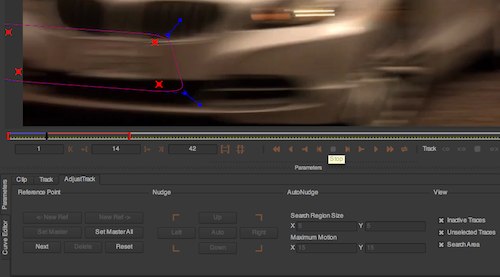
The Adjust Track tab enables new points that can be manually moved when mocha loses the track
The Adjust Track tab is an important part of mocha as that’s where the manual refinements occur. There’s a section in the user manual that deals with this and it took me a couple of reads through it to understand what the lines and points and their associated colors mean. From the mocha user manual: “Manual refinements can be made by using the AdjustTrack tool. AdjustTrack is primarily used for eradicating drift. It cannot be used to remove jitter. The concept is fairly simple; it utilizes the four-corner surface area to generate keyframable data which will compensate for tracking drift.” It’s basically keyframing the track when mocha can’t do it itself due the a problem in the footage. Any tracker has to have the ability to allow the user to manually track as it’s inevitable that it will need to be done by hand as the footage quality decreases.
When all was said an done on the two more complex shots above, this was the end result:
As with the first ‘after tracking’ clip these also took a bit of gaussian blur and motion blur on the graphic. The overall image has been color corrected as well. It’s not perfect. If you step frame by frame through the first shot above you will see black edges as the license plate moves off of screen and it doesn’t really hold in its proper position either. I got it to a point and wasn’t able to further refine the track. I sent this above result over to the powers-that-be for approval and they liked it. You really can’t see the problems as the image moves fast so the average web viewer won’t notice. But it makes me want to dig back into another similar shot and figure out how to get it right. The second shot, with the car driving away from the camera, looks quite good I think … I only see a bit of the edge of the graphic as the car gets far away from the camera. All in all, as these two shots were really only the 5th or 6th attempt at this type of effect I’ve ever attempted, I was quite happy with the results when I consider the time spent And mocha for Final Cut made it possible.
These three BMW shots were actually my 3rd, 4th and 5th attempts at this type of license plate replacement. The full segment on the BMW Z4 will be up at The Garage Blog soon. The first two attempts were in a segment on the Jaguar XKR. They are at the beginning and the end. They turned out okay but I definitely learned a few things that helped with the BMW:
Jaguar XK R at IMPA 09 from Scott Simmons on Vimeo.
Final Thoughts
mocha for Final Cut is obviously capable of way more advanced tracking and vfx functions than what I have used it for. And those that work more extensively in visual effects, or maybe the hobbiest who just dabbles in it, are probably laughing at the simplicity of the task I have been writing about. But as an editor who has worked for most of his career in a creative offline capacity then this type of vfx work was usually sent out to a dedicated vfx or After Effects artist. But that’s not true anymore with the editor being the jack-of-all-trades and being asked to do many tasks all in the same box, saving time and money in the process. That’s why I’m working on learning as much about these types of tasks as I can. And that’s where affordable and powerful tools like mocha for Final Cut can lend a hand. Plus … this type of thing is actually kinda fun.
Coming soon: Automagic Part III: Sonicfire Pro 5 and how it helped create the music bed for this Garage Blog project.


Filmtools
Filmmakers go-to destination for pre-production, production & post production equipment!
Shop Now








