(Page 1 of 1 pages for this article )

Friday, March 19, 2010

Filed under: CamerasEditingPost ProductionSoftware

Canon finally releases their DSLR plug-in for Final Cut Pro’s Log and Transfer tool

Scott Simmons | 03/19

Use the FCP Log and Transfer tool to directly transcode and import into FCP


image

We all know this fact: The Canon DSLRs (5D, 7D, 1D) use the H.264 codec for the video they shoot and wrap that into a .mov QuickTime. While Final Cut Pro does work with .movs, these H.264 versions are clunky to edit requiring much rendering when in a FCP timeline. H.264 wasn’t designed to be a robust edit format anyway so the files need to be transcoded into something more edit friendly.

Enter the new EOS MOVIE Plugin-E1 for Final Cut Pro. You can download it from Canon’s website my selecting Mac OS X from the Drivers / Software Selection on the website.

This plug-in delivers on an idea that the folks at Gluetools had been promising for a while but the info has since been removed from their website. Apparently this Canon release is that plug-in. Such a plug-in eliminates the need to send a batch through Compressor (or another transcoding application) to make ProRes files from your H.264 originals. While there’s still very valid reasons to use a Compressor-like workflow (speed, multicore or distributed rendering, transcoding on a different workstation) it makes good sense to be able to do this in Log and Transfer as well.
image

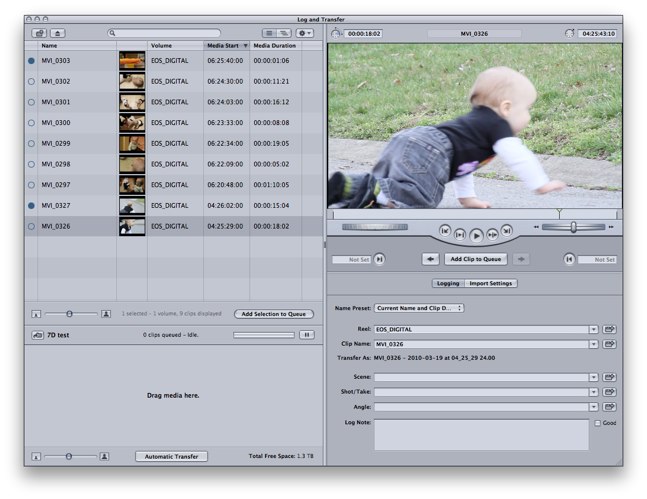
The EOS MOVIE Plugin-E1 operates just like any other Log and Transfer supported format

Log and Transfer does provide some nice options. It’s a good place to audition your clips and take care of some logging tasks right from the start of an edit. While I prefer to have as much footage from a shoot as possible online to edit there are often heads and tails and/or entire clips that you would never need ... like when the camera man was accidentally rolling while the camera is pointed at the floor. The Log and Transfer tool is a good place to sort this out. With this tool you can make INs and OUTs on clips as well as log clip names, comments and metadata.

Using this Canon plug-in allows you to browse and import Canon DSLR movie clips and transcode them to ProRes as you import into a Final Cut Pro project. It works like any other file based transfer from supported Log and Transfer media formats. While it’s easy to just drag all of the clips in at once I would suggest, at the very least adding a Reel Name to the clips as they are imported though the plug-in does give you a default reel name of EOS_DIGITAL. With a reel name the Show Duplicate Frames option in the FCP timeline will work. See this Editblog on PVC post for more info on that option.

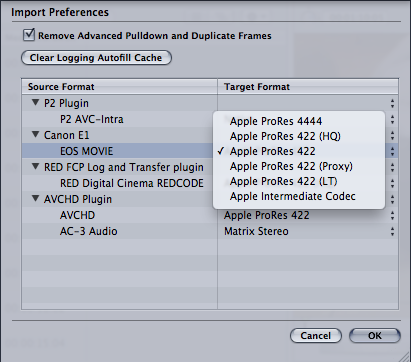
You do have the option of transcoding to any of the ProRes formats upon import. These are chosen in the preferences of the Log and Transfer tool:
image

The tool also uses the time of day stamp in the camera to assign timecode to the clips upon import. This is a very nice feature to get rid of all of those 00:00:00:00 codes that would come in otherwise.

image

You can see the time stamp from your Canon movie file in the Log and Transfer tool

image

That time stamp gets assigned to the clip as timecode upon import

It feel pretty fast upon import and I was able to import my 7D files right off of the CF card. I’ll have to do a test comparing the import speed of the Log and Transfer tool to Compressor or MPEG Streamclip. The pdf manual (pdf link) that Canon provides says to be sure and check field dominance upon importing:
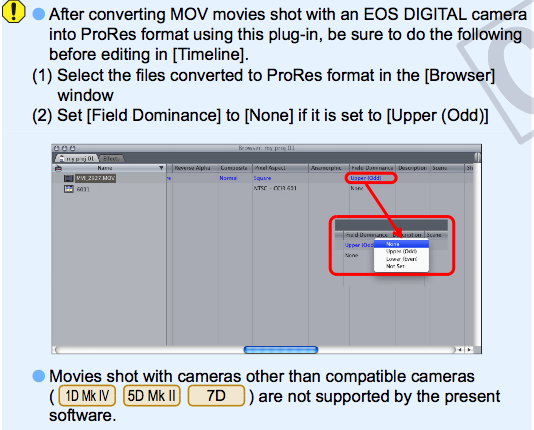
image

All of my test clips came in with field dominance set to none (as it should be) so let’s hope that’s usually the case as that could be a tedious job having to change those on a big shoot.

It’s nice to see Canon finally release this plug-in as it makes sense for all file-based camera manufactures to support importing with tools like Log and Transfer. The cameras are only as good as the editor’s ability to work with the footage in an easy and timely manner. And since there are so many acquisition formats these days that work should be placed squarely on the shoulders of the camera manufactures to add NLE support as quickly as possible.

Now Canon … let’s add support for Avid’s Avid Media Access architecture as well.

UPDATE: I tried out a few more things with this new tool after some discussion about it on Twitter. Check out the other post about the EOS Movie Plugin-E1 for some additional testing.


(Page 1 of 1 pages for this article )

                    Clip to Evernote


Check out a Number of Hardware and Software Options from B&H

Jeremiah Karpowicz | 05/16

Everything you need in one place

image

We grabbed Jerry Zorek, Manager of Business Development at B&H, to learn about what B&H was showing off at their studio booth.  He shows us a Resolve system with the…

Final Cut Pro X Multicam Editing webinar now available on-demand

Scott Simmons | 05/15

Plus a little screencast in this blog post on a topic we didn’t get to cover.

image

I had great fun last week presenting the Final Cut Pro X multicam editing webinar…

Petrol Bags Shows off Their Latest Products at NAB 2012

Jeremiah Karpowicz | 05/11

Petrol Bags unveiled a wide variety of new camera and audio equipment bags at the show

image

We talked to Sam Thomas from Petrol Bags about a number of their bags that were showcased at NAB 2012. He showed off the Deca Audio Bag (PS614), the Liteporter professional carrier…


You must be registered to comment. This is an effort to reduce spam. Please REGISTER HERE.

It’s just a pity they aren’t supporting the 550D with this release, hope it happens soon as MPEGStreamclip is still my only transcode option right now!

Posted by RichyReay  on  03/20  at  04:42 AM


You could use Compressor with 550D footage ......

Posted by Scott Simmons  on  03/20  at  10:48 AM


Lol, Scott I’d rather pull out my own eyeballs than use compressor!

Posted by RichyReay  on  03/20  at  01:20 PM


I feel the same way sometimes. But sometimes it work okay. Sometimes.

Posted by Scott Simmons  on  03/20  at  01:21 PM


Just make a preset Droplet in Compressor and forget about it.

Posted by J. Curtis  on  03/21  at  08:35 AM


Well you could but then there’s the crashing of Compressor when it’s loaded full of clips, the corruption of Quickclusters, the long wait for it to catch up as you load lots of clips (when it doesn’t crash) .....  at least for some of us grin

Posted by Scott Simmons  on  03/21  at  09:16 AM


I never have those kind of problems with Compressor (knock on wood).

Posted by J. Curtis  on  03/22  at  09:36 AM


Just like the rest of Final Cut Studio, as long as you know and understand your workflow, there aren’t too many issues.  I have had to re-install Compressor using Pacifist for a few people to get it working, but from there on out there aren’t usually too many issues. 

About time they come out with the Log and Transfer plugin.  Thanks for the heads-up, I had missed it while I was out of town on a shoot.

Posted by .(JavaScript must be enabled to view this email address)  on  03/23  at  02:56 PM


Name:

Email:

Location:

URL:

Smileys

Remember my personal information

Notify me of follow-up comments?

Submit the word you see below:


My lengthy Adobe Premiere Pro CS6 review now online
Final Cut Pro X Multicam Editing webinar now available on-demand
10 Final Cut Pro things FCP editors might be missing in Adobe Premiere Pro CS6
A collection of Avid Media Composer related links for my NAB Migrating to Avid class
An elegant iPhone timecode calculator
Random notes from my first “real world” Adobe Premiere Pro CS6 edit
NAB 2012: SpectraCal
NAB 2012: Apple and Final Cut Pro X
NAB 2012: Lightworks
NAB 2012: Baselight for Avid Media Composer
NAB 2012: Quantel new Pablo and Neo Nano
NAB 2012: Promise Technology’s portable Thunderbolt J4 and J2
NAB 2012: NewBlueFX Titler Pro
NAB 2012: PluralEyes 3.0 from Singular Software
NAB 2012: Technicolor CineLights from the GoPro booth
Autodesk Smoke 2013: it really changed for the better
My top 5 (or so) Adobe Premiere Pro CS6 features
How to preview Avid Media Composer’s MXF files for free without Media Composer
My NAB 2012 Post|Production World classes
Baselight for Final Cut Pro is one of the most powerful legacy FCP grading plugins ever
ARRI’s DNxHD Alexa update, Sorenson Squeeze Pro and OP this, OP that
What’s happening at NAB 2012?
The C300 short Hustle and some before and after images
Tip Tuesday: Disable a clip in the Avid Media Composer timeline
Testing the 7toX Final Cut Pro 7 to Final Cut Pro X conversion
Q and A with Bunim/Murray’s Mark Raudonis about their recent Avid switch
Kicking the tires on the Final Cut Pro X 10.0.3 Multicam update
Update Alert: Final Cut Pro X goes to 10.0.3
Adobe teases Prelude at the San Francisco Supermeet, FCPUG changes its name
Tangent Element panels are now shipping


Check out a Number of Hardware and Software Options from B&H

Jeremiah Karpowicz | 05/16

Everything you need in one place

image

We grabbed Jerry Zorek, Manager of Business Development at B&H, to learn about what B&H was showing off at their studio booth.  He shows us a Resolve system with the…

Final Cut Pro X Multicam Editing webinar now available on-demand

Scott Simmons | 05/15

Plus a little screencast in this blog post on a topic we didn’t get to cover.

image

I had great fun last week presenting the Final Cut Pro X multicam editing webinar…

Petrol Bags Shows off Their Latest Products at NAB 2012

Jeremiah Karpowicz | 05/11

Petrol Bags unveiled a wide variety of new camera and audio equipment bags at the show

image

We talked to Sam Thomas from Petrol Bags about a number of their bags that were showcased at NAB 2012. He showed off the Deca Audio Bag (PS614), the Liteporter professional carrier…

10 Final Cut Pro things FCP editors might be missing in Adobe Premiere Pro CS6

Scott Simmons | 05/11

These are a few of the things that I found myself searching for as I’ve been moving over to Premiere Pro CS6 as a FCP 7 replacement

image

Adobe is making a big play for Final Cut Pro users with their CS6 release of Premiere Pro. It’s vastly improved over the Premiere Pro of old and is a lot like Final…

To be considered for listing, contact pr (at) provideocoalition (dot) com


Copyright © 2012, HD Expo, LLC a division of Diversified Business Communications. DBA Createasphere

All rights reserved. HD EXPO, High Def EXPO, Createasphere, E-Tech, Entertainment Technology Exposition, 3D Production Workshop, VariCamp, P2 Camp, ColorCamp 101, and Lighting, Filters & Gels for HD are all trademarks of HD Expo, LLC.

Terms of Use  |  Privacy Policy

Check PageRank