
(Page 1 of 1 pages for this article )

Sunday, November 22, 2009

Filed under: EditingPost ProductionSoftwareTips

FCP:  an annoying delete, duplicate bug found while I was remapping the FCP keyboard

Scott Simmons | 11/22

If it’s not a bug then it needs to be documented in the user manual

image

When I’m working I’m always in a constant state of awareness about how I can change my keyboard mapping to make my workflow faster and more efficient. The keyboard manifesto argues that changing Final Cut Pro’s default keyboard mappings can make your editing faster and more efficient. But it’s also important to be aware of changes that you might make. I never would have expected a couple of keyboard changes to cause me an hour of confusion and rebuilding a timeline but that’s what this FCP bug did.

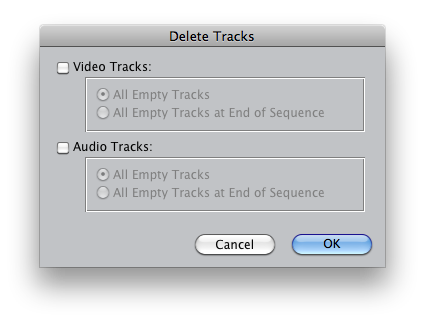
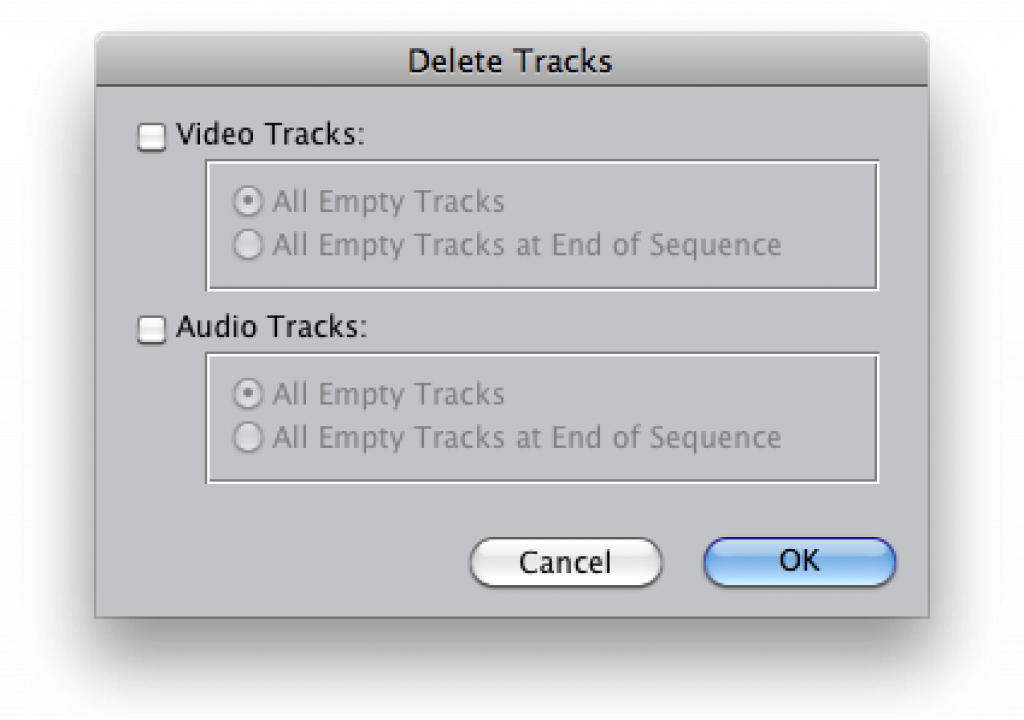
As I’ve been working on this multicamera concert for the last few weeks I’ve realized that I’ve been using the Delete Tracks (Sequence > Delete Tracks…) command quite a lot. I have many different edit sequences for the songs in the show and as I begin to hone in the edits I’m collapsing multiple video layers into one or two video tracks. With that I was constantly grabbing the mouse to choose Sequence > Delete Tracks… from the pulldown menu. I decided to map that to a keystroke.

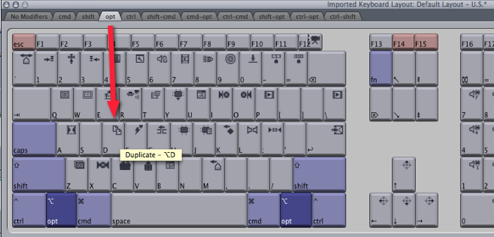
In the U.S. Default Final Cut Pro keyboard layout the duplicate command is option + D:
image

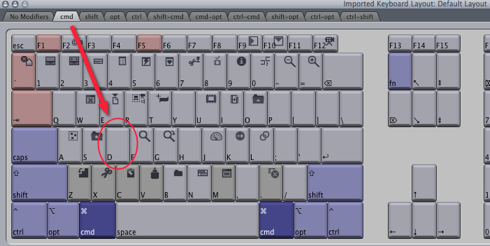
I thought this was a bit odd since the default duplication command in the Macintosh finder is command + D. When I looked at what was mapped to command + D in Final Cut Pro I was surprised to see that it is a blank key:
image

It was the same with my custom FCP keyboard man so that was a no-brainer; I would map the Duplicate command to command + D and the Delete Tracks… command to option + D. Seemed like a very natural feeling thing to do. But when I went back into FCP and used option + D to get the Delete Tracks… dialog box to appear ... it didn’t. So I hit it again, still no Delete Tracks… dialog box. I checked the new keyboard mapping thinking I had mapped it wrong but it was there, Delete Tracks… mapped to option + D:
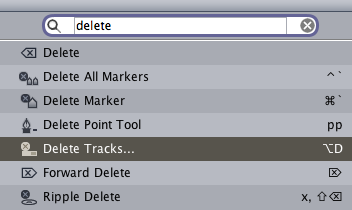
image

When I went back to my edit I realized that two of my video tracks were gone. After a lot of head-scratching and troubleshooting I discovered what had happened. Instead of Final Cut Pro bringing up the Delete Tracks… dialog box (which is supposed to happen with any FCP command that is followed by an ellipsis ... meaning that after choosing the command a dialog box will pop-up requiring action) the application was deleting the currently targeted video track. It deleted two of my video tracks as I executed the option + D command twice from the keyboard.

Once I realized this I began experimenting. It seems like whenever you map the Delete Tracks… command to any keyboard combination that includes the option key then FCP will delete any of the Destination video or audio tracks that are targeted with a connection in the FCP Timeline patch bay:
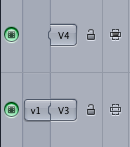
image

If your Source / Destination target is unconnected then it won’t delete the track. I tried this on two different FCP installs, mapping Delete Tracks… to various option + other modifier keys and it happens on every mapping combination on both machines. Map Delete Tracks… anywhere else and it brings up the Delete Tracks… dialog box:

image

Is this a bug? Seems like it to me. Is this an intentional function that’s documented somewhere in the FCP user manual? Maybe ... but it’s not documented in the Deleting Tracks section of the user manual. Is there some plug-in or add-on installed on both of my edit system? Possibly. If there’s official word somewhere about this oddity please comment below and let us know. I think the moral of the story here is to be careful when doing deep keyboard mapping in Final Cut Pro as you might get an unexpected result. I’ve mapped a large portion of my FCP keyboard away from the default and have never seen anything like this. In the end I mapped the Delete Tracks… command to control + shift + F2. With that I found a while row of empty F keys just waiting to be assigned to something!


image

(Page 1 of 1 pages for this article )

                    Clip to Evernote


The Editing of “Courageous” Part One

Steve Hullfish | 10/14

The off-line edit of a RED feature film

image

Last October, I had the rare opportunity to edit a feature film called “Courageous,” which is in theaters now. “Courageous” was the number one new movie the weekend it opened (September…

Final Cut Pro X Multicam Editing webinar now available on-demand

Scott Simmons | 05/15

Plus a little screencast in this blog post on a topic we didn’t get to cover.

image

I had great fun last week presenting the Final Cut Pro X multicam editing webinar…

Editing and Effects Together in One Editor Part 2

Brian Mulligan | 05/15

The NLE revolution isn’t over… Enter Autodesk Smoke for Mac

image

Editing & Effects All-In-One
Autodesk has always been known for the strength of their effects and image processing tools. The tools in Smoke have been used in everything…


You must be registered to comment. This is an effort to reduce spam. Please REGISTER HERE.

It’s been that way as long as I can remember. Even the the copies of the manuals and PDFs I have from older versions of FCP use Option + D.

Maybe I’m to lazy to ask. I assumed there was always a good reason for it, but maybe I’m wrong.

Posted by .(JavaScript must be enabled to view this email address)  on  11/23  at  09:41 AM


You’re correct Erik in that they have always had option + D as the duplicate command. There must be some reason for it since command + D was the obvious choice and remapping sees this buggy behavior I mentioned above. We may never know!

Posted by Scott Simmons  on  11/23  at  11:08 AM


Name:

Email:

Location:

URL:

Smileys

Remember my personal information

Notify me of follow-up comments?

Submit the word you see below:


My lengthy Adobe Premiere Pro CS6 review now online
Final Cut Pro X Multicam Editing webinar now available on-demand
10 Final Cut Pro things FCP editors might be missing in Adobe Premiere Pro CS6
A collection of Avid Media Composer related links for my NAB Migrating to Avid class
An elegant iPhone timecode calculator
Random notes from my first “real world” Adobe Premiere Pro CS6 edit
NAB 2012: SpectraCal
NAB 2012: Apple and Final Cut Pro X
NAB 2012: Lightworks
NAB 2012: Baselight for Avid Media Composer
NAB 2012: Quantel new Pablo and Neo Nano
NAB 2012: Promise Technology’s portable Thunderbolt J4 and J2
NAB 2012: NewBlueFX Titler Pro
NAB 2012: PluralEyes 3.0 from Singular Software
NAB 2012: Technicolor CineLights from the GoPro booth
Autodesk Smoke 2013: it really changed for the better
My top 5 (or so) Adobe Premiere Pro CS6 features
How to preview Avid Media Composer’s MXF files for free without Media Composer
My NAB 2012 Post|Production World classes
Baselight for Final Cut Pro is one of the most powerful legacy FCP grading plugins ever
ARRI’s DNxHD Alexa update, Sorenson Squeeze Pro and OP this, OP that
What’s happening at NAB 2012?
The C300 short Hustle and some before and after images
Tip Tuesday: Disable a clip in the Avid Media Composer timeline
Testing the 7toX Final Cut Pro 7 to Final Cut Pro X conversion
Q and A with Bunim/Murray’s Mark Raudonis about their recent Avid switch
Kicking the tires on the Final Cut Pro X 10.0.3 Multicam update
Update Alert: Final Cut Pro X goes to 10.0.3
Adobe teases Prelude at the San Francisco Supermeet, FCPUG changes its name
Tangent Element panels are now shipping


The Editing of “Courageous” Part One

Steve Hullfish | 10/14

The off-line edit of a RED feature film

image

Last October, I had the rare opportunity to edit a feature film called “Courageous,” which is in theaters now. “Courageous” was the number one new movie the weekend it opened (September…

Final Cut Pro X Multicam Editing webinar now available on-demand

Scott Simmons | 05/15

Plus a little screencast in this blog post on a topic we didn’t get to cover.

image

I had great fun last week presenting the Final Cut Pro X multicam editing webinar…

Editing and Effects Together in One Editor Part 2

Brian Mulligan | 05/15

The NLE revolution isn’t over… Enter Autodesk Smoke for Mac

image

Editing & Effects All-In-One
Autodesk has always been known for the strength of their effects and image processing tools. The tools in Smoke have been used in everything…

Editing and Effects Together in One Editor Part 1

Brian Mulligan | 05/15

The NLE revolution isn’t over… Enter Autodesk Smoke for Mac.

image

Post NAB 2012 Adobe has released the CS6 suite, Avid is pushing Symphony, and you may think that the editing revolution is over… but you would be wrong. Autodesk announced Smoke 2013 for…

To be considered for listing, contact pr (at) provideocoalition (dot) com


Copyright © 2012, HD Expo, LLC a division of Diversified Business Communications. DBA Createasphere

All rights reserved. HD EXPO, High Def EXPO, Createasphere, E-Tech, Entertainment Technology Exposition, 3D Production Workshop, VariCamp, P2 Camp, ColorCamp 101, and Lighting, Filters & Gels for HD are all trademarks of HD Expo, LLC.

Terms of Use  |  Privacy Policy

Check PageRank