
(Page 1 of 1 pages for this article )

Tuesday, October 06, 2009

Filed under: EditingHardwarePost Production

First impressions of the Tangent Wave

Scott Simmons | 10/06

A control surface for Apple Color can really increase your productivity

image

I was very excited when a big FedEx box arrived a couple of weeks ago with a Tangent Wave control surface for Apple Color. I had a series of short videos that I was soon to be cutting and finishing and I wanted to finally give Color the proper test it deserved. I haven’t been a fan of Color in the past, what with its non-standard interface (when compared with most Mac applications), difficulty moving an edit from Final Cut Pro to the app and back again as well as general buggyness. Those issues have kept me from using it, instead opting for Colorista (when in Final Cut Pro) for color correction duties. After speaking with Tangent Devices, they agreed to send a Wave control surface over for testing. Combine that with the recent 1.5 update to Color and I decided it was time to give the app another try. But this isn’t about Color but rather first impressions using the Wave with Color.

Unboxing the Wave
image

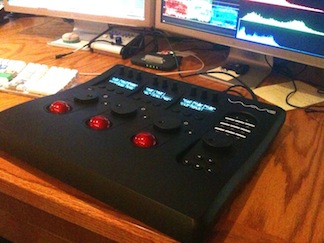
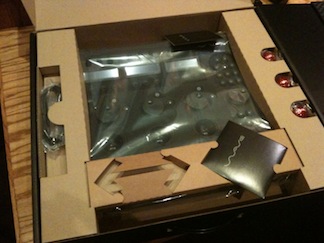
The Tangent Wave arrives in a large but thin box. The box has a handle so if you are a travel Color colorist you could conceivably take the unit with you from job to job. With the Wave’s simple USB connection it’s easy to hook up and use. Some other control surfaces connect via Ethernet so there is some setup via IP address that occurs when you launch Color. I haven’t setup via this method so it might not be difficult but I can’t say. The USB setup is very easy, basically plug and play. There is very little assembly required of the unit itself but you do have to pop-off the plastic bezels that hold the trackerballs in place and install the red trackballs. That takes all of about 30 seconds. The function buttons, jog wheel and transport controls are in the recessed area on the right and Tangent supplies a single overlay that you can use to label the function buttons.

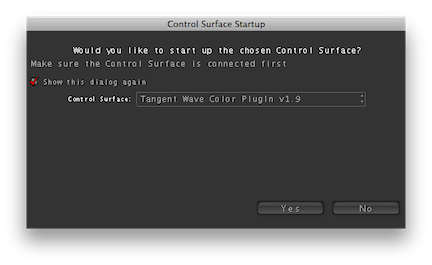
Despite what the user manual says there was no driver to install on the supplied disc. In fact the only file on the disc was the user manual. The current driver for the Wave sits at version 1.9 and this can be downloaded from the Tangent support page. Once the driver is installed and the Wave is plugged in you launch Color and select the Tangent Wave Color PlugIn v1.9 from the popup menu:
image

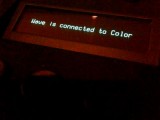
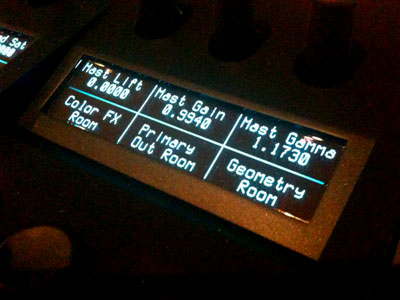
The Wave display will show the connection:
image

I was up and running in just a few minutes.

Size

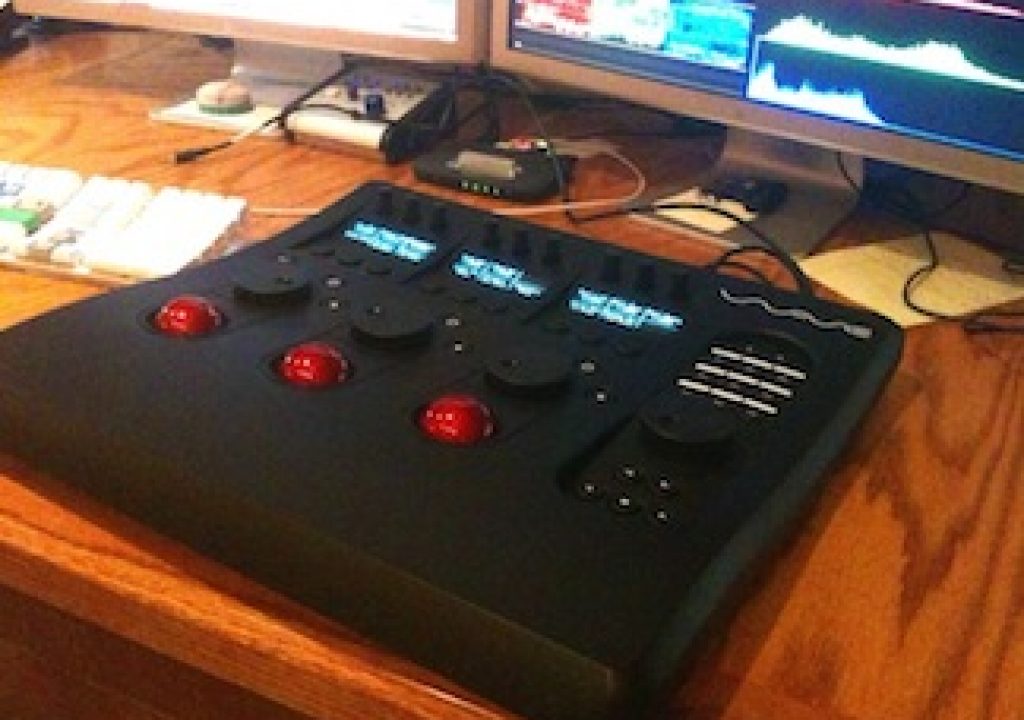
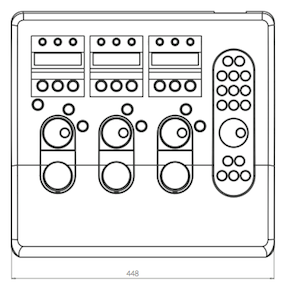
The Wave is a large device. The dimensions are about 18 inches wide and 16.5 inches deep:
image

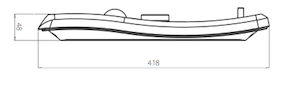
The height is about 2 inches at its highest point. The device is appropriately named Wave as the unit has a unique wavelike shape:
image

Feel

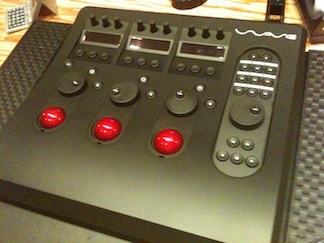
Upon first sitting down with the device one might think that is isn’t very ergonomically designed. The trackballs are on a slight reverse angle (which seemed a little odd) and the first thing I did was look for some pop-out feet on the bottom to prop the unit up like a keyboard. It does not have these feet. But if you look at proper ergonomic recommendations for computer usage the keyboard is usually advised to be at a slightly backwards sloping angle. After I used the Wave for just a short amount of time I realized that the Tangent designers know a lot more about ergonomics that I do as it’s quite comfortable to use.
image

One comment that I’ve heard from some people who have used the Tangent Wave (or at least people who have seen and/or touched the device) is that it’s plastic and feels cheap. It’s true, the unit is made of plastic. But saying that it feels cheap is a relative criticism that is only really accurate if you’ve used other control surfaces. When compared to the control surface of our DaVinci 2K Plus is does feel cheap. But that’s kind of like comparing a Rolls Royce to a Buick. Both aim for luxury transportation but they are at very different price points aimed at very different markets. When comparing the Wave to the small control surface of our Quantel eQ it feels just as sturdy. If you’ve never used a control surface before then you will be very happy with the feel of the unit. It is a night and day difference between using a mouse to grade in Color and using the Wave to grade so it could be made of balsa wood and as long as it worked it would be an improvement in productivity over a mouse alone.
image

The only gripe I can see thus far is that the rotary knobs across the top of the unit can register a small change if they are bumped. They have just a tiny bit of looseness if I jiggle them from side to side and that can register a small fraction of a parameter change. Pressing these knobs straight down is how you reset their assigned parameters and as I take my finger off after resetting a couple of the knobs will register a tiny change. It feels like they need to be tightened just a bit. Other than that all the knobs, buttons and (especially) the trackballs have a smooth operation. There is a single overlay provided for the function keys on which you can write (or use labels for a more professional look) the button assignments. It might be nice if there was a second overlay provided. If the unit is used with different colorists then they might each have different button preferences.

Those are my initial impressions after using the Tangent Wave on and off for a couple of weeks. The biggest impression I have is how much faster and how much more pleasant the Wave makes the color grading task in Apple Color. I really feel like I can get better looks as it takes less time to experiment, tweak and move to new looks. It is a night and day difference between using the Wave control surface and using a mouse. In fact I’ll just come out and say it ... using a mouse with Apple Color sucks after using a proper control surface.

Coming soon in the next installment of using the Tangent Wave: customizing the Wave Control Mapper software, learning the buttons and working fast.

(Page 1 of 1 pages for this article )

                    Clip to Evernote


NAB 2012: SpectraCal

Scott Simmons | 04/28

This may be one of the most affordable monitor color calibration systems.

image

One little booth I happened to come by as I walked the NAB show floor was SpectraCal. A bright red screen with a little…

Tangent Element panels are now shipping

Scott Simmons | 01/27

DaVinci Resolve isn’t listed as being supported as of yet. Hopefully soon.

image

Word came out today from Tangent Devices

Adobe Acquires IRIDAS Technology

PVC News Staff | 09/08

Company Extends Leadership in Professional Video with the Acquisition of Premium Tools for Digital Color Grading and Enhancement

image

SAN JOSE, Calif. and AMSTERDAM, Netherlands — Sept. 8, 2011 — Adobe Systems Incorporated (Nasdaq:ADBE) today announced at the IBC 2011 Conference and Exhibition that it has acquired certain assets…


You must be registered to comment. This is an effort to reduce spam. Please REGISTER HERE.

Good first write up about the Wave. Two questions:

• Are there buttons/commands on the Wave to move to the different color rooms or areas?
• How much does it cost?

Posted by J. Curtis  on  10/07  at  06:24 AM


Good questions. I’ll get into more detail about the buttons and usage of the Wave in the follow up article in a few weeks but to answer:

• Yes, the row of buttons by default take you to different Color rooms. But they can be mapped to other functions.

• MSRP is right at $1,795.

Posted by Scott Simmons  on  10/07  at  09:09 AM


Can you use it for anything else? Like FCP, or better still Colorista? I don’t think so, just wishful thinking.

Posted by Neil Sadwelkar  on  10/08  at  07:30 AM


Neil, unfortunately no. AFAIK there’s no support of any of these control surfaced for FCP or something like Colorista. It seems it would be way overkill unless the software could really reach into FCP and use all of the buttons, which would be nice!

You could try the “Poor Man’s Control Surface” with Colorista: http://www.studiodaily.com/blog/?p=1260

but it’s really not the same.

Posted by Scott Simmons  on  10/08  at  08:56 AM


You can however use this control surface with Scratch and SpeedGrade. It is not exclusive to Color but Scratch and SpeedGrade are much less likely to land in an average independents home or office compared to a larger studio setting grin

Posted by mikeburton  on  10/08  at  12:45 PM


Great point Mike. I I think that’s about as truthful as anything I’ve heard in a long time. Can you imagine a Scratch or SpeedGrade colorist sitting down at a session to work with a mouse? The client who knew better would be out the door!

Posted by Scott Simmons  on  10/08  at  05:46 PM


haha, I’ve done a few Scratch sessions on just a keyboard and mouse myself grin  Working with all these apps on a control surface for the first time makes you wonder why you did it any other way previously.  Haven’t had a chance to work with the Wave yet but from what I’ve heard its a great low budget option, one that I am going to purchase for myself here pretty quickly. 

Thanks for the article Scott, looking forward to the next as I gear up for my purchase!

Posted by mikeburton  on  10/08  at  09:18 PM


For Sure the Wave is the way to go. I use it for high profile Scratch projects and it rocks. I havn’t had a chance to use it in color yet but from what I’m reading here and elsewhere it’s holding up nicely.

I think the new red workflows in color and wave support will mean more projects being finished in color.

Posted by Yohance Brown  on  10/28  at  09:43 AM


Name:

Email:

Location:

URL:

Smileys

Remember my personal information

Notify me of follow-up comments?

Submit the word you see below:


My lengthy Adobe Premiere Pro CS6 review now online
Final Cut Pro X Multicam Editing webinar now available on-demand
10 Final Cut Pro things FCP editors might be missing in Adobe Premiere Pro CS6
A collection of Avid Media Composer related links for my NAB Migrating to Avid class
An elegant iPhone timecode calculator
Random notes from my first “real world” Adobe Premiere Pro CS6 edit
NAB 2012: SpectraCal
NAB 2012: Apple and Final Cut Pro X
NAB 2012: Lightworks
NAB 2012: Baselight for Avid Media Composer
NAB 2012: Quantel new Pablo and Neo Nano
NAB 2012: Promise Technology’s portable Thunderbolt J4 and J2
NAB 2012: NewBlueFX Titler Pro
NAB 2012: PluralEyes 3.0 from Singular Software
NAB 2012: Technicolor CineLights from the GoPro booth
Autodesk Smoke 2013: it really changed for the better
My top 5 (or so) Adobe Premiere Pro CS6 features
How to preview Avid Media Composer’s MXF files for free without Media Composer
My NAB 2012 Post|Production World classes
Baselight for Final Cut Pro is one of the most powerful legacy FCP grading plugins ever
ARRI’s DNxHD Alexa update, Sorenson Squeeze Pro and OP this, OP that
What’s happening at NAB 2012?
The C300 short Hustle and some before and after images
Tip Tuesday: Disable a clip in the Avid Media Composer timeline
Testing the 7toX Final Cut Pro 7 to Final Cut Pro X conversion
Q and A with Bunim/Murray’s Mark Raudonis about their recent Avid switch
Kicking the tires on the Final Cut Pro X 10.0.3 Multicam update
Update Alert: Final Cut Pro X goes to 10.0.3
Adobe teases Prelude at the San Francisco Supermeet, FCPUG changes its name
Tangent Element panels are now shipping


NAB 2012: SpectraCal

Scott Simmons | 04/28

This may be one of the most affordable monitor color calibration systems.

image

One little booth I happened to come by as I walked the NAB show floor was SpectraCal. A bright red screen with a little…

Tangent Element panels are now shipping

Scott Simmons | 01/27

DaVinci Resolve isn’t listed as being supported as of yet. Hopefully soon.

image

Word came out today from Tangent Devices

Adobe Acquires IRIDAS Technology

PVC News Staff | 09/08

Company Extends Leadership in Professional Video with the Acquisition of Premium Tools for Digital Color Grading and Enhancement

image

SAN JOSE, Calif. and AMSTERDAM, Netherlands — Sept. 8, 2011 — Adobe Systems Incorporated (Nasdaq:ADBE) today announced at the IBC 2011 Conference and Exhibition that it has acquired certain assets…

Detailed demo of the Baselight for FCP7 plug-in

Scott Simmons | 09/06

The best overview yet of what looks to be a very powerful color grading plug-in.

image

Right around the time of NAB 2011 rumors began floating around that Filmlight was going to release a Macintosh-based software only version of their Baselight

To be considered for listing, contact pr (at) provideocoalition (dot) com


Copyright © 2012, HD Expo, LLC a division of Diversified Business Communications. DBA Createasphere

All rights reserved. HD EXPO, High Def EXPO, Createasphere, E-Tech, Entertainment Technology Exposition, 3D Production Workshop, VariCamp, P2 Camp, ColorCamp 101, and Lighting, Filters & Gels for HD are all trademarks of HD Expo, LLC.

Terms of Use  |  Privacy Policy

Check PageRank