(Page 1 of 1 pages for this article )

Tuesday, November 17, 2009

Filed under: EditingPost ProductionSoftware

From reduser.net: Avid to Apple Color - step by step

Scott Simmons | 11/17

A reduser user claims to have a tested methoed


image

I was slogging through the RED workflow section of Reduser tonight, as I tend to do from time to time, and ran across this post called Avid to Color - step by step.

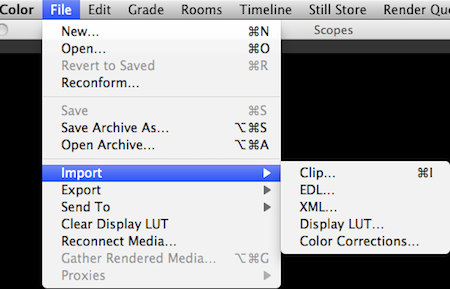
This post really caught my eye as Apple’s color grading application Color is most often associated with Final Cut Pro. But it most certainly doesn’t have to be used with FCP as it will import media from the Macintosh Finder, not just via a Send to Color command in FCP. If you look at Color’s Import menu then you can see it supports the importing of a number of different lists, including EDLs and XMLs:
image

I’ve personally never used any of these methods other than the Import > Clip command to import and grade a single clip. Other than that’s it’s always been a sequence sent from FCP. Reduser Jörgen Perrson has posted this outline for Avid to Color (from the Reduser website):

1. Preparation.

  • Use your favorite metadata rich workflow for dailies.
  • MetaFuze (MXF), RocketCine-X (MXF), Redcine (ALE), MetaCheater (ALE), RedRushes (ALE)
  • As long as you track the R3D filename and the TOD timecode it works.

2. Edit

  • Cut the show in Media Composer.
  • Impress the client.
  • Lock the cut.

3. Prepare for EDL Export (This is the key step in the workflow)

  • Make a copy of the sequence and put it in a new bin.
  • Set Bin Display > Show Reference Clips
  • Duplicate the R3D filename from column Tape to column Name.
  • If you used MetaFuze v2 for step 1 then duplicate column Camroll to column Name

4. Export EDL

  • Make sure that you have installed EDL Manager.
  • In Media Composer choose Output>EDL or launch EDL Manager
  • In EDL Manager choose the regular CMX 3600 as the EDL template.
  • In the Comments tab select Clip Name. (Color ignores if Reel is wrong and uses Comment instead)
  • Update.
  • Save the EDL.

5. Import EDL and RED Media in Color

  • In Color choose File > Import > EDL…
  • Navigate to the EDL and open it.
  • In the dialog box choose the proper framerates and frame size for your project.
  • For Source Directory navigate to the root folder of your R3D files.
  • Click Import.

Done.

Again, I haven’t tested this workflow so if anyone has or has used a list from Avid and conformed in Color then please comment below and let us know your experience.

I feel like this would work if for no other reason than the poster Jörgen sells a pretty nice looking software product called cineXML. It’s an “Avid and Red workflow companion” that looks to help with the conforming of Red media in Avid.  This includes things like multi-layer sequences, speed ramps, effects and dissolves. According to the cineXML website “a typical 30 second commercial takes less than 15 minutes from offline to online with the cineXML workflow. This includes rendering on an 8-core computer.”

Documentation for cineXML is available. The product costs $79 for Mac OS X and Windows Vista. Like all good apps of this type a demo is available as well.


(Page 1 of 1 pages for this article )

                    Clip to Evernote


Check out a Number of Hardware and Software Options from B&H

Jeremiah Karpowicz | 05/16

Everything you need in one place

image

We grabbed Jerry Zorek, Manager of Business Development at B&H, to learn about what B&H was showing off at their studio booth.  He shows us a Resolve system with the…

Final Cut Pro X Multicam Editing webinar now available on-demand

Scott Simmons | 05/15

Plus a little screencast in this blog post on a topic we didn’t get to cover.

image

I had great fun last week presenting the Final Cut Pro X multicam editing webinar…

10 Final Cut Pro things FCP editors might be missing in Adobe Premiere Pro CS6

Scott Simmons | 05/11

These are a few of the things that I found myself searching for as I’ve been moving over to Premiere Pro CS6 as a FCP 7 replacement

image

Adobe is making a big play for Final Cut Pro users with their CS6 release of Premiere Pro. It’s vastly improved over the Premiere Pro of old and is a lot like Final…


You must be registered to comment. This is an effort to reduce spam. Please REGISTER HERE.

I’ve actually managed to conform and Avid EDL to Red files even without some of the steps you’ve listed above.

So, even when I made an EDL in Avid from converted Quicktimes and which looked like this…

003   BL   V   C     00:00:00:00 00:00:00:07 01:00:02:11 01:00:02:18
004 A011_C02 V   C     19:15:46:24 19:15:48:19 01:00:02:18 01:00:04:13
* FROM CLIP NAME:  A011_C022_1112DQ_M-AVID DV.MOV
005 A011_C00 V   C     18:10:55:07 18:10:56:07 01:00:04:13 01:00:05:13
* FROM CLIP NAME:  A011_C001_11122H_M-AVID DV.MOV
006 A010_C02 V   C     17:41:12:12 17:41:14:06 01:00:05:13 01:00:07:07
* EFF_BLEND_PIP
* FROM CLIP NAME:  A010_C026_1112X5_M-AVID DV.MOV

Color still managed to conform accurately with the original R3D files.
What did go wrong, however, is that I set handles to 10 frames and got no handle at the head but 20 frames at the tail.

Neil Sadwelkar

Posted by Neil Sadwelkar  on  11/20  at  06:47 AM


I forgot to mention. Before editing in the Avid, I used Compressor with my own preset to convert the ‘_M’ Red Quicktimes to Avid DV quicktime as DV-PAL.

That’s because Red Rushes won’t convert Red to SD resolution Quicktimes.

Neil Sadwelkar

Posted by Neil Sadwelkar  on  11/20  at  06:49 AM


Thanks for pointing us to this. As it happens, I am switching to AVID for our next project, but will grade in Color, so this workflow should be very useful. I’ll report back, once post is finished.

Cheers,
Yann

Posted by Yann Heckmann  on  12/10  at  05:38 AM


I used REDrushes for my proxies and ALE in Avid, which meant I had to deselect the resolution extension before creating my ALE. As a result, the only modification I had to make to this workflow was to tack on ‘_H.mov’ after each clip name comment. Then it worked like a charm. Thank god for regular expressions smile

Posted by Evan Schiff  on  12/13  at  05:19 PM


Hi guys! I’m having trouble reconnecting the EDL in Color. For some reason, Color doesn’t recognize neither the clip name (trunkated to 8 characters), nor the full clip name (in clip name comment). It just doesn’t relink to any raw file. If I load it up, it does load the sequence properly but ends up calling each clip 001, 002, 003 etc. The files are generated from REDCINE-x in Dnx36 for offline then output edl as shown! I don’t know what i’m doing wrong?? If this could work i’d be a happy man!!

Posted by .(JavaScript must be enabled to view this email address)  on  06/30  at  08:47 PM


Name:

Email:

Location:

URL:

Smileys

Remember my personal information

Notify me of follow-up comments?

Submit the word you see below:


My lengthy Adobe Premiere Pro CS6 review now online
Final Cut Pro X Multicam Editing webinar now available on-demand
10 Final Cut Pro things FCP editors might be missing in Adobe Premiere Pro CS6
A collection of Avid Media Composer related links for my NAB Migrating to Avid class
An elegant iPhone timecode calculator
Random notes from my first “real world” Adobe Premiere Pro CS6 edit
NAB 2012: SpectraCal
NAB 2012: Apple and Final Cut Pro X
NAB 2012: Lightworks
NAB 2012: Baselight for Avid Media Composer
NAB 2012: Quantel new Pablo and Neo Nano
NAB 2012: Promise Technology’s portable Thunderbolt J4 and J2
NAB 2012: NewBlueFX Titler Pro
NAB 2012: PluralEyes 3.0 from Singular Software
NAB 2012: Technicolor CineLights from the GoPro booth
Autodesk Smoke 2013: it really changed for the better
My top 5 (or so) Adobe Premiere Pro CS6 features
How to preview Avid Media Composer’s MXF files for free without Media Composer
My NAB 2012 Post|Production World classes
Baselight for Final Cut Pro is one of the most powerful legacy FCP grading plugins ever
ARRI’s DNxHD Alexa update, Sorenson Squeeze Pro and OP this, OP that
What’s happening at NAB 2012?
The C300 short Hustle and some before and after images
Tip Tuesday: Disable a clip in the Avid Media Composer timeline
Testing the 7toX Final Cut Pro 7 to Final Cut Pro X conversion
Q and A with Bunim/Murray’s Mark Raudonis about their recent Avid switch
Kicking the tires on the Final Cut Pro X 10.0.3 Multicam update
Update Alert: Final Cut Pro X goes to 10.0.3
Adobe teases Prelude at the San Francisco Supermeet, FCPUG changes its name
Tangent Element panels are now shipping


Check out a Number of Hardware and Software Options from B&H

Jeremiah Karpowicz | 05/16

Everything you need in one place

image

We grabbed Jerry Zorek, Manager of Business Development at B&H, to learn about what B&H was showing off at their studio booth.  He shows us a Resolve system with the…

Final Cut Pro X Multicam Editing webinar now available on-demand

Scott Simmons | 05/15

Plus a little screencast in this blog post on a topic we didn’t get to cover.

image

I had great fun last week presenting the Final Cut Pro X multicam editing webinar…

10 Final Cut Pro things FCP editors might be missing in Adobe Premiere Pro CS6

Scott Simmons | 05/11

These are a few of the things that I found myself searching for as I’ve been moving over to Premiere Pro CS6 as a FCP 7 replacement

image

Adobe is making a big play for Final Cut Pro users with their CS6 release of Premiere Pro. It’s vastly improved over the Premiere Pro of old and is a lot like Final…

NAB 2012: RED

Adam Wilt | 05/07

RED’s Ted Schilowitz discusses 2012’s products, and a photo gallery.

RED’s “Leader of the Rebellion” Ted Schilowitz held a press conference at NAB on Monday, describing the projects and products RED is working on. Rather than paraphrase him, I’ve got him on card (well, it’s not “on…

To be considered for listing, contact pr (at) provideocoalition (dot) com


Copyright © 2012, HD Expo, LLC a division of Diversified Business Communications. DBA Createasphere

All rights reserved. HD EXPO, High Def EXPO, Createasphere, E-Tech, Entertainment Technology Exposition, 3D Production Workshop, VariCamp, P2 Camp, ColorCamp 101, and Lighting, Filters & Gels for HD are all trademarks of HD Expo, LLC.

Terms of Use  |  Privacy Policy

Check PageRank