Install goes well, Final Cut Pro hums right along, QuickTime X …. meh


Over the weekend I installed Mac OSX 10.6 (Snow Leopard!) and crossed my fingers as I booted up Final Cut Pro for a number of quick edit tasks I had to complete. Install was lightning fast (relatively speaking to other OS updates) at under an hour and claimed an extra 10 gigs or so of hard drive space (though that might not be totally accurate) when all was said and done. This install was on my edit machine at home, the machine that is often the guinea pig for mad scientist-type software experimentation, so I chose to do the quickest and simplest upgrade option and not a “clean install” as I usually do when a new OS rolls around. In fact a clean install isn’t a simple option with Snow Leopard but apparently it can be done by rebooting and formatting your hard drive with Disk Utility and then installing. I’ll do that on the office machine at some point. But here’s the usual warning, do not upgrade to Snow Leopard if you are in the middle of a job or don’t have the time to devote to working out problems that can arise from such an update. And always make a bootable back-up before performing any upgrade.
Since 10.6 is a release that concentrated on performance rather than new features I expected to see a much improved Finder. As far as speed goes everything does feel much snappier. Windows open, lists load and scrolls happen with greater speed than before. iCal and Address Book boot in the blink of an eye. Disk Utility seems much faster scanning and loading available disks. Much has also been said about the tweaks to Expos© and they are nice. I use Expos© many, many times a day so any improvement is appreciated. While all of the new features have been well documented around the web, as an editor here’s a few that I think I’ll find most useful.
In the Finder go to Finder > Preferences > Advanced tab and enable Search the Current Folder from the pop-up menu:
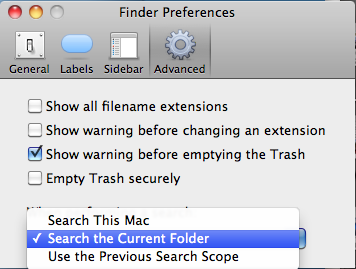
This will search only the current folder and sub-folders within (not the whole Mac) when you use the Spotlight search bar in a Finder window. This has always seemed like the most logical way to use this feature so it’s a welcome addition.
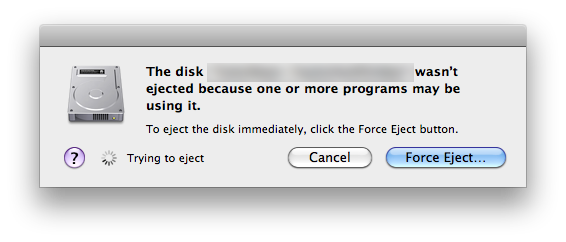
I’ve seen a couple of new warnings pop-up when trying to eject hard disks. I was unable to eject a local disk and the warning told me that “Final Cut Pro” was using it. This will be nice to see exactly what is holding the disk hostage:
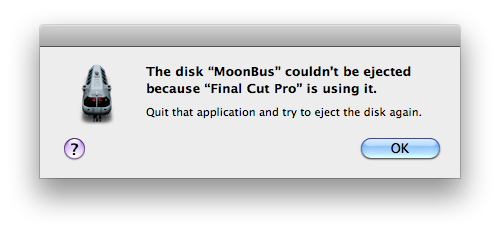
There’s also a Force Eject option that popped up too:
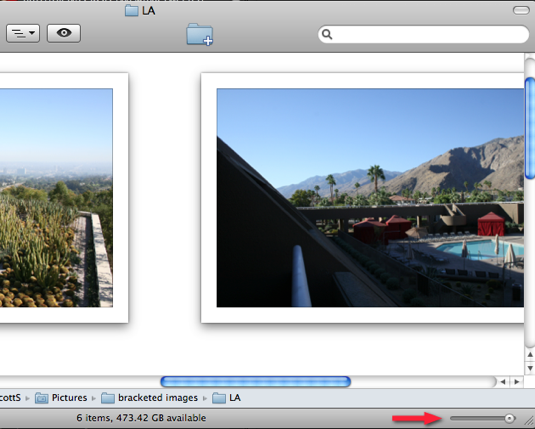
When you have a Finder window in icon view there is now a little slider in the bottom right corner to scale the icons up to 512 pixels, a really large size for an icon. Crank it up and it will be a really fast and easy way to preview still images without importing them all into your edit application or using something like Adobe Bridge:
As for Snow Leopard’s performance while editing, FCP didn’t seem to blink. It didn’t feel noticeably faster while working in FCP but 3 small jobs over the weekend (syncing a ProRes music video automagically with PluralEyes, capturing and logging a 1 hour HDV tape, basic timeline editing) went off without a hitch. One particular selling point of QuickTime X says “QuickTime X is optimized for the latest media formats – such as H.264 and AAC” and dropping a few native H.264 Canon 5D files on the timeline did allow for some pretty fast scrubbing and general timeline navigation … thought I can’t really compare that to pre-Snow Leopard since I always transcode those files to ProRes for edit. I spoke with a 5D owner/shooter who swears that the native playback feels faster. For me the problem still comes when I add a transition, effect or motion change, since these H264 files don’t support FCP’s real-time architecture and they require a render. That’s an instant deal breaker for my workflow.
Click over to the next page to read about the underwhelming QuickTime X Player interface.

The QuickTime X Player
The biggest disappointment (as least from a pro video standpoint) has to be QuickTime X. While the core technology may be something that really improves working with video on a Mac in the long run (and maybe on this release as well but who really knows) the initial reaction to QuickTime X will be the new QuickTime Player and what it removes from the pro-video experience. Several things are now gone.
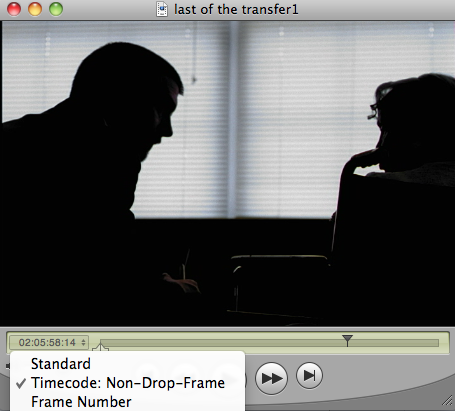
Gone is the ability to choose timecode display (if your QT file has one) in the player:
Gone is the export menu and all of the options for exporting:
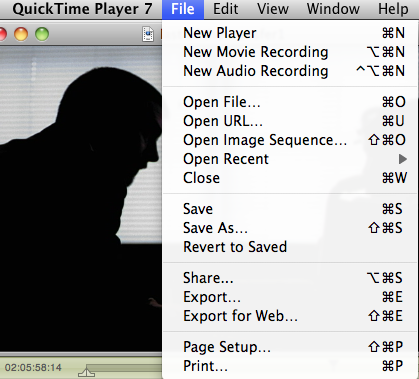
The QuickTime Player 7 file menu
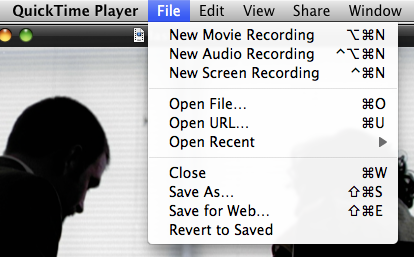
The QuickTime X Player file menu
Gone is the Show Movie Properties item and the myriad of things it allows you to do to a QT movie:
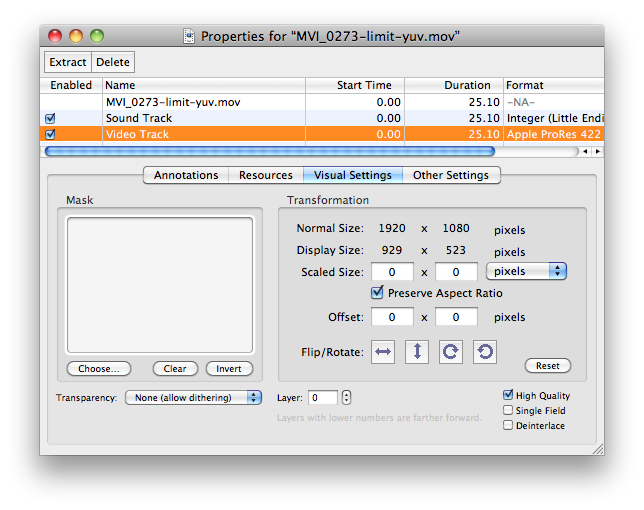
The QuickTime Player 7 Movie Properties
Gone is JKL shuttling of playback and gone is a lot of the other menu options available with QuickTime 7.
Apple trumpets the “beautiful new player” but the playback controls only appear when you hover your cursor over the window and even then the controls obscure part of the picture itself, a real design mistake IMHO:
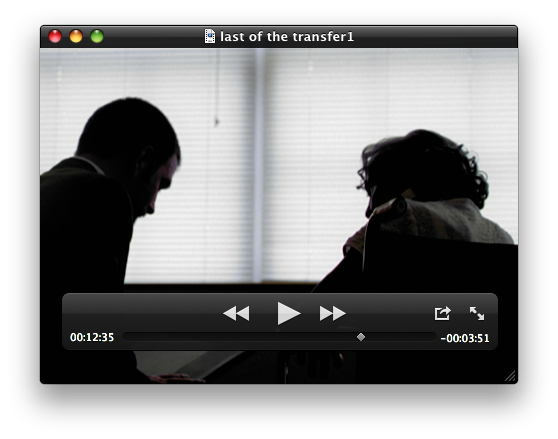
Screen real estate isn’t at a premium on a desktop machine like it is on an iPhone so we should at least have the option of leaving the playback controls up and off the screen. You can drag the playback controls around the QuickTime X window but you can’t drag them out of the window itself. This isn’t the first time Apple has place style and interface over functionality.
Thankfully Snow Leopard has the option to install QuickTime 7 and it is selected to install by default if you have Final Cut Studio installed:
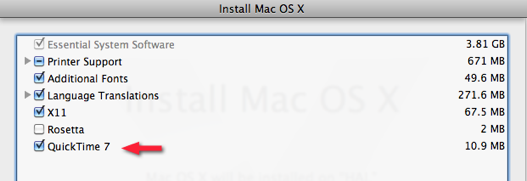
Once complete just look in the Applications > Utilities folder and QuickTime Player 7 is there. I quickly made it my default app to open QuickTime movies. Apparently you can make some changes to the QuickTime X interface via some terminal commands so maybe the QuickTime X player will reemerge with a lot of these features in updated versions. The pro video market is so dependent on QuickTime that there have been calls from the user community for Apple to branch QuickTime into two groups, the consumer user and the pro user (and not just charging for a Pro player). With QuickTime X if really feels like that is a bigger need now more than ever but with Apple’s continued focus on the consumer market I’m not holding my breath. Oh and that ever present QuickTime gamma shift thing? Apple has finally addressed that as well.
In one way, the Snow Leopard update reminds me of the recent Final Cut Studio upgrade. The cost ($29) is very affordable and there’s enough in the new version that there’s really no reason NOT to upgrade. I mean that from a cost factor as overall the under-hood advancements made in Snow Leopard are, comparatively speaking, much greater that those made to Final Cut Studio as a whole and Final Cut Pro 7 especially.
If you have Leopard then $29 is a no-brainer upgrade. If you don’t have 10.5 Leopard then word is that Apple is having you buy the whole Mac Box Set for $169 to get a stand alone version of the new OS. That’s quite a steep charge especially if you already have iLife and/or iWork. In fact, on Apple’s website there’s no option to purchase a full non-upgrade of Snow Leopard. In a production environment (especially if you are running Avids or have a machine dedicated as a server) there might still be some Macs that are running Tiger so this makes me wonder how do you get a full Snow Leopard without the Box Set purchase? It seems that you can’t. Maybe this is Apple’s way of pulling some extra $$s out of the user’s pocket. Apparently you can install Snow Leopard whether or not you’ve got Leopard installed. You just didn’t pay as much on that machine and are probably violating some legal agreement. But to do it legally head over to Amazon and buy a copy of Leopard and then Snow Leopard on top of that. It’s worth it as they are both great OSs.


Filmtools
Filmmakers go-to destination for pre-production, production & post production equipment!
Shop Now