

Filmtools
Filmmakers go-to destination for pre-production, production & post production equipment!
Shop NowInspired by Peter Wiggins … here’s my own list

Peter Wiggins posted a Top Ten Wish List for FCP in 2010 over on his blog recently. Then in a tweet he asked: What is yours? Years ago I posted what could have been called my FCP wish list in two Editblog posts: Bottom 10 Final Cut Pro …tips? and Bottom 10 FCP Tips … revisited. They read just like a Final Cut Pro wishlist. So with those in mind here’s my Wish List for Final Cut Pro in 2010. Some are revisited right from the Botton 10 FCP Tips, some echo Peter’s. Everyone who has used FCP for any length of time are bound to have their own.
It was way back in September 2006 when I posted that little list over on the original Editblog called Bottom 10 Final Cut Pro … tips? This was somewhat of a wish list (or as I subtitled it, things that just annoy me) as I wrote out a few bugs as well as some interface issues that I thought needed addressing by the FCP programmers. In November 2007 I revisited this list when FCP was updated to 6.0.2. Some issues had been addressed, most had not. Peter’s post is good inspiration to revisit the Bottom 10 FCP Tips that had not been and see if any of the items have since been addressed (we are at version 7 now) as well as add a few fresh annoyances. The original paragraphs are in blue.
Keyframing
Keyframing is necessary if you are doing effects. Often you will set up many different keyframes to get an effect or filter just right to only then have to shorten or lengthen the clip. Of course the keyframes don’t move. This can be a big pain. Of course if they did then the effect parameters would change but this is way more desirable than having to move the keyframes by hand. In the graphic above, there is only one keyframe to change. But if you have multiple keyframes this can be a big pain. These “moving” types of keyframes are called elastic keyframes in some other apps. Let’s have the option of moving the keyframes with the changing duration of a clip. Please! And if you look at the above graphic real closely you can see the time marker redraw problem that happens on occasion when you zoom around the magnification. That’s a pain too.
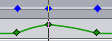 Overall keyframing behaviors still haven’t been addressed and updated as of FCP 7.0.1. We are still using the same type of keyframing timeline to do effects work and there is still no way to select and move multiple keyframes at once other than moving keyframes via the Toggle Clip Keyframes command in the master timeline. Keyframing controls and interaction should be overhauled right in the Viewer as that’s where most keyframing work takes place. You also can’t choose to scale and move keyframes when changing the duration of a clip in the timeline. Yes you can copy/paste attributes and Scale Attribute Times to achieve this in a more rudimentary fashion but that’s a workaround. Why do we still need workarounds 7 versions into a product for something so simple?
Auxiliary Timecode
Aux timecode is a must have in music videos. Often you will have 10, 20, 30 takes of a song that begin at different places throughout. The song is played back off of something that generates timecode and that syncs to a timecode slate. One take might run for the first minute of a song and one the last minute. Thus you must assign the corresponding timecode to the auxiliary timecode track. The problem in FCP is that if you make subclips of all these takes, when you change the aux timecode of one it ripples a change in the aux timecode through all the other subclips made from the same master clip. Not good. A common workaround is to capture each take as it’s own master clip. But working in an offline environment with a dv deck and its slow tape transport can be a HUGE pain, especially with 30+ takes. Please fix AUX TC!!!
 This rippling of aux timecode still hasn’t been addressed. Truth be told, in 2010 this has become less of an issue than in the past since many music videos are now acquired on tapeless media like the RED camera or Canon DSLRs so each take of a song performance is often one master clip. Add syncing software like PluralEyes into the workflow and it’s even less of a problem. At this point in time I’d much rather see Apple focus on other FCP issues than this one.
A WYSIWYG Title Tool
FCP needs a WYSIWYG title tool. There is something very simple and very elegant about being able click in the canvas with a “title tool” and type right over picture. Then you can easily change sizes, fonts, and such right there. Like, maybe a title tool that resembles… oh, I don’t know.. Motion?
 We are still stuck with the same old built-in title tool that FCP has always had. If it hasn’t been addressed at version 7 then it’s never going to be addressed until we get a drastically rewritten application. And even then if Apple keeps the suite of applications mentality intact it might not get updated then either. There’s the argument to be made that in today’s world of one editor doing multiple jobs like effects and finishing you don’t need a simple WYSIWYG text editor since you almost always want the option of effects and animation for titles. I would argue that that’s even more reason to have a simple WYSIWYG title tool so you can comp in rough titles as fast and efficiently as possible during the creative stage of the edit and not have to move to an external app like Motion or After Effects just to get WYSIWYG interaction.
Better Capture Tool Interactivity
While you are working in the capture tool you can see timecode and audio and make IN and OUT points. But as soon as you hit capture now or batch capture, you are then presented with a jerky reference right in the middle of the screen. It would be great to still see that timecode roll and those audio levels. And even better would be a way to subclip and add markers while capturing. (Shhhh…Avid can do that).
 IMHO this is one of the single items that has most needed addressing in FCP that has never been touched throughout the evolution of the application. As tapeless media becomes more the norm for acquisition then the need to capture from tape is less and less. But most post houses still have to deal with tape on a very regular basis. I doubt if we’ll ever see the ability to add markers or log a tape as it captures but at the very least FCP needs some type of rolling timecode display whenever tape rolls. More on that in a minute.
Central User Settings
When I move from my system to another machine I currently carry along a usb flash drive with keyboard settings, column layouts, track layouts, button bars, and even window layouts if I will be working on the same size monitor. If these could be centralized into a single user file that could easily be taken from system to system then that would be a huge timesaver.
 All FCP user settings still reside in different folders. Third party apps like Preference Manager help manage all the different user preferences but a single, central user preference for keyboard, columns, window and track layouts, as well as button bars would be nice and simple.
Trim Tool
When FCP was first introduced they touted it as “mode free editing.” This was a jab at Avid because in Avid you have to enter trim mode or segment mode to accomplish certain tasks. But this is not always a bad thing. When entering trim mode in Avid, the interface instantly changes and provides a number of new tools to work with. In FCP, an awkward window pops up. But the worst part about FCP’s trim mode is that it just does not work very well. It is cumbersome to use, it doesn’t give enough good feedback in the timeline and it often is hard to make it apply to the tracks you want it to trim. Even though I want to hear a specific audio track I probably still want to see my video! It is a shame as proper trimming can make fine tuning edits much quicker and easier. And because the trim tool doesn’t work very efficiently, it seems to me that most FCP editors don’t use it.
 The Trim Tool is another component of FCP that has had very little attention throughout FCP’s life. Besides the addition of Dynamic Trimming I don’t think it’s ever been touched. At version 7 it is still clunky and still doesn’t give enough user feedback to make it useful for most trimming operations. It’s sad that most FCP-only editors don’t know the power of a good Trim Tool. There’s ways to try and make FCP trimming better but the elegance of a good Trim Tool is missing in FCP.
Backward Compatibility
Every FCP upgrade adds great new features but the ability to open a newer project in an older version of FCP would be welcome. I am an early adopter but a lot of my clients aren’t. XML is great but just the ability to be a bit backwards compatible would be nice. Sure all the new effects and features wouldn’t work but if you are aware of this then no problem. I mean… 5.1 couldn’t be opened in 5.0! That’s one way to increase your bottom line by forcing an upgrade.
 The XML export is still the way to move backwards from a newer version of FCP to an older version. As with some other things on this list, and at this point in FCP’s life, I would rather see programmers focus on some other things.
Next Up: My new wishes for FCP for 2010
So what are other things that I would add to my Wish List for FCP in 2010? Beside the obvious things like a re-write of the application to make it 64-bit and able to take advantage of Snow Leopard technologies like Grand Central and OpenCL?
Fix FCP’s unpredictable behavior upon relaunch after a crash
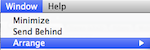 If you have taken time to arrange your windows into a favorite layout (which, of course, can be saved), have been working feverishly, saving your project and suddenly FCP crashes, it will often reopen to a default window layout and an older project than the one you were just working on. I can see no reason for this other than an annoying and stupid bug. FCP should reopen with the last project before the crash and the last window layout before the crash. Especially if you have saved and saved all.
Timecode Viewer operational during tape-based interaction
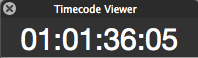 This echo’s Peter’s #4 as it is desperately needed. When videotape is rolling either in the Edit to Tape window or the Log and Capture window FCP should be able to AT THE VERY LEAST show you some rolling timecode numbers. Version 7’s Timecode Window seemed like the obvious answer to this issue but it doesn’t work when rolling tape. As I have said before, this one omission alone (7 versions and 10 years into the application) is one of the biggest oversights in the entire application. If you are working in a post-house with a machine room then the tape machines are probably not located within eyesight. Being able to see timecode numbers roll, AT THE VERY LEAST, lets the editor know that FCP is doing something on Edit to Tape or Log and Capture operations. To this day I can’t fathom why this hasn’t been implemented in some form. If there’s an Apple engineer reading this then please set up an anonymous account (since I’m sure you can’t comment officially) and place a comment below to let us all know why this hasn’t ever been added … AT THE VERY LEAST. And saying there is some technical limitation doesn’t cut it. 10 years and 7 versions into the application a technical limitation could have been overcome.
Scratch disk indicator
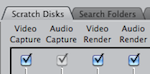 Have you ever jumped into a Final Cut Pro edit, worked, imported media and rendered all day only to find that your Scratch Disk was set somewhere other than where you thought? This can be annoying when you are trying to keep your drives and projects organized. And if you are editing anything other than your sister’s YouTube video you need to keep media organized. The Scratch Disk preference is only a keystroke away but I have to admit that I don’t always remember to check it before each and every edit. It would be nice to have some kind of indicator of where current Scratch Disks are set; be it a thin info bar that is visible (and could be customized) or just a splash screen that opens with each project that gives an overview of project settings and elements.
Centralized, per project, media deletion
 FCP has the Render Manager which allows the editor to see what all renders exist on media drives, how much space the renders require and allows the deletion of these renders. This is imperative as renders can take up a lot of space. FCP needs a similar tool to manage video media from within a project. A “media manager” if you will that allows the editor to see, via a sortable list, all of the media and assets in a given project and then be able to delete that media. The current method of hunting through Capture Scratch folders (in addition to other places where media might hide) or using the Make Offline command from within the Browser isn’t nearly as efficient or effective as it needs to be. Unlike Avid, FCP doesn’t use databases for each media drive but it seems to be that FCP should be able to scan all of the media in an open project and then present the user with a sortable list of that media. MediaMover FCP attempts something similar but this needs to be build into the application.
Switching of multiclip angles in the Viewer
 If you’re working on a multicam show or a music video then you just might have multiclips in your FCP timeline. At any point you can use the Switch Video to Previous/Next Angle buttons to step through all of the angles in a multiclip while your playhead sits on the clip in the timeline. But what you can’t do is load a multiclip into the Viewer and step through the angles via the Switch Video to Previous/Next Angle buttons. And more frustratingly you can’t match frame a multiclip angle into the Viewer and do that either. Yes you can bring up 4, 9, or 16-Up splits but often I just want to step through all of my angles, at full screen, in the Viewer. And often I have my Viewer and Canvas ganged together and I don’t want to change anything in the timeline, only examine my multiclip in the Viewer. Bizarrely, FCP doesn’t allow this, even if you have the Switch buttons mapped to the Viewer button bar. This strikes me as being a multiclip operation that was designed by engineers and not editors.
Global filter control
 Say you have a single filter applied to half of the clips in an entire sequence. Say that filter is a very processor/render intensive filter like Magic Bullet Looks. Say you have several video layers as you are in the middle of an edit and don’t have everything on one layer so Play Base Layer Only command might not work. Say you don’t have time to render or selectively remove attributes to remove only the Magic Bullet Looks filter. Wouldn’t it be nice to have some type of global control of filters where you could easily turn off ALL of one particular filter with a single check box? Of course it would.
Fix the Share menu
 One of the biggest features added to FCP 7 was the Share menu. It allows FCP to output any number of files and formats including iPhone QuickTimes, DVDs, YouTube uploads and simple Blu-rays. And it can do it all in the background. It’s wonderful in concept (and is actually usable for some tasks) but the performance is poorly executed. Many items appear to take twice as long to export as other workflows. A 36 second clip took over twice as long for me to create iPhone and iPod versions than FCP’s Export using QuickTime conversion. And the different versions had difference bit rates and were different sizes. It would seem to me those should be the same. Yes you can keep working as FCP exports in the background and that is a plus but overall performance of the Share menu is poor. And then there’s the little problem of the Cluster selection failing and not working at all from the Share menu. At least not on the 3 systems I work on and a lot of the folks on the FCP discussion board. Why even add Clusters to the Share menu if it doesn’t work? If Clusters aren’t supported in FCP why is there a pop-up to select a Cluster in the new FCP Share menu? Does it work for anyone?
Background rendering
 Since we can now encode QuickTimes, build DVDs, upload to YouTube and process for SmoothCam in the background, isn’t the necessary next step allowing for some type of background rendering? iMovie can do it.
And yours?
So those are some of my big wishes for Final Cut Pro in 2010. Thanks to Peter Wiggins for the inspiration. I’m sure some of them are big, under the hood-type changes that will never happen (be it technical reasons or a lack of development resources of the FCP engineering team) until a big, fresh, new version of Final Cut Pro comes along in whatever form that might be. And some of them have been mentioned before. I just hope the engineers listen to feedback from editors using the product every day and work on some of these less flashy, less marketing centric, issues that will make the life of an editor using the product much better. Apple has a dedicated Final Cut Pro feedback page and I try to use it as much as I can.
What are some of your wishes for Final Cut Pro in 2010?