
(Page 1 of 1 pages for this article )

Tuesday, April 26, 2011

Filed under: AppleFinal Cut ProEditingGentryMedia Sister SitesHDSLRMac CoalitionProVideo CoalitionPost ProductionSoftware

New version of the Canon FCP Log & Transfer plug-in

Scott Simmons | 04/26

Biggest change seems to be addressing folders structure issues

image

There’s a new version of the Canon EOS MOVIE Plugin-E1 for Final Cut Pro Log and Transfer plug-in that came online 4-05-2011. This is a maintenance update but it appears to address a few features in regards to the rigid folder structure that the plug-in has required (though it seems to have broken importing for a bunch of my 7D backups). Plus it’s free.

A big plus of this EOS MOVIE Plugin-E1 for Final Cut Pro has always been that it can extract the timestamp from the card and make that into readable timecode, all the while adding a reel name for FCP. But a downside has been that it required the folder structure that the camera created to remain intact. This version seems to address that. Here’s the bullet points from the Canon website:

Changes in v1.2

- The usability of importing movies has been improved.

- It is now possible to import movies in selected folders.

Conventionally, it has been possible to import movies that are properly saved in the DCIM folder structure that cameras created in memory cards, but now it is also possible to import movies that are selected directly.

- When loading movie files shot with an EOS 5D Mark II, EOS 7D, or EOS-1D Mark IV and “.THM” files* are not located in the same folder, the following restrictions apply.

1. Incomplete shooting information is displayed.

2. Movies shot with an EOS 5D Mark II having firmware version 1.2 or earlier cannot be loaded.

* A “.THM” file is a (thumbnail) file generated and saved together with a movie file when shooting movies with some of Canon digital cameras. It has the same file name as the movie and includes shooting information, etc.

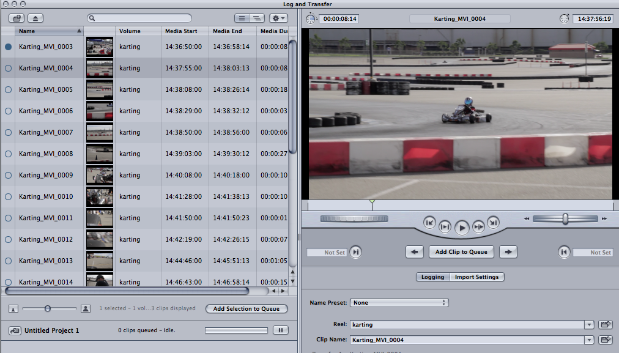
I did a quick test with this new version and it does appear that it will now find files that are just in their own folder.
image

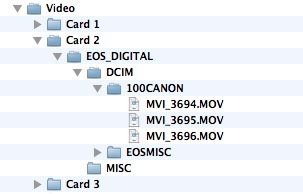
The original folder from the shoot.


image

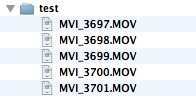
A test folder that I created and moved a few of the files into.
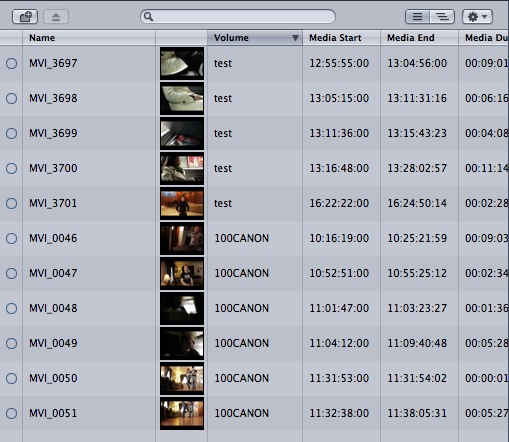
image

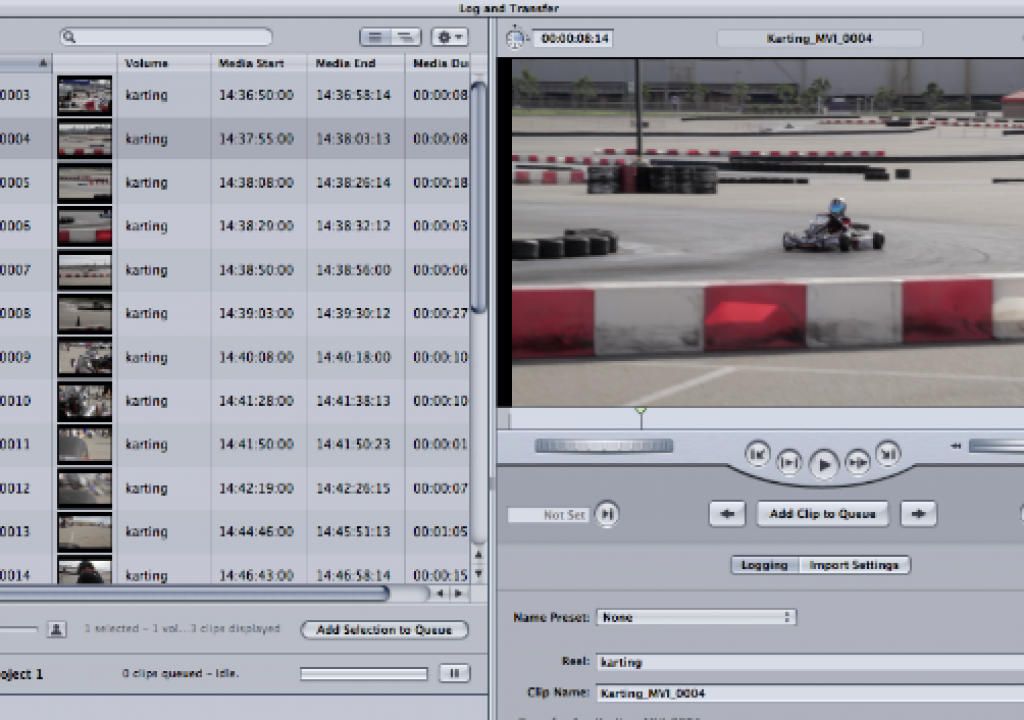
Both folders loaded into the version 1.2 plug-in.

I’m not exactly sure what camera these example files were shot with (folder says 100CANON) but the version 1.2 plug-in didn’t have any problems loading these clips up.

I installed this update on my system at home and tried to load some files from my Canon 7D but had a couple of issues. It seems that the plug-in no longer wants to load 7D clips that I have backed up forever using the proper directory structure:
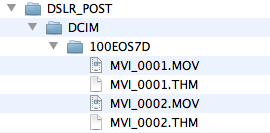
image

The updated L&T plugin won’t load this 7D directory.
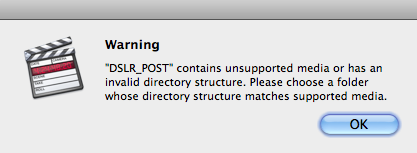
image

It returns this warning.

What is really strange is that I was able to remove the .THM files from the above directory and it did load the clips.
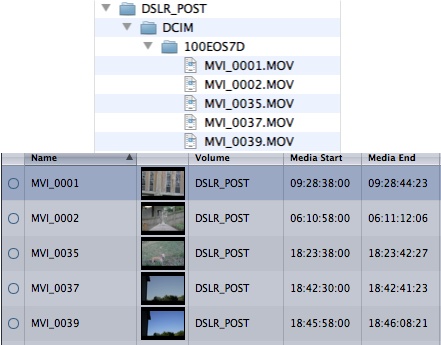
image

By removing the .THM files the updated L&T plug-in was able to load clips from my 7D backups that it wasn’t able to load before.
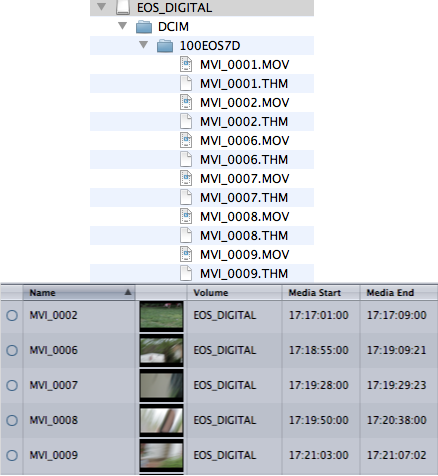
image

It will load media directly off a 7D CF card however.

As the release notes say, you will get “incomplete shooting information” when importing from a 7D with missing .THM files but from the looks of the Media Start and Media End columns after I removed the .THM files it’s still getting timecode from somewhere. What I like best about the update is that it appears to now load raw H.264 files that have been backed up without any specific folders structure and/or .THM files:
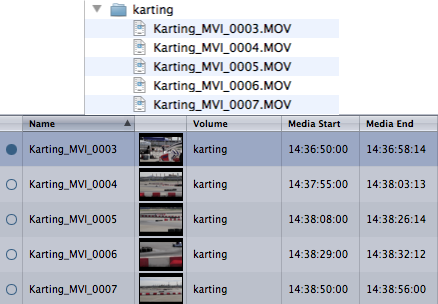
image

As you can see above there is no Canon directory structure or .THM files. Plus I had added a suffix to all these file names before backing them up.

This Canon EOS MOVIE Plugin-E1 for Final Cut Pro has been known to have a few problems for a while now. It’s most common problem has seemed to be not transcoding the entire file but I have never experienced that problem and I have transcoded many, many hours of footage. I prefer this plug-in over most other FCP transcode options when possible as it’s fast and it assigns both a reel name and timecode, two very important things to my editing workflow.

I guess what I really don’t understand is why can’t Canon make this plug-in always perform the same way and be compatible (without hacking) with all of their DSLRs that shoot video?

(Page 1 of 1 pages for this article )

                    Clip to Evernote


The Editing of “Courageous” Part One

Steve Hullfish | 10/14

The off-line edit of a RED feature film

image

Last October, I had the rare opportunity to edit a feature film called “Courageous,” which is in theaters now. “Courageous” was the number one new movie the weekend it opened (September…

Check out a Number of Hardware and Software Options from B&H

Jeremiah Karpowicz | 05/16

Everything you need in one place

image

We grabbed Jerry Zorek, Manager of Business Development at B&H, to learn about what B&H was showing off at their studio booth.  He shows us a Resolve system with the…

Final Cut Pro X Multicam Editing webinar now available on-demand

Scott Simmons | 05/15

Plus a little screencast in this blog post on a topic we didn’t get to cover.

image

I had great fun last week presenting the Final Cut Pro X multicam editing webinar…


You must be registered to comment. This is an effort to reduce spam. Please REGISTER HERE.

From my experience it hasn’t been a good update so far:

1. Not all thumbnails are getting generated, if at all. 

2. When mounting a volume that still contains THM files, FCP crashes. 

3. It takes much longer to mount volumes (3 to 4 times as long)

4. Still getting the problem of not transcoding the entire clip.

Posted by .(JavaScript must be enabled to view this email address)  on  04/26  at  08:28 PM


thanks for the notes lfcitz.

I didn’t get a crash on two machines that you are seeing in #2 but L&T wouldn’t mount those clips until I removed the thm files as I said in the post.

As for 3 I did see it taking quite a while on some volumes while others were very fast. Haven’t been able to try and determine why that is.

As for #4, someone on Twitter said this has been traced back to other processes and multitasking happening on your computer while the L&T plugin processes clips. Personally I’ve never seen it but try and leave the machine idle while it processes and see if that helps.

Truth told it feels like this plug-is is still a bit half-baked. Shame as you’d think a company like Canon could get it right.

Posted by Scott Simmons  on  04/27  at  09:02 AM


If the L&T plug in assigns a TC to imported Canon movies, does this TC and reel no. get ‘striped’ on the originals? Or does it exist only on the ProRes transcodes?

Meaning, after L&T with this plug-in, one ends up with ProRes files with a certain TC and the originals with no TC. So you can’t use the originals in further stages of post.

Or am I not getting this right?

So far, I’ve always striped my originals (after making a backup copy) using Bouke’s utility. And then transcoded them for use either in FCP or Avid.

Posted by Neil Sadwelkar  on  04/27  at  10:10 PM


@Neil - no the new timecode and reel metadata is not striped to the original h264 files. But once you have new ProRes files then you don’t need to go back to the original files anymore. ProRes is a much better, much more robust format for post, that’s what it was designed for. There are grading apps like Color or Resolve that can grade the h264s but despite a comment I’ve seen once or twice you don’t really gain anything by going back to them.

But you’re coronet on Bouke’s tool. It can be very handy.

Posted by Scott Simmons  on  04/28  at  03:48 AM


I agree. Once converted to ProRes one need not go back to the H.264 movies.

However, often times, DoPs are a bit hard to convince that the conversion from H.264 to ProRes does not take away any latitude or resolution. So there is the occasional “Show me the original file”.

Besides, ProRes files won’t open in a Baselight (without Kompressor) but the H.264 originals do. TC striped H.264 originals conform perfectly in a Baselight.

So, one can stripe the H.264 originals with TC and reel info (with QTChange), convert to ProRes Proxy for editing, and then conform the EDL to the originals in a Baselight.

One can also import the H.264 originals (after striping) into a Media Composer, edit and make an EDL, and conform to the originals in a Baselight.

I’m not sure about this, but, Canon H.264 movies open fine in a Quantel IQ, and possibly in a Lustre and Linux Resolve, but ProRes files definitely do not.

I’m sorry this is probably completely OT in an article on the Canon EOS L&T plug-in.

Posted by Neil Sadwelkar  on  04/28  at  07:13 AM


Ahhh, really good point Neil and not OT at all!

We have a Kompressor with our Baselight so we’ve always used ProRes but that’s a great point about Baselight w/o Kompressor and other grading tools.

Come to think of it I’ve cut native 7D H264 files in Premiere Pro and then sent that over to Apple Color which does a pretty good job with the H264s as well. I think I did that with Resolve for Mac as well. I think if you’re going to be using things like Bouke’s tools to assign timecode you’re probably not too concerned with the L&T plugin working anyway.

Posted by Scott Simmons  on  04/28  at  09:15 AM


My Log & Transfer now crashes FCP every time I point it at the file folder containing a file from the 7D- doesn’t seem to matter whether the 7D files are on the hard drive as their own .mov files or on a card from the 7D. Crashed FCP every single time!

Posted by lightprismtv  on  04/29  at  05:53 AM


It’s now crashing every time I try to mount a volume.  Anyone know how to manually uninstall the update.  I tried re-installing the first version, but it’s still crashing fcp.

Posted by .(JavaScript must be enabled to view this email address)  on  04/29  at  03:08 PM


This just shows that you learn everyday.
<a >thanks</a>

Posted by verbrandencalorieen  on  05/03  at  12:22 PM


Name:

Email:

Location:

URL:

Smileys

Remember my personal information

Notify me of follow-up comments?

Submit the word you see below:


My lengthy Adobe Premiere Pro CS6 review now online
Final Cut Pro X Multicam Editing webinar now available on-demand
10 Final Cut Pro things FCP editors might be missing in Adobe Premiere Pro CS6
A collection of Avid Media Composer related links for my NAB Migrating to Avid class
An elegant iPhone timecode calculator
Random notes from my first “real world” Adobe Premiere Pro CS6 edit
NAB 2012: SpectraCal
NAB 2012: Apple and Final Cut Pro X
NAB 2012: Lightworks
NAB 2012: Baselight for Avid Media Composer
NAB 2012: Quantel new Pablo and Neo Nano
NAB 2012: Promise Technology’s portable Thunderbolt J4 and J2
NAB 2012: NewBlueFX Titler Pro
NAB 2012: PluralEyes 3.0 from Singular Software
NAB 2012: Technicolor CineLights from the GoPro booth
Autodesk Smoke 2013: it really changed for the better
My top 5 (or so) Adobe Premiere Pro CS6 features
How to preview Avid Media Composer’s MXF files for free without Media Composer
My NAB 2012 Post|Production World classes
Baselight for Final Cut Pro is one of the most powerful legacy FCP grading plugins ever
ARRI’s DNxHD Alexa update, Sorenson Squeeze Pro and OP this, OP that
What’s happening at NAB 2012?
The C300 short Hustle and some before and after images
Tip Tuesday: Disable a clip in the Avid Media Composer timeline
Testing the 7toX Final Cut Pro 7 to Final Cut Pro X conversion
Q and A with Bunim/Murray’s Mark Raudonis about their recent Avid switch
Kicking the tires on the Final Cut Pro X 10.0.3 Multicam update
Update Alert: Final Cut Pro X goes to 10.0.3
Adobe teases Prelude at the San Francisco Supermeet, FCPUG changes its name
Tangent Element panels are now shipping


The Editing of “Courageous” Part One

Steve Hullfish | 10/14

The off-line edit of a RED feature film

image

Last October, I had the rare opportunity to edit a feature film called “Courageous,” which is in theaters now. “Courageous” was the number one new movie the weekend it opened (September…

Check out a Number of Hardware and Software Options from B&H

Jeremiah Karpowicz | 05/16

Everything you need in one place

image

We grabbed Jerry Zorek, Manager of Business Development at B&H, to learn about what B&H was showing off at their studio booth.  He shows us a Resolve system with the…

Final Cut Pro X Multicam Editing webinar now available on-demand

Scott Simmons | 05/15

Plus a little screencast in this blog post on a topic we didn’t get to cover.

image

I had great fun last week presenting the Final Cut Pro X multicam editing webinar…

Editing and Effects Together in One Editor Part 2

Brian Mulligan | 05/15

The NLE revolution isn’t over… Enter Autodesk Smoke for Mac

image

Editing & Effects All-In-One
Autodesk has always been known for the strength of their effects and image processing tools. The tools in Smoke have been used in everything…

To be considered for listing, contact pr (at) provideocoalition (dot) com


Copyright © 2012, HD Expo, LLC a division of Diversified Business Communications. DBA Createasphere

All rights reserved. HD EXPO, High Def EXPO, Createasphere, E-Tech, Entertainment Technology Exposition, 3D Production Workshop, VariCamp, P2 Camp, ColorCamp 101, and Lighting, Filters & Gels for HD are all trademarks of HD Expo, LLC.

Terms of Use  |  Privacy Policy

Check PageRank