
You may or may not have to use the option modifier after all!


Quicktip #15 (February 15, 2009) Option+click (or maybe don’t Option+click) on an existing file to use that name
Thanks to Andy Mees and the power of Twitter I got a question about today’s Quicktip #15. Andy said: “scott, is it just me? i get the filename behaviour you blogged without pressing a modifier … just click, works system wide, no?” I had always thought you had to use Option so I tried it while saving a PDF on my laptop and much to my surprise I didn’t have to hit Option to use the name of a file already on disk. But when I got up to my production machine to update this post I find I have to use the Option modifier. What gives? Anyone have any answers? Do you have to use the Option key or don’t you?
If you already have a file saved on your hard drive and you export and/or save a file you can option+click on a file already save on disk while in the save/export dialog box to select that file’s name:
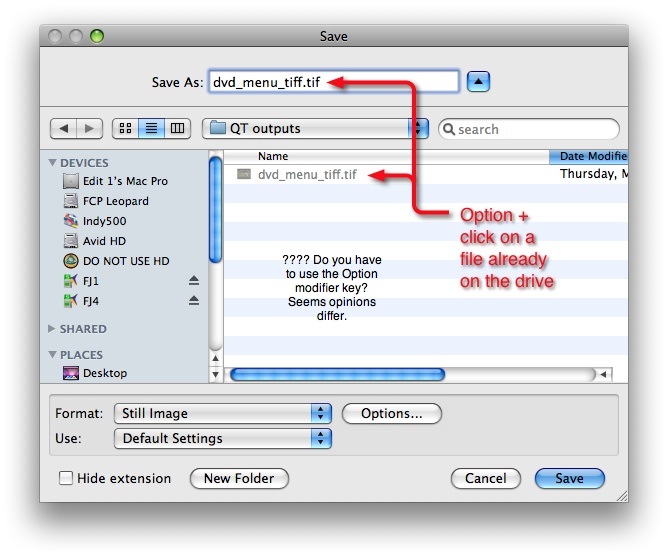
This is particularly helpful if you are saving incremental versions of a file and don’t want to type the name over and over. Just option+click the file and add a version number. It’s also helpful if you export a QuickTime and then make a change and need to export again and not keep the first file. Option+click to select the same file name and then choose to replace the old file when promoted.


Filmtools
Filmmakers go-to destination for pre-production, production & post production equipment!
Shop Now