


Quicktip #19 (February 19, 2009) Use the option key for more Finder options
When working in the Mac OS Finder you can press the OPTION and/or the SHIFT key on the keyboard for other tasks and options from the Finder menus:
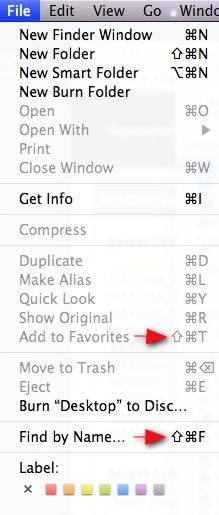
In the above example of the SHIFT key pressed under the File menu in the Finder you have the option of Add to Favorites (instead of Add to Sidebar) and Find by Name… (instead of simply Find…).
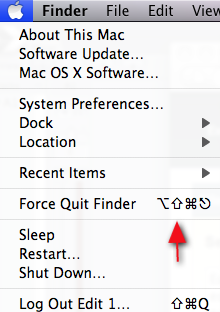
If you press shift + the Apple menu you get the option to Force Quit Finder instead the usual Force Quit that brings up the Force Quit dialog box. You also get a number of different options when you use the Option modifier key as well. Explore the different menus to find them all!


Filmtools
Filmmakers go-to destination for pre-production, production & post production equipment!
Shop Now